Uniqode’s solution has made our lives a lot easier. Creating QR Codes is quick, and being able to track their performance has proven to be essential for our business.
A text QR Code stores a plain-text message instead of a link. When you scan a text QR Code, the words show up on the screen right away.
The message in a QR Code generator for text can run up to 300 characters, room enough for a coupon code, a short set of instructions, or a disclaimer too long to fit on cramped packaging. Reading it doesn't need a data connection either. Once a phone's camera decodes the pattern, the text is already there, fully formed, with no network request happening at all.
That offline simplicity closes a real gap. Uniqode's State of QR Codes 2026 report found that 36% of marketers use QR Codes to convey information, while 75% of consumers scan a QR Code specifically to get more information. A text QR Code answers that consumer motivation directly: the message is the entire destination, with nothing standing between the scan and the answer.
A plain text QR Code generator works without an app, wifi, or a data connection. The message decodes instantly on the scanning phone. They also keep long text off crowded print, moving coupon codes, terms, and product specs into a single scan instead of cluttering a label.
Creating a Uniqode text QR Code takes four steps and about a minute, whether the message is a six-digit coupon code or a full paragraph of terms and conditions. Here is how to convert text to QR Code:
1. Select text from the QR Code type
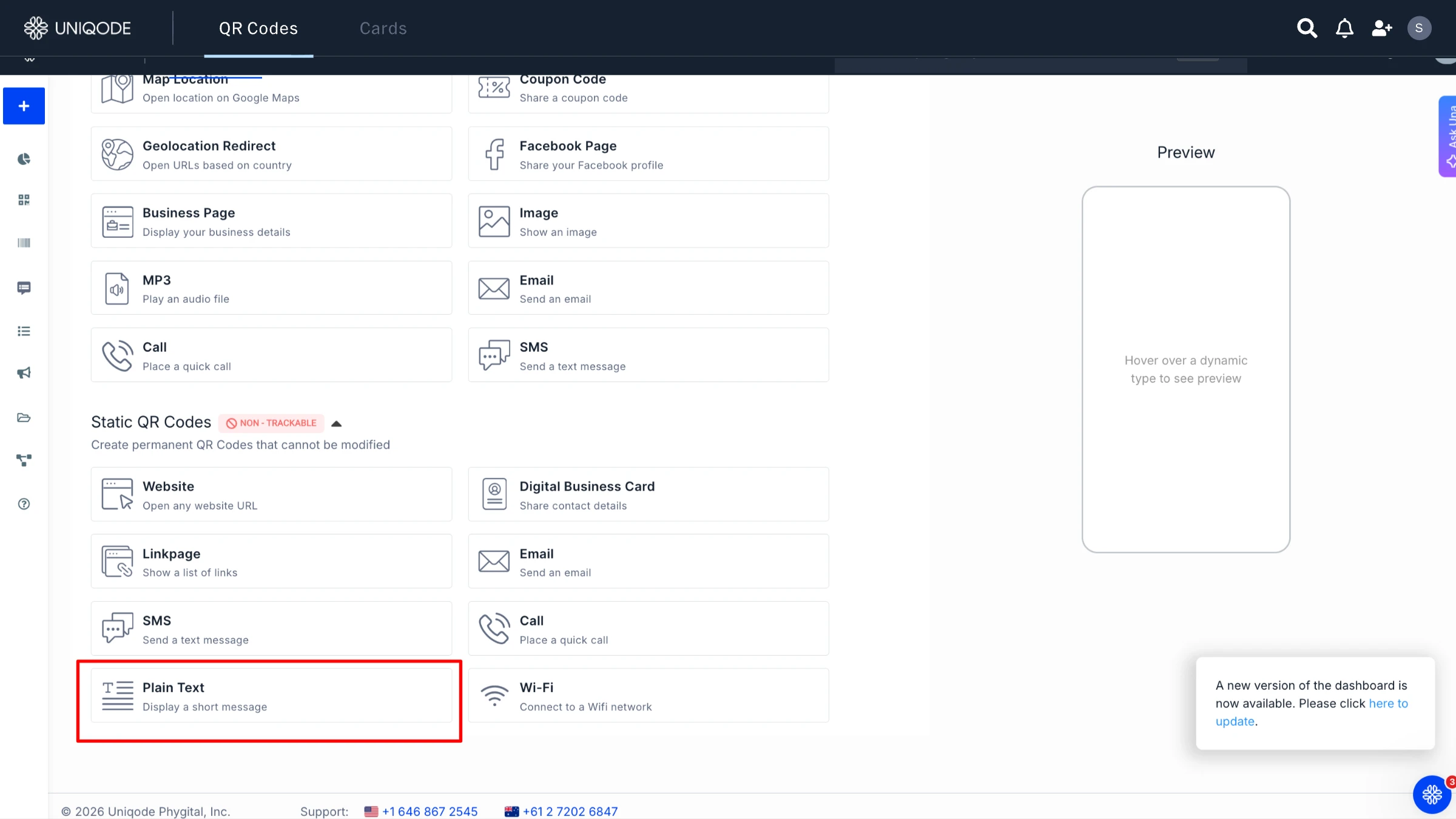
The first step to creating a QR Code from text is to open the Uniqode dashboard. On your Uniqode dashboard,click on +Create. Select Static QR Code and then select Text from the QR Code type list and the tool opens straight into a message field.
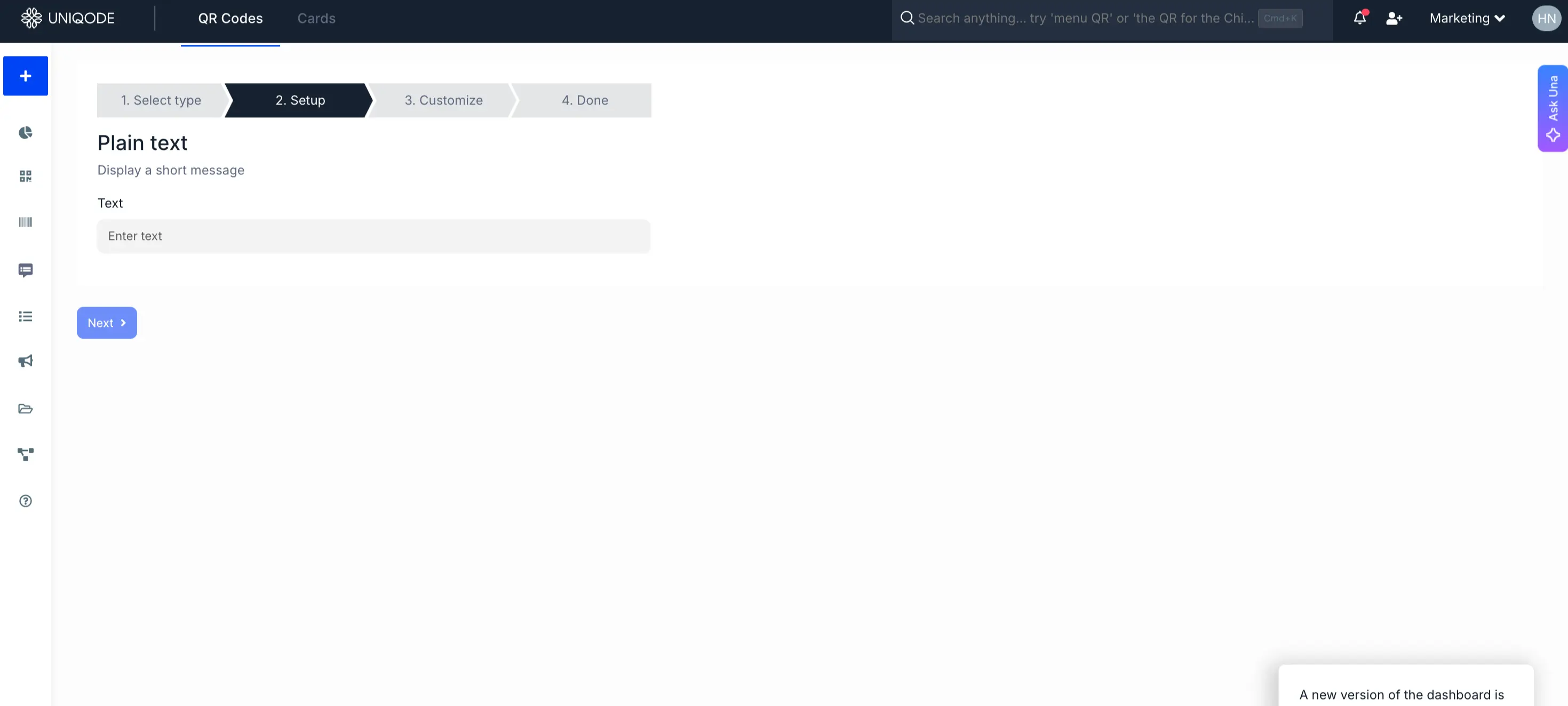
2. Type the message
Enter the text you want to show when the QR Code is scanned.
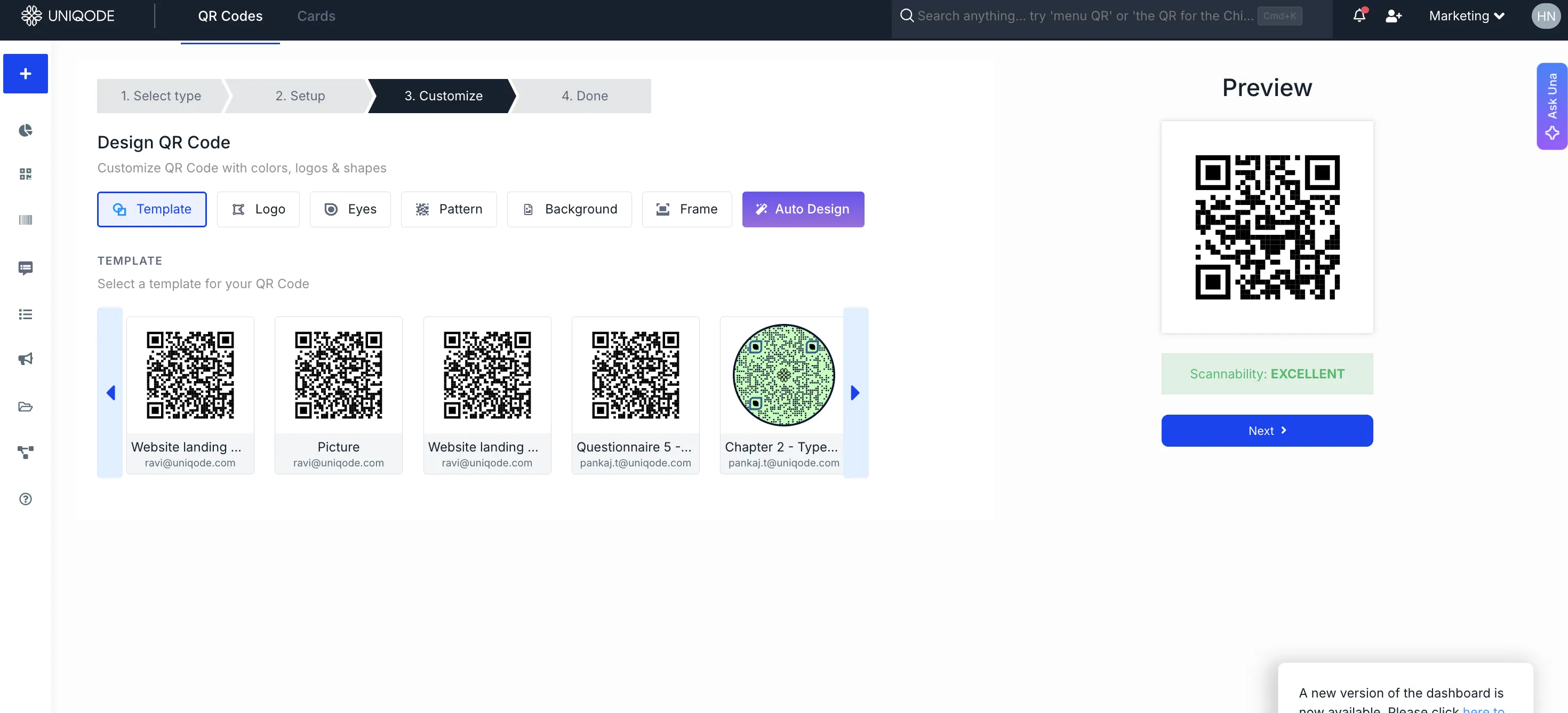
3. Customize the design
Add a logo, change the colors, or add a background. You can also add a frame with a text below it.
Step 4: Download the code
Once you have generated the QR Code for text, all you must do is download it. PNG covers most digital placements, SVG scales cleanly for large-format print, and PDF suits anything headed to a professional print shop.
Text QR Code vs. URL QR Code: what is the difference
The main difference between a text QR Code and a URL QR Code is where the information is stored.
Feature
Text QR Code
URL QR Code
Mobile Text
What happens after scanning?
Mobile Text
Displays text directly
Mobile Text
Opens a webpage
Mobile Text
Where is the content stored?
Mobile Text
Inside the QR Code
Mobile Text
On the linked website
Mobile Text
Works offline?
Mobile Text
Yes
Mobile Text
Usually no
Mobile Text
Best for
Mobile Text
Short, fixed information
Mobile Text
Longer or online content
Mobile Text
Can the content be updated later?
Mobile Text
No, static
Mobile Text
Yes, if you use a dynamic QR Code
Mobile Text
Can you track scans?
Mobile Text
No
Mobile Text
Possible with a dynamic QR Code
When should you use a text QR Code?
Use a QR Code with text when you want someone to see a short piece of information immediately after scanning and the content does not need to change.
For example:
“Wi-Fi password: Guest2026” “Return this package to reception” “Batch number: BZ10492”
When should you use a URL QR Code?
Use a URL QR Code when you want to send scanners to:
A website
Product information
A menu
A PDF
A landing page
A form
Frequently updated content
A URL QR Code is also a better option when you have a lot of information to share. Instead of placing all that data inside the QR Code, you can keep the QR Code simple and host the content online.
Why should you use a plain text QR Code generator
No internet connection required
A plain text QR Code holds your message right within its pattern, so the moment you scan it, the information appears instantly, no internet connection or hosted page required. Even in places where reception is unreliable, like basements, elevators, or remote locations, your code always works.
Nothing to host or maintain
Since the plain text QR Code contains all the data, there is no need for a server, a landing page, or any ongoing upkeep. Once you generate the code, your work is done; there is no infrastructure or maintenance to think about.
Fixed content survives the print run
Once you create a plain text QR Code, its content is set in stone. This makes it ideal for sharing information that never changes, such as a Wi-Fi password, warranty details, or care instructions printed on packaging.
Faster to generate at scale
Static text QR Codes eliminate the extra steps required for dynamic codes, such as setting up destination pages or redirects. This means you can generate hundreds of codes for labels, tags, or manuals in no time, perfect for content that will remain unchanged.
Better fit for privacy-sensitive text
When you scan a plain text QR Code, no server is contacted, so there is no record of scan locations or device details. This makes it a thoughtful option when privacy is a priority, such as sharing a personal note or an address.
Where can you use a plain text QR Code
Text QR Codes show up in more places than most people expect. The common thread is situations where a short, immediately readable message matters more than a link, a form, or a landing page. Below are the most practical applications of a text encoded QR Code.
Coupon codes and retail promotions. A QR Code containing text on a flyer, a poster, or a product display reveals a discount code the moment it's scanned, no app download or account sign-in required to redeem it.
Product packaging and terms too long to print. Detailed offer terms, usage instructions, or product specifications that would clutter a label move into a scan instead, keeping the printed packaging clean while the full text stays one tap away. This is the same logic that pushes some products toward a dedicated product packaging QR Code setup once the amount of information grows beyond a short message.
Verification and anti-counterfeit codes. A state government program prints QR Codes onto vehicle permit decals, encoding the permit number, VIN, and expiration date directly into each code. Enforcement officers scan the code in the field to confirm a decal hasn't been altered or copied onto a different truck, catching counterfeits that a glance at the printed text alone would miss. The pattern generalizes past permits: anywhere a printed number can be altered by hand, a separately encoded QR Code becomes a second, harder-to-fake source of truth.
Personal messages and one-off instructions. A gift tag with a short note, a quick assembly or setup instruction taped to a product, or a one-time message for a small event doesn't need an app, a landing page, or an account to work, just a scan and the words are right there.
Equipment and asset labels: Keep track of essential details such as equipment IDs, serial numbers, maintenance notes, and internal reference numbers. This organised approach ensures that every piece of information is easily accessible whenever you need it.
When to not use a text QR Code
A text QR Code is not the right choice if:
You have a large amount of content
The information changes frequently
You want scan analytics
You want to add images or video
You want people to complete an action such as filling out a form
You may need to change the content after printing
In those cases, use a URL or dynamic QR Code and send scanners to an online destination instead.
Best practices for text QR Codes
Getting a plain text QR Code right the first time avoids most of the problems above, whether it ends up on a decal, a coupon, or a product label. A handful of rules cover almost every situation.
1. Stay well under the 300-character limit for anything scanned quickly in the field. Dense text takes longer to read on-screen and increases the odds of a scan being abandoned halfway through.
2. Choose static only if the message will never change. A single edit later means reprinting everywhere the code appears; if there's any real chance the text will need updating, start dynamic instead.
3. Test at final print size before mass production. A code that scans cleanly on a laptop screen can fail at 1cm on a product label. Check the smallest size the code will actually ship at, not the size it was designed at.
4. Test scanning on iOS 17+ and Android 14+ native camera apps, not just a dedicated scanner app, before deploying. Most people scan with their phone's built-in camera, and that's the experience that has to work. A code that only scans reliably inside one dedicated app has already failed most of its real-world readers, and a code that won't scan at all is worth ruling out before a batch goes to print, not after.
5. Never encode confidential or sensitive personal data as plain text. Anyone who scans the code sees it exactly as written, with no access control in front of it. If the content is sensitive but still needs to travel as a QR Code, a password-protected dynamic code, one that requires a passcode before the destination loads, is the safer pattern.
Frequently Asked Questions
What is a text QR Code?
Is a text QR Code free?
How do I create a text QR Code for free?
Can I start with a free static text QR Code and upgrade it to dynamic later?


.png)


 Templates
 Logo
Logo
 Design
 Frame
Frame



.webp)
%20(1).webp)
.webp)
.webp)
.webp)
.webp)
.webp)
.webp)
.webp)
.webp)
.webp)
.webp)