Free vs. Paid QR Code Generators: What Is the Difference?
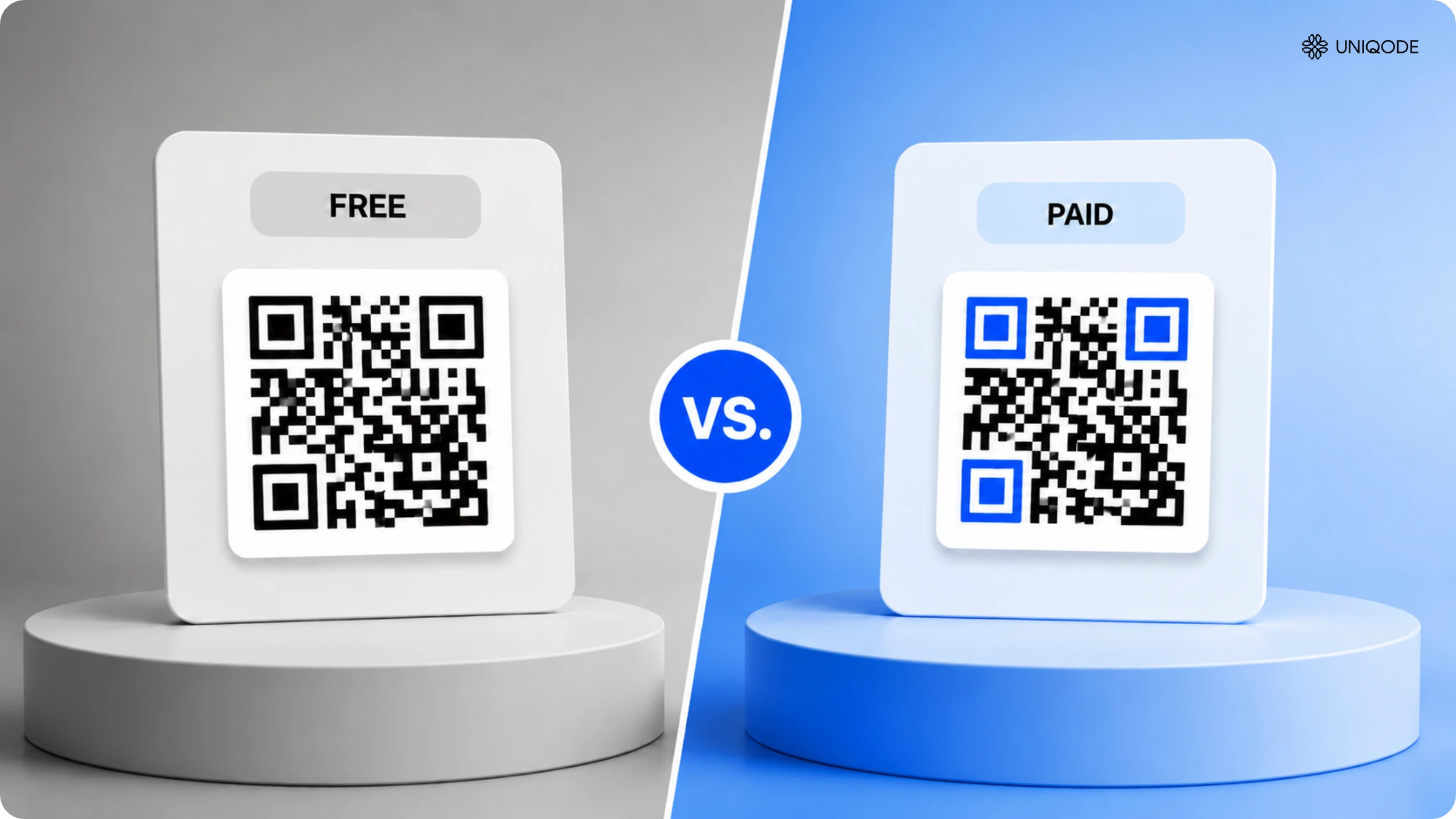
Should you go for free or paid QR Code generators? Find an answer to the debate in this article. Discover the main differences between free and paid QR Code generators, their diverse use cases, and which one should you go for.
QR Codes are free to generate but "free" applies to the code itself, not what happens after you print it. Free generators produce static QR Codes: permanent, uneditable, and untracked. Once printed, the destination URL is locked. If the linked page changes or disappears, the code breaks with no warning and no fix short of reprinting.
Free is the right choice for small batches, ideally fewer than 20 codes, for one-time events where scan tracking and destination editing don't matter.
Paid dynamic QR Code is the right choice for materials with a shelf life longer than a season, packaging, locations you don't control daily, or any context where compliance teams need to verify or update destinations.
Three capability tiers determine the real decision:
- Static - permanent, untracked, free
- Dynamic - editable destination, scan analytics, paid
- Smart Rules - conditional routing by time, location, or language, paid
The real question isn't whether it's free. The question you must ask is It's free until when and free of what obligations.
Overview: When free QR Code generators work vs. when you need paid
Stay free if: you need QR Codes for short-lived posters, small events, a few business cards, signage that points to a page you’ll never change, or internal docs.
Consider paid when you need at least two of the following:
• Content changes after printing (menu updates, price changes, new offers)
• Analytics matter for your business (proving ROI, optimizing campaigns)
• Customer experience depends on QR Codes working (packaging, signage)
• You’re managing 50+ QR Codes (multiple locations, products, campaigns)
• Security compliance is required (healthcare, finance, enterprise)
• You need CRM integration or marketing automation
Is a free QR code generator really free?
The true cost of a free QR Code generator isn't its $0 price, it's the risks that surface when one of four common assumptions turns out to be wrong. Each assumption seems reasonable at the moment you create the code. The failure shows up only after you've distributed it.
Assumption 1: Free is fine because we can always change the webpage
Updating a webpage doesn't change where a printed QR Code points. A static code on packaging, menus, or signage keeps directing users to the original URL for as long as it stays in circulation. Without a dynamic redirect layer, reprinting is the only way to update the destination.
Assumption 2: QR is top-of-funnel, so we don't need analytics
This assumption holds until someone with budget authority asks which placements drove engagement. A generator that tracks only total scans with no data on unique visitors, location, or conversions can't answer that question. Marketing loses the ability to justify the channel when it matters most.
Assumption 3: Domains don't matter; people just scan
Many users check URLs before scanning, especially as QR phishing awareness grows. Generic redirect domains appear suspicious. Branded domains build trust before the user taps through.
Assumption 4: Governance can wait until we scale
By the time an enterprise needs access control and an audit trail, dozens of ungoverned codes are already in the field, created by different people, pointing at different destinations, with no inventory of what exists or who owns it. Governance debt compounds silently. Nobody recognizes it as a problem until a security review or compliance audit asks a question nobody can answer.
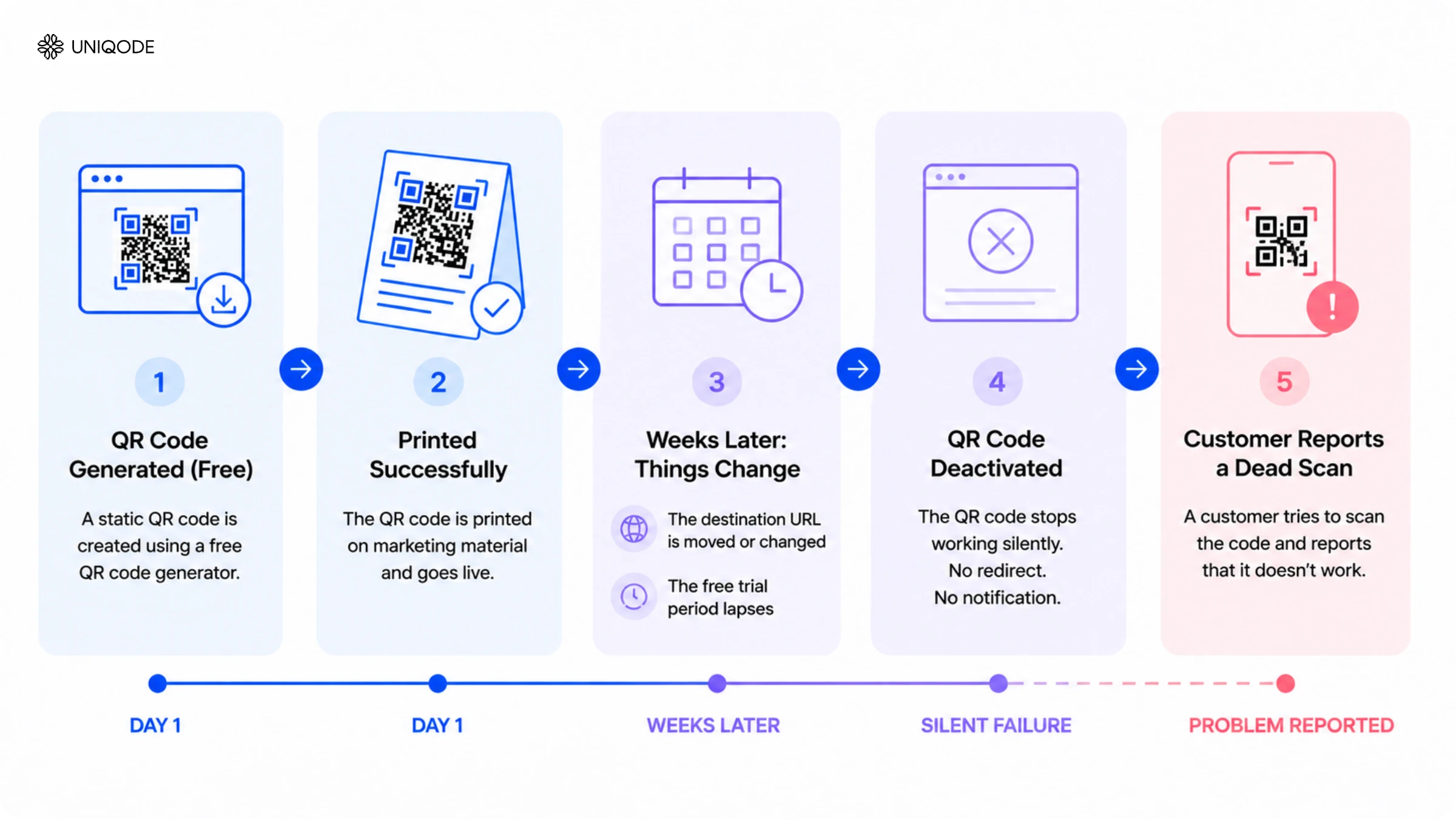
One failure mode underlies all four assumptions. A free static QR Code never technically expires, but it functionally dies the moment its destination page moves or gets taken down because the URL is baked into the printed code with no way to redirect it. A dynamic QR Code on a lapsed free trial deactivates every code tied to that account simultaneously, silently, usually discovered only when a customer reports a dead scan weeks later. Static-code permanence is a myth worth naming directly: the code image itself never expires, but the destination behind it can vanish without a single warning to whoever printed it.
The 5 hidden costs of a free QR Code generator, quantified
Free QR Codes carry five distinct costs, each with a measurable financial impact: reprint tax, trust penalty, attribution blindness, ops drag, and governance debt. When two or more apply, a paid platform pays for itself quickly.
One more cost appears before the five main factors: opportunity cost. Many "free dynamic" QR Code offers include scan limits, trial periods, or hidden restrictions that only surface after printing. Designers and small businesses regularly encounter codes that stop working after 14 days or once a scan cap is reached. The most reliable free option is a static code pointing to a page on your own domain, one you can update directly. Most complaints about failed free codes trace back to dynamic QR Code providers offering limited free trials, not truly free codes.
1. Reprint tax
A static QR Code with an outdated or inactive destination requires reprinting the physical material. Multiply locations or SKUs by annual changes, unit count, and print cost, and the annual reprint risk becomes significant fast, often exceeding mid-tier software costs by Q2. One restaurant chain spent $18,000 reprinting table tents for a menu update that dynamic editing would have resolved in 30 seconds. Uniqode lets marketing teams update a QR Code's destination after printing, turning a costly reprint into a dashboard update.
2. Trust penalty
Users check URLs before scanning, especially as QR phishing awareness grows. Generic redirect domains read as suspicious; branded domains build trust before anyone taps through. Uniqode's client data shows branded domains increase scan-through rates by 25 to 30% compared to generic shorteners. Marriott Aruba proved the return: after switching to a monitored, branded QR setup, the hotel reached 80,000 unique customers and saved $150,000. A B2B software company saw demo requests from QR scans increase 2.3 times after moving from free QR Codes to a branded domain, with every other variable held constant.
3. Attribution blindness (why marketing budgets get cut)
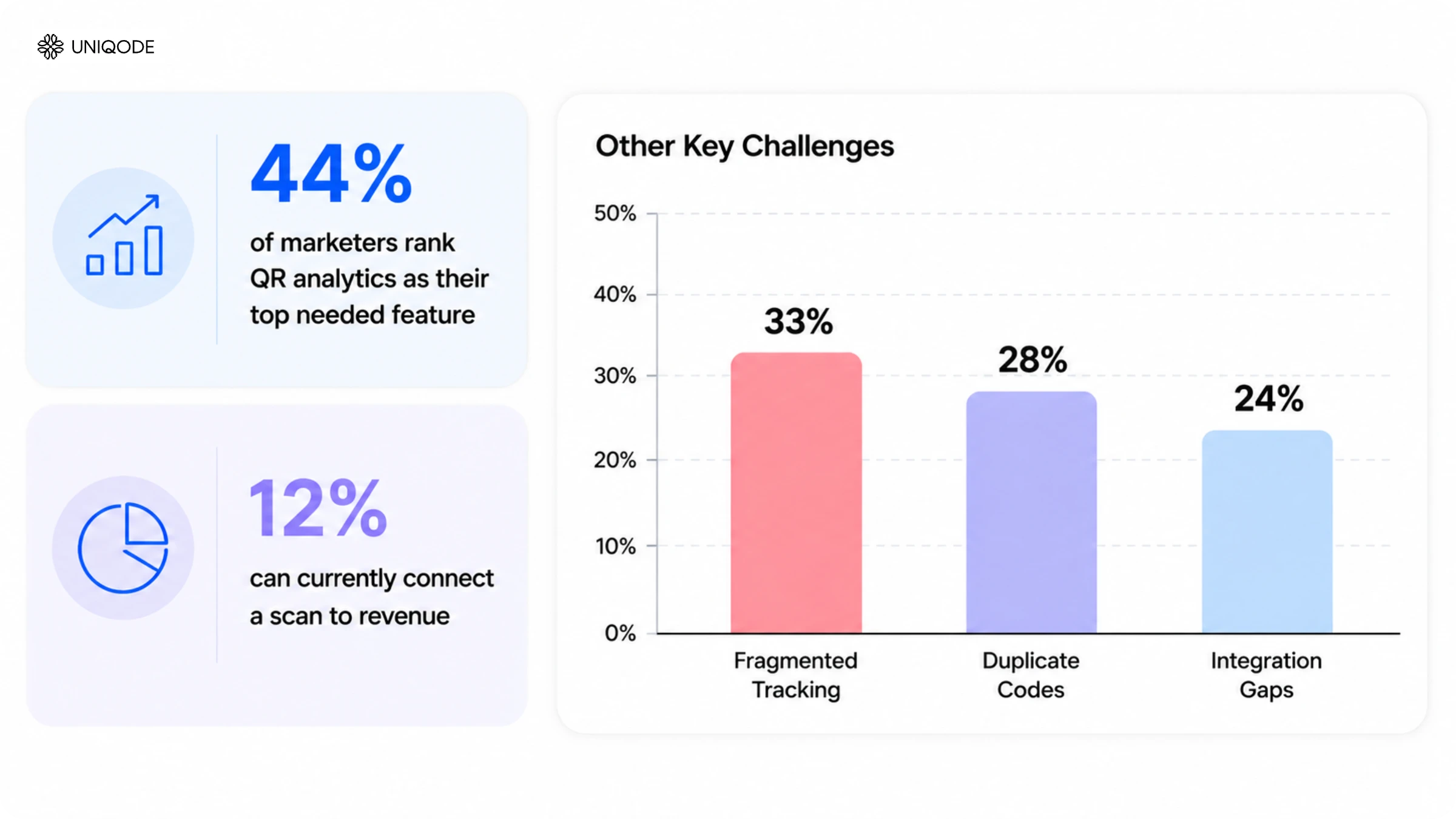
According to the State of QR Codes 2026 report, only 12% of marketers can connect a QR scan to revenue, even though 44% identify analytics as their top QR feature need. That gap between desired insight and actual proof is exactly what triggers budget cuts. Without unique-visitor tracking and integration with GA4 or a CRM, marketing teams can't justify spends or identify which placements work. Routing scans to GA4 with UTMs gives teams the data-backed answers they need to defend the channel.
4. Ops drag (death by spreadsheet)
Without bulk operations, APIs, or shared workspaces, operational inefficiencies multiply. State of QR Codes 2026 data shows that 33% of marketers deal with fragmented tracking, 28% manage duplicate codes, and 24% run into integration gaps, all of which compound as QR programs scale. Teams managing more than 200 QR Codes across scattered spreadsheets find 30 to 40% of codes leading to dead links, with unclear ownership and no version history. Bulk creation and folder-based organization replace that chaos with a unified, transparent view of every code.
5. Governance debt (the compliance time bomb)
Governance debt is the most expensive problem to fix after the fact. The moment compliance teams request code ownership records or change permissions, the lack of oversight becomes an immediate audit liability. One fintech company had to restart its entire QR program when its security team found the free tool couldn't provide SOC 2 attestation, a three-month delay and a significant loss of customer trust. Maesa used QR-based counterfeit protection to prevent $10 million in losses, demonstrating exactly what unmonitored codes without ownership trails put at risk. Counterfeit-resistant codes with ownership trails turn QR into a digital brand protection layer, not just a scan destination. A single unchangeable promo URL in a CPG relabeling case costs $50,000, proof that neglecting governance early produces far larger expenses later.
Each factor demands a targeted fix. Reprint tax requires QR Codes with editable destinations. Attribution blindness requires routing all scans into GA4 with UTMs. Ops drag requires a dashboard with folders and shared access. Governance debt requires single sign-on, role-based access, audit logs, and automated malicious redirect scanning, all in place from day one, not retrofitted after a compliance incident.
Can I just use ChatGPT or another AI tool to generate a QR Code?
ChatGPT and similar AI tools can generate a basic, scannable QR Code image from a URL, but what they produce is a static image, not a managed or trackable QR Code.
When a chatbot generates a QR Code, it uses a standard encoding library to return an image. It performs no scan validation, makes no error-correction adjustments for print size, and creates no redirect layer behind the URL. The result is functionally identical to a free static generator, with one added drawback: there's no account, dashboard, or record of what was generated. If the destination breaks, there's no way to identify or update the affected code. Free generators at least maintain a record within their platform.
AI-generated QR Codes also skip the quality checks that dedicated generators run automatically. Insufficient contrast, small dimensions, or high data density can all cause scan failures that look fine on screen but fail in print.
Canva, Adobe Express, and Google's QR Code tool compared to a paid tool
Canva, Adobe Express, and Google's built-in QR Code tool all generate a free, functional QR Code with no account required. The differences that actually matter show up the moment you need to edit, track, or manage more than a handful of codes.
| Capability | Canva | Adobe Express | Google's QR Code tool | Paid QR Code generator |
|---|---|---|---|---|
| Free static QR Code | Yes | Yes | Yes | Trial or paid |
| Design customization (colors, logo) | Yes | Yes | No | Yes |
| Dynamic QR Code (editable after printing) | No | No | No | Yes |
| Scan tracking and analytics | No | No | No | Yes |
| Branded custom domain | No | No | No | Yes |
| Team access controls | No | No | No | Yes |
| Security and compliance certifications | No | No | No | Yes |
Free-tier terms change frequently so always verify current limits on each vendor's pricing page before relying on specific features. Despite varying terms, all three free tools share the same core design philosophy: quick code generation, not long-term management of codes at scale.
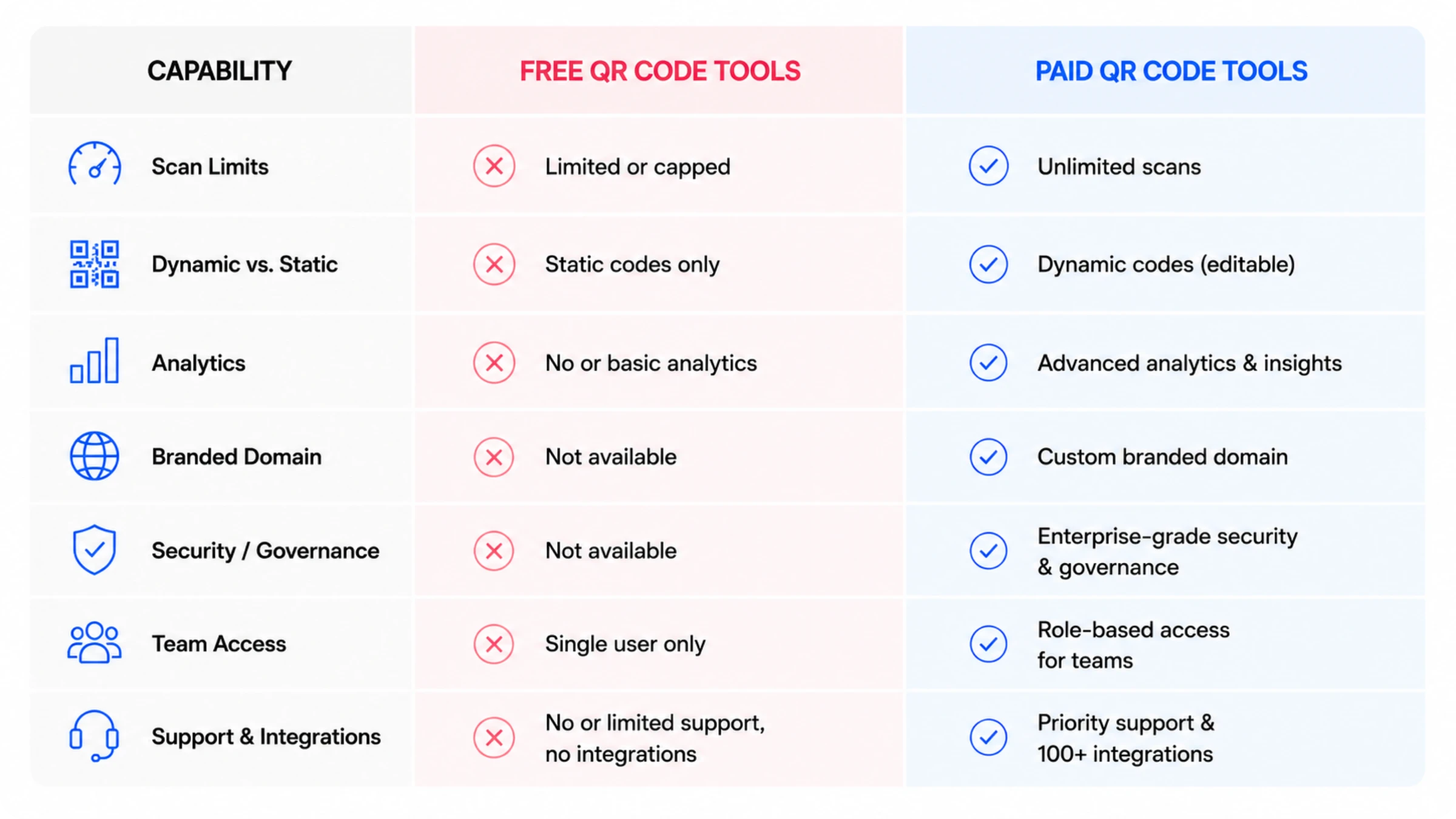
Paid tools don't compete with free options on simplicity. They address a different set of needs entirely: editing a QR Code's destination after printing, tracking scan data and locations, setting team access controls, and routing scans through monitored, branded links.
The same caveat applies throughout: if you need a one-time, static, unbranded code for a simple use case, any free tool works. A design team creating a single conference flyer can use Canva. A retail chain deploying the same code across multiple locations needs capabilities that only a dynamic QR Code generator can provide.
Key differences between free and paid QR Code generators
| Feature | What it means | Free QR Code generators | Paid QR Code generators |
|---|---|---|---|
| 💰 Cost | Upfront savings vs. long-term value | Free | Subscription-based |
| ✏️ Editability | Change URLs/QR Code destinations without reprinting the QR Code | Static only | Dynamic + Smart Rules |
| 🎯 Smart Rules | Personalize experiences: Show the right content to the right person | Not available | QR Code routes to different content based on time, location, device and more conditions |
| 🎨 Customization | Trust and conversion rates | Basic colors | Full branding + Custom Domain |
| 📈 Analytics | Data-driven optimization | None or basic | Comprehensive + attribution |
| 🔐 Security | Risk mitigation | Minimal | Enterprise-grade + compliance |
| 📊 Scalability | Bulk QR Code creation/ update | Manual, one-by-one | Bulk QR Code+ API automation |
| 🧩 Integrations | Workflow automation | None | CRM, GA4, marketing stack |
| 👥 Collaboration | Organized operations, Role Based Access Control (RBAC) | Single user | Teams + permissions |
| 🎯 Retargeting | Re-engage offline scanners | No | Yes (integration with ad platforms like Google Ads, Meta Pixel) |
| 🎧 Support | Problem resolution | FAQ only | Human support + SLAs |
Free vs. paid QR Code generator: how to decide
Free is enough when a QR Code is short-lived, low-stakes, and never needs to change after printing. Paying is worth it the moment any one of those conditions breaks.
| Factor | Free is fine | Pay for a QR Code generator |
|---|---|---|
| How long the code is in use | Single campaign with a fixed end date | Printed on packaging, menus, or signage with real shelf life |
| Performance tracking | Nobody needs to track performance | Attribution needs to survive a budget review |
| Team size | One person managing one or two codes | More than one person or team creates codes |
| Risk and compliance | Nothing regulated, brand-sensitive, or customer-facing at scale | Anything touches compliance, healthcare, or financial data |
| Offline-to-paid retargeting | Not a concern | Scanners need to be retargeted from offline media back into paid campaigns |
Which is better: Free or paid QR Code generators
The answer to this question depends on your marketing use case and budget.
Free QR Code generators are more suitable for simple, one-off use cases. A free QR Code generator may suffice if your requirements are basic and you do not need extensive customization, analytics, and support.
However, if you’re seeking to use QR Codes in large-scale campaigns or for high-value sales, investing in a paid QR Code generator such as Uniqode can provide a significant advantage.
Want to give Uniqode’s QR Code maker a shot? Get started with a 14-day free trial, or check out our pricing plans.
Frequently Asked Questions
- Do you have to pay for QR Codes?
No, there are free QR Code generators available in the market that allow you to create basic QR Codes without any upfront cost. Examples include QR Code Monkey, Adobe, and Canva.
However, free options often have limited features, such as a lack of edit-ability—costing you time and money in terms of re-printing costs.
- Should I use a free QR Code generator?
A free QR Code generator might suit simple, one-off use cases, especially if you have budget constraints or temporary marketing campaigns.
- Are free QR Code generators safe?
Free QR Codes are not GDPR, HIPAA and SOC® 2 Type 2 compliant. Nor are they ISO 27001: 2022 certified, leaving QR Codes vulnerable to malicious alterations or data breaches.
- Do free QR Codes expire?
Free QR Codes typically do not have an expiration date. However, if the QR Code directs to a broken link or expired content, there is no way to update it.
- Can you create dynamic QR Codes for free?
Free QR Code generators usually allow the creation of static QR Codes only. Dynamic QR Codes, which allow updates to the linked content even after distribution, are available with paid QR Code generators such as Uniqode.
- What are the hidden costs of using free QR code generators?
The hidden costs of free QR codes include reprinting expenses when you can't update destinations (averaging $50,000 for packaging relabeling in the case study mentioned), lost marketing ROI from inability to track and optimize campaigns, and trial period expirations that break codes after 14-30 days on already-printed materials. Free platforms often impose undisclosed scan limits (typically 50-100 scans), lack branded domain options that reduce scan-through rates by 23%, and don't offer the security compliance required for healthcare or enterprise use. For campaigns managing 50+ codes across multiple locations, the time cost of manual updates and lack of bulk management tools also adds up significantly.
- What is the difference between free and paid QR Code generators?
Free QR Code generators create static, unmanaged codes with a permanently baked-in destination and no scan data. Paid QR Code generators create dynamic codes whose destination can be edited after printing, along with scan analytics, branded domains, and team-level access controls. The gap isn't about code quality. Both produce a QR Code that scans. The gap is about what happens after printing, when the free code's destination is fixed forever and the paid code's isn't.
About the Author
Ektha is a QR code expert with years of research and analysis into the evolution of QR codes. Having written over 70 in-depth articles on QR technology, she has developed a comprehensive understanding of how QR codes are transforming industries. Her insights, including The State of QR Report, have been featured in leading publications. With a passion for simplifying complex topics and providing actionable strategies, Ektha helps businesses leverage QR codes to enhance their 'phygital' connections.