Uniqode Vs Scanova: Which QR Code Generator Should You Pick?
Can’t decide between Uniqode and Scanova? We have you covered! Here’s a detailed comparison guide that’ll help you out.
You’re likely here because you’ve whittled down your options for QR Code generators to Scanova and Uniqode. Or maybe you’re just on the lookout for a better Scanova alternative.
In either case, the question is, which QR Code generator should you pick?
Uniqode is an offline-to-online engagement solution built for enterprises. It is scalable and has all the tools you need to make end-to-end QR Code campaigns
Scanova, on the other hand, is a QR Code solution targeted at SMBs. It caters to your growing business needs with all the basics covered. But scaling may not come off naturally in it.
As far as G2 reviews are concerned, Uniqode fares better than Scanova. But let’s not dwell on rating alone. Take a close look into both the offerings and make an informed decision.
Note: The features compared in this guide are grouped based on similarity and are broadly clubbed into three main buckets: Essentials that everyone should consider, advanced needs for professional marketing campaigns, and enterprise features for a scalable QR Code solution.
The QR Code essentials
No matter your company size or use case, your QR Code partner should ideally have all these features:
- Static and dynamic QR Codes
- QR Code customizations
- Ease of use
- Scannability
- Analytics
1. Static and Dynamic QR Codes
Any paid QR Code generator software should be able to create both static and dynamic QR Codes.
Dynamic QR Codes
- You can edit the QR-linked content on the backend without reprinting or redeployment.
- You can track essential QR Code data, such as number of scans, time of scans, device type, peak hours, and top-performing QR Codes.
- Dynamic QR Codes include customization options, integrations, white labeling, and more.
Static QR Codes
- You cannot track, edit, and collect data using static QR Codes.
- Typically used when tracking or content updates are not crucial, such as one-off marketing campaigns or QR Codes containing phone numbers or email addresses.
Here’s how Uniqode and Scanova compare in this regard:
| Features | Uniqode | Scanova |
|---|---|---|
| Static QR Codes | ✅ (free and unlimited) | ✅ (paid subscription required) |
| Dynamic QR Codes | ✅ | ✅ |
Uniqode
- You can create unlimited static QR Codes for free, without the need for sign-ups or sharing personal details.
- Visit our free static QR Code generator and create one easily.
- For dynamic QR Codes, Uniqode offers a paid subscription plan
Scanova
- You must subscribe to download any static QR Code.
- For dynamic QR Codes, Scanova also offers a paid subscription plan (check the pricing comparison at the end of this blog)
2. QR Code customizations
Does your QR Code generator cover as many QR Code use cases as possible? Do they provide extensive mobile-friendly landing page customization? Can you make interactive forms and dynamic menus?
Here’s how Uniqode and Scanova compare when it comes to QR Code customizations:
| Features | Uniqode | Scanova |
|---|---|---|
| Multiple campaign templates | ✅ | ✅ |
| Customizable mobile landing pages | ✅ | ✅ |
| Dynamic restaurant menu | ✅ | ❌ |
| Geolocation QR Code | ✅ | ❌ |
| Dynamic forms | ✅ | ❌ |
| Multi-link QR Codes | ✅ | ❌ |
Uniqode
- Access a range of QR Code campaign templates: website, social media links, PDFs, locations, and so on.
- Edit web-based menu on the go (no PDF downloads), and offer dynamic menus that change with time with interactive menu templates.
- Get more creative control and flexibility over your marketing assets with fully customizable, mobile-friendly landing pages
- Get dynamic forms with logic jumps to ask users questions based on their answers. Assign different points to answers to collate a final score for each end-user.
- Get a multi-link QR Code generator and replace 10s of QR Codes with just one.
- Get geolocation QR Codes and redirect users based on their device location.
Scanova
- QR campaign customization features aren’t nearly as exhaustive as Uniqode. Although you can choose from many use-case-based templates
- Get drag-and-drop mobile landing pages. However, customizations, such as custom forms, custom scripts, and video uploads are available only in enterprise plans.
- No dynamic forms, restaurant menus, geolocation QR Codes, and multi-link QR Codes.
3. Ease of Use
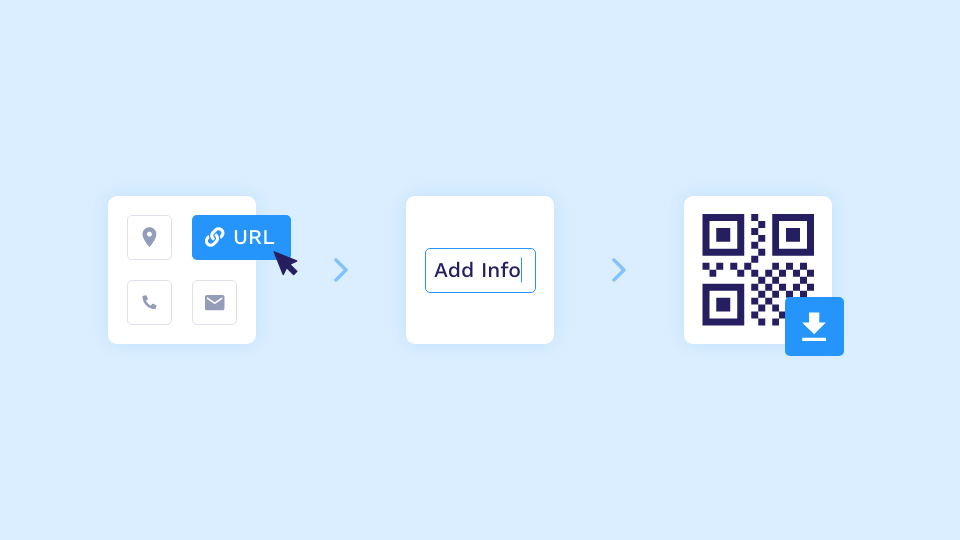
Creating, customizing, and deploying QR Codes must be as easy and intuitive as possible. Here’s how Uniqode and Scanova compare when it comes to ease of use:
| Features | Uniqode | Scanova |
|---|---|---|
| Save QR Code designs for reuse | ✅ | ✅ |
| Filters to sort QR Codes | ✅ | ✅ |
| Custom labels for easy identification | ✅ | ✅ |
| Step-by-step QR Code creation | ✅ | ✅ |
Uniqode
Uniqode dashboard is intuitive and easy to use without compromising functionality:
- Easily save QR Code designs, so they’re just a click away whenever needed.
- Sort QR Codes by URL, label, or source for easy management
- Add custom labels on QR Codes for better organization.
- Create QR Codes in a breeze. Access a user-friendly step-by-step process, making campaign launches easy.
Scanova
- You can save QR Code designs for future use on Scanova.
- You can filter QR Codes by tags, category, type, status, and time period.
- You can apply tags to QR Codes, making identifying and categorizing them easier.
- Scanova offers a three-step QR Code creation process that is easy to use and doesn’t take much time.
4. Scannability
Why is scannability something you should worry about?
The simple answer is that customizations, such as with low-contrast color schemes and significant data content can lead to unreadable QR Codes.
Most QR Code generators don’t notify the user about scannability, and even if they do it’s usually a blanket indication of “readable” and “not readable.” It hardly helps.
Here’s how Uniqode and Scanova compare when it comes to scannability:
| Features | Uniqode | Scanova |
|---|---|---|
| Error-correction | ✅ | ✅ |
| Real-time scannability score to guide customizations | ✅ | ❌ |
Uniqode
- Get real-time, range-based scannability updates as you customize your QR Code design.
- You can custom set the right error-correction level and ensure your QR Codes can handle potential damage or wear and tear.
Scanova
- No real-time scannability score. You won’t get instant feedback on how easily people can scan your QR Code while designing it.
- No custom error correction.
5. QR Code analytics
Running QR Code campaigns without tracking and measuring performance for optimization is as good as shooting in the dark.
For professional QR Code campaigns, marketers require relevant KPIs that give them an accurate picture of campaign performance.
Here’s how Uniqode and Scanova compare when it comes to QR Code analytics:
Both platforms provide various analytics commonly used in measuring professional marketing QR Code campaigns. Here’s a comparison:
| Features | Uniqode | Scanova |
|---|---|---|
| Track scans/Time of day | ✅ | ✅ |
| Track scans/Location | ✅ | ✅ |
| Track scans/Device type | ✅ | ✅ |
| End-user behavior with Google Analytics | ✅ | ✅ |
| Weekly email reports | ✅ | ✅ |
| Exact GPS location | ✅ | ✅ |
| Top-performing QR Codes | ✅ | ✅ |
| No. of Unique Users | ✅ | ❌ |
Uniqode
- Use QR Code analytics to see the number of scans, unique visitors, device type and OS, and scan date and time.
- You can track the exact GPS location of users who scan your QR Code on Uniqode on all plans.
- Use Google Analytics to track QR codes and view the data on the Uniqode dashboard. Get detailed information about end-user behavior, such as age, gender, preferences, and on-site activity.
Scanova
- Get analytics, such as the number of scans, unique visitors, device type and OS, and the date and time of the scan.
- You cannot track the unique visitor count, which is a key metric in understanding the reach of your QR Code campaign.
Advanced features
For running professional QR Code marketing campaigns, consider these features.
- Design customizations
- Campaign settings
1. Design customizations
QR Code generators should ideally have design customization features that allow users to consistently showcase their brand identity.
Features that give you complete creative control over all aspects of QR Code design lead to better branding.
Here’s how Uniqode and Scanova compare when it comes to QR Code design customizations:
| Features | Uniqode | Scanova |
|---|---|---|
| Custom QR eyes & pattern | ✅ | ✅ |
| Custom logo & size | ✅ | ✅ |
| Custom frames | ✅ | ✅ |
| Custom QR Code Size | ✅ | ✅ |
| Custom Background Color | ✅ | ✅ |
| Gradient Pattern | ✅ | ✅ |
| Add Image As Background | ✅ | ✅ |
| Multiple download formats | ✅ | ✅ |
| QR Code templates | ✅ (14 On Trial) | ✅ (4 On Trial) |
| Circular QR Codes | ✅ | ❌ |
Uniqode
- You can customize QR Code eyes to add a unique touch to your QR Codes on Uniqode.
- Set a custom background color for your QR Codes for design versatility.
- Add images as QR Code backgrounds, enhancing customization.
- Add custom frames around your QR Codes.
- Get multiple downloadable formats, such as PNG, EPS, and SVG, for your QR Codes, ensuring compatibility with various applications.
- Apply gradient patterns to QR Codes and make them stand out.
- You can customize the logo size within your QR Codes.
- Create circular QR Codes that make your branding stand out.
Scanova
- Get extensive design customization, QR Code templates, and multiple downloadable formats.
- There are no options to generate circle QR Codes.
- You get a limited number of QR Code templates, only four, versus Uniqode’s fourteen.
2. Campaign settings
Advanced settings ensure that you have greater control and flexibility over how your campaigns are delivered to your end users.
Here’s how Uniqode and Scanova stack up against each other on the QR Code campaign personalization front:
| Features | Uniqode | Scanova |
|---|---|---|
| Custom domain/URL | ✅ | ✅ |
| Ad-free campaigns | ✅ | ✅ |
| Age-gating | ✅ | ❌ |
| In-built custom parameters | ✅ | ❌ |
| Schedule campaign time of day | ✅ | ❌ |
| Multilingual campaigns | ✅ | ❌ |
Uniqode
- Use custom domain/URL to direct your visitors to a page or domain of your choice that is completely ad-free and without any Uniqode branding.
- Get native-level multilingual functionality that detects the language on the end-user’s phone and redirects them to the desired URL.
- Use the age-gating feature to create age-confirmation pop-ups whenever a user scans your QR Code.
- Add custom UTM parameters that help attribute marketing success to QR Codes.
- Schedule QR Code campaigns with a start and end date for all your QR Codes—a perfect use-case for one-time events and time-sensitive discount coupons/offers.
Scanova
- Get custom domains to boost engagement, stay on brand, and a completely ad-free QR Code experience.
- No native age-gating. You have to take the help of tech-intensive external scripts.
- Get multilingual QR Codes, but they are not native to the platform. You must manually create a landing page with multiple CTAs for different languages and URLs.
Source: Scanova Blog - No custom UTM parameters to attribute marketing success to QR Codes.
- Get only an auto-deactivation option. You must manually launch a campaign, even if it must go live early morning.
Enterprise offerings
If you’re an enterprise looking for a scalable QR Code solution, look for these features.
- Security
- Scalability
- Collaboration
- Retargeting
- White labelling
- Customer service and support
- Integrations
1. Security
At Uniqode, we know that users looking for the best QR Code generator value data handling and security deeply.
This is especially true for our enterprise customers, who regularly deal with cyberattacks and breaches by hackers.
For the same reason, we place a great emphasis on ensuring that our customer data is secure.
Here’s how Uniqode and Scanova stack up against each other when it comes to data security:
| Features | Uniqode | Scanova |
|---|---|---|
| Two-Factor authentication | ✅ | ✅ |
| SSO login | ✅ | ✅ |
| SOC® 2 Type 2 certification | ✅ | ✅ |
| GDPR compliance | ✅ | ✅ |
| Password protection | ✅ | ✅ |
| Access management | ✅ | ✅ |
| Phishing URL detection | ✅ | ✅ |
| Advanced algorithm for rooting out inconsistencies in scan behavior | ✅ (Uniqode Shield) | ❌ |
Uniqode
- Get a QR Code solution with SOC® 2 certification and GDPR compliance.
- Get SSO login feature that gives users access across multiple sites and applications with a single set of credentials.
- Always stay safe from phishing attacks with an updated blacklist of phishing URLs.
- Stay on top of abnormal scan behavior, as Uniqode identifies and filters them from your QR Code’s analytics. Get accurate scan metrics to better understand your QR Code performance.
Scanova
- Get 2FA, SSO, SOC 2, and GDPR compliance, password protection, and phishing URL detection.
- No advanced algorithm for rooting out inconsistencies in scan behavior.
2. Scalability
Here, we see how Scanova and Uniqode compare with each other on the bulk QR Code creation front:
| Features | Uniqode | Scanova |
|---|---|---|
| Static QR Code API | ✅ | ✅ |
| Bulk QR Code generation with spreadsheets(upload CSV or XLSX files) | ✅ (up to 2000 QR Codes) | ✅ |
| Bulk QR Code creation using simple Google Sheet add-ons | ✅ | ❌ |
| Dynamic QR Code API for automation | ✅ | ❌ |
Uniqode
- Seamlessly create QR Codes in bulk with Google Sheets plugin (you don’t even have to visit the dashboard) that automates the entire process at the click of a button.
- Automate dynamic QR Code generation within your app or website using Dynamic QR Code API. QR Codes created at scale are both editable and trackable.
Scanova
- Get bulk QR Code creation. However, you must download Scanova excels templates and fill them out manually.
Note: Even if one opts for manual Excel uploading, Scanova offers a confusing pricing structure for bulk QR Code creation, extending up to $0.364 per QR Code – compared to Uniqode’s $0.3 per QR Code for bulk upload for all QR Code types. That’s a 21% price jump per QR Code!
- Scanova’s QR Code API is static and not dynamic, i.e., it can only generate static QR Codes, which are not editable or trackable.
3. Collaboration
Using QR Codes at an enterprise level requires multi-user and cross-functional collaboration while running QR Code campaigns.
Here, see how Scanova and Uniqode compare with each other when it comes to collaboration:
| Features | Uniqode | Scanova |
|---|---|---|
| Add multiple users | ✅ | ✅ |
| QR Code management with custom labels | ✅ | ✅ |
| Template locking | ✅ | ✅ |
| Configure separate teams | ✅ | ❌ |
| Asset library | ✅ | ❌ |
| QR transfer across teams | ✅ | ❌ |
Uniqode
- Get team management for improved collaboration via user seats for each team member. Available from the PLUS plan onwards.
- Set up teams with exclusive access to their independent dashboards and clear work organization.
- Teams can lock templates so users can only change the QR Code content but not the design.
- Share QR Codes cross-functionally using the QR Transfer feature.
- Access an Asset Library—a single repository to store, standardize, manage, and share your organization’s digital assets, such as logos, PDF files, and media files.
- Users can also add labels to QR Codes for easy identification.
Scanova
- You can add multiple users, and custom labels, and lock certain dashboard parts like templates (to prevent brand inconsistency). There are limited options to configure separate teams within an organization or allow QR Code transfer across teams.
- Does not support any asset library to store your brand assets, such as logos and images, which can be reused later while creating a QR Code.
4. Retargeting
QR Codes are a great way to capture intent in the physical world. End-users who scan your QR Codes and engage with the linked content are surely interested in you or your organization. Therefore, they make ideal candidates for retargeting purposes.
Here’s how both the platforms compare when it comes to retargeting:
| Features | Uniqode | Scanova |
|---|---|---|
| Meta Pixel retargeting | ✅ | ❌ |
| Google Ads retargeting | ✅ | ❌ |
Uniqode
- Organize high-intent users who engage with your campaigns into online cohorts. You can then re-target them across digital channels with our Meta Pixel and Google Ads retargeting. Setting this up could not be easier – all you need is a Pixel or Google Ads conversion ID.
Scanova
- Scanova does not support retargeting.
5. White labeling
Say you’re a big enterprise that wants to integrate Uniqode with your current software toolset for a better workflow. Or you’re a marketing agency that uses a QR Code generator for managing its QR Code campaigns.
In either case, you may wish to remove the QR Code generator’s branding completely for consistency purposes. Can you do this?
Here’s how both the platforms compare when it comes to white labeling:
| Features | Uniqode | Scanova |
|---|---|---|
| White label platform | ✅ | ❌ |
Uniqode
- With the BUSINESS+ plan you can white-label the entire dashboard and remove all traces of Uniqode branding, making it look just like your own.
Scanova
- White labeling option is not available in Scanova.
6. Customer service and support
Firstly, we’d give our nod of approval to everyone in the Scanova team for ensuring quality customer support for its users. As a company for whom customer support and success is always the #1 priority, we appreciate this.
Here’s a detailed comparison on the support front for both platforms:
| Features | Uniqode | Scanova |
|---|---|---|
| Live chat | ✅ | ✅ |
| Email support quality | ✅ | ✅ |
| Phone support quality | ✅ | ✅ |
| G2 ratings | ✅ 4.9/5 based on 363 reviews | ✅ 4.7/5 based on 28 reviews |
Uniqode
- Get excellent customer service as a central part of our product. We’re not being self-congratulatory – do check out our G2 reviews!
- Be it an enterprise or an SMB, we’re here to listen and resolve issues as quickly as possible. We’re available across multiple mediums – telephone, live chat, and email.
Scanova
- Scanova offers email, phone, and live-chat support; however, it falls short on customer delight with a rating of 4.7/5 with just 28 reviews compared to Uniqode’s 4.8/5 and 463 reviews.
7. Integrations
When trying out different QR Code generators, the solution you finally settle on should allow integration with various commonly used software tools. This ensures a smooth workflow.
Here’s how Uniqode and Scanova stack up against each other concerning the integrations they provide:
| Features | Uniqode | Scanova |
|---|---|---|
| Google Analytics | ✅ | ✅ |
| Webhooks Integration | ✅ | ✅ |
| Zapier | ✅ | ❌ |
| Integromat | ✅ | ❌ |
| Workato | ✅ | ❌ |
| Google Sheets Plugin | ✅ | ❌ |
| Slack | ✅ | ❌ |
| Canva | ✅ | ❌ |
| Mailchimp | ✅ | ❌ |
Uniqode
- Automate repetitive tasks across applications within the Uniqode dashboard, via Zapier integration.
- Use Integromat and Workato integrations to connect thousands of apps and build amazing workflows in your QR Code suit.
- Easily add your QR Code assets to flyers, brochures, emails, and newsletters, with Canva and Mailchimp integrations.
- Give your entire workspace on Slack real-time updates on your QR Code scan behavior and analytics—via Slack integration.
- Access a dedicated plugin to bulk-create QR Codes within Google Sheets. Learn more about the bulk-creation functionality here.
- Use Google Analytics (GA) integration to view GA data on the Uniqode dashboard with detailed information about end-user behavior, such as age, gender, preferences, on-site behavior, etc.
Scanova
- Get Webhooks and Google Analytics integrations.
- Scanova does not offer any other integration.
Pricing and plans
Weigh your options based on affordability and payment flexibility.
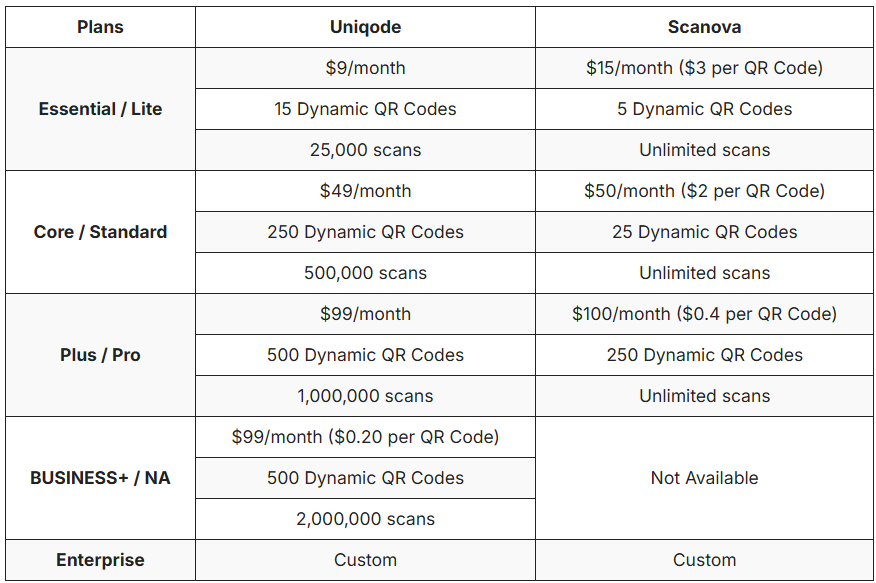
Here, we compare different subscription tiers and pricing details for both QR Code generators:
Uniqode
- Choose from four QR Code subscription plans (ESSENTIAL, CORE, PLUS, BUSINESS+).
- Get GPS tracking and bulk creation from the ESSENTIAL plan onwards.
- Access API from CORE plan onwards.
- Get integrations from CORE plan onwards.
- Get add-ons on all non-enterprise plans.
Scanova
- Choose from three plans with fewer QR Codes for every subscription at a higher price.
- The price per QR Code for the starter plan is ≈ 2X that of Uniqode. For the advanced plans, it is ≈ 6X Uniqode’s pricing.
Choose a QR Code solution that works best for you
With better functionality, safety, and customer support, Uniqode’s QR Code Generator does more at a lower price than Scanova. So that’s a wrap! We hope that this comparison guide was informative and helpful. If our QR Code platform convinces you and you want to schedule a demo, you can do so here.
Frequently Asked Questions
- Can you create free QR codes without signing up?
Uniqode allows users to create unlimited static QR codes completely free without requiring sign-ups or sharing personal details through their free static QR code generator. In contrast, Scanova requires a paid subscription to download any static QR code, making Uniqode the better option for users who need quick, no-commitment QR code generation.
- What are multi-link QR codes and how do they work?
Multi-link QR codes allow businesses to replace 10 or more individual QR codes with just one code that can redirect users to different destinations. Uniqode offers multi-link QR code generation as a standard feature, while Scanova does not provide this functionality, making Uniqode more efficient for campaigns requiring multiple destination options from a single QR code.
- Do QR code generators offer location-based redirects?
Uniqode provides geolocation QR codes that automatically redirect users to different landing pages based on their device's geographic location, enabling targeted regional campaigns. Scanova does not offer geolocation-based QR code functionality, limiting its ability to serve location-specific content to different audiences from the same QR code.
About the Author
Ektha is a QR code expert with years of research and analysis into the evolution of QR codes. Having written over 70 in-depth articles on QR technology, she has developed a comprehensive understanding of how QR codes are transforming industries. Her insights, including The State of QR Report, have been featured in leading publications. With a passion for simplifying complex topics and providing actionable strategies, Ektha helps businesses leverage QR codes to enhance their 'phygital' connections.
Related Posts
The 8 Best QR Tiger Alternatives in 2026
Uniqode vs QR Code Generator Pro
How Does the Google QR Code Generator Rank? Our In-Depth Review
SurveyMonkey QR Code vs Uniqode: A Complete Comparison
Adobe QR Code vs. Uniqode QR Code: Which One Should You Choose?