
How to Secure QR Codes Against Phishing and Quishing Attacks in 2026
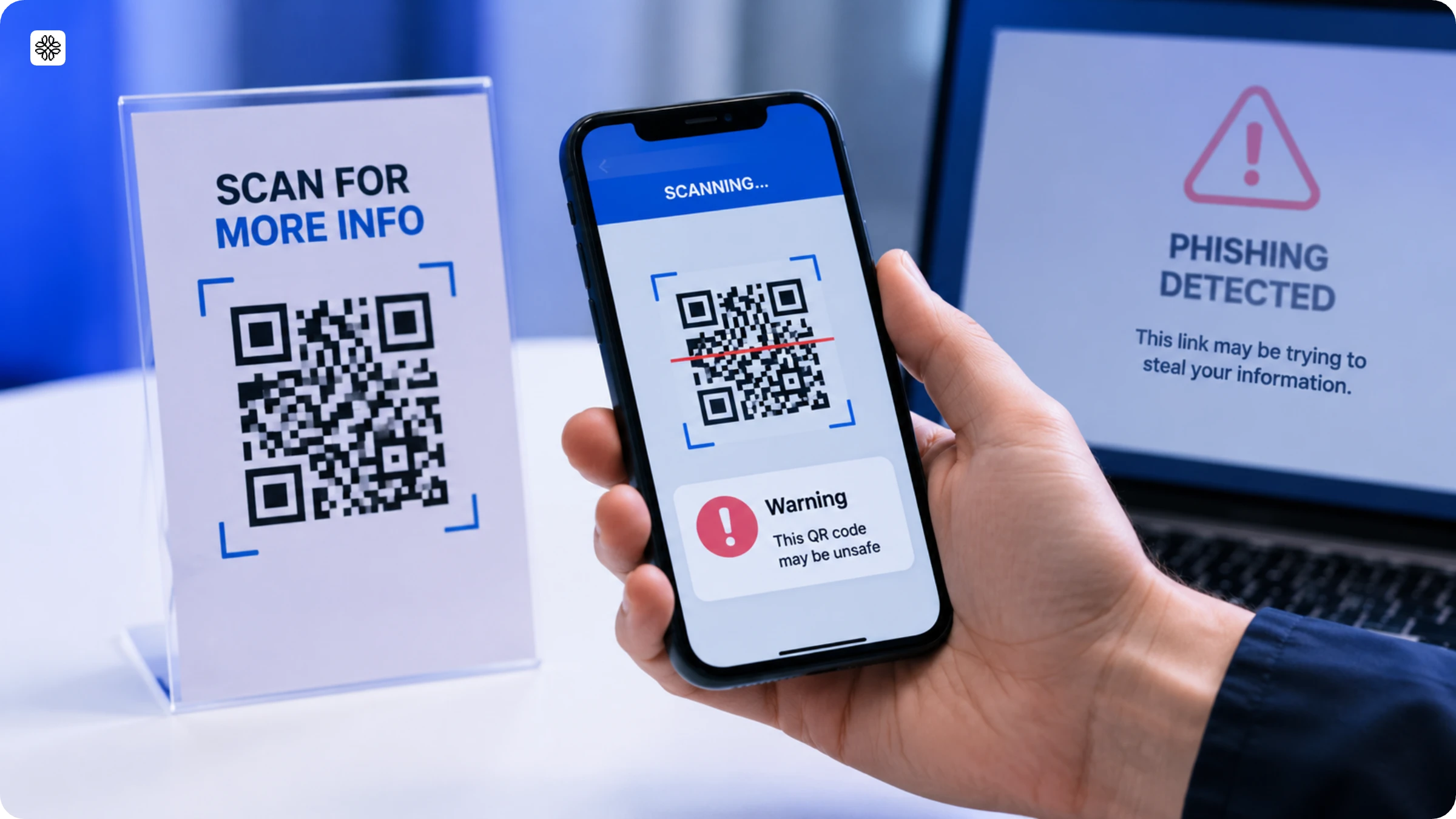
QR code phishing is a major cybersecurity threat in 2026. What looks like a legitimate QR Code for parking, payments, or restaurant menus can instead lead to a phishing site that steals your credentials or financial information. Here's how to spot these scams and scan QR Codes securely.
Brief overview
- Quishing (QR Code phishing) is a rapidly increasing cyber threat. In March 2026, 18.7 million attacks were recorded, with attackers using malicious QR Codes to steal credentials, payment details, and personal data.
- Check QR Codes for tampering, preview destination URLs, verify domains before entering sensitive information, and avoid QR Codes from unsolicited emails or suspicious public places.
- Protect your business by using branded domains, validating destination URLs, monitoring unusual scan activity, enforcing role-based access controls, and maintaining audit logs to prevent QR Code abuse and preserve customer trust.
QR Code phishing, also known as quishing, is a social engineering attack in which scammers encode malicious links into QR Codes to send people to fake websites that steal passwords, payment details, and other sensitive information or silently download malware onto their devices. The best way to prevent QR Code phishing is to verify the destination URL before entering any information and, for businesses, to secure the QR Code's destination against unauthorized changes.
Why does QR Code phishing work so well? QR Code phishing works because a QR Code hides its destination until it's scanned. Attackers exploit this by slipping malicious QR Codes into phishing emails as images or PDF attachments and by placing fake QR Code stickers over legitimate ones on parking meters, restaurant menus, and posters. Microsoft Threat Intelligence reported 18.7 million QR Code phishing attempts in March 2026 alone, marking a 146% jump from the previous quarter. According to Uniqode’s State of QR Codes 2026, 14% of consumers have already fallen victim to a QR Code scam.
In this guide, you will find out how QR Code phishing works, how to spot a fake QR Code, and what you can do to protect yourself. Businesses will also discover the best security practices to keep QR Codes safe from phishing attacks.
What is quishing?
Quishing (QR Code phishing) is a cyberattack in which criminals embed malicious links inside QR Codes to steal credentials, payment details, or personal data. When someone scans the code, it opens a convincing fake like a spoofed login screen, payment portal, or file download, instead of the destination they expected. The word blends "QR" and "phishing" and is pronounced KWISH-ing.
Quishing works because a QR Code hides its URL until after the scan, and because most scans happen on personal phones, outside the email filters and security tools that catch traditional phishing links. Security practitioners get tired of the vocabulary (one r/cybersecurity commenter: "It's just phishing with QR codes! Stop it with the weird names!"), and they have a point. The mechanics are classic phishing; the delivery is what changes the defense.
Quishing is one of 4 ways attackers exploit QR Codes, and the difference matters because each requires a different defense.
Quishing vs. other QR Code threats
Quishing is one of four ways attackers exploit QR Codes, and the difference matters because each requires a different defense.
| Threat type | How it works | What risk does it pose |
|---|---|---|
| Quishing | Fake QR Codes lead to scam websites | Your passwords and credit card info get stolen |
| QRLjacking | Hackers steal your login session when you scan | Someone else controls your account |
| Cloning | Criminals copy real QR Codes but change the destination | You end up on the wrong website without knowing |
| Tampering | Stickers with fake codes placed over real ones | You scan the fake QR Codes, thinking it’s real |
During the 2024 holiday season, scammers pasted fake QR Code stickers over legitimate codes at 200 locations of a major retail chain. Within 48 hours, legitimate scans fell 15%, and support tickets surged. The retailer spent $2.3 million on damage control, even before accounting for lost holiday sales or the customer trust the campaign was built to earn.
How does a quishing attack work in 2026?
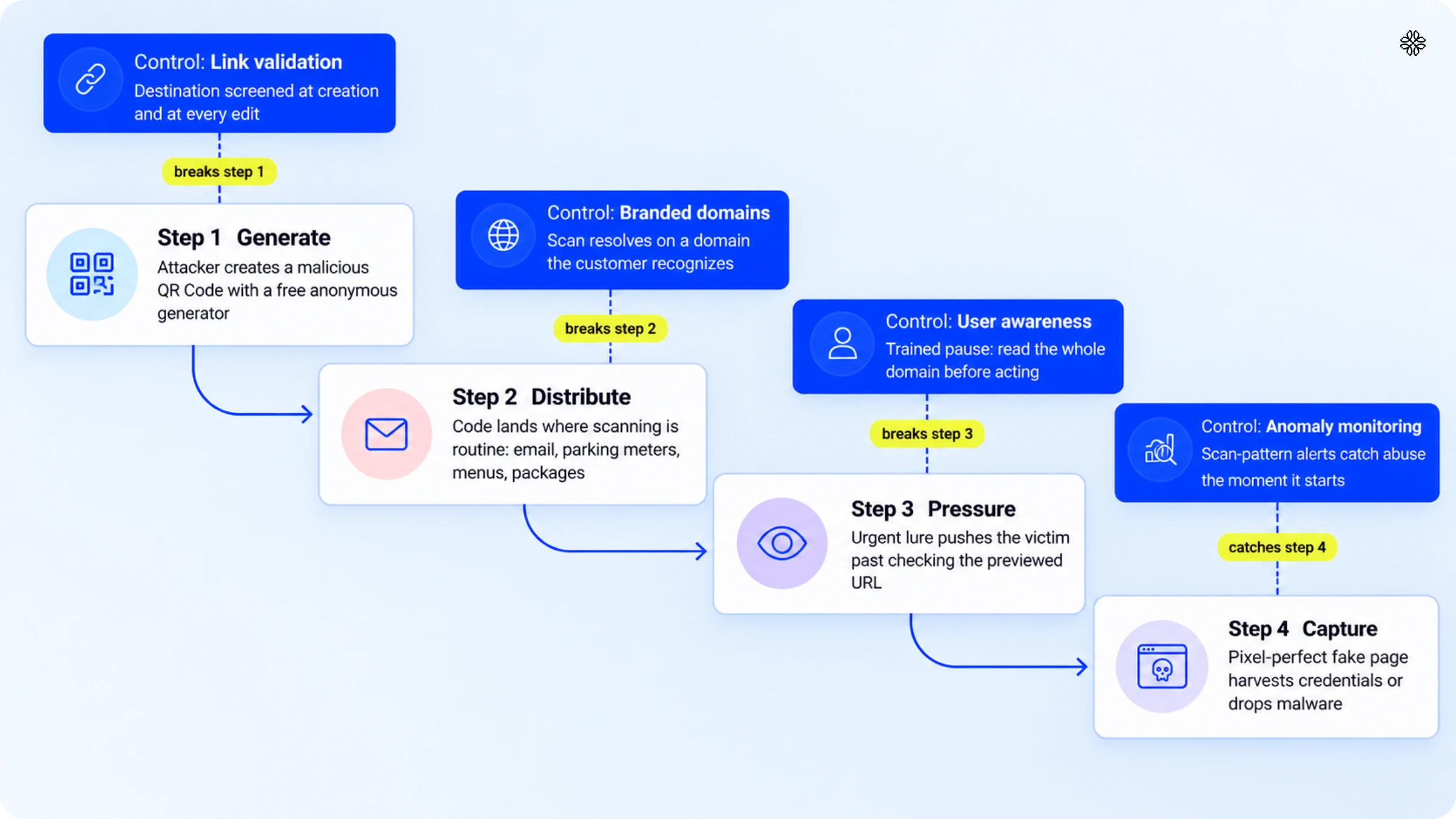
A quishing attack involves four steps: generating a malicious QR code, placing it in locations where scanning is common, urging the victim to act quickly, and then capturing credentials or delivering malware through a fraudulent page. In early 2026, quishing incidents more than doubled within 90 days. Microsoft Threat Intelligence reported 7.6 million QR-based phishing attempts in January and 18.7 million in March, out of 8.3 billion email threats analyzed.
- The attacker generates a malicious QR Code: Attackers use free online generators to quickly create codes that redirect users to spoofed login pages, fake payment portals, or malware downloads. This method requires no technical expertise. In addition, the accessibility that supports marketers also enables criminal activity. Attackers often use URL shorteners, making suspicious links difficult to identify, even when previewed.
- The code is distributed in contexts where scanning is routine: Email is the most common channel for these QR Code attacks, with scammers often using fake MFA prompts, invoices, or HR documents that embed QR codes. These codes can bypass link-scanning filters because the URL is hidden within an image. Physical distribution also occurs, including stickers placed over legitimate codes on parking meters, menus, and posters, as well as scam QR codes included with unsolicited packages.
- There exists urgency for immediate action: The message creates urgency by warning of issues like account suspension, increased fines, or pending deliveries. This sense of urgency often causes victims to skip reviewing the previewed URL.
- The fake page captures whatever the victim types: A convincing replica of a familiar login or payment page can collect credentials or initiate a silent malware download. Since the scan occurs on a personal phone, corporate security tools do not detect the threat, and the compromise remains unnoticed until the stolen credentials are used.
How attackers evade email security in 2026
Attackers now create QR Code scams that email gateways cannot decode. According to Cisco Talos, nearly 1 in every 500 emails now contains a scam QR Code, and these attacks are alarmingly effective because most anti-spam filters cannot interpret images. In 2026, techniques advanced further. Barracuda highlighted the Gabagool QR Code phishing kit, which splits a code into two harmless-looking images that only form a malicious QR Code when viewed together in the victim’s mail client. Kaspersky, too, reported a dramatic fivefold surge in QR-phishing emails in late 2025, with numbers jumping from 46,969 in August to 249,723 in November, with many hidden in a PDF attachment. StrongestLayer's February 2026 vendor analysis found that 12% of gateway-bypassing attacks used ASCII text-based codes, which do not require image decoding.
The goals behind these attacks have evolved as well. In a January 8, 2026, FBI FLASH alert, it was revealed that North Korean Kimsuky actors used quishing QR Codes in targeted spearphishing campaigns against US think tanks and government bodies. These malicious QR Codes lured victims into scanning them with their personal, unsecured phones, opening the door to session token theft. Notably, this technique can bypass even multi-factor authentication, making it a persistent threat.
How to spot a fake QR Code?
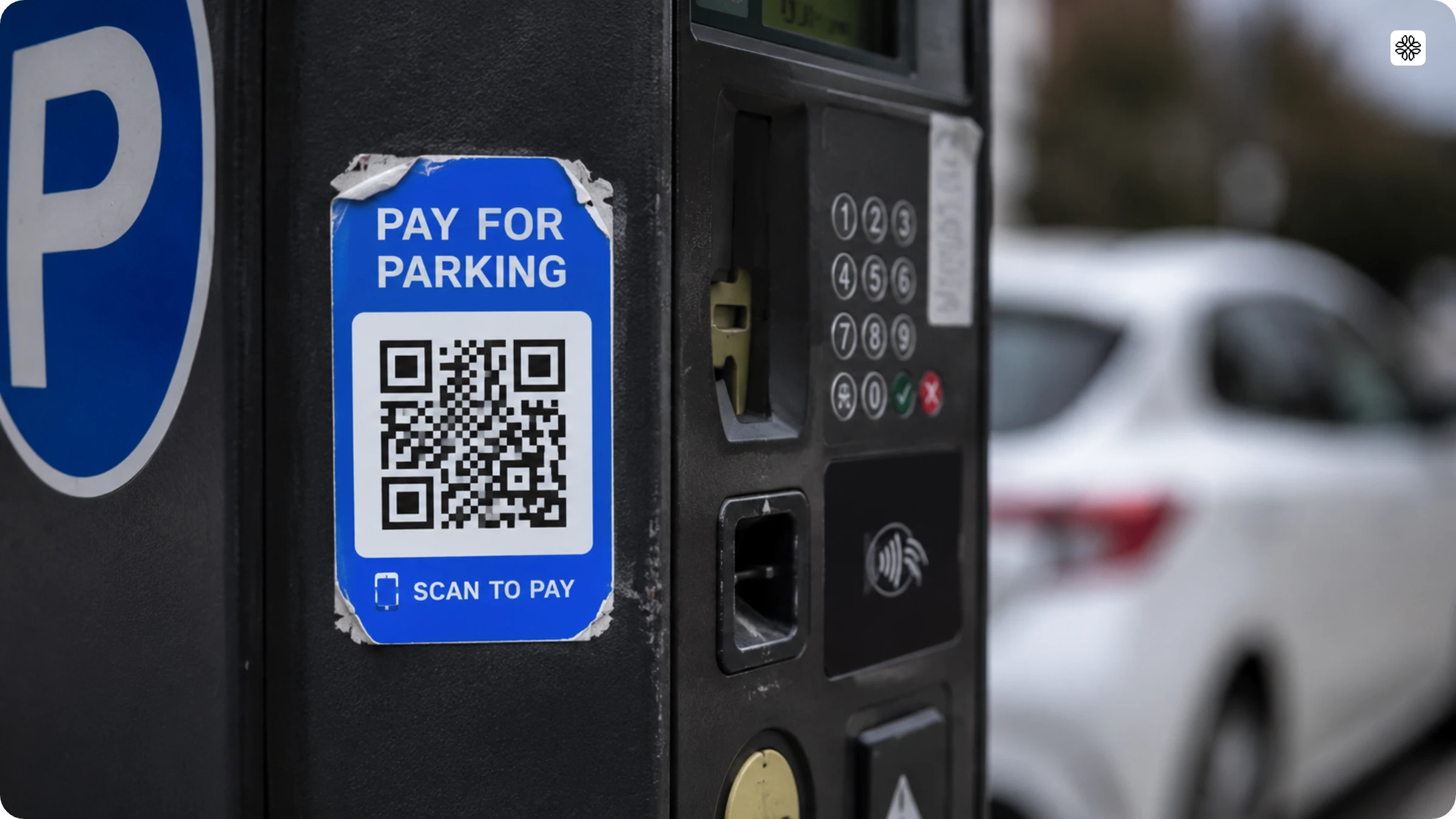
A fake QR Code gives itself away in 7 ways: 4 visible before you scan and 3 after. Check the physical code first, then the URL it produces.
Before scanning, look for these 4 signs:
- A sticker or label sits on top of another code. Raised edges and misalignment are the classic marks of tampering, flagged in the FBI's July 2025 alert on unsolicited-package scams.
- The code arrives in a context you didn't ask for. A package you never ordered, a windshield flyer, or an email demanding urgent verification are delivery channels the FTC has warned about since December 2023.
- The code sits in an unmonitored public spot. Parking meters, shared tables, and street posters are the highest-swap locations because nobody notices a new sticker.
- No human-readable URL or brand context appears near the code.
After scanning, 3 more signs appear:
- The previewed domain fails to match the brand. Scammers register look-alike domains. For instance, TrustDALE documented that poi2park.com was created to impersonate pay2park in parking scams.
- The page demands credentials, payment, or an app download it has no reason to need.
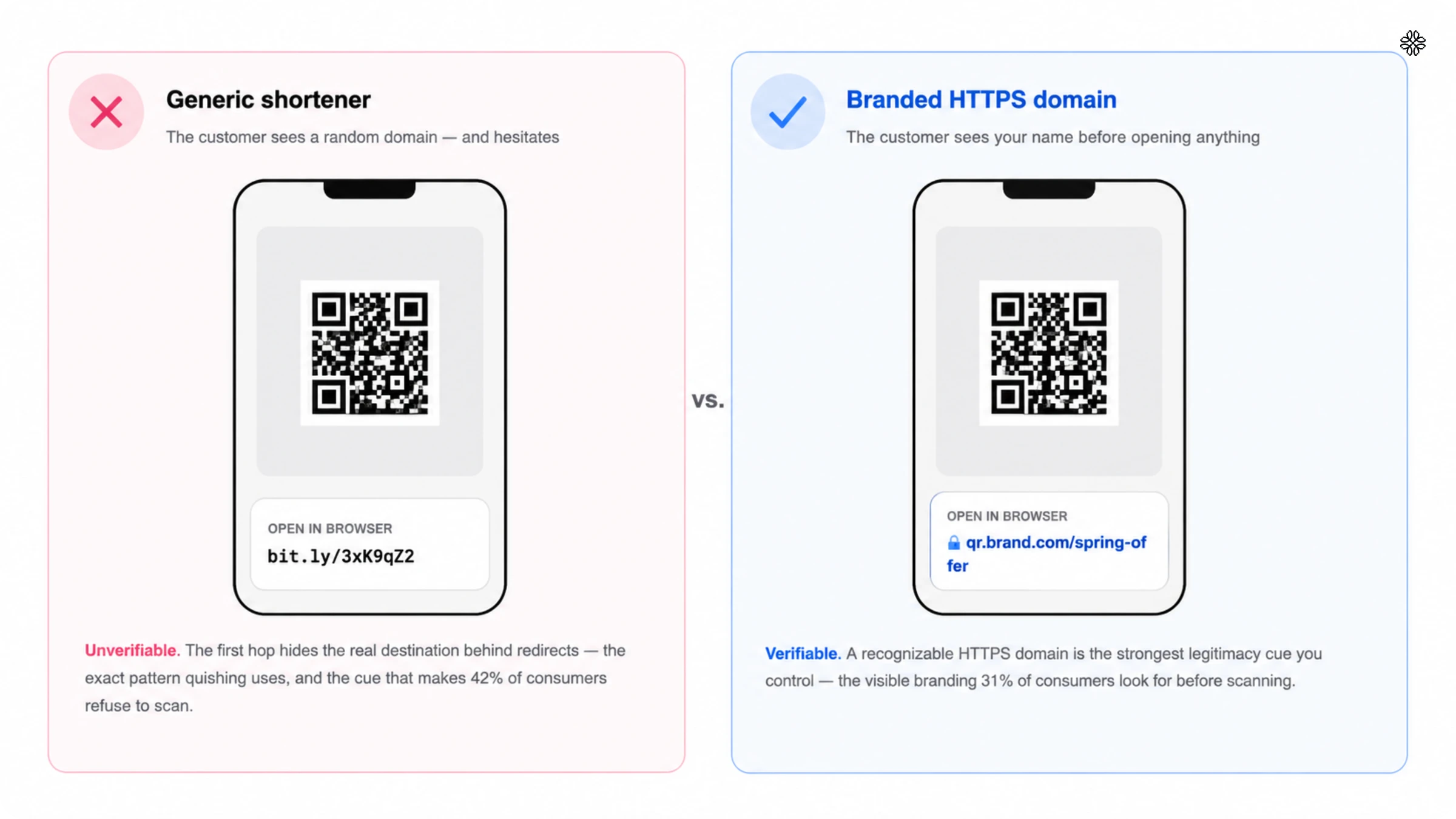
- The URL hides behind a generic shortener with no visible destination.
Previewing the URL is common advice, but it is not sufficient. Research shows that attackers can design QR Codes to behave differently based on the scanner, and that branded or stylized QR Codes increase user trust and scanning rates. When the risks are significant, do not rely solely on previewing the link; verify the actual destination. Our guide on checking QR Code safety provides step-by-step instructions.
How to protect yourself from QR Code phishing
Five steps protect you from QR Code phishing: verify the source, preview the full URL, keep credentials out of scanned links, harden your phone, and report exposure fast. Each step covers one layer of QR Code safety by breaking one link in the attack chain from the previous section.
- Verify before you scan. Confirm the code belongs where it sits. Inspect printed codes for overlays, and treat codes from unsolicited emails, packages, or flyers as hostile until proven otherwise.
- Preview the URL and read the whole domain. Read past the first hop: a shortener that hides the destination is a reason to stop. CISA's phishing guidance calls this verifying through a known-good channel.
- Never enter credentials from a scanned link. Navigate to the site manually instead. This single habit defeats the credential-harvesting page entirely, and it was the consensus answer when practitioners debated QR phishing defenses on Hacker News.
- Secure the phone that does the scanning. Use a scanner or browser that previews links before opening them, switch off automatic actions, and turn off NFC when you are not using it. QR Code safety on mobile matters more than on desktop: Verizon's 2026 Data Breach Investigations Report measured phishing click rates on phone channels at 2.0% versus 1.4% for email, roughly 40% higher.
- Report and reset fast. Report QR Code scams to the FTC and the FBI's IC3. If you typed anything into a scanned page, change that password immediately and revoke active sessions, because session-token theft keeps working even after an MFA challenge.
Why quishing is a business problem, not just a scam warning
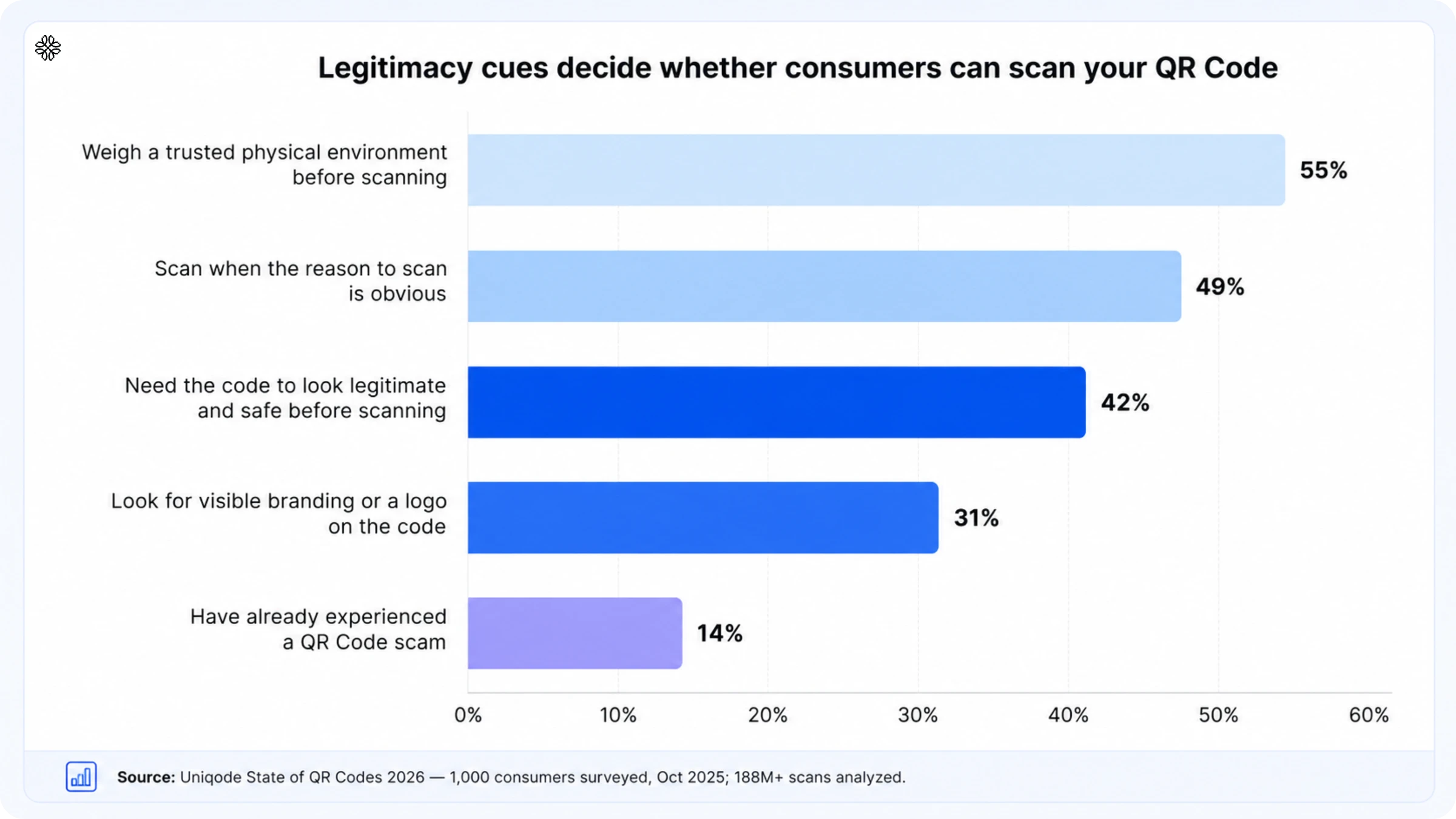
QR Code phishing undermines scan-through rates, delays campaigns, and erodes brand trust even before any credentials are compromised. Uniqode's State of QR Codes 2026 report (524 marketers and 1,000 consumers surveyed, 188M+ scans analyzed) quantifies this trust tax: 14% of consumers have encountered a QR Code scam, 42% require a code to appear legitimate before scanning, and 26% of marketers cite security concerns as a barrier to adoption. Spoofed campaigns can turn your customers into non-scanners.
Quishing scares off legitimate users
Customers cannot distinguish between fraudulent and legitimate QR Codes, and incidents like unsolicited package QR Codes that steal data further erode trust. This leads to lower scan rates for genuine campaigns and increases friction in the offline-to-online transition. The State of QR Codes 2026 data identifies which cues influence scan decisions, both positively and negatively:
- Visible branding on the code raises scan intent: 31% of consumers look for it.
- A trusted physical environment raises it: 55% weigh placement.
- Clear relevance to the moment raises it: 49% scan when the reason is obvious.
- Generic shorteners and anonymous domains lower it, feeding the hesitation 42% of consumers already apply.
Security reviews stall campaigns
Security teams delay QR Code campaigns if they find unknown redirects, generic shorteners, or unverified destinations. This caution is warranted, as 26% of phishing links are delivered through malicious QR Codes. However, providing compliance documentation can accelerate approvals. As Claire Bing, VP of Regulatory and Quality at Maesa, notes, Uniqode supplied the necessary data protection and privacy documentation. To pass security reviews, use pre-publishing URL scans, transparent redirects, SSL validation, and auditable change logs.
Sticker overlays and generic shorteners hurt trust
QR codes are not actually tied to their destinations in a secure way. This means that a malicious sticker can easily pass off as a legitimate one. The problem gets worse when generic URL shorteners are used, as they hide the final landing page behind several redirects. This makes it tough for both users and security tools to verify where a QR code will take you. As a result, security risks go up, customer trust takes a hit, and campaign approvals get delayed. Using branded domains, redirect allowlists, URL reputation checks, and HSTS can help address these issues.
Lack of governance creates brand risk
Without audit trails, access controls, and defined roles, QR phishing escalates from a manageable risk to a brand liability. Security reviewers halt campaigns when they can't verify who created a code, what destination changes were made, or how quickly a malicious link was removed. Security standards reinforce this directly. NIST SP 800-53 requires event logging and audit records. ISO/IEC 27001:2022 mandates logging, monitoring, and role-based access controls. Regulated sectors face stricter requirements, for instance, HIPAA enforces audit controls for ePHI, PCI DSS v4.x requires payment data monitoring, and GDPR Article 32 demands clear access control. Failing to meet these standards increases both security exposure and brand risk simultaneously.
What CISA, the FBI, and the FTC say about QR Code phishing
If you have been searching for a dedicated CISA QR Code advisory as of July 2026, you will not find one. The so-called "joint FTC-CISA QR Code warning" that often appears in IT-services blogs is, in fact, a myth. Each agency, CISA, FTC, and FBI, issues its own guidance, tailored to its unique responsibilities.
CISA treats QR phishing as just another form of phishing, not a separate threat category. In its consumer guidance, "Recognize and Report Phishing" (part of Secure Our World), the agency urges you to verify any requests through a trusted channel. The joint guide with the NSA, FBI, and MS-ISAC, "Phishing Guidance: Stopping the Attack Cycle at Phase One," highlights the importance of phishing-resistant MFA and DMARC enforcement. Notably, CISA's only QR-specific alert, issued on November 24, 2025, focused on spyware campaigns that used malicious device-linking QR Codes to hijack Signal and WhatsApp accounts.
The FBI has also been active on this front, issuing two secure QR Code-related warnings in the past year. The first, an IC3 alert on July 31, 2025, warned about unsolicited packages containing scam QR Codes. The second, a FLASH alert from January 8, 2026, detailed how North Korea's Kimsuky group has been using malicious QR Codes to target US organizations.
The FTC, for its part, released its foundational QR Code safety warning back in December 2023, followed by a package-scam alert in January 2025. Their June 2026 data release revealed that reported fraud losses soared to a record $16 billion in 2025. However, the FTC does not break out QR-specific losses, so be wary of any QR fraud cost figures you come across, as they are likely to be estimates at best.
Local advisories from New York DOT, Raleigh, Toronto Police, and the HHS HC3 healthcare white paper speak to city and sector-specific risks. These resources are designed to help protect individuals who scan QR Codes. However, they do not govern the QR Codes your team creates and distributes. That responsibility, ultimately, rests with your organization.
Benefits of using a secure QR Code platform
Here’s how a secure QR Code platform like Uniqode protects you and your customers from QR Code phishing attacks.
Boost scan-through and lower spoof risk with branded domains
QR phishing attacks exploit domain ambiguity. A secure QR platform fixes this by routing scans to a brand-controlled hostname (qr.brand.com). It also uses transport layer security to:
- Authenticate the server. Customers’ devices connect to qr.brand.com and start a TLS handshake once they scan your QR Code. Then the server presents an X.509 certificate that must list qr.brand.com as its official identity. The device checks that the certificate is trusted, valid, and not revoked. The browser confirms the site is genuine, so only your server (not an attacker’s look-alike) can complete the action.
- Encrypt the connection. Modern TLS lets you keep traffic confidential with ephemeral session keys and secure ciphers. As a result, attackers can only see the domain name instead of the full URL or data on public Wi-Fi or captive portals. They also can’t inject fake redirects or scripts.
- Preserve integrity. TLS also checks if the data has been changed in transit. The browser detects a mismatch and rejects the response even when a single byte of data changes. A secure QR Code platform tightens this further by adding HTTP strict transport security (HSTS). Plus, it blocks redirects to non-HTTPS sites and keeps the entire redirect chain unmodified.
Reduce malicious links with automated link checks and SSL validation
Automated link checks and SSL validation offer proactive protection against malicious destinations.
A secure QR Code platform continuously vets dynamic QR destinations and auto-disables codes when URLs become malicious. Plus, you receive immediate alerts to swap destinations before your users become victims of QR phishing.
SSL validation ensures your QR destinations use HTTPS with a valid, non-expired, and domain-matched certificate. As a result, users won’t see ‘not secure’ warnings when they scan your QR Code.
You can add server-side redirects and sidestep 404s when a page destination changes. These redirects fix broken links and give you clean scan-to-visit funnel data and conversion rates. The QR platform handles all these automatically, so you don’t have to change campaign links or reprint campaign assets.
Stop bot and VPN spikes at the source
Attackers often use a single IP, autonomous system numbers (ASN), or a datacenter-like source to scam your users. This sudden surge leaves you with messy analytics. A secure QR Code software platform detects these anomalous scans and protects individual QR Codes from bot interference. If a link becomes malicious, you get an immediate notification to swap in a clean destination.
You’ll also find QR Code platforms helpful if you struggle with VPNs, which skew location and sometimes mimic bot traffic. QR Code solutions document the limits of IP geolocation and support opt-in, device-level GPS capture for scan location. The result is fewer false positives and a clear read on ROI.
Ensure governance with RBAC, SSO, and audit trail
Role-based access and organizational hierarchies let you decide who creates or modifies QR Codes, landing pages, and forms. Secure QR Codes with single sign-on (SSO) makes life easier for marketers by letting them log in with their existing identities, and multi-factor authentication (MFA) adds an extra layer of compliance and security.
Audit trails tie it all together by recording exactly who did what, when, and from where. This gives you HIPAA-level accountability and makes security reviews less painful. All these translate into fewer surprises, safer delegation with least-privilege integrations, and the ability to roll out campaigns faster.
Keep campaigns safe after launch with edit-time revalidation
QR Codes don’t stop being security risks after launch. You can make a minor edit and open the door to phishing, quishing, or a broken experience. For background on the threat model, see this deep-dive into QR code scam tactics. Edit-time revalidation prevents this by automatically rechecking the destination against trusted threat intel feeds and SSL checks whenever you swap a URL, replace a PDF, or retarget a new landing page. You can also preserve analytics integrity since a QR Code platform captures hijacked URLs before they start polluting scan-to-conversion funnels.
Now, let’s look at how Uniqode helps marketing or growth teams like yours to realize these benefits.
Audit your QR Codes before someone else does
Quishing defense lives in the code: the domain it resolves on, the destination behind it, and the governance around who can touch it. User training helps the people you employ; the controls above protect the people you can't train, which is everyone who scans your brand's codes. Run this audit in the next 72 hours:
- Inventory every live QR Code your team has printed or shipped.
- Check that each destination resolves over HTTPS to a domain you control.
- Kill any code hiding behind a generic shortener.
- Assign one owner and a response SLA for QR incidents.
- Benchmark your program against the State of QR Codes 2026 data.
If step 2 turns up codes you can't trace, can't edit, or can't kill, that gap is the finding. Schedule a demo to see destination validation, ScanGuard, and audit trails running on your own codes. Attackers only need one unwatched code. You only need to be the brand whose codes are never worth faking.
How to secure your QR Code campaigns: 6 best practices
Securing a QR campaign comes down to six essentials: branded domains, destination screening, anomaly detection, access governance, a written security policy, and an audit log. First, an honest baseline: a QR Code from any generator, Uniqode included, is only as safe as the link behind it and the governance around it.
Free and anonymous QR Code generators make quishing easier, since anyone can create an untraceable code in seconds. For personal use, a free static code might do the job. But when your brand or customer data is involved, you need more. A secure QR Code generator checks every destination, uses branded domains, tracks scan activity, and limits editing to trusted users.
Want a complete checklist? Take a look at our guide on what makes a QR Code generator safe.
1. Use branded domain QR Codes
Branded, HTTPS-enabled custom domains for all QR Code campaigns and block generic shorteners is a non-negotiable. Uniqode provides native support for custom domains with SSL, ensuring every scan resolves to a familiar, secure URL, with secure defaults available if you don't have your own domain. The benefits of this are both commercial and security-driven: a recognizable domain is the most effective legitimacy signal for the 42% of consumers who expect it before scanning. For printed codes in public spaces, you need to strengthen tamper resistance further with holographic stickers that change color when removed, serial numbers, and monitored placement.
2. Maintain link hygiene
Every time you create or edit a QR Code, make sure to screen the destination. Uniqode does this by checking URLs with Google Web Risk and validating them through Google's VirusTotal API. If a link is flagged, you receive a warning within 10 to 15 minutes. A second warning follows if the problem persists, and continued inaction leads to the account being blocked and every related QR Code deactivated. This way, malicious links are kept far from your customers.
Combine URL screening with SSL checks when setting up your domain. This prevents "not secure" warnings from affecting customer trust before anyone even scans your code. If your team uses other tools, you can manually escalate flagged URLs through VirusTotal. Remember to screen links both when you create them and every time you edit.
3. Detect anomalous scans
Monitoring scan patterns is as important as checking web traffic. Bot floods from a single IP, sudden surges from VPNs, or scans originating from locations where your business does not operate are clear signs of potential QR Code abuse. With ScanGuard, Uniqode’s built-in anomaly detection, these suspicious patterns are filtered out. The system sends you alerts at first, and then disables the code if the abuse continues. This way, your analytics remain accurate, and your ROI figures stay trustworthy.
Scan-location monitoring is not just about tracking activity; it is also a powerful tool for detecting fraud. "We're monitoring location data on Uniqode to see if any scans are coming from places where we don't have a point-of-sale," says Claire Bing at Maesa. This simple step is part of a broader program that Maesa credits with saving over $10 million each year by preventing losses.
4. Clean QR governance
Start with least privilege as your default, and make sure every user has a clear role. Uniqode makes this easy with four access levels: Owner, Admin, Editor, and Viewer, plus organizational hierarchies to keep teams or markets separate. SAML SSO lets users log in securely through trusted identity providers like Okta. Governance pain is the norm, not the exception. According to the State of QR Codes 2026 report, 33% of marketers struggle with fragmented tracking, 28% face duplicate codes, and 22% cannot retire outdated ones.
Dynamic QR Codes are a double-edged sword. The ability to update a safe QR Code’s destination after printing is a huge advantage, but it also creates risk if an account is compromised. That is why edit rights should always be protected by role-based access control, and every change must trigger a fresh validation. The Cigna Group manages around 700 active dynamic QR Codes, with over 700,000 scans to date. They use custom domains and strict role-based access, a big step up from the days when teams relied on basic generators with no audit trail.
"We're a large enterprise, in a highly regulated industry. We needed a QR solution that was enterprise-grade, easy to setup, easy to use, with rich analytics, and cost effective,"
- Chris Vitti, Senior Director and Head of Marketing Technology, The Cigna Group.
5. Create a QR Code security policy
Start by publishing a QR Code security policy that clearly identifies responsible owners, establishes service-level agreements for triage, and details the entire incident process from detection to remediation. Ideally, a 0-to-7-day response timeline is recommended. It is essential to train employees to verify domains before scanning and to spot common warning signs such as untrusted shorteners or urgent language, following CISA's phishing guidance. Avoid using QR-based authentication unless you have implemented phishing-resistant multi-factor authentication and have secured the authentication process against tampering.
6. Maintain an audit log
Keeping track of who creates, edits, or deactivates QR Codes is essential, especially when it comes to procurement and security assessments. With Uniqode, you get a complete history of every QR Code, and alerts are sent directly to the tools your teams already rely on. Internal updates go to Slack, external notifications are sent by email, and incidents are automatically opened in ticketing systems like Jira or ServiceNow through iPaaS connectors such as Zapier or Workato. When it is time for a review, Uniqode’s certifications (SOC 2 Type II, ISO 27001, GDPR, and HIPAA) mean your secure QR Code operations are already covered by a robust, audited security framework.
Secure QR Codes with enterprise-grade compliance
Uniqode ticks all the boxes of a secure QR Code generator: SOC 2 Type II, ISO 27001, GDPR, and HIPAA compliance. This means every QR Code you create, share, or track is backed by infrastructure that has already passed independent audits for the controls that matter.
Access control is part of that same story. Uniqode supports SAML SSO, allowing your team to log in through the identity provider they already trust, such as Okta or Azure AD. No need for extra passwords that could be targeted by attackers. Combine this with role-based access like Owner, Admin, Editor, and Viewer, and you have a system that keeps your QR Code program safe from the inside out.
Audit your QR Codes before someone else does
Quishing defense lives in the code: the domain it resolves on, the destination behind it, and the governance around who can touch it. User training helps the people you employ; the controls above protect the people you can't train, which is everyone who scans your brand's codes. Run this audit in the next 72 hours:
- Inventory every live QR Code your team has printed or shipped.
- Check that each destination resolves over HTTPS to a domain you control.
- Kill any code hiding behind a generic shortener.
- Assign one owner and a response SLA for QR incidents.
- Benchmark your program against the State of QR Codes 2026 data.
If step 2 turns up codes you can't trace, can't edit, or can't kill, that gap is the finding. Schedule a demo to see destination validation, ScanGuard, and audit trails running on your own codes. Attackers only need one unwatched code. You only need to be the brand whose codes are never worth faking.
Frequently Asked Questions
- What is quishing?
Quishing (QR Code phishing) is a cyberattack in which criminals embed malicious links inside QR Codes to steal credentials, payment details, or personal data. Scanning the code opens a spoofed login page, fake payment portal, or malware download instead of the expected destination. The attack works because a QR Code hides its URL until after the scan, so victims can't inspect the link the way they would in an email.
- What is the difference between quishing and phishing?
Quishing is a form of phishing. The goal is identical: trick victims into surrendering credentials, payment details, or personal data on a fake page. The difference is the delivery. Phishing uses clickable links or attachments that victims can hover over, and that email security tools scan and block. Quishing hides the malicious URL inside a QR Code image, which most email filters can't read, and moves the attack to the victim's personal phone.
- What are the warning signs of QR phishing or quishing attacks?
Warning signs before scanning include QR Codes placed in unusual locations, codes pasted over legitimate ones, and requests to scan from unsolicited messages or emails. After scanning, watch for requests to enter sensitive data, domains that fail to match the brand, and prompts to download unexpected apps.
- What is an example of quishing?
A common quishing example is the fake parking ticket or meter sticker that routes payment to a scammer's page. Others include QR Codes in fake package-delivery notices, codes in phishing emails disguised as account-verification links, and fraudulent stickers pasted over legitimate codes in public places.
- Does CISA have QR Code phishing guidance?
CISA has no standalone QR Code advisory as of July 2026. Its "Recognize and Report Phishing" guidance and the joint CISA-NSA-FBI phishing guide apply to QR delivery, and its November 2025 alert on malicious device-linking QR Codes is its most QR-specific publication. The FBI (IC3) and FTC publish the QR-specific consumer alerts.
- Which industries are most targeted by QR Code phishing attacks?
Financial services, healthcare, retail, and manufacturing top the target list. Banks hold direct access to payment systems, patient data commands premium prices (with HIPAA violations adding regulatory risk), retail's multi-location QR deployments create many attack points, and supply-chain QR implementations expose manufacturers to operational disruption.
- How can you tell if a QR Code is legitimate?
A legitimate QR Code directs you to a clearly branded, HTTPS-secured domain that matches the company you expect. Treat an odd or generic domain as a red flag, check printed codes for tampering, and confirm through official channels when anything feels off.
- What is a safe QR Code generator?
A safe QR Code generator validates every destination link, supports branded domains, monitors scan anomalies, and controls who can edit a live code. A secure QR Code generator meets the same 4 criteria; vendor reviews use the terms interchangeably. Free anonymous generators carry no accountability for any of this. Certification is the fastest proxy in a vendor review: look for SOC 2 Type II, ISO 27001, GDPR, and (for healthcare) HIPAA compliance, all four of which Uniqode holds.
- Can a QR Code itself contain a virus?
No. A QR Code only encodes data, most commonly a URL; the danger is the destination it opens or the action it triggers. Malware arrives from the malicious page or download the code points to, which is why previewing the URL and screening destinations stops the attack.
- What should organizations do after detecting a QR phishing attack?
Respond in three phases. Immediate (0-1 hour): disable affected QR Codes, alert the security team, and preserve evidence. Short-term (1-24 hours): notify affected users, implement temporary controls, and begin forensic analysis. Long-term (1-7 days): complete the investigation, update controls based on findings, and file regulatory notifications if required.
About the Author
Ektha is a QR code expert with years of research and analysis into the evolution of QR codes. Having written over 70 in-depth articles on QR technology, she has developed a comprehensive understanding of how QR codes are transforming industries. Her insights, including The State of QR Report, have been featured in leading publications. With a passion for simplifying complex topics and providing actionable strategies, Ektha helps businesses leverage QR codes to enhance their 'phygital' connections.
Related Posts
How to Implement QR Code Product Authentication: Anti-Counterfeiting Guide
Are QR Codes Safe? How to Check if a QR Code is Safe
Is a QR Code Generator Safe? 10 Security Features to Check Before You Print
Password-Protected QR Code: Complete Security Guide (2026)
How Internet Outages Impact QR Codes and How Brands Can Stay Resilient