A Guide On QR Code Scams And How To Protect Yourself From Them (2026)
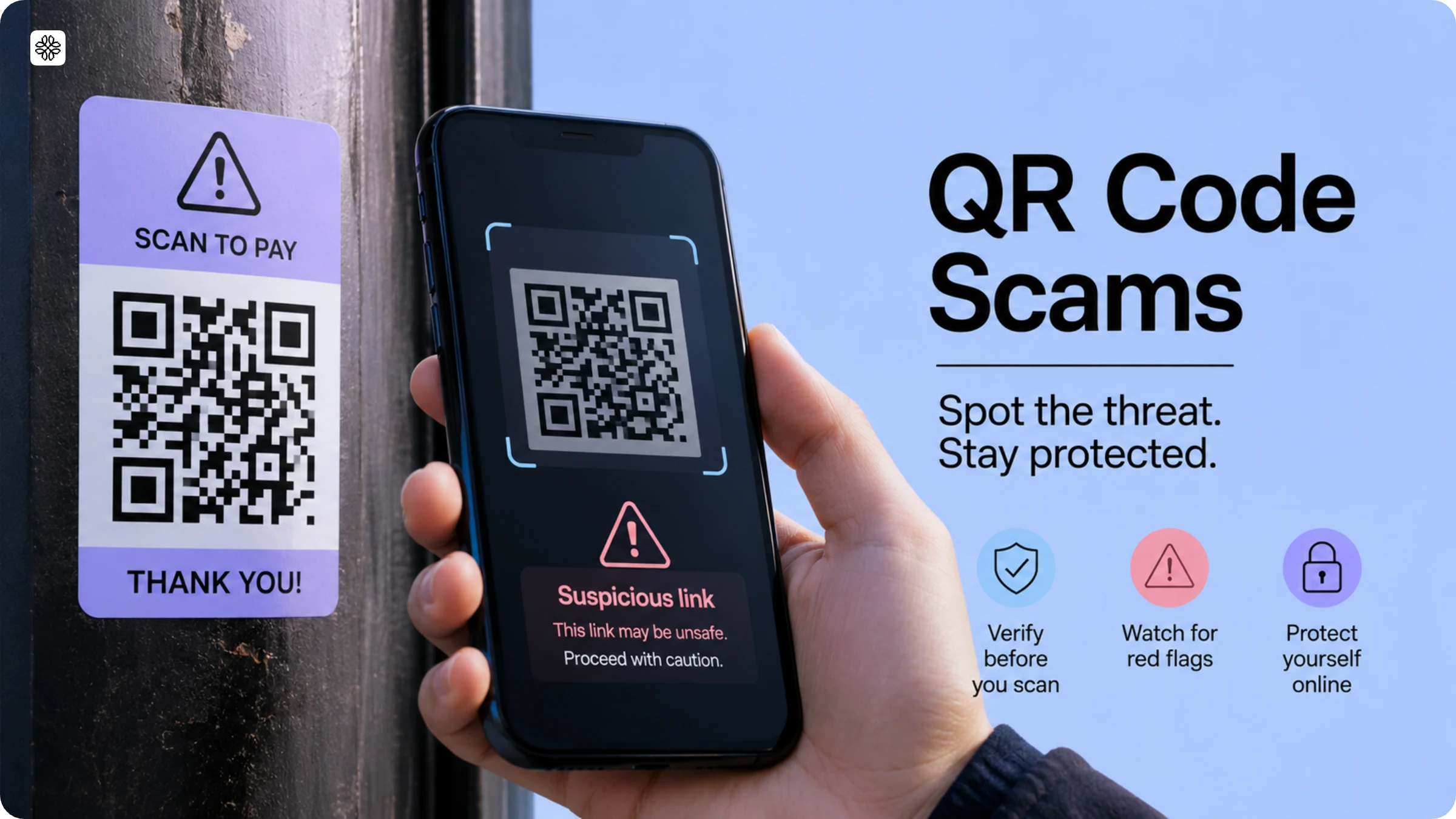
QR Code scams use fake QR Codes to trick people into visiting phishing websites and stealing personal or financial information. Learn how these scams work, how to spot them, and how to stay safe.
A QR Code scam, also known as quishing, disguises a code's true destination so that scanning it compromises your data or installs malware. The term combines "QR Code" and "phishing," reflecting its similarity to malicious email links. According to Uniqode's State of QR Codes 2026 report, which analyzed 188 million scans across 796,000 QR Codes in 2025, 58% of consumers believe QR Codes are safe, yet 14% have already experienced a QR Code scam. That means one in seven people have encountered exactly what most still believe won't happen to them.
This isn't a story about careless scanning. It's a story about ownership. Once a QR Code is printed and distributed, it can't be revoked, updated, or flagged if it becomes compromised. Scammers exploit that permanent, unmanaged nature. This guide explains how quishing works, the tactics attackers use today, how to verify a QR Code before scanning, steps businesses can take to protect their codes, and what to do if you've already scanned a malicious one.
How QR Code scams actually work
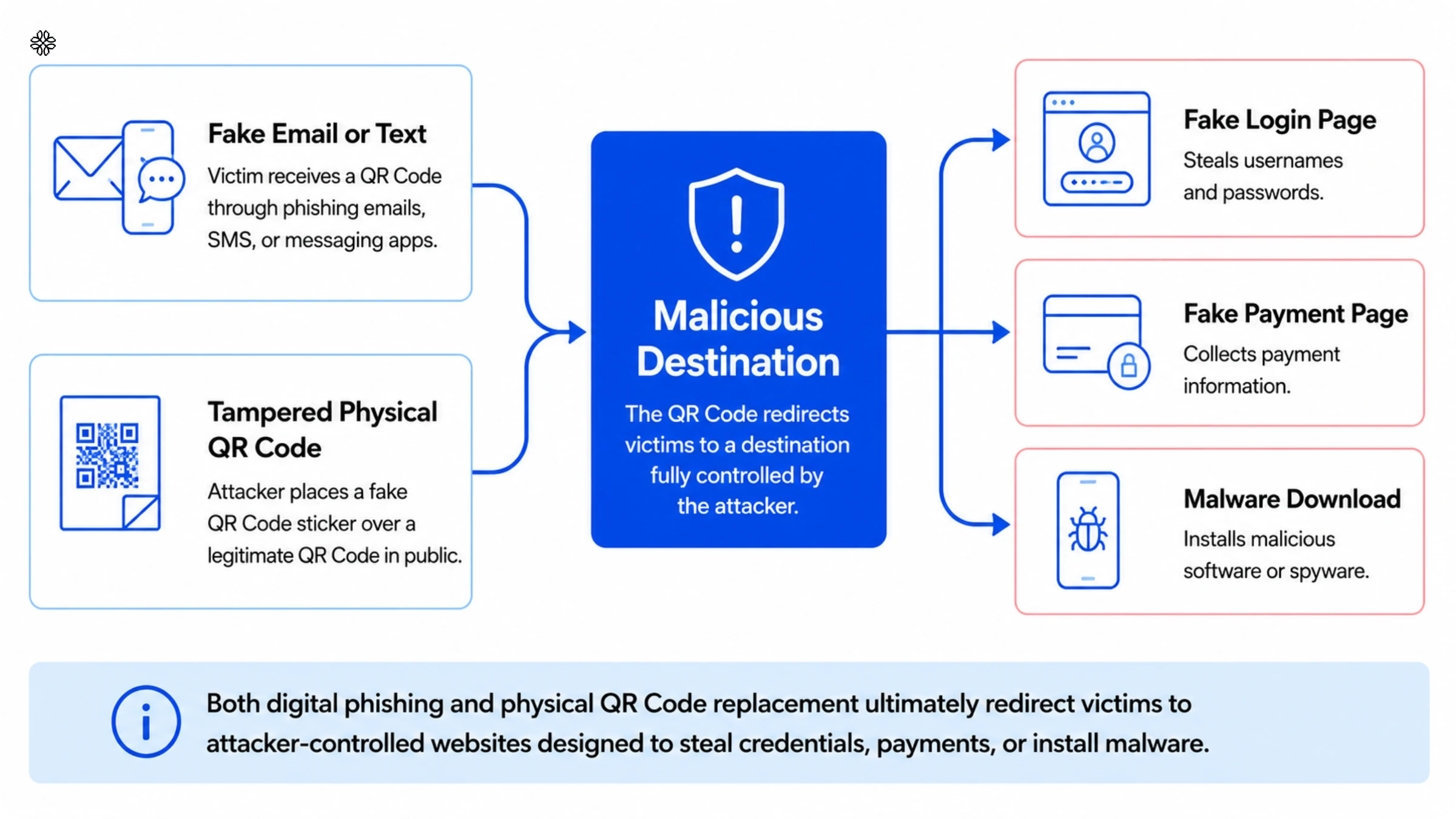
A QR Code has no inherent security features. It encodes a destination, and a phone treats it like any typed web address. Scammers only need to control where the code points without even having to touch the underlying technology.
That's what makes quishing spread so quickly. Email and text security filters scan visible text for malicious links, but a QR Code hides its destination inside an image. Filters designed to detect harmful URLs in plain text can't analyze a QR Code. The malicious link only reveals itself after a phone decodes the image, at which point the filter has already let the message through. Unlike hyperlinks, which show their destination on hover, QR Codes provide no preview until scanned, removing the one check most users rely on to spot suspicious links. Physical scams bypass digital filters entirely by placing fake QR Code stickers over or near legitimate ones on parking meters, restaurant tables, or flyers. In both digital and physical scenarios, attackers direct users to controlled destinations that closely mimic legitimate sites.
What is quishing?
Quishing, or QR Code phishing embeds a malicious link inside a QR Code instead of an email hyperlink. Scan it and you land on a fake login page, a fraudulent payment page, or trigger a malware download. McAfee's security research team coined the term as quishing and identified it as a distinct attack category, separate from traditional email-based phishing.
Quishing now represents a significant and rapidly growing share of phishing attacks, with credential theft as the primary objective. According to Keepnet Labs, approximately 89% of detected QR-phishing incidents target login credentials and multifactor authentication codes and not malware installation. That focus matters: a stolen password alone can't compromise an account protected by multifactor authentication, which is exactly why attackers go after MFA codes directly.
Quishing is harder to filter than standard phishing emails because the destination link stays hidden inside an image until scanned, and decoding happens in a phone's camera app rather than a security-vetted email client.
Common QR Code scam tactics
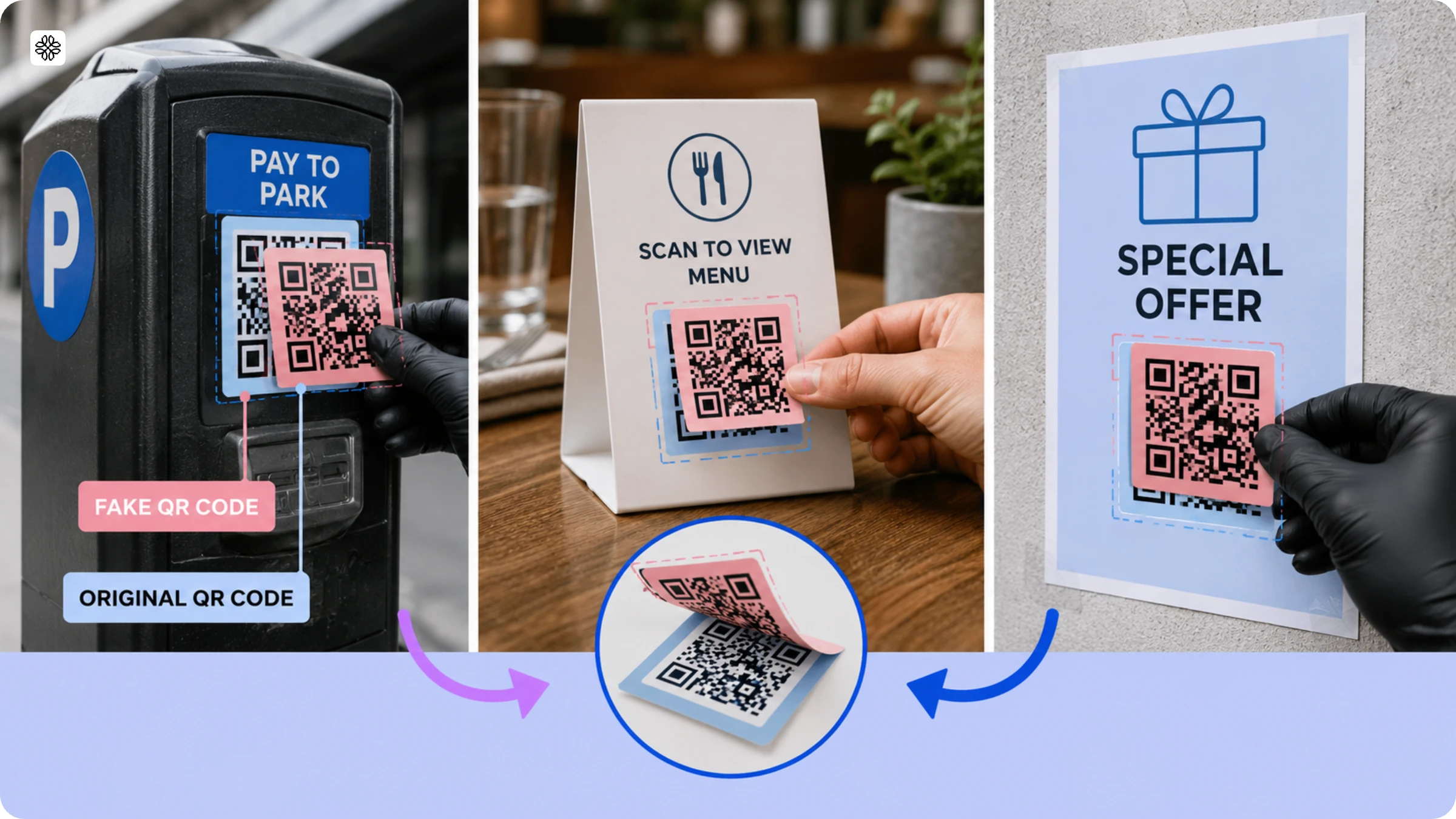
QR Code scams follow a handful of repeatable patterns rather than a single method. Recognizing patterns is more effective for QR Code product authentication than tracking specific brand names, because these tactics remain consistent even as the impersonated brands change.
1. Physical sticker swap: A fake QR Code goes over or next to a legitimate one on parking meters, restaurant tables, or posters. Javelin Strategy & Research analyst Jennifer Pitt and Bentley University's Steve Weisman, quoted by AARP, identify this as a common entry point, as a printed sticker looks ordinary to someone moving quickly.
2. Package delivery impersonation: A text message or physical delivery notice carries a QR Code claiming to resolve a shipping issue. Scanning it leads to a credential-harvesting page, not legitimate tracking information. The FBI's Internet Crime Complaint Center issued a public alert about this pattern in 2025 after unsolicited packages with QR Codes began appearing on doorsteps.
3. Marketplace "verify your account" scams: QR Codes arrive claiming to verify identity or payment, but capture account login credentials instead. This tactic appears frequently on Facebook Marketplace and resale apps like Poshmark.
5. QRLJacking (session hijacking): Some apps let users log in by scanning a QR Code displayed on a screen instead of entering a password. Security researchers at SlashNext have documented attacks that mimic this login process. Scanning a spoofed code hands the attacker an active, authenticated session on a trusted platform.
6. Fake scanning apps: Downloaded instead of using a phone's built-in camera, these apps may contain malware unrelated to the QR Codes they scan. The risk is the app itself, not the code.
7. Government impersonation: Fake IRS or postal notices carry QR Codes demanding "verification." Federal authorities have flagged this as a recurring pattern during tax and holiday seasons running into 2026.
Is a QR Code generator itself safe to use?
Staying safe from malicious QR Codes and trusting the platform you use to generate your own are separate concerns that you must address separately. Malicious codes are created by others to target you while generator safety is about whether the platform you use manages your billing, data, and account with integrity.
People searching for "QR Code generator scam" are rarely worried about malware. Their real concern is unexpected billing, free trials that convert to paid subscriptions without notice, unclear pricing, or platforms that make it difficult to access codes you've already created.
Before trusting any QR Code generator with your account, verify three things: transparent pricing with no undisclosed free-to-paid conversions, a clear and accessible data-handling policy, and full visibility into every code you've created. These checks apply to any generator and address concerns that go well beyond whether a specific code is malicious.
A generator that fails the billing check almost always fails the other two as well. Platforms that hide pricing until a free trial ends rarely provide clear data-handling practices either. Use billing transparency as your first filter and then confirm the other two before committing to any platform.
How to tell if a QR Code is safe before you scan it?
Checking a QR Code before scanning takes about ten seconds and prevents most common threats. Follow these five steps to check QR Code safety:
1. Inspect the code for sticker layers, bumps, or misalignment with the surrounding print. A code that looks crooked or has a visible edge over the original design is a strong indicator of tampering.
2. Preview the destination link before proceeding. Most phone cameras display a link preview after scanning. Confirm the URL uses HTTPS is not a shortened or unfamiliar address and matches the expected business.
3. Treat urgency as a warning sign. If a code demands immediate action like "verify now or lose access", it's a scam. Legitimate businesses don't use QR Codes to manufacture urgency.
4. Keep your phone's operating system and messaging apps updated and disable automatic image downloads where possible. This reduces the risk of malicious images loading without your knowledge.
5. Use your phone's built-in camera to scan QR Codes. Only use third-party scanning apps from trusted, recognized publishers.
What businesses can do to stop their own QR Codes from being weaponized?
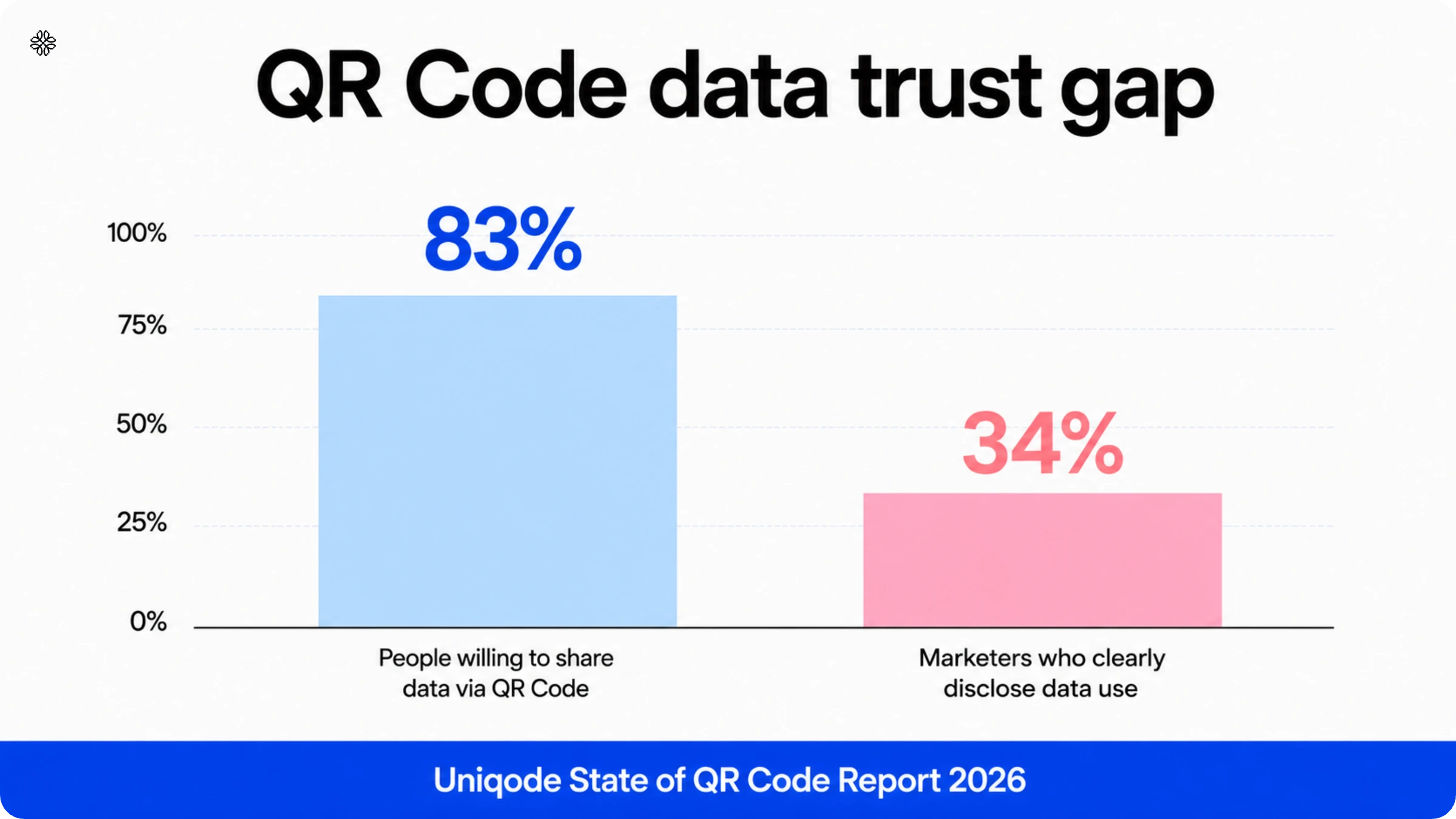
Businesses bear more responsibility for QR Code safety than most current guidance acknowledges. According to the State of QR Codes 2026, 83% of consumers willingly share data via QR Codes but only 34% of marketers clearly disclose how that data is used. For every three shoppers who provide information, roughly two don't know where it goes.
Static QR Codes make this problem worse. Once printed, they can't be edited, paused, or monitored. If a scammer covers the code with a sticker or the destination gets compromised, there's no way to track scans, warn users, or redirect them to safety. The code stays active and unmanaged for as long as the printed material exists.
Dynamic QR Codes address all of this directly. Businesses can update destinations without reprinting, use branded domains so users can visually verify the source before scanning, and enable password protection to restrict access to authorized audiences. Automated malware and phishing detection scans every destination continuously and not just at setup. Uniqode's ScanGuard identifies unusual scan patterns, geographic anomalies, and volume spikes that signal potential tampering, triggering alerts before customer complaints surface.
If a code needs to be disabled immediately, updating the destination to a branded safety page applies across every printed instance simultaneously. A QR Code history log records every edit with the user and timestamp, giving security and compliance teams a clear, auditable trail when reviews or incidents demand it. These controls are unavailable with static codes, which offer no visibility, no revocation, and no protection once they leave the print shop.
What to do if you have already scanned a malicious QR Code?
If you've scanned something malicious, follow these steps. The first two are the most critical, while subsequent actions depend on the specifics of your situation.
1. Disconnect from Wi-Fi or cellular data immediately if a file is downloaded or an app begins installing. Run a mobile security scan before reconnecting to anything.
2. Change the password for every account where you entered credentials, starting with your email. Email access lets attackers reset most other accounts, so securing it first limits the damage.
3. Enable multifactor authentication on any affected account where it isn't already active. This single step blocks most credential theft, even when a password has already been compromised.
4. Review your bank and card statements for unauthorized charges if the scam involved payments. Contact your card issuer immediately if you spot anything suspicious, and then report the code to help prevent others from being targeted.
Where to report a QR Code scam?
Report business impersonation or any financial loss to the Federal Trade Commission at ReportFraud.ftc.gov. Report scams involving unsolicited packages or larger-scale fraud to the FBI's Internet Crime Complaint Center at ic3.gov. Report suspected mail or package impersonation specifically to the U.S. Postal Inspection Service. Filing a report takes a few minutes and helps investigators connect an individual incident to the broader pattern it belongs to.
Frequently Asked Questions
- What is quishing and how does it work?
Quishing is a phishing scam that uses QR codes to trick people into divulging personal information. During the third quarter of 2023, cybersecurity platform Trellix detected over 60,000 QR code scam attempts in emails alone. Scammers send fake QR codes via email or place them on physical locations like parking meters that link to malicious websites designed to steal login credentials or download malware onto your device.
- How common are QR code phishing attacks on businesses?
According to an Osterman Research and Ironscales report from March 2024, more than 3 in 4 surveyed companies were victims of quishing within the past year. The volume of quishing emails spiked more than 2,400% by late March 2024, growing 270% on average each month. Abnormal Security found that approximately 9 in 10 (89%) quishing attacks detected were multifactor authorization requests designed to steal user credentials.
- How can I tell if a QR code on a poster or menu is fake?
Fake QR codes often have physical irregularities you can spot before scanning. Look for QR codes with bumps, peeled edges, or that appear stuck on top of another code—these are red flags that scammers have replaced a legitimate QR code with a malicious one. Fraudsters commonly target parking meters, restaurant menus, and public posters by placing fake QR code stickers over authentic ones to redirect users to payment scams or phishing websites.
- Can a QR Code steal your information?
Yes. A QR Code itself can't extract data, but it can redirect a scan to a fake login or payment page built to capture whatever you type there, the same risk as clicking a malicious link in an email.
- Is a "QR Code generator scam" about the tool or about the codes it makes?
It's almost always about the tool. Complaints under this search term are about a generator service's billing or data-handling practices, not about the codes it produces being malicious. Check pricing transparency and data handling before trusting any generator with your account.
- How can I tell if a QR Code is safe?
Check the code for a sticker layer or misalignment with its surroundings, preview the destination URL for HTTPS and a matching domain before tapping through, and treat any code demanding urgent action as a red flag.
- Who's responsible for QR Code protection: the scanner or the business that created the code?
Both. Scanner-side habits like verifying a code before scanning matter, but so do publisher-side controls like password protection, the ability to pause a compromised code, and scan monitoring. Most current advice only covers the scanner's half of that responsibility.
About the Author
Ali Hickerson is a content writer and strategist, multimedia journalist, and contributing writer for Stacker, based in Brooklyn, New York City. She has worked extensively in non-profit and health communications in Melbourne, Australia, and New York City, and has also worked in video production and the tech industry, most recently at Waze.