At one major AI conference in Abu Dhabi, the registration area turned into a long, unmoving queue. Attendees stood outside for hours. People grew frustrated and started flooding X with posts, and by afternoon, the narrative had shifted to “chaotic registration.”
Sponsors later raised concerns about lower booth footfall because many attendees didn’t make it inside on time. A minor operational issue quickly became the day’s biggest problem.
A few days later, at a crypto event with over 25,000 attendees, the experience looked very different. Attendees received QR-based passes the moment they purchased tickets, and entry was a single smooth scan.
The venue even had a massive banner that read, “We have QR Codes for everything.” And they truly did. Attendees could scan a QR anywhere in the venue, see where they were on the map, and get directions to their next stop.
These scenarios illustrate the significant impact that simple systems can have. QR Codes now anchor touchpoints that shape attendee influence, sponsor ROI, perception, efficiency, and whatnot. And this playbook breaks down how they power the full event lifecycle and how organizers can use them strategically.
Table of contents
- What is an event QR Code?
- How to create a QR Code for your event
- Best practices for creating event QR Codes
- Benefits of QR Code in events
- How to measure ROI from events using QR Code tracking
- Types of events that benefit from QR Codes
- Using QR Codes as event infrastructure
- Post-event nurturing with QR Codes
- QR Code solution for your next event
- Frequently asked questions
What is an event QR Code?
An event QR Code is a scannable code that connects the physical aspects of an event to the digital experience. It delivers and manages key information throughout the entire event lifecycle and streamlines essential workflows such as ticketing, registration, check-ins, agenda access, navigation, feedback collection, booth engagement, and post-event follow-ups.
How to create a QR Code for your event
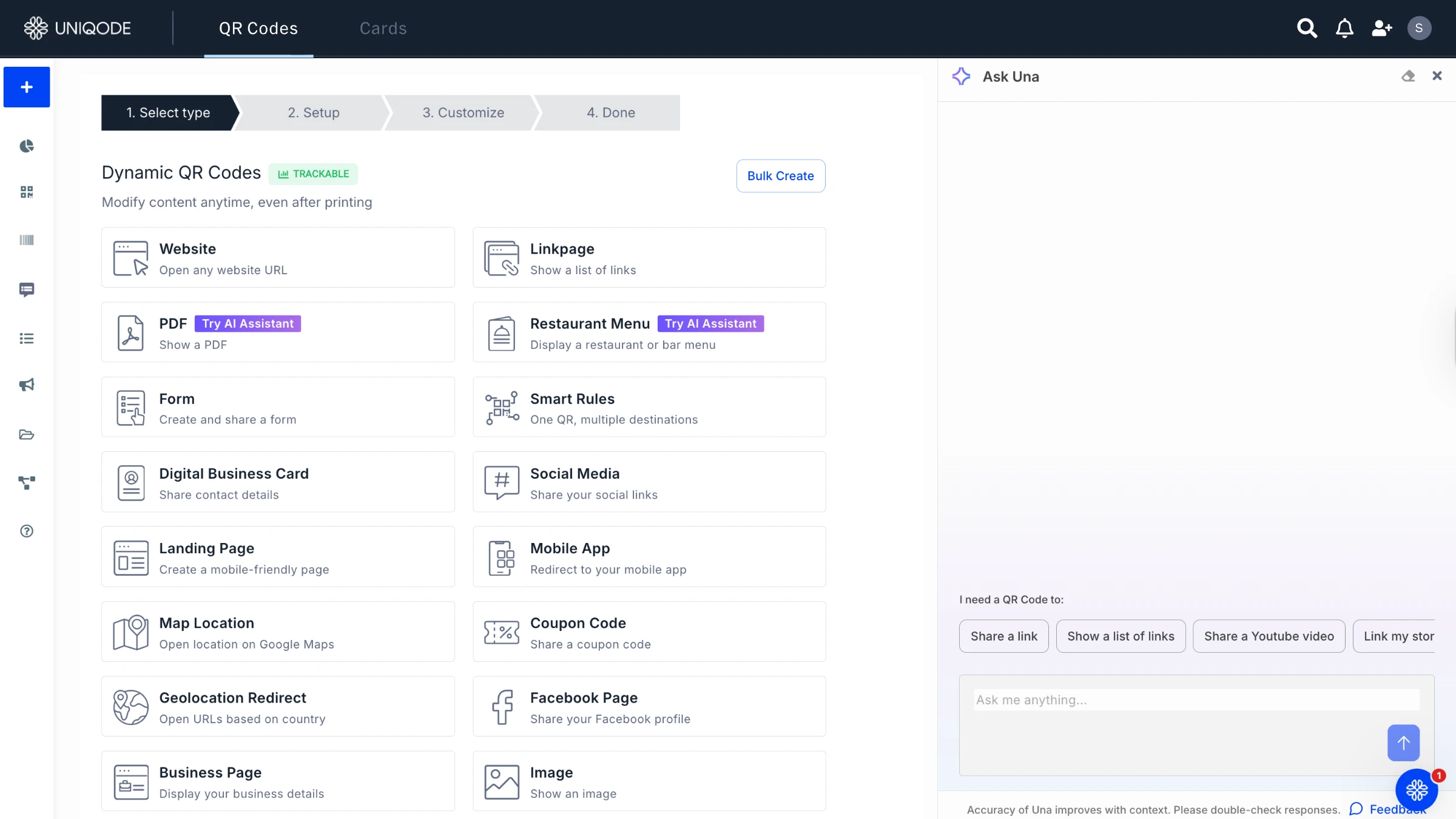
Creating a QR Code for any event with Uniqode is easy. Follow these steps:
STEP 1: Log in to the Uniqode dashboard.
STEP 2: Click on +Create and then QR Code
STEP 3: Choose your QR Code type based on what you want attendees to access.
– Use Website if you already have a URL.
– Use Landing Page if you need a mobile-friendly page to host multiple links.
STEP 4: Add your event details and the content you want the QR Code to display.
STEP 5: Customize the design by adjusting colors, patterns, logos, or frames to match your event branding.
STEP 6: Test and download the QR Code in your preferred format.
Best practices for creating event QR Codes
Use the following guidelines to ensure your event QR Codes are reliable, high-performing, and optimized for both attendees and operational teams.
- Think mobile: Ensure pages are mobile-friendly with a responsive design and fast load times.
- Integrate with ticketing systems: Link QR Codes to registration systems and update them as needed.
- Instant access to event details: Use QR Codes to access schedules, maps, and announcements quickly.
- Strategize placement: Place QR Codes at key locations to improve navigation and access to content.
- Offer exclusive content: Provide exclusive discounts, early access, or behind-the-scenes content via QR Codes.
- Promote networking: Link QR Codes to networking platforms or attendee profiles for easy connection.
- Encourage real-time engagement: Use QR Codes for live polls, surveys, or Q&A during the event.
- Track attendee interaction: Monitor engagement and session interest with dynamic QR hCodes.
- Strategic placement for performance: Position QR Codes in high-traffic areas to maximize engagement.
- Test under real conditions: QR Codes should be tested at the venue, under event lighting, from different distances, and using multiple devices, to ensure no scanning failures during peak crowds.
- Ensure stable and accessible connectivity: QR Codes lose value if attendees can’t load the linked content. Verify Wi-Fi strength, add fallback mobile networks where possible, and avoid placing QR Codes in dead zones.
- Use branded yet scannable designs: Customizing QR Codes for branding is valuable, but over-styling reduces scan accuracy. Maintain clean contrast, clear edges, and adequate quiet space so codes work instantly.
Benefits of QR Code in events
Events operate with tight timelines, high foot traffic, and zero tolerance for delays. Registration, navigation, and on-site communication must run flawlessly while sponsors expect clear ROI and attendee behavior data. To meet these demands, organizers need tools that streamline workflows and deliver reliable, real-time insights at scale.
QR Codes support these pressures by strengthening various operational layers—replacing manual processes with digital, trackable, and scalable workflows.
Here are some of the key benefits of using QR Codes at events:
- Faster registration: QR-based passes speed up entry by eliminating paper tickets and manual verification.
- Improved on-site navigation: QR Codes give attendees instant access to maps, schedules, and session details for easier venue navigation.
- Smarter networking: QR-enabled badges, with integrated digital business cards, let attendees exchange contact information instantly and capture leads digitally.
- Lower operational costs: Dynamic QR Codes reduce printing needs and allow real-time content updates without reprinting.
- Stronger access control: Unique QR Codes prevent unauthorized entry and improve on-site security.
- Behavioral and footfall analytics: QR scans reveal attendee flow, session interest, and booth engagement patterns.
- Operational efficiency: QR Codes enable quick facility requests and issue reporting for faster staff response.
- Higher sponsor and exhibitor ROI: QR Codes help sponsors capture leads, distribute content, and measure engagement accurately.
- Better F&B transparency: QR Codes provide menus, allergen information, and nutrition details instantly.
- Richer session engagement: Attendees can use QR Codes to submit questions, join polls, and access session materials.
- Equipment and asset tracking: QR Codes help organizers track equipment, log maintenance, and manage deployments.
- Simplified staff coordination: QR Codes give staff instant access to SOPs, protocols, and shift schedules.
- Real-time issue reporting: Volunteers and staff can report problems immediately by scanning dedicated QR Codes.
- Stronger post-event insights: QR data feeds into consolidated analytics that inform layout decisions, sponsor reporting, and future planning.
How to measure ROI from events using QR Code tracking
QR Codes give organizers a data-backed view of event performance, with each scan serving as a measurable touchpoint that reveals attendance patterns, engagement levels, and sponsor value.
Here’s how to evaluate ROI using QR Code tracking.
- QR Codes at booths log visitor volume, dwell time, and which digital assets, such as product sheets or demos, were accessed.
- QR-linked registration and landing pages capture which marketing channels generated event sign-ups.
- QR Codes on documents, presentations, or session materials capture which sessions, topics, or exhibitors attendees scanned and accessed.
- Forms connected to QR Codes collect attendee information and lead details at the point of scan, along with timestamp and scan source.
- QR scanning patterns capture the zones attendees visited, the sequence of their movement, and the frequency of scans in high-traffic versus low-traffic areas.
- Service-related QR Codes collect submissions for cleaning, support, or F&B requests, along with timestamps and location details.
💡Want to dive deeper into QR Code tracking? Check out our comprehensive guide on QR Code tracking for a detailed breakdown of strategies.
Types of events that benefit from QR Codes
1. Corporate events and conferences
Corporate events run on tight schedules with multiple parallel sessions and constant movement. QR Codes streamline check-ins, simplify networking through digital profiles, and give attendees instant access to agendas, speaker bios, and venue maps—keeping the experience efficient and professional.
2. Music festivals and concerts
Large-scale entertainment events depend on speed and engagement. QR Codes enable secure digital ticketing, manage VIP or tiered access, and extend the experience through interactive merchandise, exclusive content, and loyalty-driven fan engagement.
3. Sports events and stadium experiences
Stadiums prioritize crowd flow, safety, and immersion. QR Codes give fans access to live stats and highlights, power interactive fan zones, and enable seat-level food ordering—reducing congestion without interrupting gameplay.
4. Trade shows and expos
Expos are built around lead generation and ROI. QR Codes replace printed collateral with digital demos and spec sheets, capture leads instantly, and track booth and session engagement through measurable scan activity.
5. Weddings and private events
Private events benefit from simplicity and personalization. QR Codes manage RSVPs, share schedules and seating information, and create shared photo experiences—reducing administrative effort while adding a modern, interactive touch.
6. Fashion shows and brand pop-ups
Fashion events rely on storytelling and speed. QR Codes connect attendees to virtual try-ons, behind-the-scenes content, and direct purchasing, turning physical experiences into immediate digital action.
7. Educational events and academic conferences
Academic events require efficient content distribution and collaboration. QR Codes provide access to workshop materials, research papers, session recordings, and networking profiles—helping participants stay engaged beyond the room.
Using QR Codes as event infrastructure

An AI-powered sports betting predictions company needed a QR-based system that could support multiple events and sales workflows without losing control. At conferences, the team wanted a single kiosk QR Code that attendees could scan to download media kits, product one-pagers, and demo assets without printed collateral.
Beyond the booth, QR Codes were intended for guerrilla sales onboarding, placed on informal touchpoints and linked to scheduling or qualification forms to capture high-intent interest. At the same time, a rapidly expanding affiliate program required a scalable way for dozens of partners to share their own QR Codes and track warm leads without creating hundreds of landing pages.
A very different event revealed the same underlying need. For an annual, invite-only gathering of 150–200 guests, an investment firm wanted to deliver a polished, tech-forward experience without asking attendees to download an app or juggle multiple tools. The requirement was simple: one step for registration, one scan for check-in, and instant access to the agenda and speaker bios.
In both cases, the requirement was not more QR Codes, but a system that could support different event needs without fragmentation. This is where platforms like Uniqode fit in.
By combining dynamic QR Codes with Linkpages, centralized management, and branded domains, Uniqode allows teams to operate QR Codes as shared infrastructure rather than one-off assets.
A single Linkpage can serve as a flexible destination for event content, while unique QR Codes handle attribution, access, or role-based use across booths, affiliates, or guest entry points. And because everything is managed from one dashboard, teams can update content in real time, maintain brand consistency, and track engagement across use cases; whether managing large-scale event sales workflows or delivering a simple, app-free experience for a private event.
Post-event nurturing with QR Codes
So what do we do with the data once the event is over? The scan activity reveals real signals of intent—sessions attended, booths explored, content accessed, and areas of high interest. When used well, this becomes the backbone of post-event nurturing, allowing organizers to deliver targeted communication and stronger long-term engagement.
1. Behavior-based attendee segmentation
QR Code scans help naturally segment attendees beyond basic demographics. Organizers can identify:
- Topic interest (based on session or panel QR scans)
- Buying intent (based on product demo or booth scans)
- Engagement depth (number of scans, dwell time, repeat interactions)
- Role-driven patterns (VIPs vs. speakers vs. sponsors vs. general attendees)
- Journey paths (movement patterns inside the venue)
These segments enable organizers to create more personalized follow-up journeys.
2. Personalized content delivery
The scan data shows which sessions, topics, or exhibitors drew interest. Organizers can use this to share the right recordings, slides, case studies, or guides with the right attendees, reinforcing value long after the event ends.
3. Stronger sponsor and exhibitor nurturing
For sponsors, QR Code insights are one of the most valuable outcomes of the entire event. And organizers use these insights to share them with their sponsors post-event proactively and strengthen the sponsor-organizer relationship.
They can identify:
- Who visited their booth
- Who scanned product sheets or campaign-specific QR Codes
- Which demographics showed interest
- The depth of engagement with their content
- How many attendees returned more than once
- Which sessions drove traffic to their zone
This enables them to:
- Build priority lead lists
- Craft targeted follow-up campaigns
- Offer context-aware outreach (“Since you scanned our XYZ demo…”)
- Develop personalized offers or trials
- Strengthen their ROI case for returning next year
4. Fuel for future marketing and retention
QR Code insights don’t just support nurturing—they help shape the future of the event itself.
Organizers gain visibility into:
- High-traffic areas to optimize booth layout
- Underperforming zones to redesign in future editions
- Sessions that consistently attract attention
- Topics that drove unexpected interest
- Gaps in programming based on low scan activity
- Which promotions or QR placements were most effective
This data can guide retargeting efforts, support ongoing community engagement, inform early-bird promotions, strengthen sponsor pitch decks, shape next year’s programming, and refine venue layouts based on actual attendee movement.
QR Code solution for your next event
If you’re looking to bring QR Codes into your next event in a reliable, enterprise-ready way, Uniqode is built for precisely that. It’s a top-tier QR Code platform designed to support events of any scale.
Uniqode makes it easy to create dynamic QR Codes, manage them from one intuitive dashboard, and update them in real time without reprinting anything. You also get detailed, real-time scan analytics that help you understand attendee flow, engagement, and performance across the venue.
For events that require tighter control, Uniqode offers smart rules like age restrictions, password protection, and access logic.
Furthermore, Uniqode offers linkpages and digital business cards that support content delivery, networking, and more. And because events can’t afford downtime, Uniqode also provides priority support and 99.9% uptime, giving organizers the reliability they need.
Frequently asked questions
1. How do event QR Codes work?
Event QR Codes store information, such as tickets, registration details, schedules, maps, or forms, that attendees can access by scanning the code with their smartphone. Once scanned, the user is directed to a digital resource or action, like checking in, viewing event details, downloading content, or interacting with a booth.
2. How do I create QR Code for an event invitation?
You can easily create a QR Code for an event invitation using Uniqode. Follow these steps:
- Go to Uniqode’s QR Code generator.
- Choose the QR Code type depending on the event (URL, event page, registration form, etc.).
- Fill in the details of the event.
- Customize the event QR Code with your branding.
- Test and download the event QR Code.
3. What are the best QR Code solution options for managing event check-ins?
Enterprise-grade platforms like Uniqode are ideal for managing event check-ins. Uniqode supports bulk QR Code creation for tickets or badges, real-time scan tracking, access controls, password protection, and dynamic updates—all essential for handling large crowds seamlessly. It’s built for events that require fast, reliable, and secure entry systems.
4. Can I customize QR Code for my event branding?
Yes. QR Codes can be fully customized to match your event’s branding. You can add your logo, choose custom colors, adjust patterns, and select different shapes and frames. Just make sure the design maintains enough contrast and clear space to ensure reliable scanning.