
Black Friday Checklist 2026: A Week-by-Week Plan
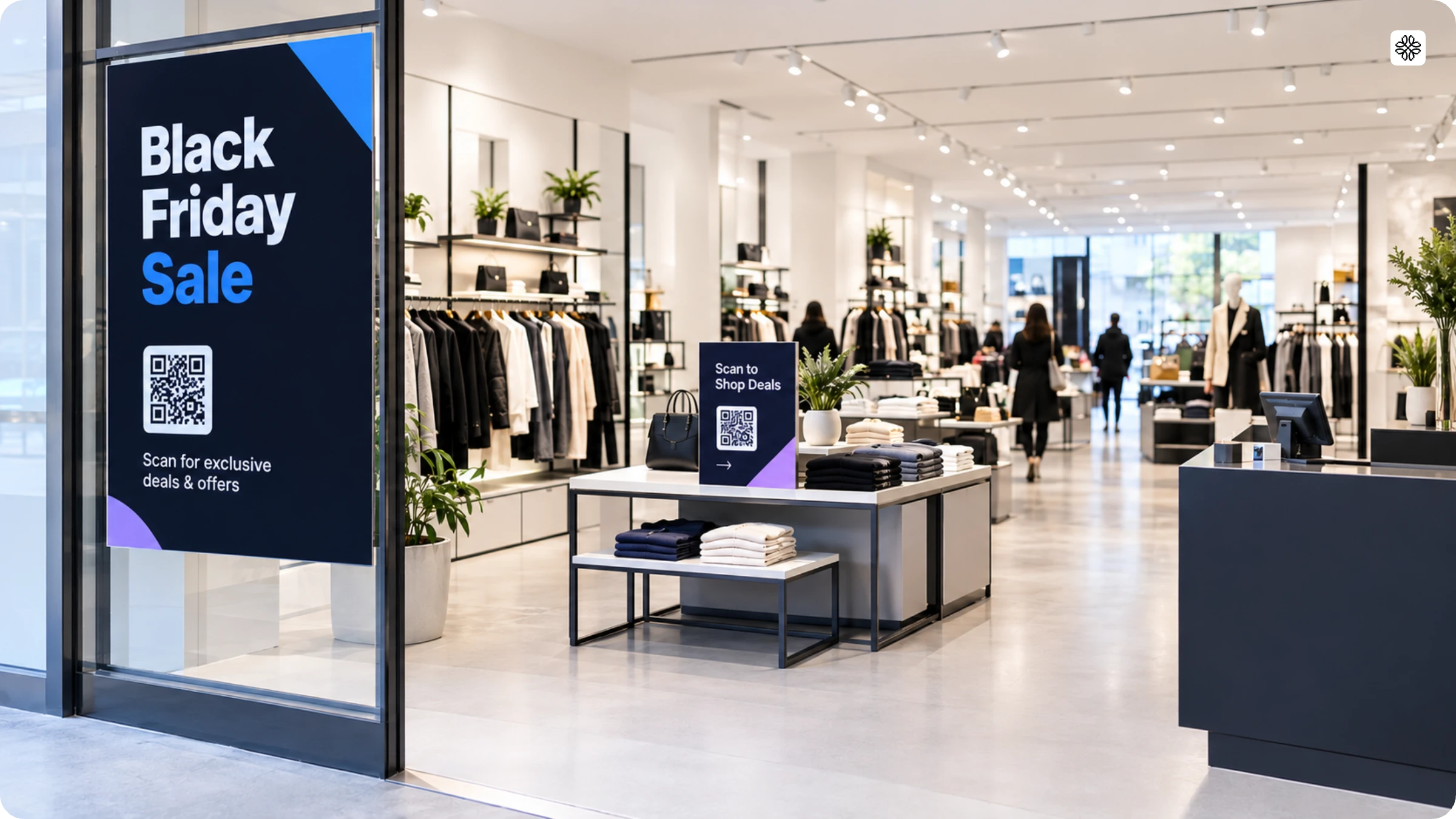
Get your online and in-store sale ready with a dated Black Friday checklist, from inventory and checkout tests to the QR Code that connects each sign to your offer.
BFCM, short for Black Friday Cyber Monday, is the four-day shopping weekend that starts the day after Thanksgiving. In 2026, it runs from Friday, November 27, to Monday, November 30. If you are planning your sale, you have probably chosen which products to discount and how to promote them.
But the offer is only part of the plan. What happens when a discount works online but rings up at full price at the register? When a sign promotes an offer that ended yesterday? Or when an item sells out in store while your website still lists it?
These gaps are easy to miss when your website, store, and messages are planned as separate lists.
This Black Friday checklist plans every channel together. Its six dated windows run from six weeks out to the week after Cyber Monday.
Download the Black Friday checklist as a PDF with all 24 tasks, grouped into six windows. Each task has a tag, a checkbox, and space for an owner and a due date. The last page is a QR Code tracker for your window posters, shelf tags, and counter signs.
Print a copy, assign each task an owner and a due date, and check it off when done. Add a row to the tracker each time you print a new QR Code.
Black Friday checklist at a glance
Start Black Friday preparation six weeks before the sale, on October 16. Work through six windows, from planning to follow-up. In Uniqode’s survey of marketers, 31% began promoting their sale one to two weeks before Black Friday.
| When | Dates | Focus |
|---|---|---|
| 6 to 4 weeks out | October 16 to 29, 2026 | Set goals, choose offers, order stock, and decide how orders reach customers |
| 4 to 2 weeks out | October 30 to November 12, 2026 | Build the landing page, print signs, set up tracking, and schedule messages |
| 2 weeks to 1 week out | November 13 to 19, 2026 | Test checkout, the register, signs, and stock counts |
| The final week | November 20 to 26, 2026 | Brief staff, set up displays, prepare support, and post shipping cutoffs |
| Black Friday to Cyber Monday | November 27 to 30, 2026 | Check results each morning, adjust offers, and add Saturday and Monday offers |
| After the sale | December 1, 2026 onward | Check sales, end old offers, compare results, and follow up with shoppers |
October 16 to 29, 2026: Plan your offers and stock
Begin planning your BFCM sale by setting goals, choosing offers, ordering stock, and deciding how orders reach customers. These choices are hard to change once you order stock and start advertising your offers.
| Task | How to do it |
|---|---|
| Set your sales and profit goals | Look at last year’s sales for your website and your stores. Pick a sales goal for this year, and decide the lowest profit you will accept on each sale. |
| Choose your offers | Pick one offer for each product group, such as a bundle, a percentage off, or free shipping. Check that every offer still leaves you a profit. |
| Estimate demand and order stock | Check last year’s sales for each product to estimate how much will sell. Confirm delivery dates with your suppliers in writing, and order extra of your top sellers. |
| Decide how orders reach customers | Choose how each product reaches shoppers: shipping, in-store pickup, or click and collect. Click and collect means shoppers order online and pick up in your store. Offer it only if your stores can hold stock for online orders. Set a last-order date for each method. |
October 30 to November 12, 2026: Build your landing page and signs
Start building your BFCM sale by creating a landing page, printing signs, setting up early access, and scheduling messages. Build the page first, because every sign and message should point to a page that already exists. Start building your BFCM sale by creating a landing page, printing signs, setting up early access, and scheduling messages. Build the page first, because every sign and message should point to a page that already exists. Our guide to a Black Friday landing page covers what to include.
| Task | Channel | How to do it |
|---|---|---|
| Build one landing page for the sale | Online | A landing page is one web page for your sale. List your offers, the date each one ends, and your store hours, and check that it works on a phone. Need to build one? A Uniqode Linkpage needs no hosting or domain, and you can edit it after you print your signs. |
| Print signs and shelf tags with their own QR Codes | In-store | Print window posters, shelf tags, and counter signs, each with its own QR Code that opens your landing page. Name each QR Code by sign and store, such as “Window poster, Main Street,” so your data shows which sign customers scanned the most. To see which signs lead to sales, add the Uniqode Insights tracking code, called a pixel, to your landing page. Then connect each QR Code and set a goal, such as a purchase or a sign-up. Print your signs by the end of this window. |
| Set up an early-access sign-up | Online and in-store | Early access lets your best customers shop a day or two before everyone else. Collect sign-ups on your website and at the register with one form. Uniqode Forms connects each form to a QR Code, so each sign-up shows which QR Code it came from. |
| Schedule your email and text messages | Online | Plan four messages: a preview email, an early-access message, a launch-day text, and a final-hours text. |
Need ideas for what to offer and say?
Read our BFCM marketing ideas for early-access offers, Cyber Monday deals, and campaign examples from real brands.
November 13 to 19, 2026: Test your orders, register, and signs
Start testing your sale by placing a test order online and in store, scanning every sign, and checking stock counts. Fix problems now, while there is still time to reprint a sign or correct a price.
| Task | Channel | How to do it |
|---|---|---|
| Place a test order on your website | Online | Buy a product on a phone, using the same discount code shoppers will use. Check that the price, tax, shipping, and confirmation email are right. Then place a second order with a different payment method. If you set up Insights, scan one sign first, then check that your test order appears under that QR Code. |
| Scan every sign | In-store | Scan each printed sign with at least two phones, under your store lights and from where shoppers stand. Check that each QR Code opens your landing page, and reprint any that fail. |
| Test your register | In-store | Ring up a test sale for each offer at every register. Check that each discount applies correctly, and that card payments and receipts work. |
| Match stock counts and prices across channels | Online and in-store | Compare stock counts for your top products on your website and in your stores. Make sure the website price, the register price, and the price on your signs match. |
November 20 to 26, 2026: Finalize your staff, displays, and cutoffs
Get ready for the sale by briefing staff, setting up displays, preparing support, and posting your cutoffs. Staff, signs, and shipping dates all need to match the offers you have promised.
| Task | Channel | How to do it |
|---|---|---|
| Brief your store team | In-store | Walk staff through each offer, what it excludes, and how returns work. Give them a plan for sold-out items, such as offering a similar product or taking an online order. |
| Set up your displays | In-store | Put up your signs and shelf tags. Place sale items where shoppers will see them first. |
| Prepare your customer support | Online | Decide who answers customer messages on sale days, and add extra people for busy hours. Write ready replies for common questions about shipping and returns. |
| Confirm and post your cutoffs | Online and in-store | Ask your carrier about pickup times and holiday delays. Post your last-order dates and pickup times on your landing page and at the register. |
November 27 to 30, 2026: Run Black Friday and Cyber Monday
Run the sale by checking your results each morning and changing offers while shoppers are still buying. Each day brings a different set of shoppers, so Saturday and Monday get their own offers.
| Task | Channel | How to do it |
|---|---|---|
| Check your results every morning | Online and in-store | Compare sales on your website and in your stores with the goals you set while planning. Check which signs shoppers scan most, and which signs led to sales. Decide if anything needs updating. |
| Change offers that are not working | Online and in-store | If an offer is slow, change it on your landing page. If a product sells out, remove it or point shoppers to a similar one. A dynamic QR Code opens a page you choose, and you can change that page without reprinting the QR Code. |
| Add a Small Business Saturday offer | Online and in-store | Small Business Saturday, on November 28, encourages shoppers to buy from small, independent businesses. Add a small offer for that day, such as a free gift with a purchase. Limit it to the first 100 shoppers who scan using a Smart Rules QR Code. Send everyone scanning after that to a page that says the offer has ended. |
| Switch to your Cyber Monday offer | Online and in-store | Cyber Monday, on November 30, is an online shopping day. Give it a different offer from Black Friday, such as free shipping or an online-only bundle. Update your landing page on Sunday night, and every sign that opens it shows the new offer. |
December 1, 2026 onward: Follow up and measure results
Wrap up the sale by checking your sales, ending old offers, comparing results by sign, and following up with shoppers. Do this in the first week, while the details are fresh.
| Task | Channel | How to do it |
|---|---|---|
| Check your sales and orders | Online and in-store | Match your website and in-store sales against your payments and refunds. Contact customers whose orders are late or on hold. |
| End your old offers | Online and in-store | Take down every offer that has ended. Change your landing page to a thank-you message or a holiday offer. Signs still in your store will then open a live page. |
| Compare your results | Online and in-store | Compare sales and scans against your goals, by channel and by sign. Keep the signs that worked, and drop the rest. Label each QR Code by where it hangs, so you can compare it with next year’s results. |
| Follow up with shoppers | Online | Email new sign-ups to thank them and tell them what they get next time. With Uniqode Insights, you can show ads to shoppers who scanned but did not buy. |
Want to keep track as you go?
Print the BFCM checklist and check off each task as your team finishes it.
How to connect in-store signs to your online sale
Connect your store to your online sale with a QR Code on your window posters, shelf tags, and counter signs. Each QR Code opens your landing page. Give each printed piece its own QR Code, so you can see which ones drive sales.
Place signs where shoppers are ready to scan
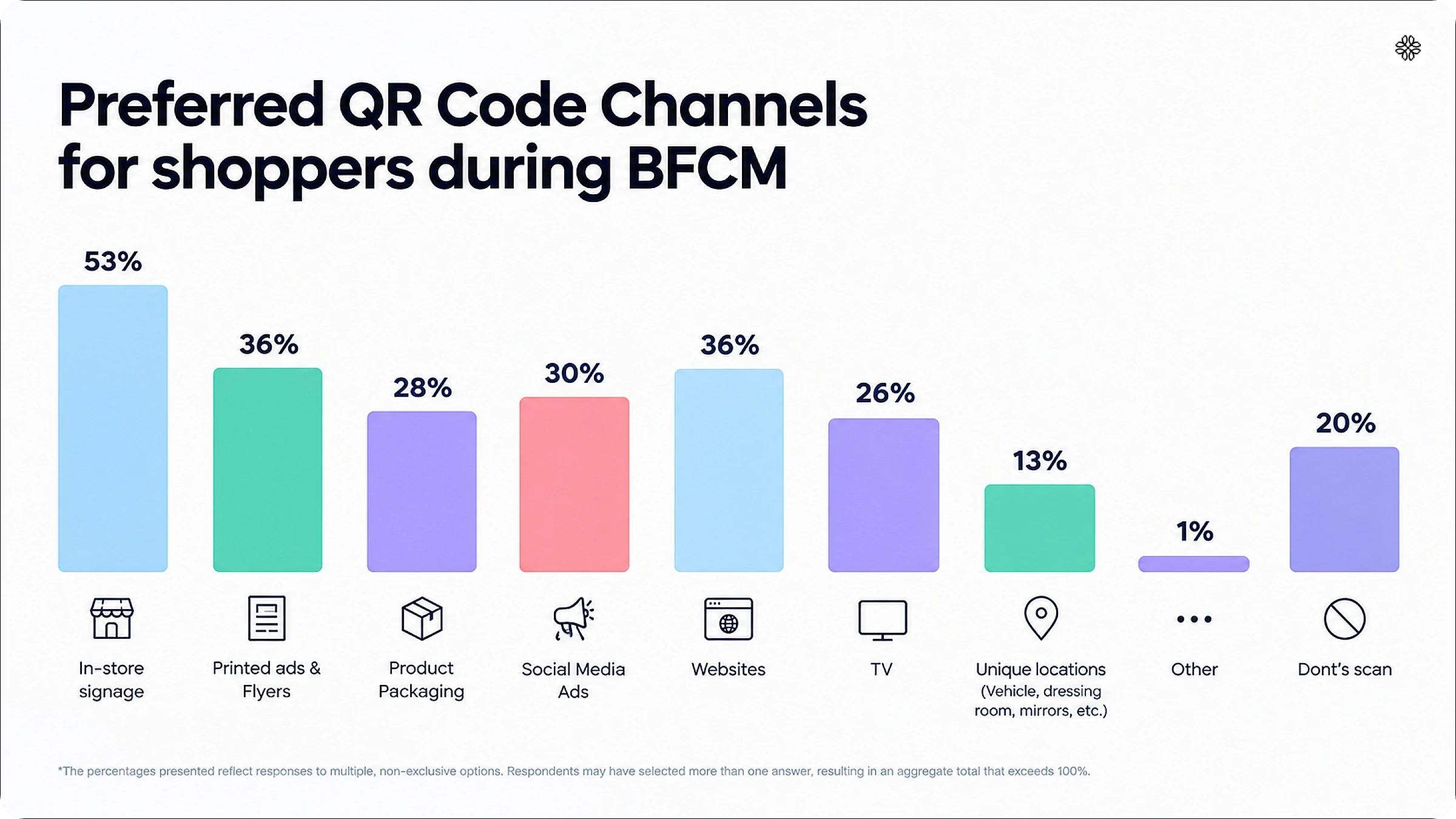
Start with in-store signs, such as window posters, shelf tags, and counter signs. In Uniqode’s survey of 1,000 U.S. shoppers, 53% named in-store signs as a preferred place to scan. Printed ads and flyers came next, at 36%.
Match the offer to the location in your store. Use an early-access offer on the window poster, a bundle on the shelf tag, and a loyalty sign-up on the counter sign.
Show the reward before shoppers scan
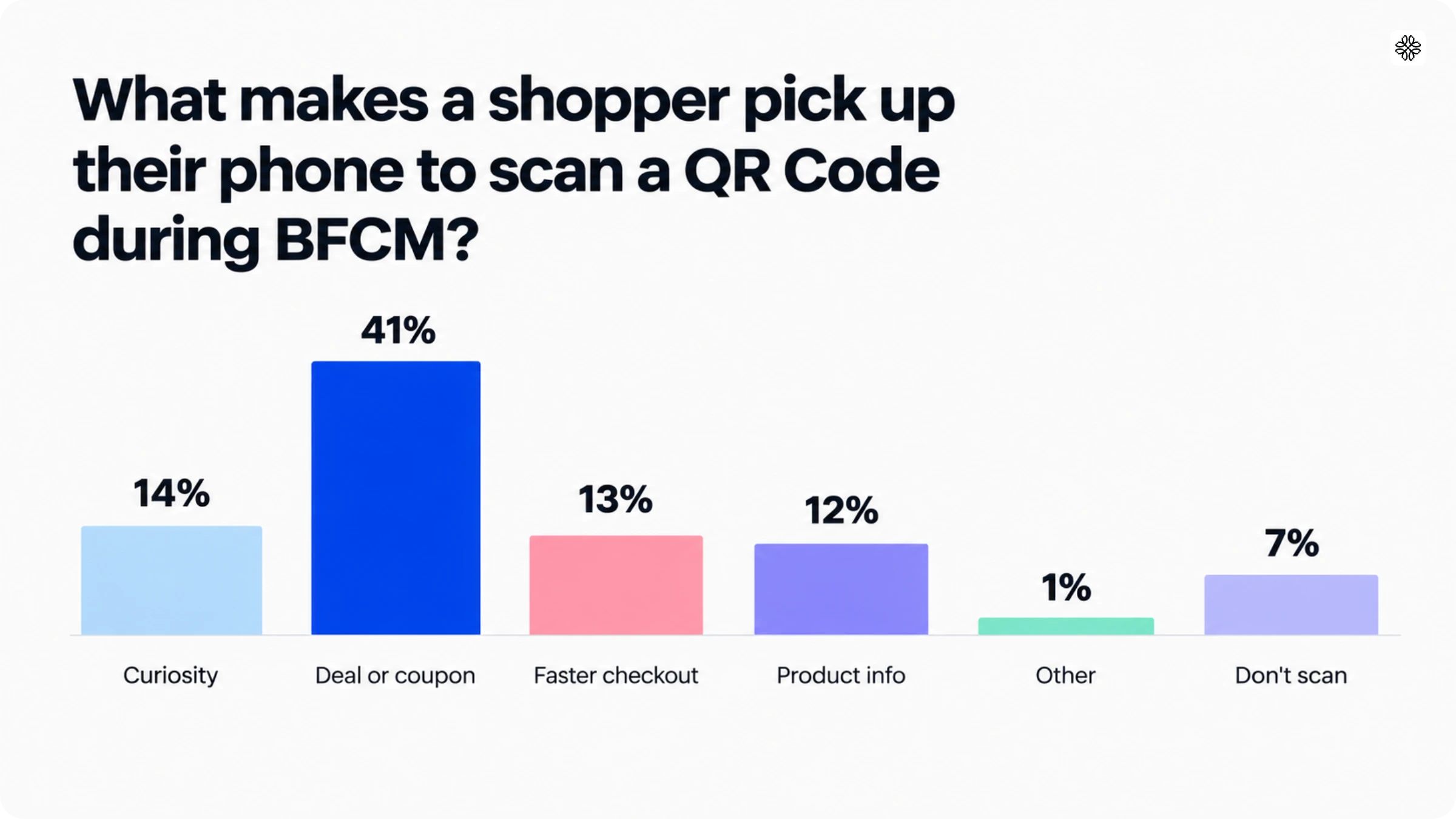
Print the reward on each poster, tag, and sign, so shoppers know what they get before they scan. In the same survey, 41% said they scan for a deal or coupon, and 56% expect a discount after scanning. A line such as “Scan for 10% off. No sign-up needed.” gives them a reason.
Make sure every scan works
A QR Code that fails costs you the sale. Shoppers’ most common problem is a QR Code that will not scan (35%), followed by a slow page (27%) and a broken link (26%). Another 22% reached an expired offer. The checks before the sale and each morning of the sale catch these problems early.
See which poster, tag, or sign drove each sale
Give each window poster, shelf tag, and counter sign its own QR Code. Each QR Code’s scans and sales then show up separately. To track this without extra tools, add a short tracking tag, called a UTM, to the link each QR Code opens.
Where does this data come from?
The BFCM QR Code Marketing Report combines a survey of 1,000 U.S. shoppers with marketer data on BFCM campaigns. Read the full report.
How Uniqode helps you connect signs to sales
With Uniqode, you can create, update, and track every in-store QR Code from one platform.
- Dynamic QR Codes let you change a sign’s offer without reprinting it.
- A Linkpage gives you a landing page with no hosting or domain.
- Forms collect early-access and loyalty sign-ups, and record which QR Code each one came from.
- Insights connects each scan to the sale it led to.
- Smart Rules limit an offer to the first shoppers who scan.
Frequently Asked Questions
- What does BFCM stand for?
BFCM stands for Black Friday Cyber Monday, the shopping weekend that runs from the day after Thanksgiving through the following Monday. In 2026, that means November 27 to 30.
- What is the difference between Black Friday and Cyber Monday?
Black Friday is the Friday after Thanksgiving, and Cyber Monday is the Monday that follows. Cyber Monday is an online shopping day.
- What is Small Business Saturday?
Small Business Saturday is the Saturday after Thanksgiving, on November 28 in 2026. It encourages shoppers to buy from small, independent businesses.
- When should I start preparing for Black Friday?
Start preparing about six weeks before Black Friday. In 2026, that is October 16, when you set goals, choose offers, and order stock.
- What should I do in store before Black Friday?
Before Black Friday, print signs with their own QR Codes, test your register, brief your staff, and set up displays. Scan every sign on two phones, and check that each discount rings up correctly. Give staff a plan for sold-out items, such as offering a similar product.
- How do I avoid running out of stock on Black Friday?
Base your stock order on last year’s sales for each product, and order extra of your top sellers. Match stock counts on your website and in your stores before the sale. If an item sells out, remove it from your website or point shoppers to a similar one.
- What should be on a Cyber Monday checklist?
Your Cyber Monday checklist should include a new offer, a landing page update, and a morning results check. Give Cyber Monday a different offer from Black Friday, such as free shipping or an online-only bundle. Update your landing page on Sunday night, so every sign that opens it shows the new offer.
- What should I do if a QR Code stops working during the sale?
Check the page it opens first, then fix or replace that page. A dynamic QR Code lets you point the same printed QR Code to a new page without reprinting. Then scan it on two phones to confirm it works.
- What should I do after Black Friday?
After the sale ends, check your sales and orders, take down old offers, and compare results by sign. Follow up with new sign-ups within the first week, while the details are fresh.
- How do I measure whether my Black Friday sale worked?
Measure your sale by comparing sales and scans against your goals, by channel and by sign. Check results each morning of the sale, then compare the full totals after Cyber Monday. QR Code analytics show scans by date, location, and device.
- How can I turn Black Friday shoppers into repeat customers?
Thank new customers by email, and tell them what they get next time. Keep your early-access list for the next sale, so repeat shoppers hear about it first.
About the Author
Architaa is a Content Marketer at Uniqode, where she explores how QR Codes, Digital Business Cards, and phygital experiences are reshaping the way brands connect with their audiences. She transforms complex marketing trends and technologies into clear, actionable insights that help businesses strengthen engagement and build lasting connections with their customers. Outside of work, Architaa is most likely lost in a novel, following every ball of a cricket match, or binging her favorite shows.
Related Posts
How to Create a QR Code for Waze Location
QR Codes for Customer Service: Cut Support Costs, Not Corners

Stadium QR Codes: A Complete Guide for Venue Operators
How to Create a QR Code Menu (Step-by-Step Guide)

How QR Codes Boost Fan Engagement & Revenue in Events
