BFCM Marketing Ideas for 2026: In-Store and Online
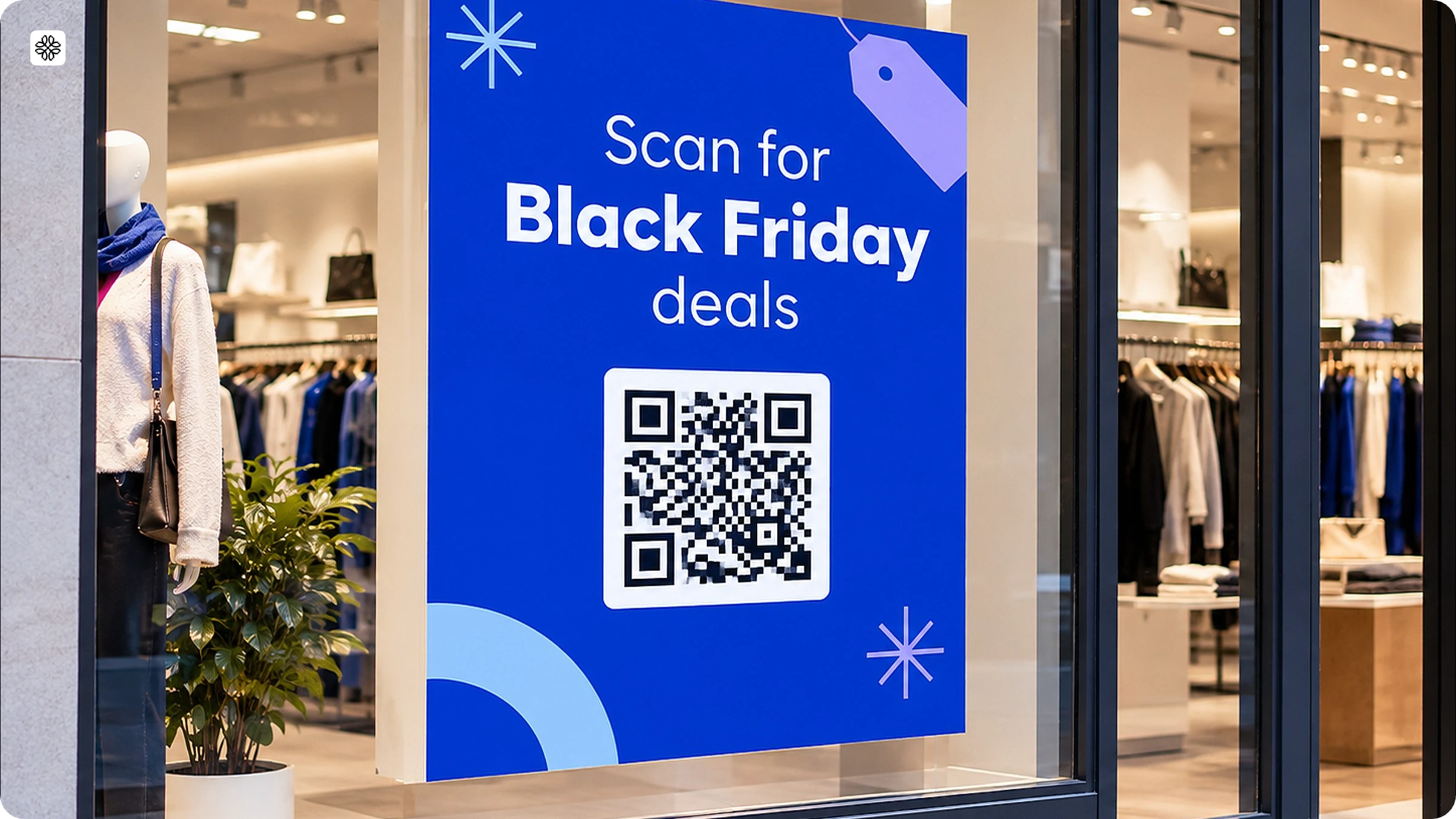
Plan BFCM offers for your retail store, connect in-store signs to your online sale with QR Codes, and see which sign drove each sale.
Black Friday falls on November 27 and Cyber Monday on November 30, 2026. If you're planning your BFCM campaigns, you've probably started thinking about which products to discount, which customers to target, and how to make your offers stand out.
But the offer is only part of the plan. What happens when someone spots a promotion in-store but wants to compare products before buying? When a shopper visits your website but isn't ready to check out? Or when a first-time customer makes a purchase during the sale, and you want them to return?
These moments are easy to overlook when each campaign is planned separately. A shelf display, a product page, an early-access offer, and a post-purchase email might serve different purposes, but they all shape the same shopping experience.
The opportunity is to plan beyond the promotion itself. Give shoppers a clear next step at each touchpoint, whether that's exploring a product, discovering a bundle, signing up for early access, or finding another reason to buy from you.
Here are some BFCM marketing strategies for 2026 to help you put that approach into practice, with ideas for connecting in-store promotions to digital shopping experiences.
Key takeaways
- Start your BFCM 2026 marketing in October. Build your email and SMS list, lock your offers, and then begin promoting about a month before Black Friday on November 27.
- Add bundles, free shipping, or buy-one-get-one deals to your BFCM offers. In 2024, 61% of marketers used percentage discounts, while 44% offered free shipping, 37% offered bundles, and 33% offered buy-one-get-one deals.
- Give Cyber Monday on November 30 its own offer, so shoppers have a reason to return after Black Friday.
- Put a QR Code on each in-store sign that links to your online offer.
- Review your results daily during the sale, such as scans and sales by touchpoint, so you can change an offer while shoppers are still buying.
About the data in this guide
The stats come from Uniqode’s BFCM QR Code Marketing Report, which combines a survey of 1,000 U.S. consumers with marketer data on BFCM campaigns.
When to start BFCM marketing in 2026
Start planning your BFCM campaigns in October. Black Friday falls on November 27, 2026, and Cyber Monday follows on November 30. Use the weeks before the sale to finalize your offers, prepare campaign assets, grow your audience, and test every customer touchpoint.
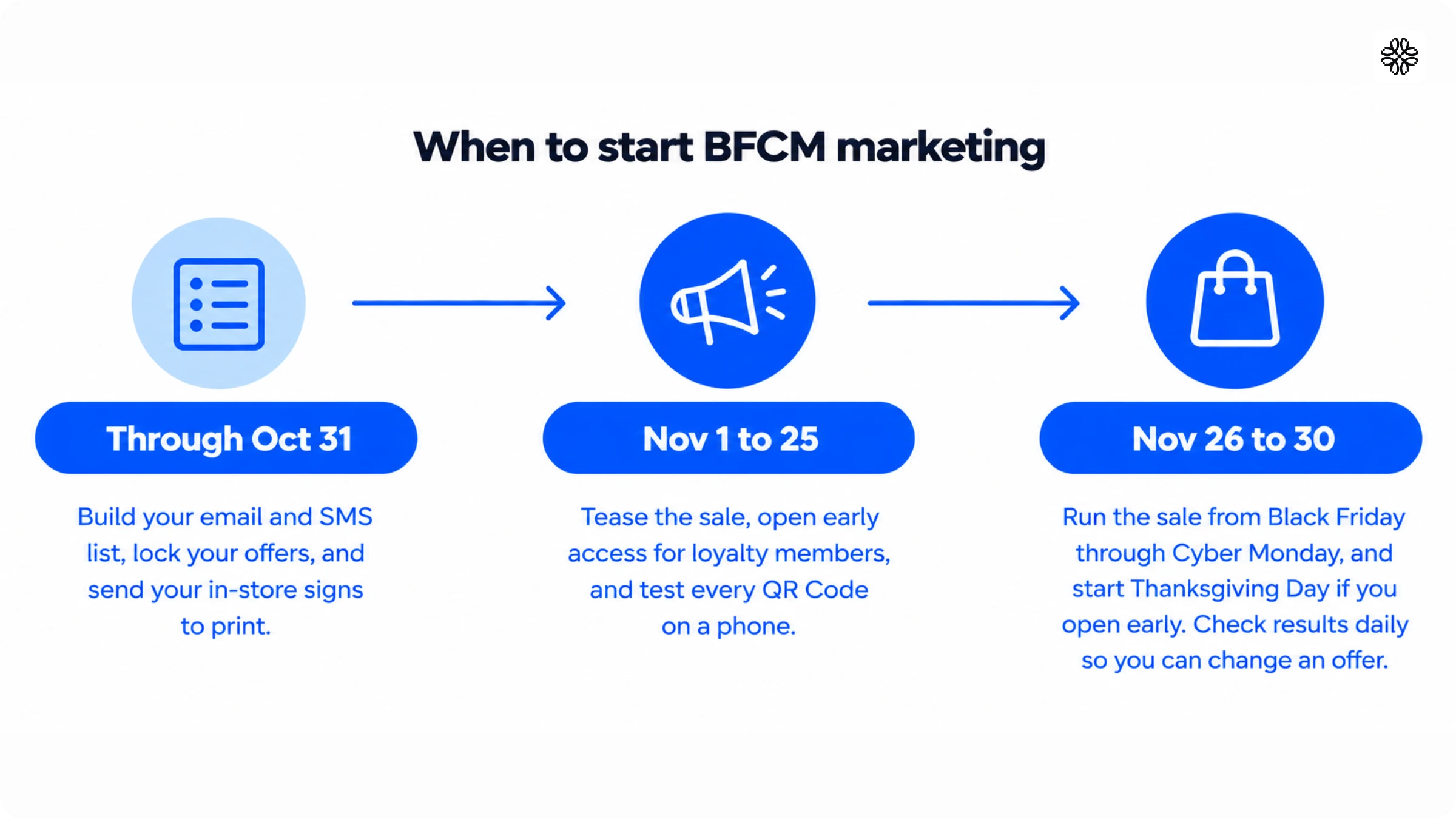
In 2024, 31% of marketers began promoting only one to two weeks before the sale.
Need a task-by-task plan?
Use our Black Friday Cyber Monday marketing checklist to organize your campaign preparation, launch tasks, and post-sale follow-up.
BFCM marketing ideas for 2026
BFCM marketing ideas that fit a retail store in 2026 include early access for loyalty members, offers beyond a flat percentage, a different Cyber Monday deal, an email and SMS sequence, and one BFCM landing page. Each idea gives shoppers a reason to visit your store, return online, or do both.
Give loyalty members early access
Give loyalty members and email subscribers a first look at your BFCM offers before the public sale opens. Early access rewards your most loyal customers and gives other shoppers a reason to join your list.

Set it up in four steps:
- Give members a head start of 24 to 48 hours before the public sale.
- Attach something members can’t get later, such as first pick of a limited-edition bundle.
- Send members the password by email and text.
- Place a loyalty sign-up QR Code at the checkout counter, so shoppers who miss early access can join before the sale opens.
For example, a home goods store could print a password-protected QR Code on a window sign that reads “Members, scan to open the sale early.” Members enter the password from their email. Scan the code on a phone before you send the sign to print.
Offer more than a flat percentage
A useful Black Friday marketing tip is to offer a bundle, free shipping, or a buy-one-get-one deal, so shoppers have a reason to buy beyond a percentage off. Match each offer to the place the shopper sees it.
- A bundle suits a shelf tag, where it can promote items shoppers buy together, such as a gift set.
- A tiered offer raises the discount as the order grows, such as 15% off $75, 20% off $125, and 25% off $200. Post the tiers at the checkout counter.
- Free shipping can work well when you set a minimum order value just above your average order. Promote it on your website and in email.
- Buy-one-get-one can move slow stock. Show it on the shelf where that item sits.
- A gift with purchase adds a low-cost item to orders above a set value.
Check your margins on each offer before you print any signs. In our marketer survey, 21% of marketers ran offers available only in store in 2024. A shelf-only bundle gives shoppers a reason to visit your retail store.
Make Cyber Monday different from Black Friday
Give Cyber Monday its own offer, so shoppers who bought on Black Friday have a new reason to return. Cyber Monday is an online shopping day, so use it to bring in-store shoppers back to your website.
Change at least one of these so the two days feel different:
- Offer an online-only bundle or free shipping on Monday.
- Lead with bestsellers on Black Friday and with bundles on Cyber Monday.
- Add a second offer on Saturday or Sunday for shoppers who haven’t bought yet.
Print a QR Code on receipts and bag inserts that opens your Cyber Monday offer. Use a dynamic QR Code, which is a QR Code whose destination you can change after printing. On Friday, point it to a “coming Monday” page. On Monday morning, switch the destination to the offer without reprinting anything. Shoppers who buy in your store on Black Friday can scan it at home. Set the offer to end that night, so the deadline is clear.
Sequence email and SMS
Use email to tell the story of your BFCM offer and SMS for time-sensitive moments such as early access and the final hours. Each channel does a different job, so the messages should not repeat each other.
A simple sequence uses five messages:
- One week before Black Friday: an email that previews your offers.
- The day before: an email and a text to loyalty members with the early-access link.
- Black Friday morning: a text that the sale is live.
- Saturday or Sunday: an email with a new offer for shoppers who haven’t bought.
- Cyber Monday evening: a text that the offer ends tonight.
In our marketer survey, 67% of marketers used email and 36% used SMS in 2024. Send a text only when it carries a deadline or a new offer. Collect sign-ups at checkout, get clear opt-in consent before you text anyone, and give every message a way to opt out. A text message QR Code that opens a pre-written text can start the sign-up at the counter.
Build one BFCM landing page
Send every channel to one BFCM landing page, so shoppers always know where to find your offers. The page lists your early-access offer, your bundles, and your Cyber Monday deal in one place.
Include these five things on the page:
- Your offers and the date each one ends
- The early-access login for members
- Your bundles and top products
- Your store hours and locations
- How to redeem the offer at checkout
Shoppers meet your BFCM offers in many places. In 2024, 76% of marketers used social ads and 42% used in-store signage. A home goods store could print a dynamic QR Code on each window poster and shelf tag and point every one to the landing page.
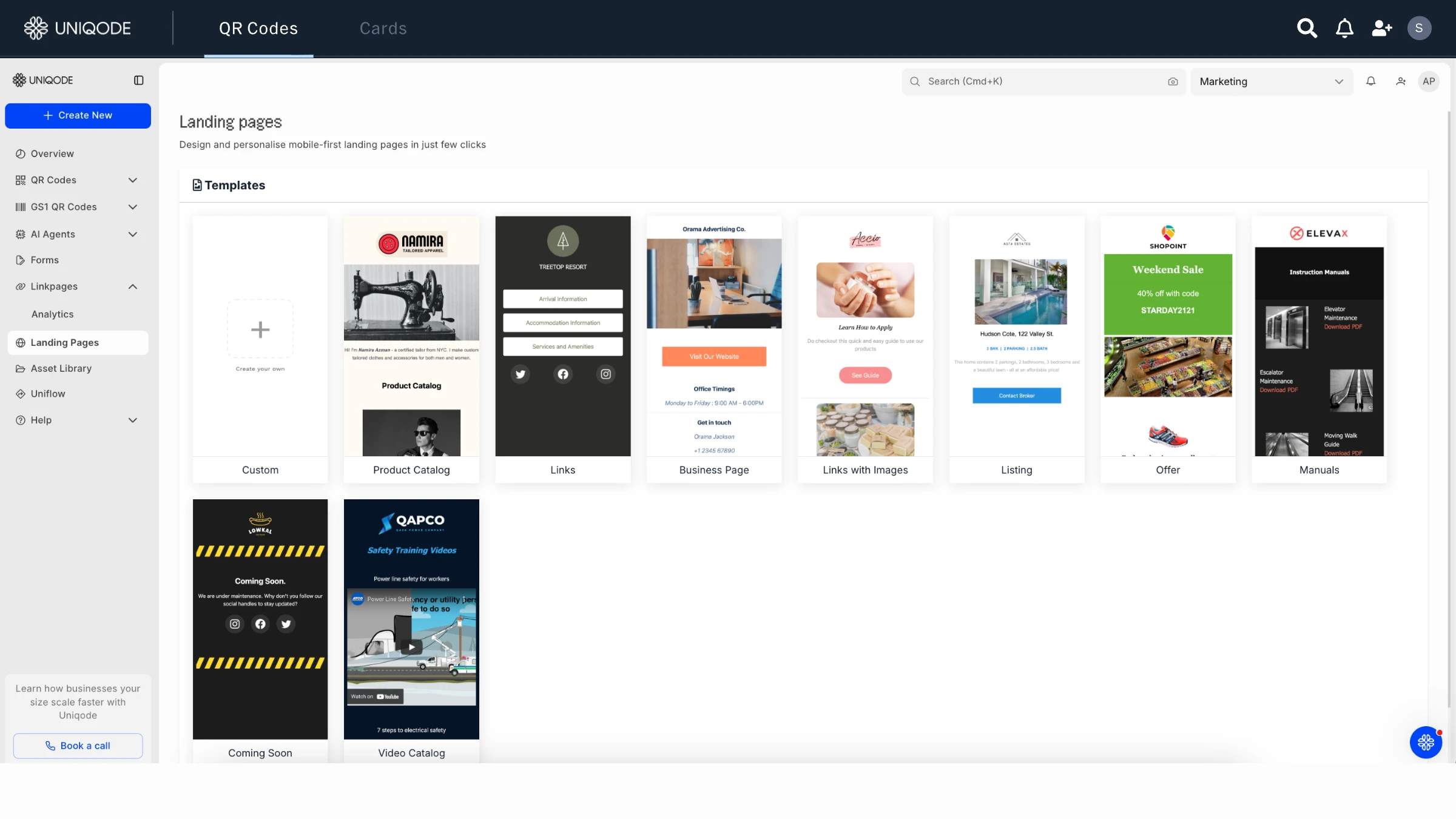
Use a dynamic QR Code on every sign, so you can change the destination after you print. A static code is fixed once it’s made. Add a different UTM tag, which is a short code added to a web address, for each channel, so you can see which one sent each visitor. Build the page before October 31. To plan it, read our guide to a Black Friday landing page.
How to use QR Codes to connect your store and your online BFCM offer
QR Codes link a printed sign or shelf tag to your online offer, so every sign in your retail store leads to a page you can update.
Choose where to place your QR Codes
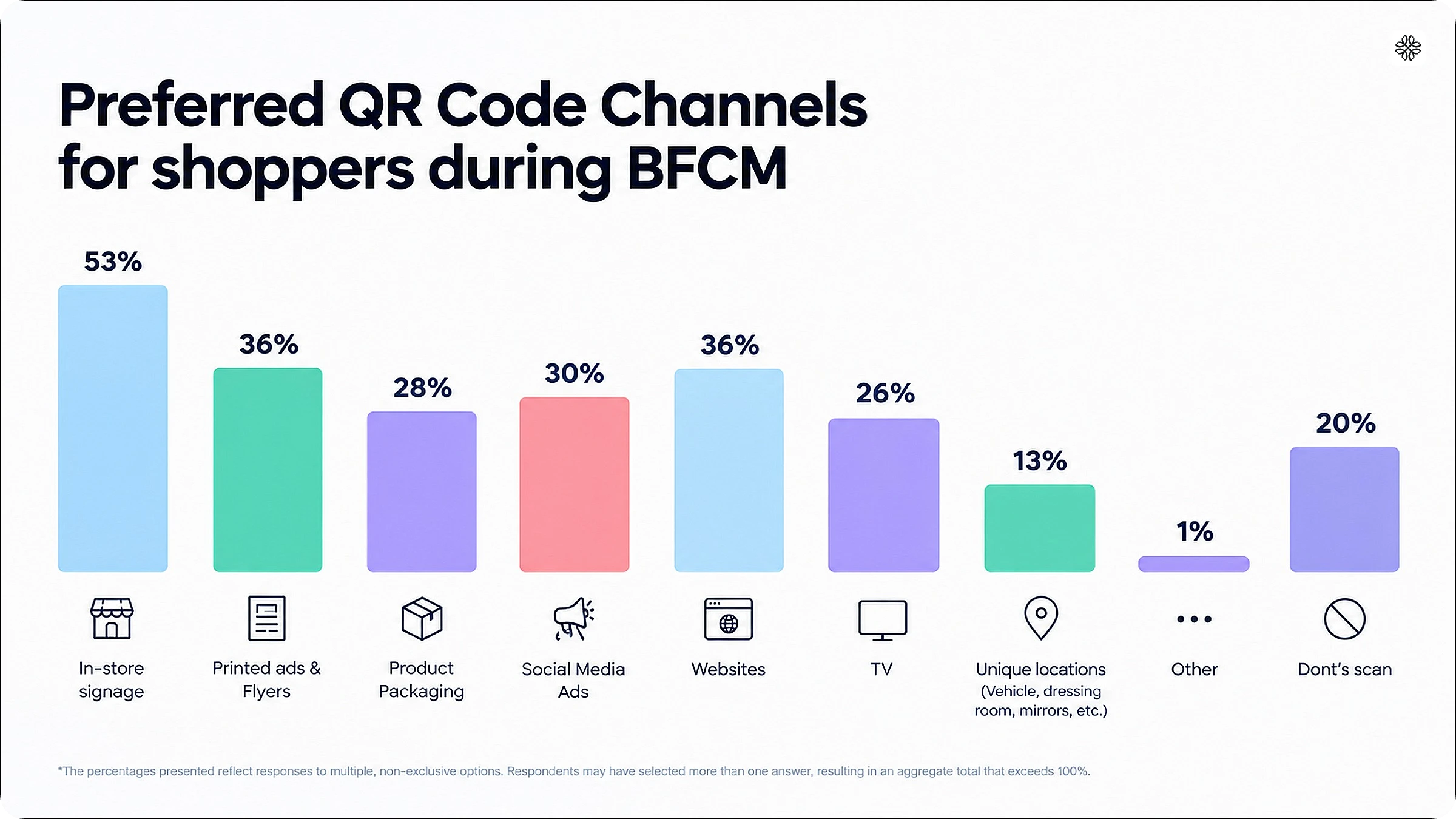
Start with in-store signage, the placement shoppers name most for scanning a QR Code. In our survey of 1,000 U.S. shoppers, 53% chose in-store signage, ahead of printed ads and flyers (36%), websites (36%), social ads (30%), and product packaging (28%). Shoppers could pick more than one.
Each placement reaches shoppers at a different moment, so give each one its own offer and its own measure:
| Placement | Best for | Pair with | Track |
|---|---|---|---|
| Window poster | Passers-by when the store is closed | Early-access offer | Scans by hour |
| Shelf tag | Shoppers at the shelf | Product details or a bundle | Scans per product area |
| Checkout counter | Buyers already in the store | Loyalty sign-up | Sign-ups |
| Receipt or bag insert | Shoppers after they buy | Cyber Monday offer | Scans on Monday |
| Flyer or direct mail | Reach before the sale | A unique offer | Redemptions |
| Product packaging | Online orders | Review or reorder prompt | Scans |
Create a separate QR Code for each placement, so your scan data shows which sign worked.
Deliver offers offline with scan-to-redeem coupon codes
Make every scan end in an offer shoppers can use at once. In our survey, 41% of shoppers scan for a deal or coupon, and 56% expect a discount after they scan.
- Create one QR Code per placement that opens a page with the offer.
- Show the coupon code in large type, with a line on how to redeem it at the register or online.
- Put the reward on the sign, such as “Scan for 10% off. No sign-up needed.”
- Add the end date to the offer page.
- Give each placement its own coupon code, such as WINDOW10 and SHELF10, so redemptions show which sign worked.
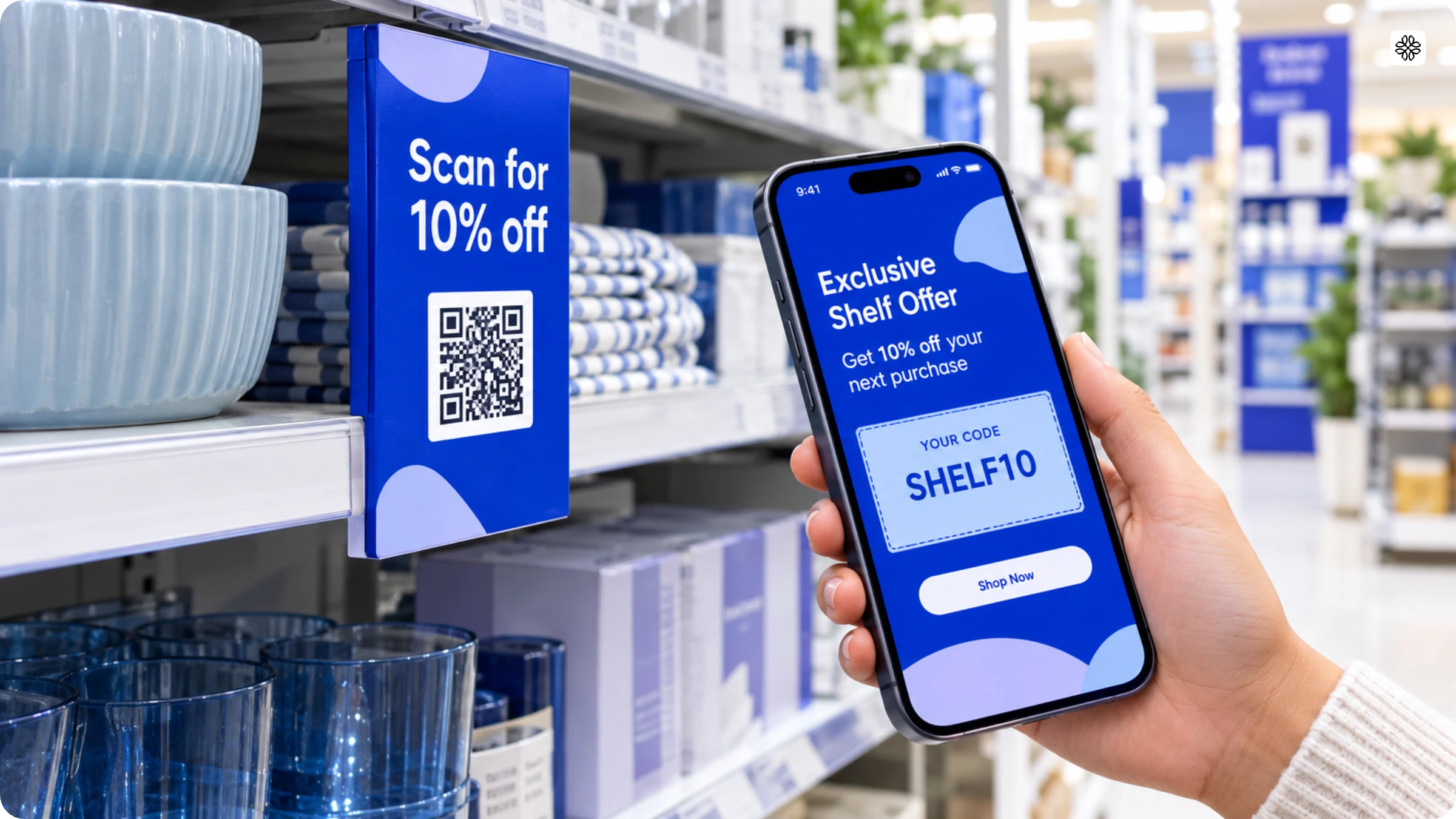
Brief your store staff on how to accept each code at the register before the sale starts. To set up the page, see how to use QR Code coupons.
Run in-store giveaways and games
An in-store game gives shoppers a reason to scan beyond the discount. In our survey, 14% of shoppers scan out of curiosity.
A toy store could place QR Codes at the entrance and in three aisles. Each code opens an instant-win page that reveals a mystery discount, so shoppers have a reason to walk the store and scan them all. To run one:
- Set two or three prize levels, and keep the smallest prize the most common.
- Limit each prize by scan count, so you control the cost.
- Add a QR Code form if you want emails.
Change the offer by the hour with dynamic QR Codes
A dynamic QR Code lets you change the offer behind a printed sign by the hour, with no reprinting. In our survey, 22% of shoppers hit an expired offer after scanning.
Use dynamic QR Codes to run your day:
- Show a morning-only deal, then switch to an afternoon offer.
- Send the sign for a sold-out item to a similar product.
- Retire an offer the moment it ends, so no sign points to a dead deal.
- Set changes in advance if your platform supports rules by time or scan count.
Review every code each morning of the sale and list the offer each one shows.
Test every QR Code and build trust
A QR Code gets scanned when it works and when shoppers trust it. In our survey, the problem shoppers report most is a code that won’t scan (35%), followed by slow load times (27%) and broken links (26%). Trust is the second hurdle: 39% of shoppers say QR Codes are safe, 37% say “somewhat”, and 12% say they are unsafe. Link each code to an HTTPS page on your own website, and check each morning that no one has stuck another sticker over it.
Scan each printed sign on at least two phones, under your store lights and from the distance shoppers stand, before you send it to print. Repeat the test each morning of the sale, because links can break.
To see what makes a QR Code trustworthy for shoppers, read our guide to safe QR Codes.
Black Friday campaign examples
These campaigns from 2023 to 2025 show how brands connect stores, apps, and online offers during BFCM. Each one ends with an idea you can use in your own store.
Walmart: early access online, QR Codes on the shelf
In 2025, Walmart ran three deal events: November 14 to 16, November 25 to 30, and Cyber Monday on December 1. Before each one, Walmart+ members got five hours of early access online. Cyber Monday was online only.
In the same season, Walmart’s stores used QR Codes to send shoppers to the app. A holiday tree display carried a sign reading “Find your perfect tree” with a QR Code to see hundreds more options in the app. A shopper at the shelf saw a few trees and could scan to see the rest.
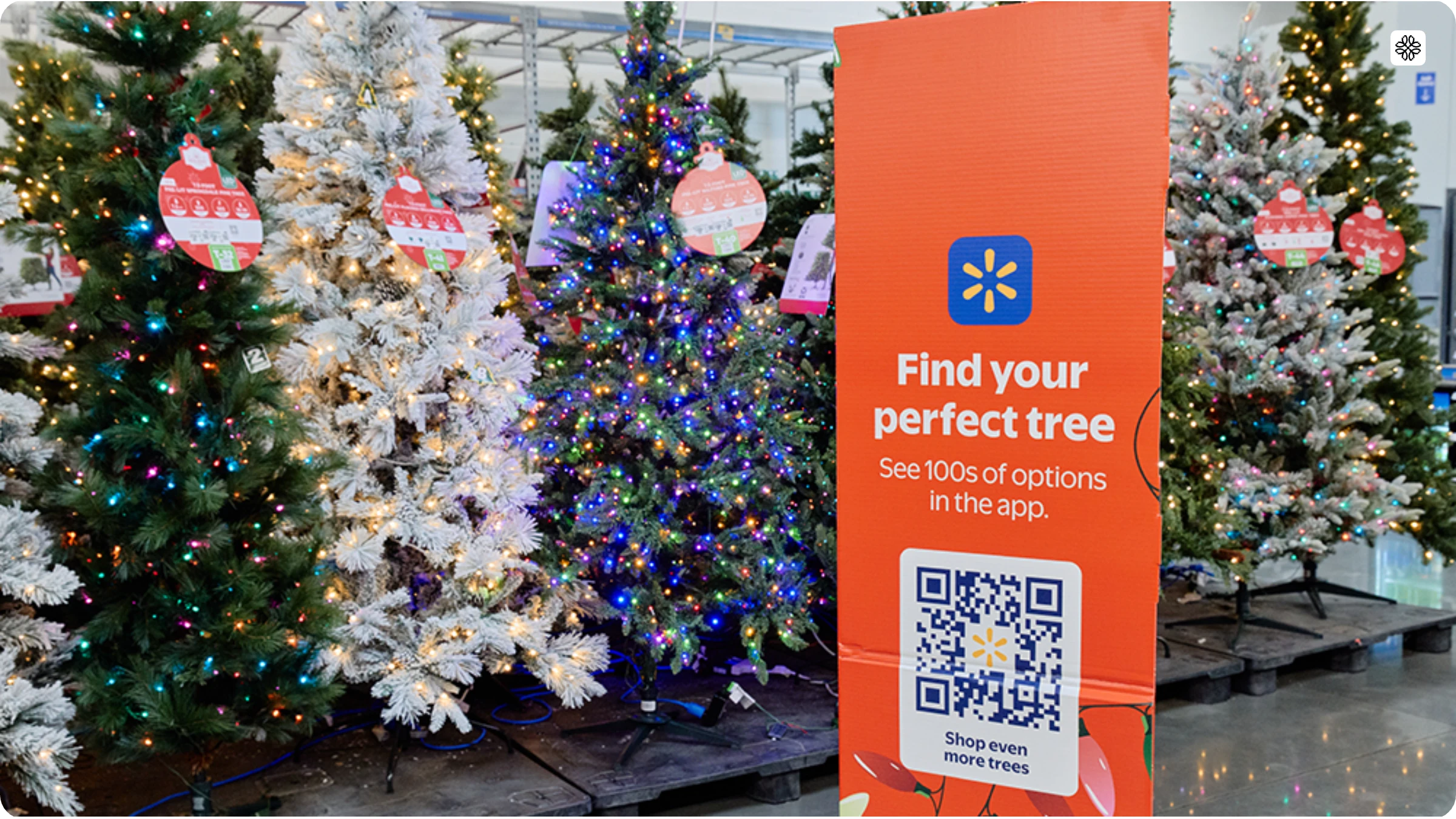
What Walmart could have done: The sign already moved shoppers from the aisle to the app. During BFCM week, a different QR Code could open the early-access sign-up for the next event. A shopper at the shelf joins before the window opens, and you send the access link by email or text. Change the destination for each event, and nothing needs reprinting.
Build it with Uniqode: Print a dynamic QR Code that opens a Form for early-access sign-ups. When the sale starts, switch the destination to the event page.
REI: closing every store on Black Friday
In 2025, REI closed all 195 of its stores on Thanksgiving and Black Friday for the tenth year of its #OptOutside campaign. About 14,000 employees got a paid day off. Shoppers could still order on REI’s website, but orders weren’t processed until the next day. REI gave up one of the biggest sales days of the year to put its values first. The closed doors were the campaign.
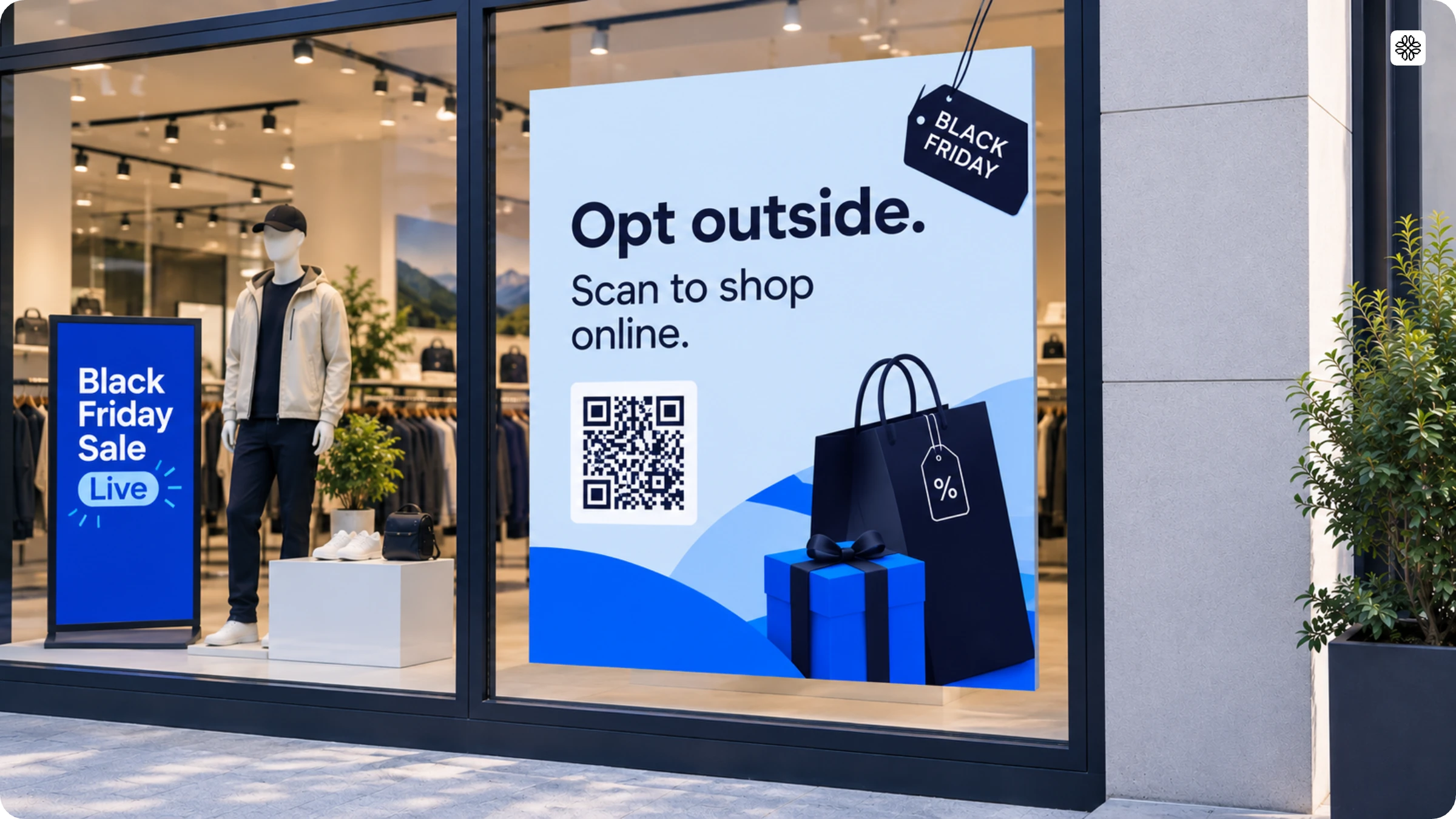
What REI could have done: A closed store still has a window, and REI’s website was still taking orders. A QR Code on the glass could send passers-by to the site, so someone who stopped to look can buy now, with the order processed the next day. Open the page with the #OptOutside message so the scan feels on-brand, then add one clear shop button.
Build it with Uniqode: Print a dynamic QR Code for the window that opens a Linkpage with a “Shop online” button.
Apple: a gift card instead of a discount
In 2025, Apple ran its Black Friday shopping event from November 28 to December 1. Instead of cutting prices, Apple gave a gift card with the purchase of an eligible product. The offer ran in Apple Stores, in the Apple Store app, and on apple.com. The gift card couldn’t lower the current purchase. It could only be spent on a future one.
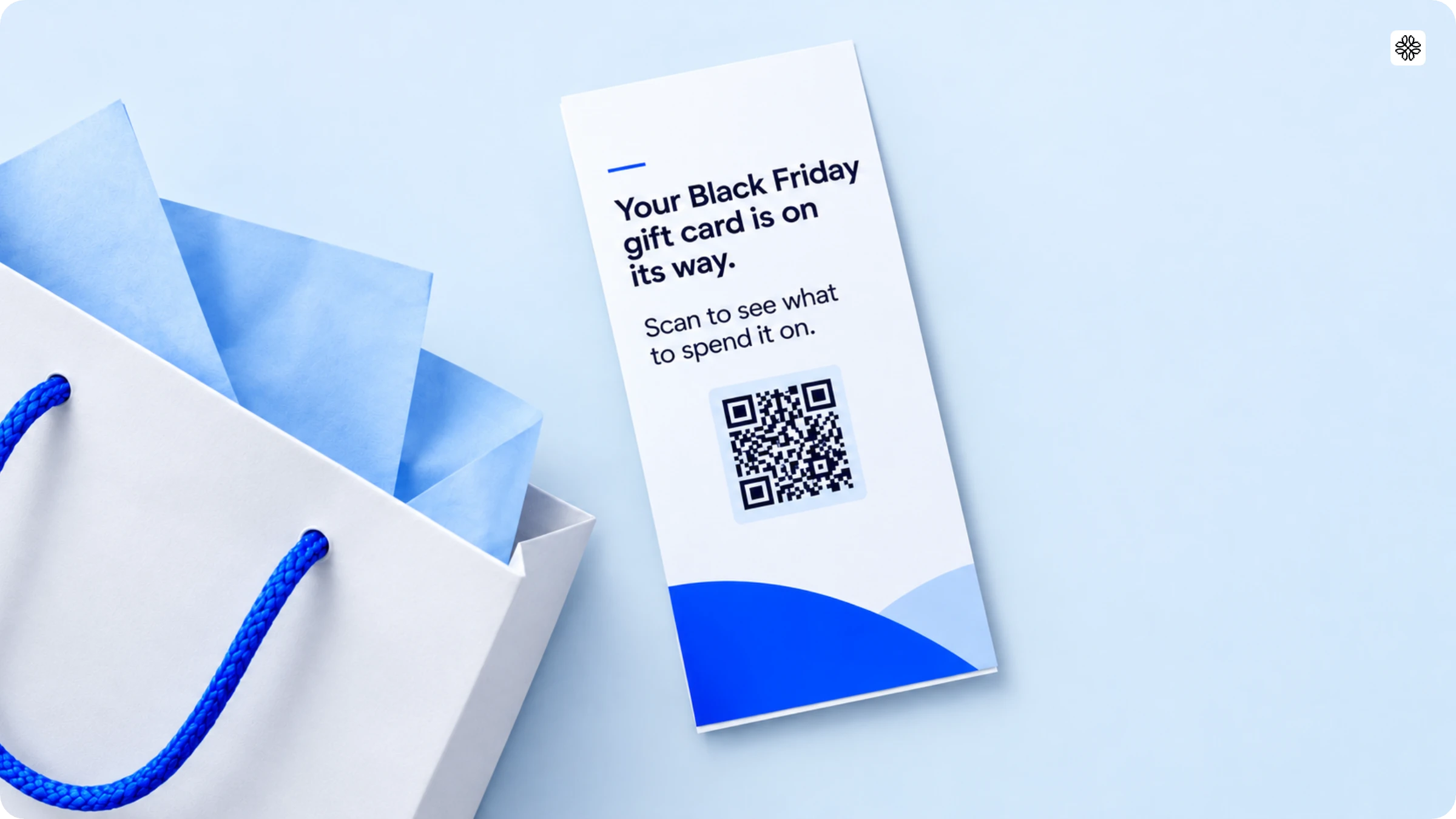
What Apple could have done: The gift card only works on a future purchase, so the weekend sale ends with a promise. A QR Code on the receipt or bag insert could open a page that says the card is on its way and shows what to spend it on, such as accessories or add-ons. Shoppers who might forget the card have a reason to return.
Build it with Uniqode: Print a dynamic QR Code on the receipt or bag insert that opens a Linkpage with ideas for spending the card. Later, switch the destination to a January offer without reprinting anything.
American Express: a QR Code on a door
On Small Business Saturday 2023, the day between Black Friday and Cyber Monday, American Express put blue door frames in public spaces in Chicago, Los Angeles, and New York. QR Codes built into the frames opened an AR experience where people could browse hand-picked products from small businesses. Cardholders who registered also got a statement credit for spending $50 or more in Amex’s Shop Small portal.
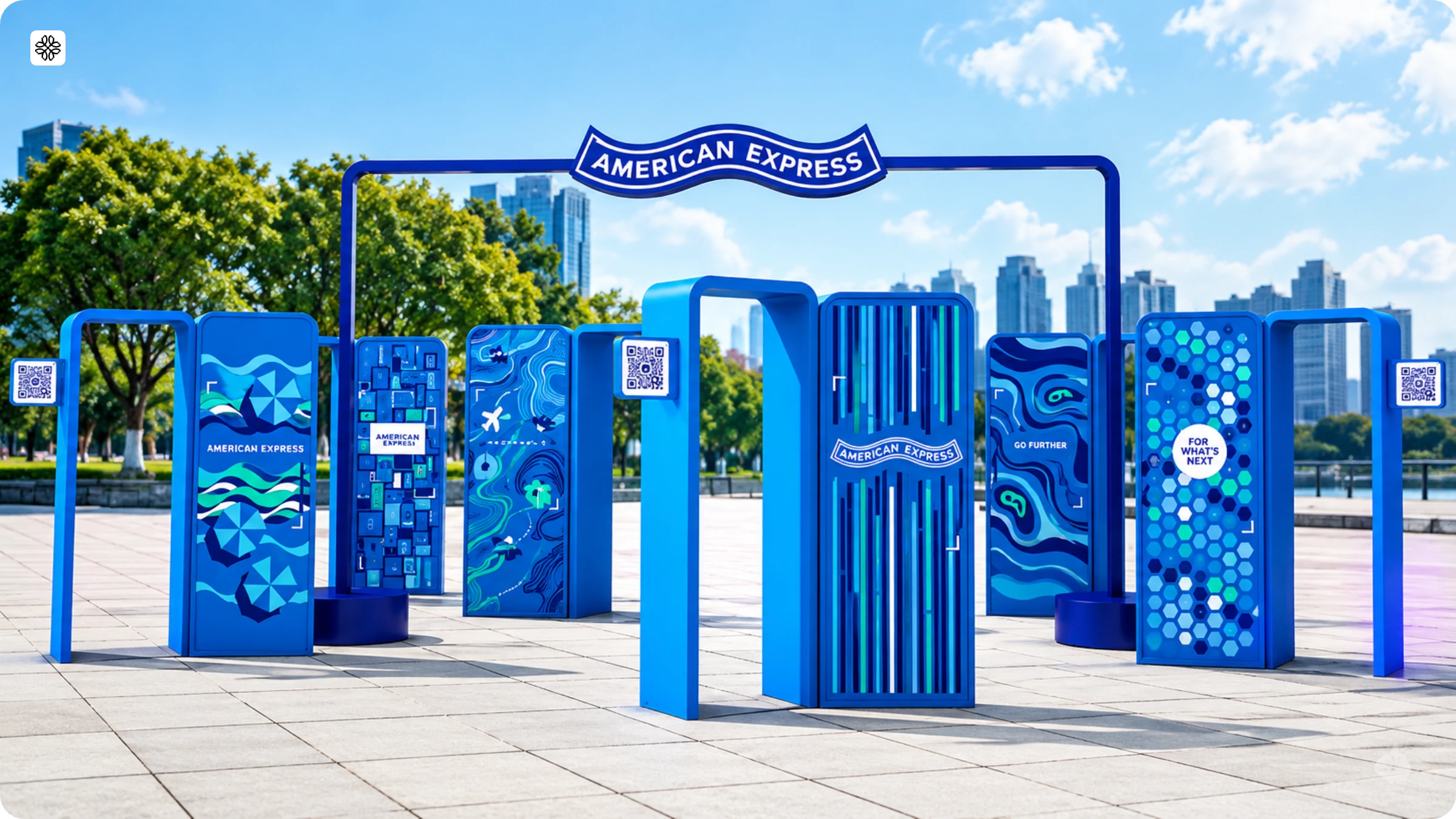
How to do it yourself: You don’t need a street installation. A shop, market stall, or pop-up can do the same at a smaller scale. Put a QR Code on a window, door, or counter sign that opens a page of your featured products and one offer. Create one QR Code per location, so your scan data shows which spot drew people in.
Build it with Uniqode: Create a dynamic QR Code for each location that opens a Linkpage with your featured products and offer. Name each code by location, such as “Door, Main Street,” and compare scans in QR Code analytics. For many locations, use bulk creation.
Google: Black-Owned Friday
In 2024, Google ran its fifth annual Black-Owned Friday campaign. A short film followed Druski, GloRilla, and Jayda Cheaves as they visited three Black-owned businesses in Georgia. Google pointed viewers to the Black-owned label on Google Search and invited them to share the businesses they support.
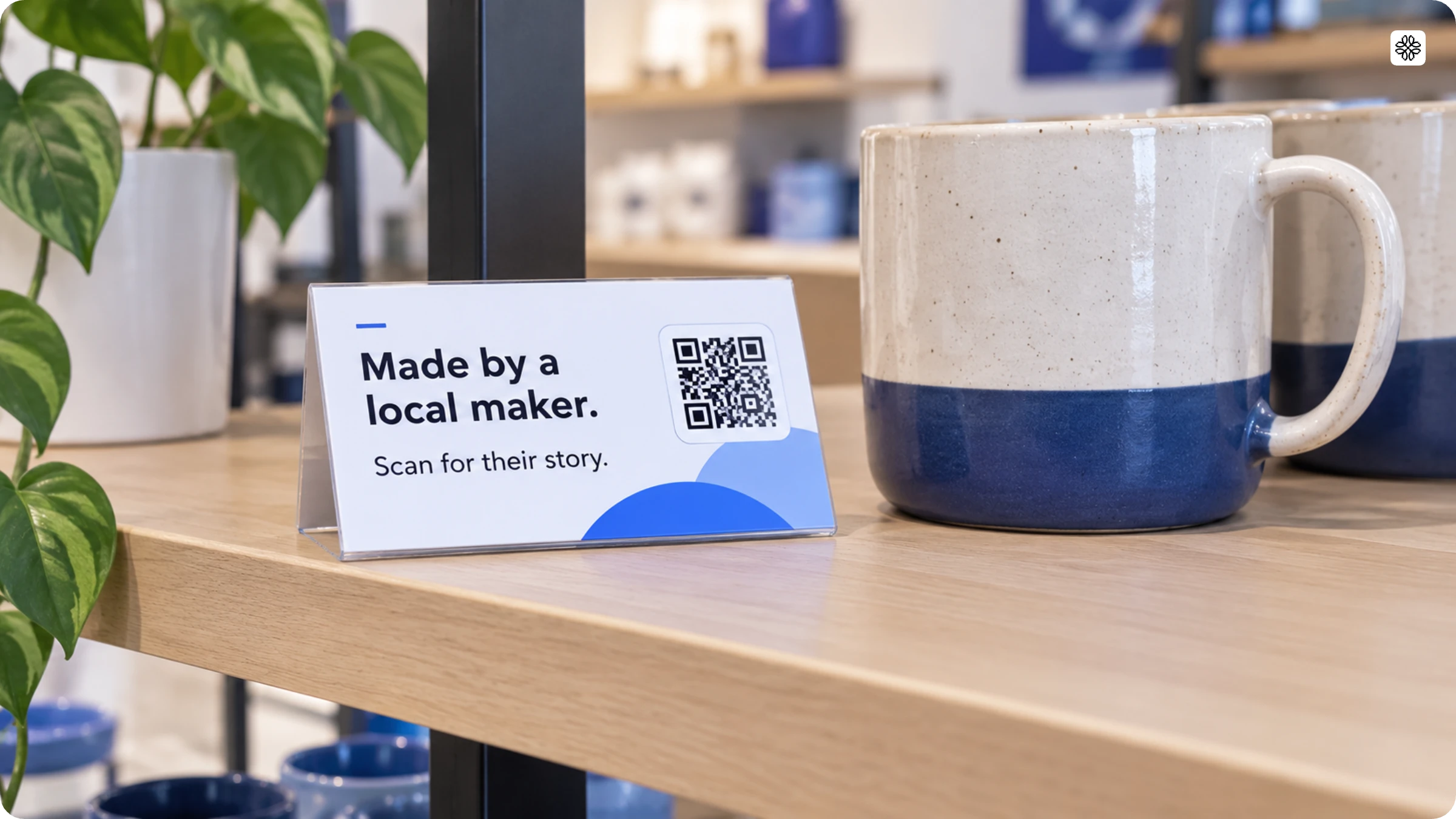
What Google could have done: The campaign lived on screens: a film, a search label, and a website. A QR Code on a participating shop’s window or counter could open that shop’s page, so a passer-by can read its story and buy online.
Build it with Uniqode: A store that sells work from Black-owned or local makers can do this at the shelf. Put a QR Code on each shelf tag that opens a Linkpage with the maker’s story and a link to buy. Add a Form where shoppers can name the businesses they support.
Amazon: real customer reviews as the ad
In 2024, Amazon’s “5-Star Theatre” campaign for Black Friday Week and Cyber Monday featured actor Adam Driver performing real customer reviews as dramatic monologues, including the well-known banana slicer review. Amazon built the campaign on its own survey, which found that 79% of its customers often or always read a product review before buying.
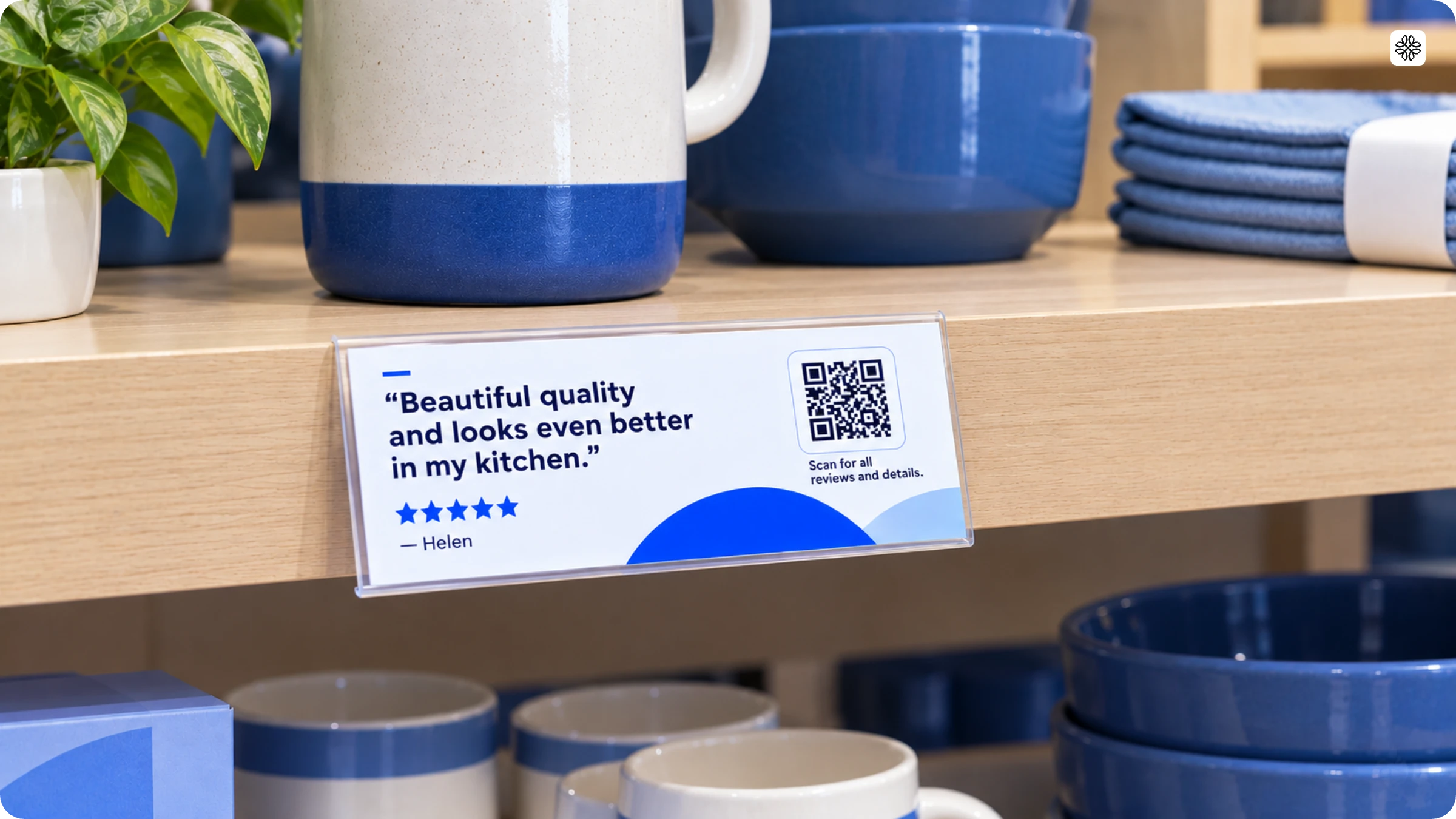
What Amazon could have done: Reviews work online, but a store shelf has none. A shelf tag could print one real review line with a QR Code beside it that opens the full reviews and product details. Shoppers who are unsure at the shelf get the proof Amazon says they look for.
Build it with Uniqode: Put a QR Code on each shelf tag that opens a Linkpage with the product’s reviews, details, and current offer. Create one code per product area, and compare scans to see which shelves drew questions.
Jaded London: a sale only in the app
In 2025, UK fashion brand Jaded London made its Black Friday sale of up to 50% off available only inside its app. Shoppers had to download the app to get the deal, so the offer itself was the reason to install.
What Jaded London could have done: An app-only sale gives shoppers a reason to download, but they still have to find the app. A QR Code on a package insert, a pop-up sign, or an event flyer can open the right app store in one scan. The shopper doesn’t search for the app by name.
Build it with Uniqode: Print an app download QR Code on the insert or sign. Use a separate code for each placement, so scan counts show which one drove installs.
Measure what’s working during your BFCM sale
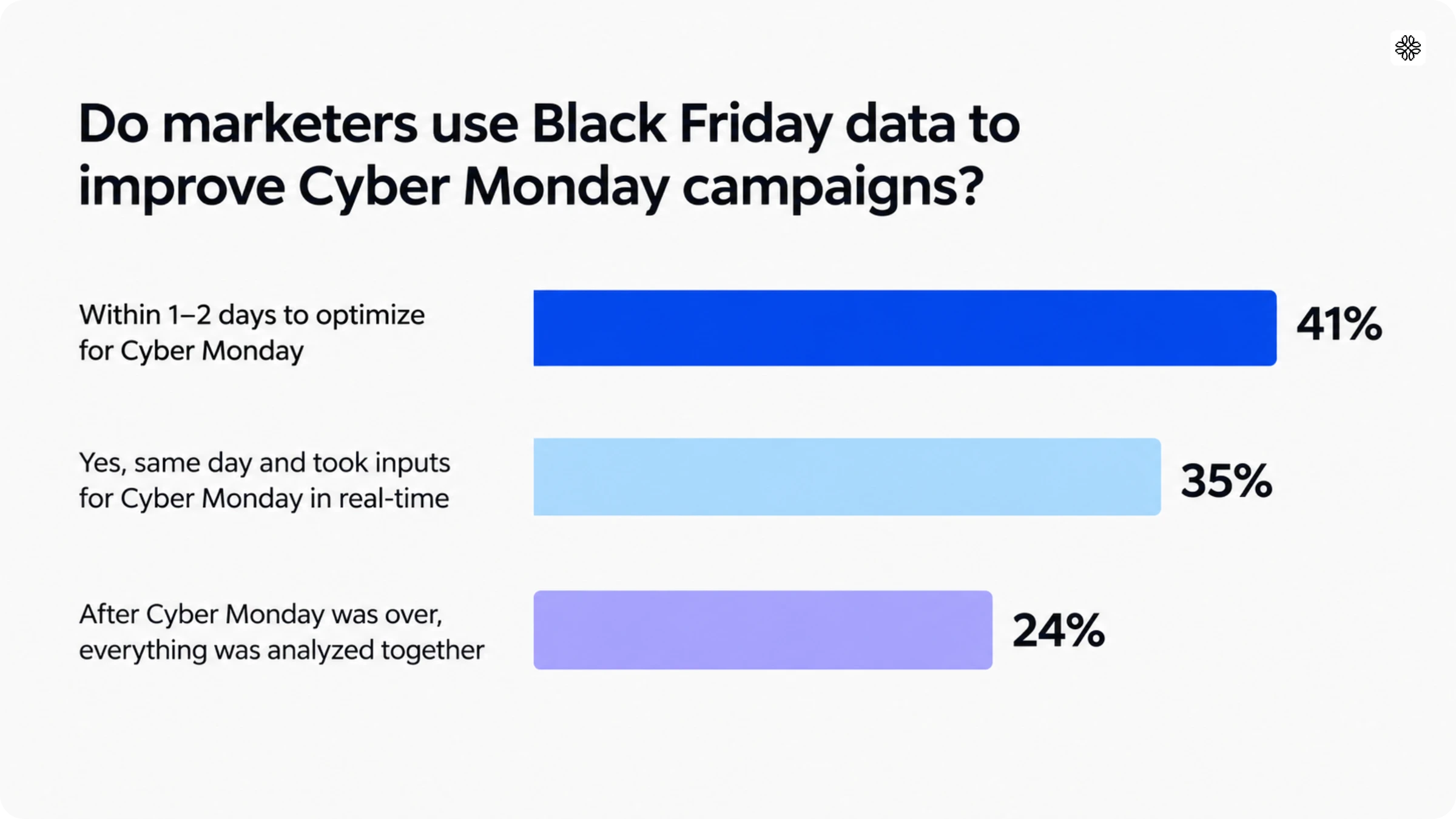
Compare scans by placement while the sale runs, so you can change an offer before the weekend ends. In our marketer survey, only 21% of marketers tracked QR Code scan rates in 2024. And 24% waited until after Cyber Monday to review their results, while 41% reviewed them within one to two days
Set up your tracking before the sale:
- Name each QR Code by placement and store, such as “Window poster, Main Street”.
- Add a different UTM tag to each QR Code, so your web analytics show visits and sales by placement.
- Assign one person to check the numbers each morning and decide what they can change.
Track three measures in addition to revenue:
- Scans per placement show which signs shoppers notice.
- Bounce rate shows who leaves your offer page without acting.
- Checkout completion rate shows who finishes buying.
QR Code analytics show scans by date and time, location, and device. Each morning, compare scans with sales for each placement. These patterns can guide your next change:
| What you see | What it can mean | What to try |
|---|---|---|
| Many scans, few redemptions | The offer page is slow, or the reward is unclear | Test the page on a phone and state the reward at the top |
| Few scans on one sign | Shoppers can’t see the sign, or the message is weak | Move the sign, enlarge the code, or change the line next to it |
| Scans fall after the first day | The offer feels old | Switch the offer with a dynamic QR Code |
Change one thing per sign each day, so you know what caused the change. Use Friday’s results to plan Saturday and Cyber Monday.
What to do after BFCM
Follow up within a week with the shoppers who scanned, signed up, or bought, so one sale becomes repeat visits. Use the week after the sale for four jobs:
- Welcome new loyalty members by email, and tell them what they earn on their next visit.
- Put a January offer behind the same dynamic QR Code on your receipts and bag inserts. You can change the destination without reprinting.
- Show ads to shoppers who scanned but did not buy. Add a Meta Pixel or Google Ads tag to your offer page, so your ad platform can reach them.
- Compare scans and sales for each placement, keep the signs that worked, and retire the rest.
Build your BFCM campaign with Uniqode
Build your BFCM campaign with Uniqode by creating a dynamic QR Code for each placement, sending every code to a Linkpage, collecting sign-ups with Forms, and attributing sales with Insights. Una, the Uniqode AI assistant, creates QR Codes, Linkpages, and Forms from a plain-language description. Uniqode is SOC 2 Type II certified, connects to Google Analytics, and uses role-based permissions to give each store team its own access.
Send every scan to one Linkpage
A Linkpage is a mobile landing page you build in the Uniqode dashboard, with your own content, links, and branding. For BFCM, build one Linkpage that lists your early-access offer, your bundles, your Cyber Monday deal, and your store hours. Then point the QR Code on every sign to it.
Because the page lives in the dashboard, you can change what it shows without touching a printed sign. Feature the early-access offer in November, switch to your Black Friday deals on November 27, and feature the Cyber Monday offer on November 30. A shopper who scans the same shelf tag on each day sees the offer that is live that day.
Capture sign-ups and giveaway entries with Forms
Uniqode Forms capture leads, feedback, and registrations right from a QR Code scan. For BFCM marketing, use a form for three jobs: loyalty sign-ups at the checkout counter, early-access sign-ups on window posters, and entries for an in-store giveaway.
Keep each form short, because shoppers fill it out on a phone while standing in your store. Ask for an email address, and add a clear opt-in checkbox if you plan to send texts. With Insights, form submissions can also sync to HubSpot or Salesforce with scan context, so your team can follow up with the shoppers most likely to buy.
Attribute sales to each QR Code with Insights
Uniqode Insights connects every QR Code scan to the conversion it drives, so you can see which QR earned a sale. To set it up for BFCM, add the Insights pixel to your landing page or through Google Tag Manager, connect the QR Codes you want to track, and set a conversion goal such as a purchase or a loyalty sign-up.
Finish the set-up by October 31, so you can test it before the sale. Each morning, compare placements by conversions, and not only by scans. After the sale, Insights can send shoppers who scanned but did not buy to Meta Ads and Google Ads as audiences.
Set up your campaign faster with Una
Una is the Uniqode AI assistant, and it creates QR Codes, Linkpages, and Forms from a plain-language description and answers questions about campaign performance. Una asks follow-up questions when it needs more detail, so each result is ready to use.
For BFCM, describe each job to Una in one sentence:
- Ask for a QR Code that opens your Cyber Monday offer from a receipt insert, and Una recommends the right QR Code type and creates it.
- Ask for a BFCM Linkpage with your early-access offer, bundles, and store hours, and Una builds a page you can edit, with a live preview.
- Ask for a loyalty sign-up form for your checkout counters, and Una drafts the title, description, and questions for you to refine and publish.
- During the sale, ask which QR Codes shoppers scanned most, and Una answers in plain language with trends.
If you manage many stores, the Uniqode connector for Claude lets you work with your QR Code data inside Claude, see performance across all your organizations at once, and create, edit, and organize QR Codes at scale.
Ready to build your BFCM marketing campaigns? Create your first dynamic QR Code with our free trial.
Want to see these features in action? Book a demo to learn how Uniqode can support your BFCM campaign.
Frequently Asked Questions
- What does BFCM stand for?
BFCM stands for Black Friday Cyber Monday, the shopping weekend that starts on Black Friday and ends on Cyber Monday. In 2026, it runs from Friday, November 27, through Monday, November 30. Cyber Monday is the online-focused day that closes the weekend.
- When should I start BFCM marketing in 2026?
Start your BFCM marketing in October 2026: build your email and SMS list and lock your offers by October 31, then begin promoting about a month before Black Friday on November 27. Use November to tease the sale and open early access for loyalty members.
- What are good Black Friday marketing ideas for retail stores?
The best Black Friday and Cyber Monday marketing ideas for retail stores are early access for loyalty members, bundles or free shipping, a separate Cyber Monday offer, and QR Codes that connect in-store signs to your online sale. Add email and SMS messages with set deadlines, and send every channel to one BFCM landing page.
- How do I make Cyber Monday different from Black Friday?
Make Cyber Monday different from Black Friday by giving it its own offer, such as an online-only bundle or free shipping on Monday. You can also lead with bestsellers on Black Friday and bundles on Cyber Monday. A dynamic QR Code on receipts can send Black Friday shoppers to the Monday offer without reprinting.
- How do I use QR Codes for Black Friday in a store?
Use QR Codes for Black Friday in a store by placing a separate code on each window poster, shelf tag, and checkout counter, and linking each one to a page with a clear offer. Use dynamic QR Codes to change the offer without reprinting, and test each sign on two phones first.
- Are Black Friday QR Codes safe?
Black Friday QR Codes are safe when they link to a trusted page, because a QR Code is only a link and its safety depends on where it leads. Link to an HTTPS page on your own website, and check that no one has stuck another code over yours.
- What are examples of successful Black Friday campaigns?
Recent Black Friday campaigns worth studying include Walmart’s member early access, REI’s store closures, Apple’s gift card instead of a discount, American Express’s QR Code doors, Google’s Black-Owned Friday, Amazon’s 5-Star Theatre, and Jaded London’s app-only sale. Each ends with a way to bring the idea into your store with a QR Code.
- How do I deliver coupon codes or offers offline?
Deliver offers offline by printing a QR Code on each sign that opens a page with the offer, the reward, and the end date. Give each placement its own coupon code, such as WINDOW10 and SHELF10, so redemptions show which sign worked. Brief store staff on how to accept each coupon code at the register before the sale starts.
- How do I track which BFCM placement drove sales?
Track which placement drove sales by creating a separate QR Code for each placement and adding a different UTM tag to each one, so your web analytics show visits and sales by placement. Name each code by placement and store, such as “Window poster, Main Street”. Each morning of the sale, compare scans with sales.
- Will shoppers scan QR Codes on Black Friday?
In Uniqode’s survey of 1,000 U.S. shoppers, 74% said they are likely to scan a QR Code, including 33% who said very likely. A deal or coupon is the top reason to scan, so put the reward on the sign.
About the Author
Architaa is a Content Marketer at Uniqode, where she explores how QR Codes, Digital Business Cards, and phygital experiences are reshaping the way brands connect with their audiences. She transforms complex marketing trends and technologies into clear, actionable insights that help businesses strengthen engagement and build lasting connections with their customers. Outside of work, Architaa is most likely lost in a novel, following every ball of a cricket match, or binging her favorite shows.
Related Posts
How to Create a Black Friday Landing Page That Converts (2026)
A Quick Guide To Creating a QR Code for Wedding Photos
Christmas QR Codes: Ideas, Real Examples, and How to Create One
How to Create a QR Code for a Wedding Invitation
How To Create a QR Code for a Wedding Registry