QR Codes for Customer Service: Cut Support Costs, Not Corners
QR Codes can help you significantly improve customer service and boost repeat business. How? Read this guide to find various QR Code use-cases that can let you achieve these goals.
Getting customer support should not be hard. But for most customers, it still is. A number buried in fine print, a website that takes three clicks to find the right page, a chatbot that loops without resolving anything. Customer service QR Codes fix the first part of that problem. One scan, and the customer is exactly where they need to be.
In this article, we’ll look at exactly how QR Codes are revolutionizing customer service, and how you can leverage them to make stronger, better connections to generate more sales.
What is a customer service QR Code?
A customer service QR Code is a scannable code placed on packaging, receipts, signage, or a product itself. It routes customers straight to a support resource, a phone call, a chat thread, or a troubleshooting video. No searching required.
In Uniqode's State of QR Code report 2026, 38% already point a QR Code at customer service. Almost none of the packaging, receipts, or in-store signs carrying those codes can survive a single policy change without a reprint order, because the code was static from the day it was printed.
QR Codes can be a support cost reduction lever with its own operational math, and it will work better if the underlying code can be edited after it's printed.
How are QR Codes used for customer support?
QR Codes show up in customer support in more ways than most people expect. The use cases range from simple contact shortcuts to full self-service flows, depending on what the customer needs in that moment.
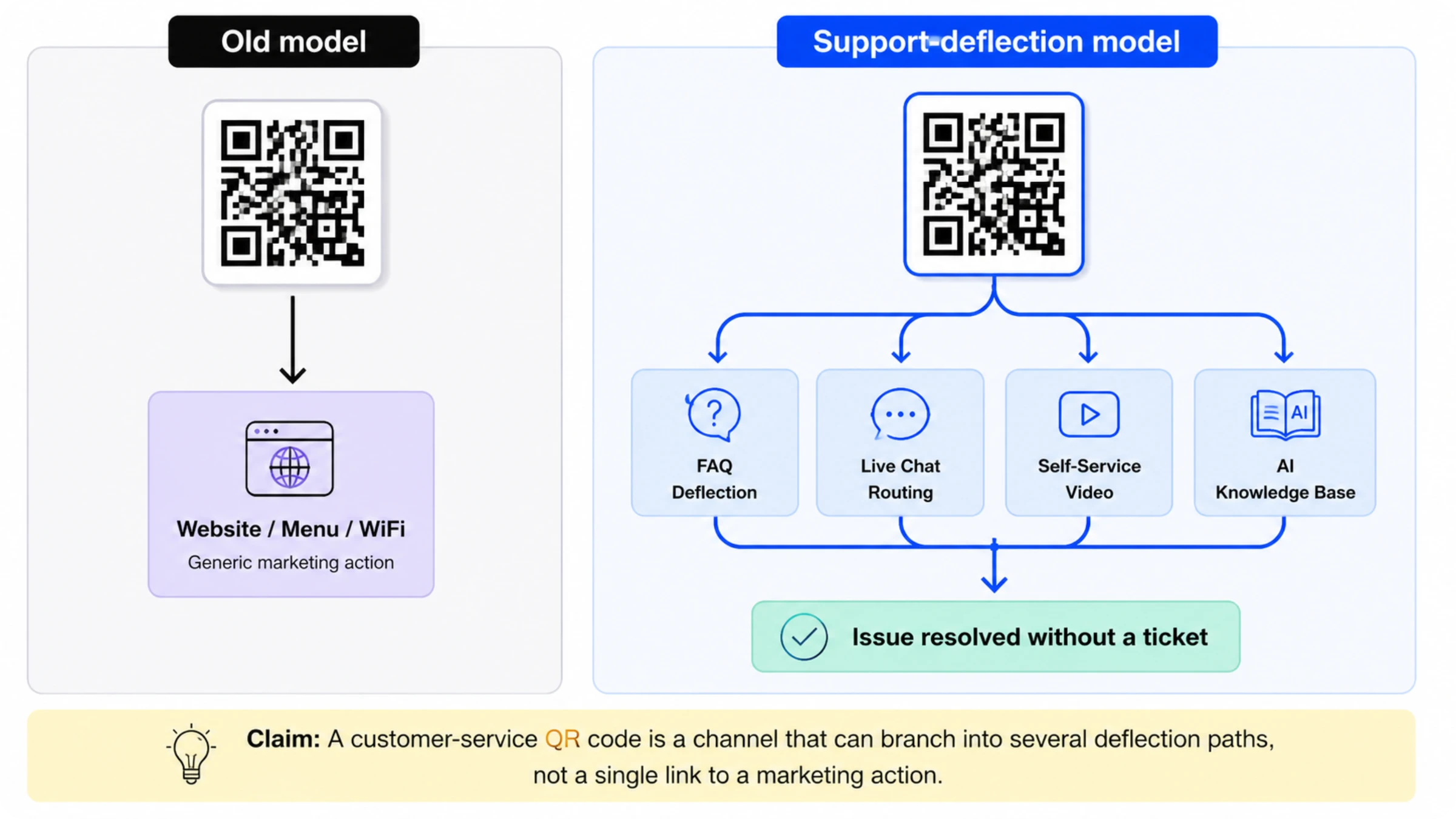
1. Help center and FAQ deflection
The simplest version of a customer-service QR Code routes straight to a help center or FAQ page. It's the floor of this use case, not the ceiling. A code that dumps every scanner onto a generic support homepage forces them to search again once they land, which defeats the point of scanning in the first place.
The fix is scoping. A QR code on a specific product's packaging should route to that product's troubleshooting page, not the general knowledge base. A code on a receipt for a particular service should route to order-status or return information for that transaction type, not a support directory.
A generic help-center link asks the customer to do the navigation work the code was supposed to eliminate. A topic-scoped link answers the question in the same motion as the scan.
2. Live chat and call routing, without typing a number
Self-service doesn't resolve every question, and this is the escalation path for when it doesn't. A direct-call QR Code on a receipt or a piece of packaging removes the step where a frustrated customer has to find a phone number, then dial it manually. Scan the code, and the phone dials automatically.
The same mechanic works for messaging apps. A QR Code can open a customer directly into a support chat thread instead of a phone call, which matters for customers who'd rather type than talk. Either way, the code removes friction at the exact moment a customer has decided the self-service options didn't answer their question and they need a person.
⚡Pro tip: Uniqode's Call QR Code type does exactly this, opening the dialer with the number pre-filled the moment someone scans. For messaging apps, a QR code pointed at a wa.me or SMS link gets the same one-scan handoff into a chat thread, without needing a dedicated app-specific QR type.
3. Self-service setup and troubleshooting videos
A QR ode that links to a setup video, a manual, or a troubleshooting walkthrough catches the "how do I..." class of question before it turns into a ticket. This is the mechanic behind most product-packaging QR Codes already in circulation: scan the code, land on a knowledge base article or a video that shows the fix. A written manual works for some products. A 90-second video works better for anything with a physical assembly step, because customers can watch and act at the same time instead of reading and interpreting.
A single QR Code in a guest room can serve breakfast information in the morning and dinner information at night, using time-based routing rules, without anyone reprinting a card or manually swapping content. The code itself never changes. Only what it points to changes, based on the time someone scans it.
Uniqode's Smart Rules make time-based routing possible without any manual intervention. You can set routing conditions based on time, location, device type, or scan count, so the same code delivers the right resource to the right customer at the right moment. No reprint, no redirect, no extra step.
4. Placement-specific service QR: packaging, in-store, receipts
Packaging QR Codes cut support calls by putting the answer one scan away. Point the code at step-by-step setup videos, troubleshooting guides, or model-specific FAQs, and it catches "how do I" questions around the clock, including outside business hours when no support team is staffed.
Because the destination is editable, new troubleshooting steps ship without a reprint the moment an issue surfaces, and a single code can detect a scanner's language or region to cut calls caused by a misunderstanding. Scan analytics show exactly where customers get stuck, sharpening the fix instead of repeating the same answer.
In-store signage and receipts move faster and at higher volume than packaging, but the rule is the same: the destination has to be updatable without a reprint.
5. Instantly join any WiFi network via a QR Code
You can create a WiFi QR Code and display it on your business premises (such as a cafe). This then allows your customers and visitors to quickly connect to your WiFi and join your network.
However, you’ll need to find a place to advertise your QR Code where it’s visible to customers/visitors you trust, but not to those whom you don’t want on your network.
6. Let customers easily rate your services
By adding a rating QR Code, you can generate more reviews from customers. People like to leave reviews, but many don’t leave them because they don’t know where to write them. A rating QR Code simply makes it easier for your happy (and not so happy) customers to write a short, public overview of their experience with your brand.
Positive reviews will help you generate more customers, while negative ones will help you understand what you can improve on.
The static vs. dynamic constraint for customer service QR Codes
A static QR Code's destination is fixed the moment it's printed. Hours change, teams shift, policies update. The code still points to the same page. Nobody notices at first. A customer scans it, gets outdated information, and escalates to a human regardless, which shows up months later as a spike in complaint calls that nobody traces back to the code that caused it.
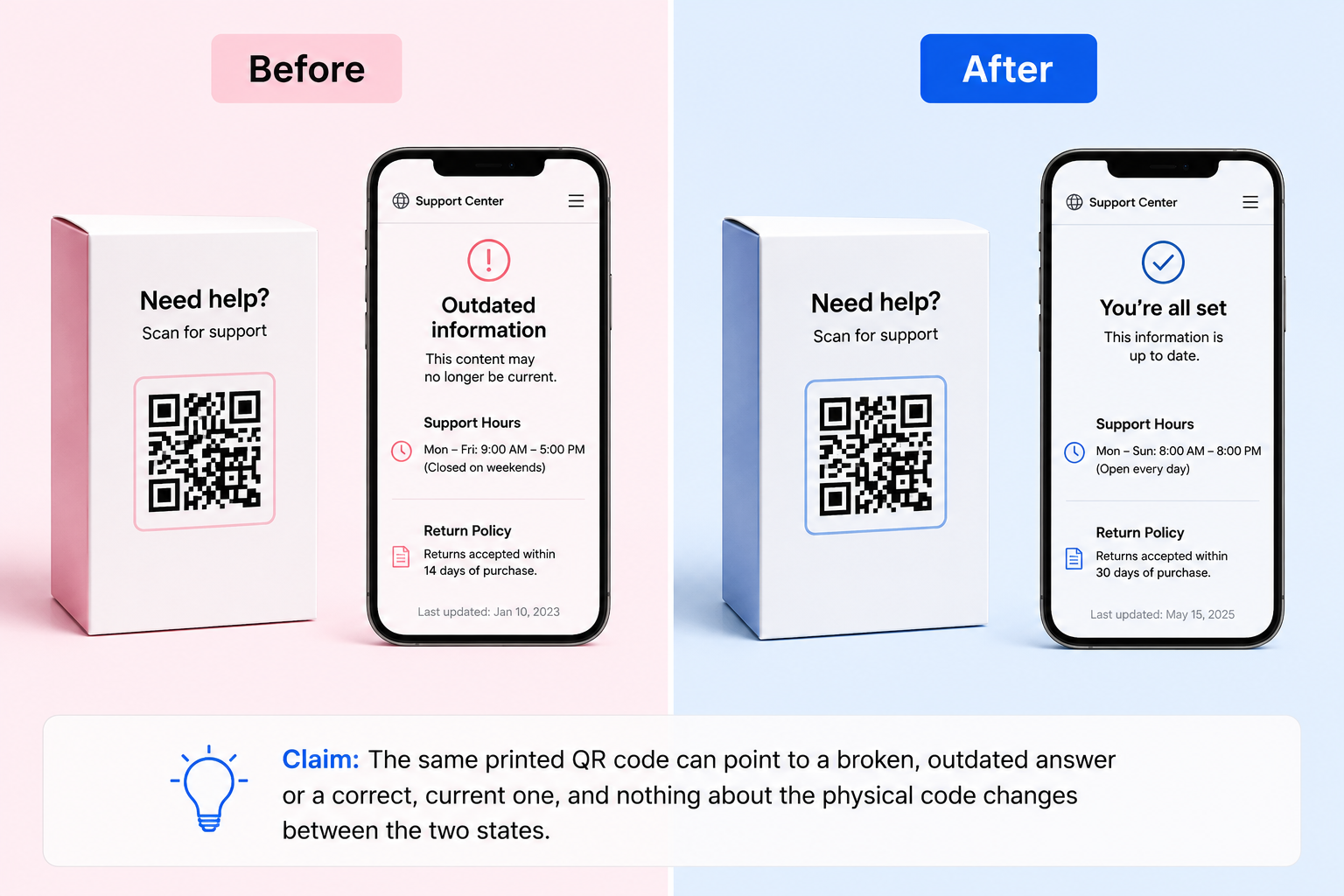
A dynamic QR code keeps the printed graphic exactly the same while its destination stays editable. For a customer service team, that means:
- Updating a help-center link the moment hours or policy change, with no reprint order
- Redirecting a code to a different destination during an outage or recall, then back again once it's resolved
- Rolling a single code through several support channels over its lifetime: FAQ deflection today, live chat routing next quarter, an AI knowledge base after that
- Seeing scan data on when and how often a code gets used, instead of guessing
[IMAGE: Comparison table with rows for Editability after print, Cost of a destination change, Failure mode when a policy changes, and Analytics and scan tracking, columns for Static QR Code and Dynamic QR Code. Claim: Static and dynamic QR codes differ on exactly the dimensions that determine whether a customer-service program can survive a policy change. | ALT: Comparison table of static versus dynamic QR codes across editability, cost of changing the destination, failure mode when policy changes, and analytics availability | FILENAME: static-vs-dynamic-qr-comparison-table.png]
How to create a customer service QR Code on Uniqode
Creating a customer service QR Code on Uniqode takes a few minutes. Follow the four steps below to create a QR Code in five minutes.
Step 1: Create a new QR Code
Sign in to the Uniqode dashboard, click +Create New, and choose QR Code. Select dynamic, since the destination needs to stay editable after print.
Step 2: Choose the right type
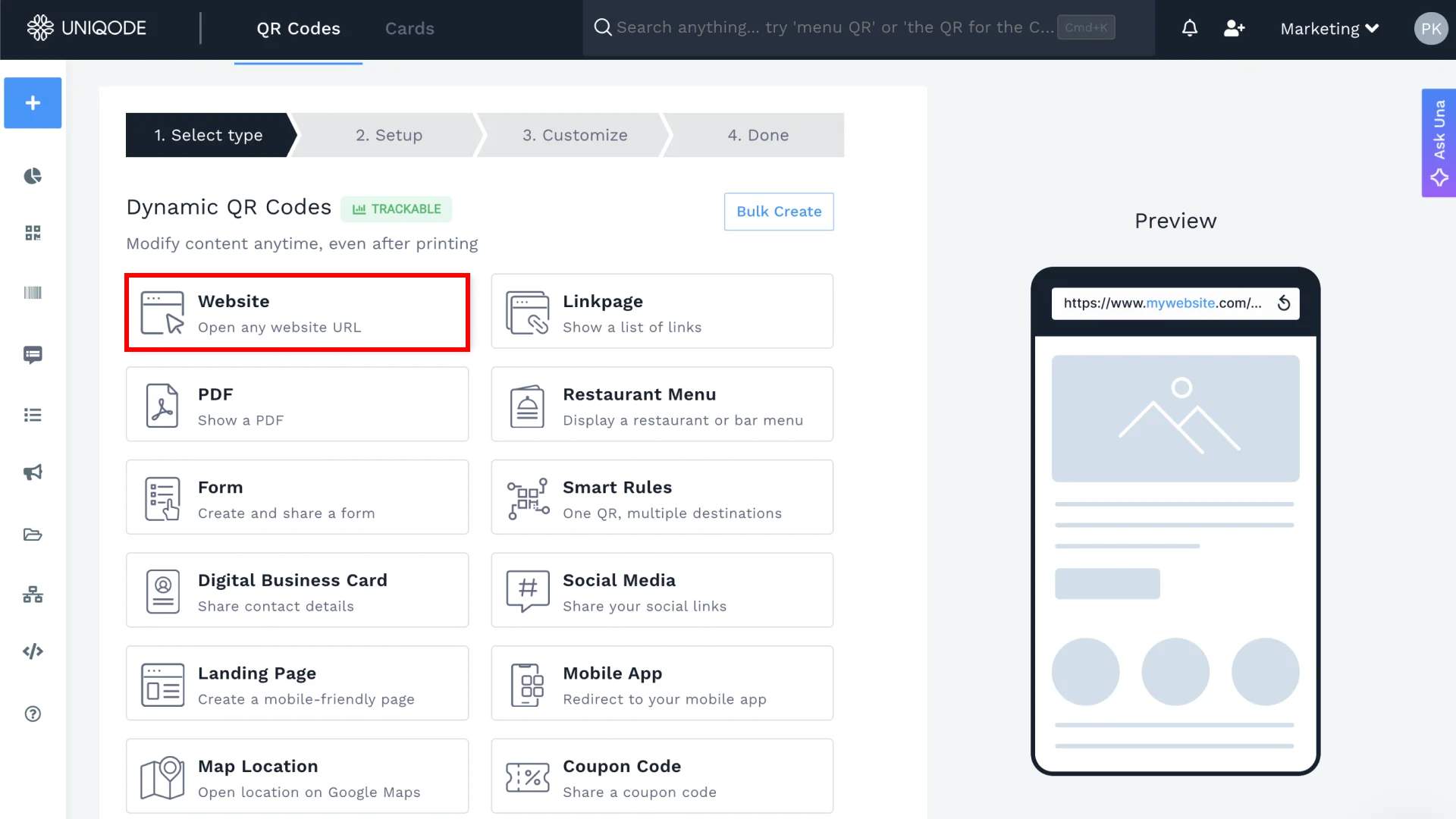
Pick a Call QR Code if the destination is a phone number, or a Website QR Code if it points to a help-center page, a troubleshooting video, or a chat link.
Step 3: Add the destination
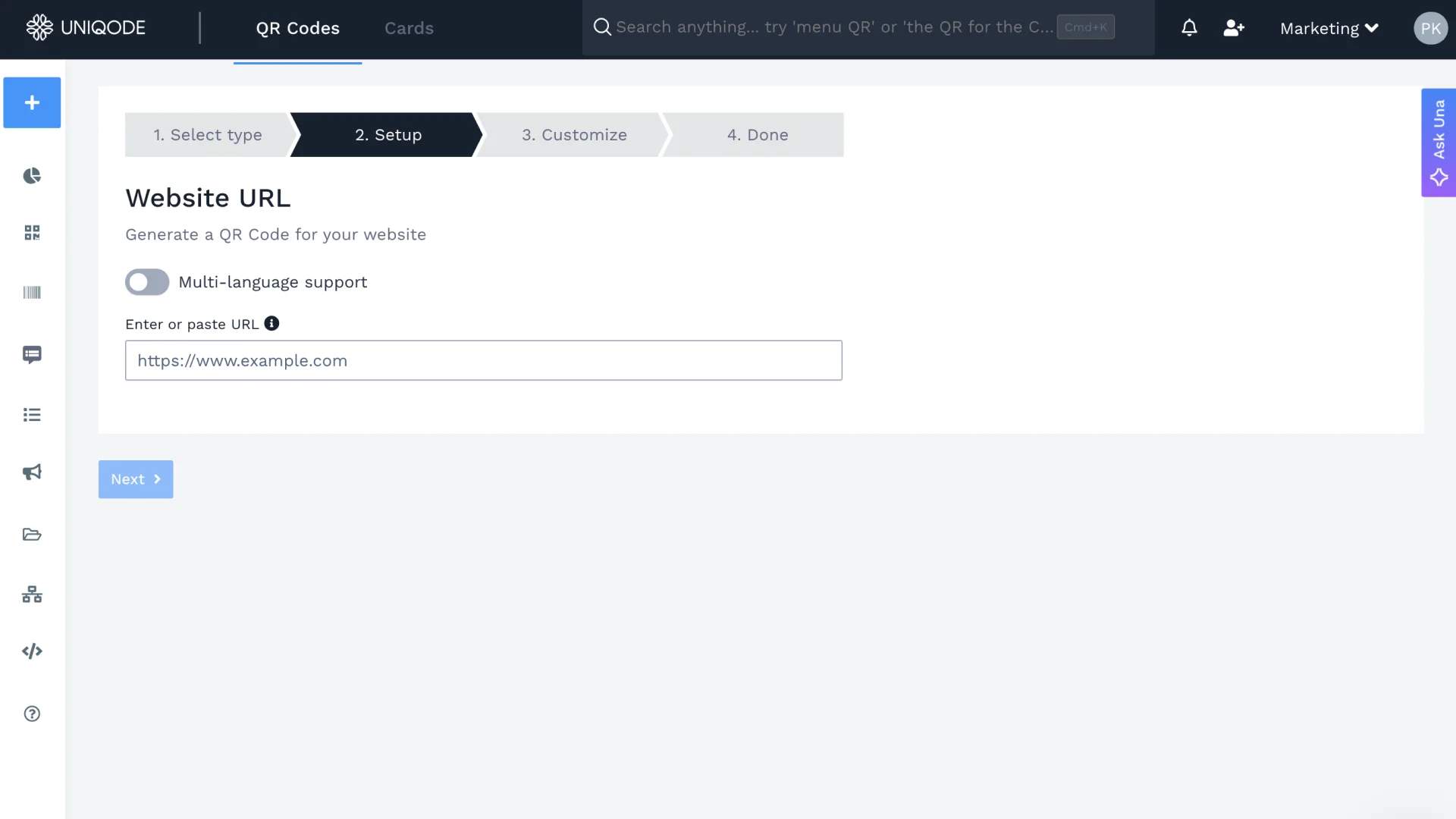
Enter a phone number for the Call type, or a URL for the Website type. This includes a wa.me link if the goal is a messaging-app handoff.
Step 4: Customize, save, and download
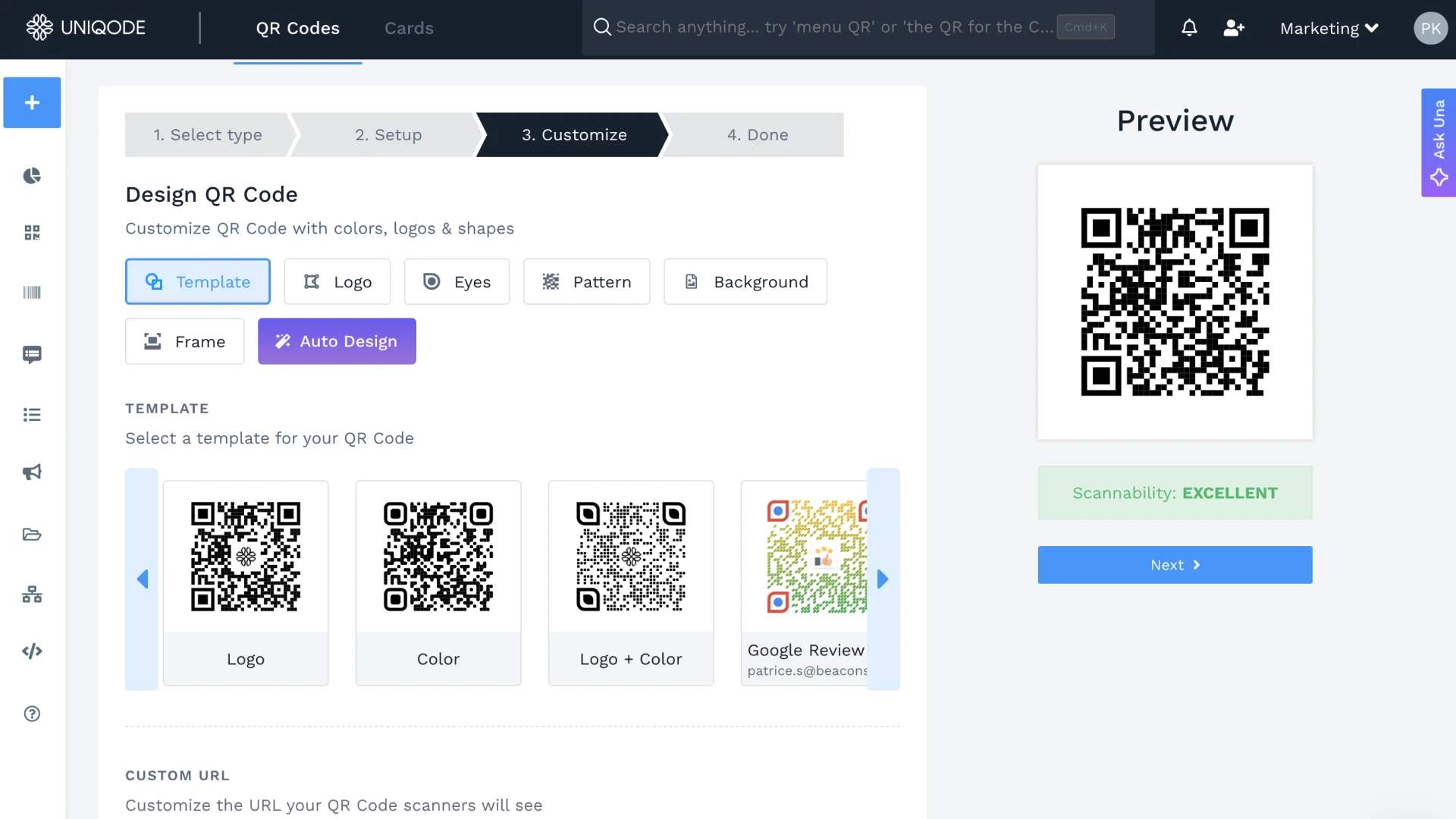
Match the design to the packaging, receipt, or signage it will appear on. Save and download in the format the print run requires. Once live, the destination can be edited from the dashboard at any time, without touching the physical print.
What to measure: tickets deflected, minutes saved, first-contact resolution
A customer service QR Code program only proves its value if someone tracks what happens after the scan. Most teams measure scan count. That is the wrong metric.
What actually matters:
- Tickets deflected: How many support requests never became tickets because the QR Code answered the question first
- Agent minutes saved: Time recovered per deflected ticket, multiplied across volume
- First-contact resolution rate: Whether the scan resolved the issue in one step, or the customer still needed to follow up
Connect scan data to your GA4 instance using UTM parameter passthrough, and you can map the full path from scan to resolution, whether that is a help-center pageview, a completed form, or a chat session started.
Scan count with no context is not a metric. A path from scan to resolution is.
The choice that decides whether any of this works
Customer service QR Codes are not a design choice. They are an operational one. The difference between a code that reduces tickets and one that sits ignored on packaging comes down to three things: where it routes, whether that destination stays accurate, and whether anyone is measuring what happens after the scan.
The technology is simple. The discipline around it is not.
Start with one use case, one channel, one measurable outcome. Get that right, then scale. Start your free trial on Uniqode and create your first QR Code.
Frequently Asked Questions
- 1. Can a QR Code's destinatination after it's printed?
Yes, but only if it's a dynamic QR Code. A static code's destination is fixed permanently at creation, so changing it means reprinting whatever the code is on. A dynamic code, available on platforms including Uniqode, can have its destination edited any time after printing, with no change to the printed code itself.
- 2. How do QR Codes improve customer service?
QR Codes eliminate the manual dialing process by automatically triggering phone calls when scanned, cutting the time between "I need help" and "I'm talking to someone." Direct-call QR codes on receipts let customers connect with support by scanning instead of typing a phone number, which matters most in the moments customers are already frustrated and looking for the fastest path to a person.
- 3. Is AI-layered conversational support available in QR Codes today?
It's an emerging pattern, not a widely shipped feature. A small number of adjacent tools have begun pairing dynamic QR codes with conversational AI trained on a knowledge base, but the capability isn't standard yet. What matters now is making sure the underlying QR code is dynamic, since a static code can't support this kind of layer even once it becomes more common.
- 4. How do you measure if a customer service QR Code is working?
Track scan-to-resolution, not just scan count: tickets deflected, agent minutes saved, and first-contact resolution rate are the metrics that show whether the code is actually doing its job. Connecting scan data to an analytics platform with UTM tracking shows the path from scan to outcome, which a raw scan total can't.
About the Author
Ektha is a QR code expert with years of research and analysis into the evolution of QR codes. Having written over 70 in-depth articles on QR technology, she has developed a comprehensive understanding of how QR codes are transforming industries. Her insights, including The State of QR Report, have been featured in leading publications. With a passion for simplifying complex topics and providing actionable strategies, Ektha helps businesses leverage QR codes to enhance their 'phygital' connections.
Related Posts
How to Create a QR Code for Waze Location

Stadium QR Codes: A Complete Guide for Venue Operators
How to Create a QR Code Menu (Step-by-Step Guide)

How QR Codes Boost Fan Engagement & Revenue in Events

Event QR Playbook: How to Use QR Codes Across the Event Lifecycle