Stadium QR Codes: A Complete Guide for Venue Operators

A stadium QR Code offers immense scope to boost your campaign reach and ROI. Moreover, you can deploy it for various use cases. In this article, learn more on how to integrate stadium QR Codes into your marketing.
A stadium on gameday is one of the densest QR Code environments in the world. Fans scan to enter gates, find their seats, order food, claim giveaways, access parking, and engage with sponsor offers. For venue operators, that density is both an opportunity and a management challenge. You need to ensure that the QR Codes scan reliable from the pods and keep the destinations up to date.
Get the QR Code campaigns right and you reduce print costs, unlock real-time ad revenue, and create trackable fan touchpoints across the entire venue. Get it wrong and you're reprinting signage mid-season and leaving sponsor dollars on the table. Uniqode's State of QR Codes 2026 report found that 45% of marketers who switched to dynamic QR Codes reported meaningfully fewer reprints; a direct result of treating different use cases differently rather than running every code the same way.
This guide breaks down exactly how to do that across the four places QR Codes show up most in stadiums: gate entry, wayfinding and parking, gameday giveaways, and sponsor activations.
What is a stadium QR Code?
A stadium QR Code is any QR Code deployed across a stadium or arena's physical and digital surfaces, seats, concourse signage, tickets, scoreboards, wristbands, food packaging, to automate a specific operational or marketing task. Scoreboards and billboards display codes digitally for AR video shares or live poll voting, while physical ticketsm and wristbands concourse signage carry printed codes for gate entry, parking, and wayfinding.
A single stadium can run ten or more of these deployments at once, and they rarely belong to the same department. Ticketing and operations own gate entry. Food and beverage owns in-seat ordering. Marketing and sponsorship own brand activations on a jersey ad or concourse banner. Guest services owns wayfinding and feedback.
Static vs. dynamic QR Codes in stadiums
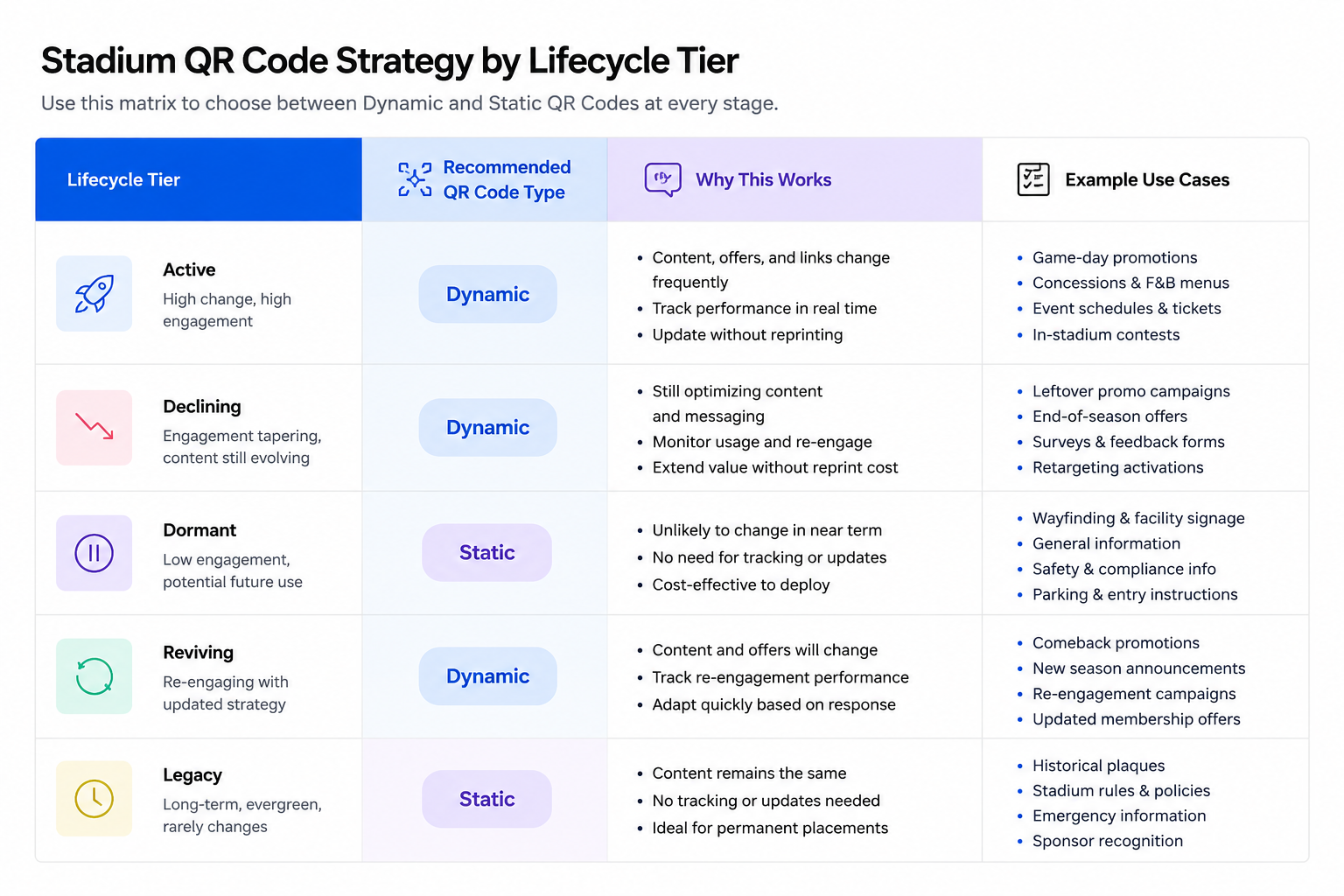
The choice between static and dynamic QR Codes comes down to one question: how likely is this code's destination to change before it stops being used?
One-off codes printed for a single gameday giveaway do not need to be dynamic. The code gets scanned during one event and never again, so paying for edit-after-print capability you will never use adds cost without any return.
Season-long codes are where dynamic becomes worth it. Parking lots get reassigned, sponsor campaigns update, and construction changes wayfinding routes. Every one of those changes forces a full reprint cycle with a static code. A dynamic code lets you update the destination from a dashboard in minutes, without touching the physical print.
Permanent codes on gate signage and seat markers need to be dynamic. A broken gate entry code creates a bottleneck during peak entry that cannot be fixed until someone physically replaces the signage. Dynamic codes can also be deactivated immediately if ticket fraud is detected, while a counterfeited static code stays valid until it is manually caught and reported.
Digital ticketing and gate entry: where the decision has the highest stakes
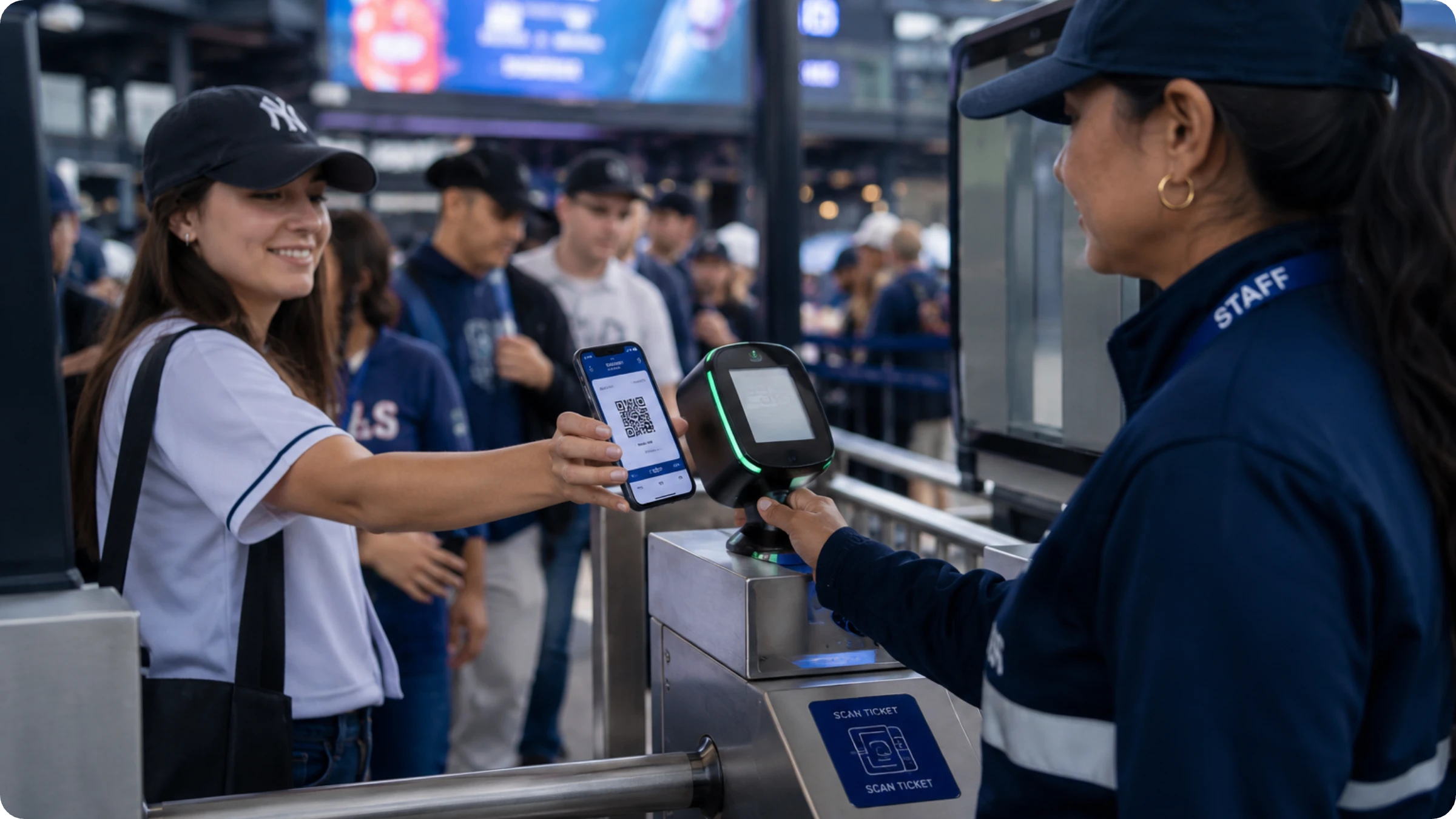
Gate entry carries the highest consequence in a stadium's entire QR Code portfolio, because the failure mode here is a closed gate, not a stale sign. Major venues are moving toward mobile-only, dynamic ticketing as the default for large-scale events, and the clearest current signal is the 2026 FIFA World Cup.
Picture a fan arriving at a World Cup gate with nothing but a phone: no printed ticket as backup, no paper stub if the app glitches. The QR Code on the screen is the only credential that gets them through, at the scale of the most-watched sporting event in the world.
Fraud prevention runs on the same logic as speed. A dynamic ticketing QR Code can be deactivated the moment a duplicate or suspicious scan shows up, closing off resale fraud in a way a printed static barcode never could.
One QR Code, one print run, but the destination adapts to who's scanning it. Smart Rules' device-OS condition (conditional routing based on device, time, or location) routes iPhone users to the App Store and Android users to Google Play automatically, the same code that hands a fan their mobile ticket routing a first-time app visitor to the right app store without printing two separate codes. A sports marketing team evaluating QR Code platforms asked for this exact routing and got it, during a real platform migration.
Gate entry connects directly to what happens after a fan is inside: fan engagement and revenue use cases covers what stadiums do with the data once the gate scan is complete.
How QR Codes are used in stadiums
Gate entry is the highest-stakes deployment in a stadium's QR Code portfolio, but it's one of many, and the rest sort cleanly into the same three tiers once you stop treating them as a flat features list.
1. Digital ticketing and gate entry
Gate entry is the highest-stakes QR Code deployment in any stadium. A broken wayfinding sign is an inconvenience. A broken gate code stops fans from entering.
The 2026 FIFA World Cup is moving to mobile-only ticketing, where the QR Code on a fan's phone is the only credential that gets them through the gate.
Fraud prevention is the other reason gate codes need to be dynamic. A dynamic code can be deactivated the moment a duplicate scan is detected. A static code stays valid until someone manually identifies and flags the problem.
2. Wayfinding and navigation (season-long or permanent tier)
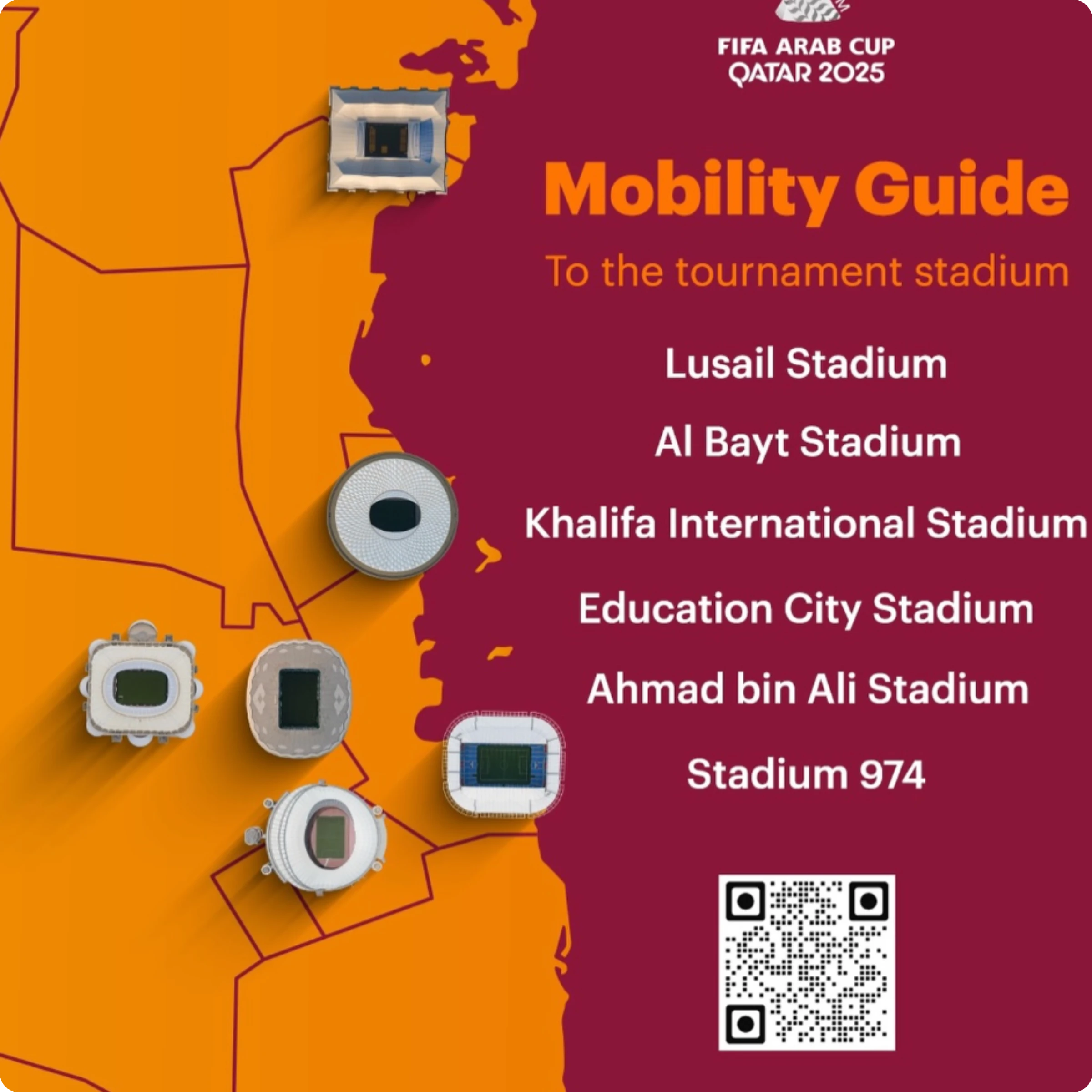
During the FIFA World Cup 2022 in Qatar, Lusail Stadium used a QR-based Mobility Guide that gave visitors real-time directions and the fastest routes to the venue. Content changes when construction reroutes a path, which puts wayfinding in dynamic territory rather than static.
3. In-seat food and merchandise ordering (season-long tier)
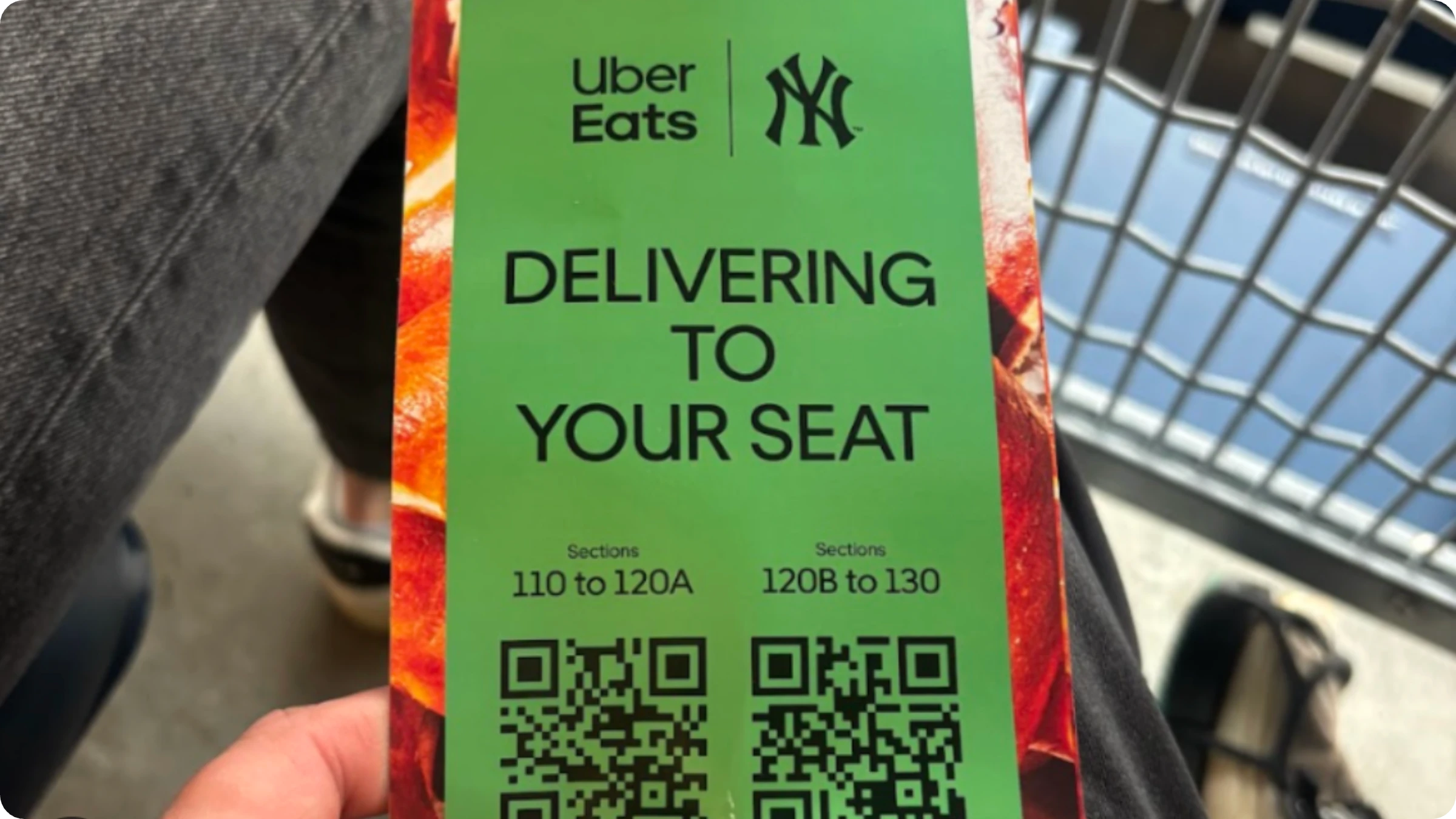
Yankee Stadium partnered with Uber Eats to let fans scan a QR Code at their seat and order food, drinks, or merchandise, with delivery in as little as five minutes. Menus and prices shift throughout a season, sometimes within a single game day, exactly the destination change a dynamic code handles without a reprint. A restaurant menu QR Code is built for that rotation.
4. Sponsor and multilingual activation (season-long tier)
Allianz Arena partnered with language-tech firms to trigger multilingual audio guides through QR Codes near exhibits like the trophy room, reportedly reaching 65% of non-German-speaking visitors. Sponsor content and language offerings change often enough that dynamic is the safer default. Smart Rules' device-language condition routes by a scanner's device language automatically, an Italian visitor sees the Italian version, everyone else sees German, without separate printed codes per language.
5. Parking (season-long tier)
Parking QR Codes belong in the season-long tier: printed once at the start of a season, pointing to a parking-map or payment page, likely to need an update if a lot closes or pricing shifts mid-year. The same reprint-cost math applies here as it does to wayfinding. This is the content gap this refresh closes: the live page did not cover parking before.
6. Fan feedback collection (one-off or season-long tier)
QR Codes placed at food counters, restrooms, and exit gates let venues collect feedback while the experience is still immediate. The data this generates is operationally useful. Venue teams can identify which concession stands are drawing complaints, which sections have recurring restroom issues, and how satisfaction shifts across different matchday conditions.
Mistakes that break stadium QR Code programs
Here is what can go wrong in QR Code programs in stadiums, and how to avoid each one:
- Departments creating codes independently. Marketing, ops, F&B, and ticketing each build their own codes with no shared system. Fix: organize all codes into department folders with scoped edit access and a shared naming convention.
- Static codes in the wrong places. A sponsor code printed as static points to a dead link two weeks into the season. Fix: any code that runs longer than a single event should be dynamic so the destination can be updated without a reprint.
- No ownership when something breaks. A broken code gets noticed by a fan or a sponsor, not by the venue team. Fix: assign a code owner per deployment and set up scan-drop alerts so problems surface internally before they surface publicly.
- Spoofed codes in high-traffic areas. Fake parking or sponsor codes are easy to plant in a venue where thousands of fans scan unfamiliar codes quickly. Fix: use branded, recognizable code designs and publish what your official codes look like.
Uniqode's State of QR Codes 2026 report backs this up: 33% of marketers cite inconsistent tracking as a scaling problem and 28% report duplicate codes. In a stadium context, those numbers translate directly to broken fan experiences and sponsor complaints that could have been caught with a basic governance system in place.
How to create a stadium QR Code
Creating a stadium QR Code is straightforward with a dynamic QR Code generator. First, you’ll need to confirm which lifecycle tier this specific code belongs to. That tier, one-off, season-long, or permanent, determines whether you need dynamic at all, per the framework above. Then, you can decide which type of QR Code you need to create. Follow the four steps below to create a QR Code for your stadium.
Step 1: Click "+Create" and choose your QR Code type
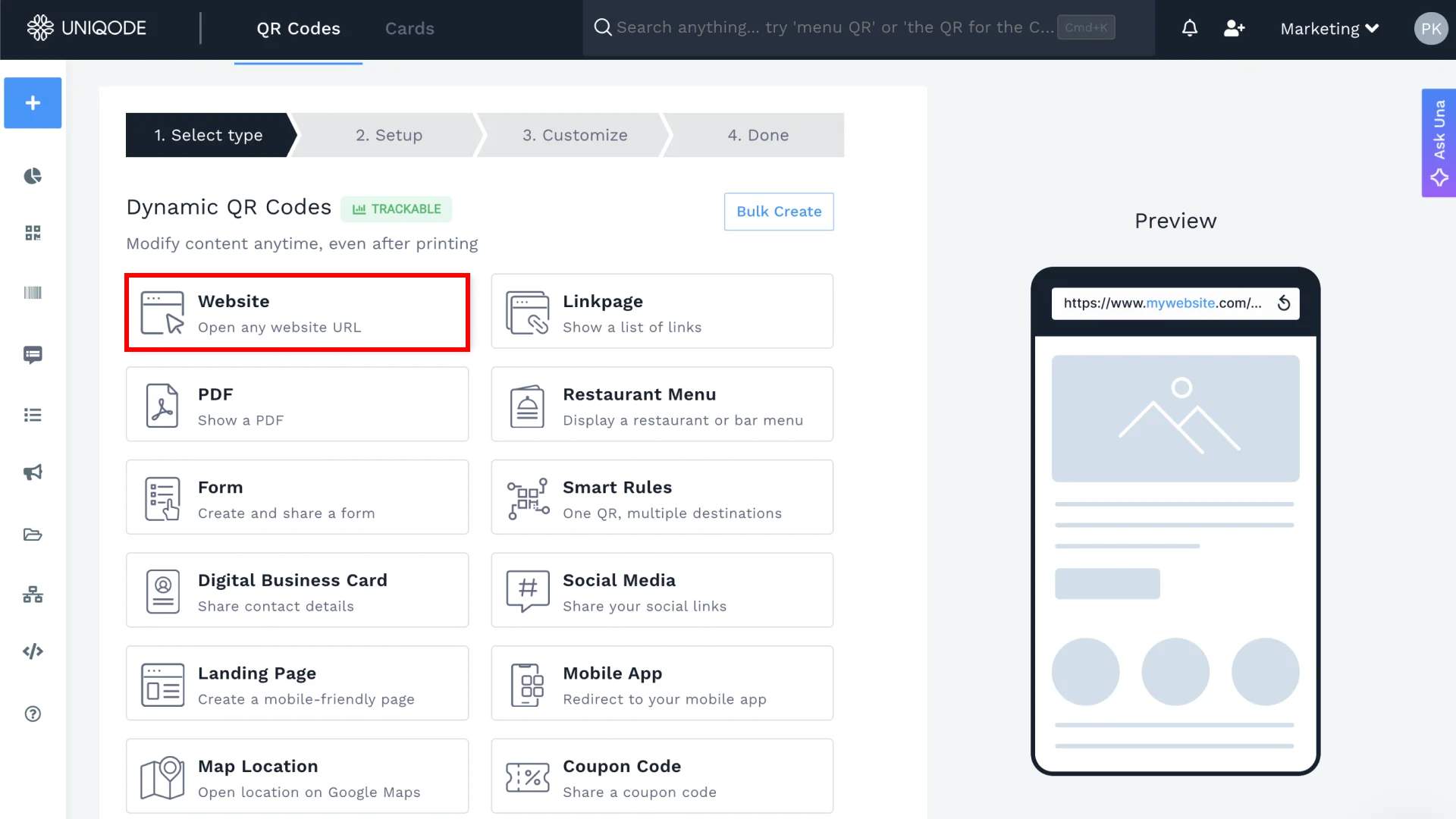
Once logged in, click the button in the top right corner. Choose your QR Code type. For this example, I am choosing Website.
Step 2: Add the QR Code details
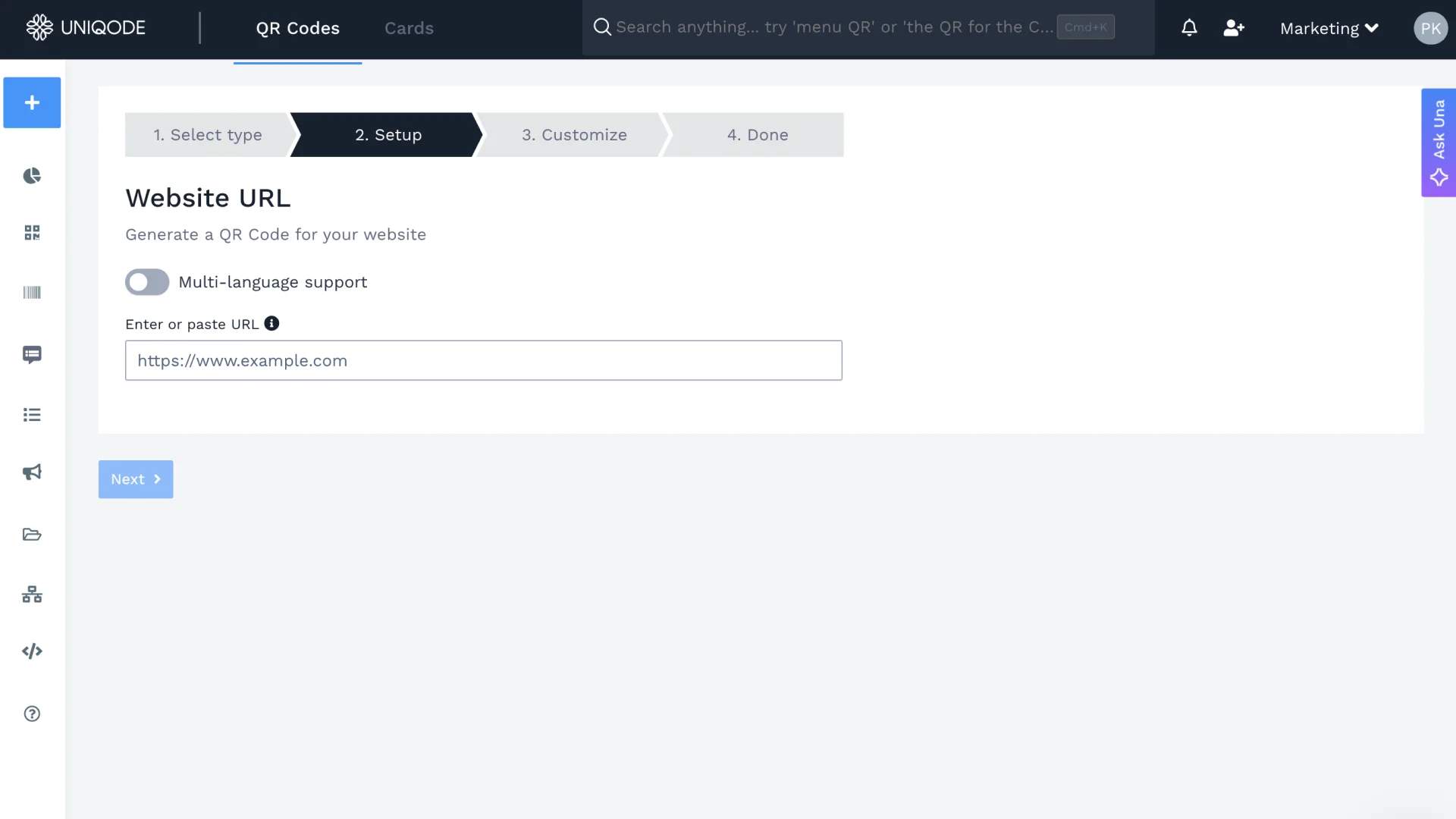
Enter in the details that your QR Code will carry. In this case, we enter the website URL that the code will point to when scanned.
Step 3: Customize your stadium QR Code
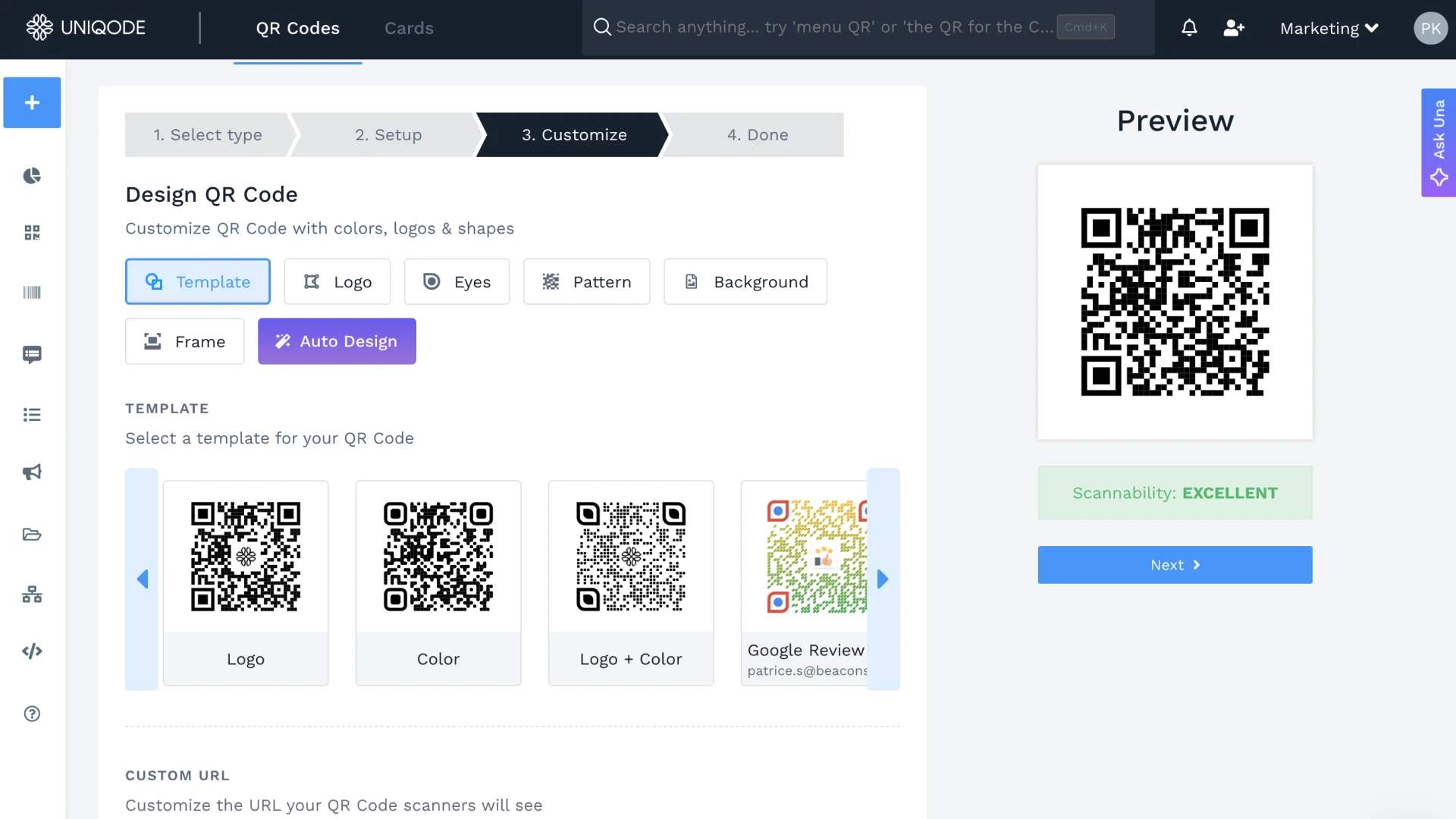
Choose colors, frames, and templates that give it a distinct look and draw attendees' attention.
Step 4: Download your stadium QR Code
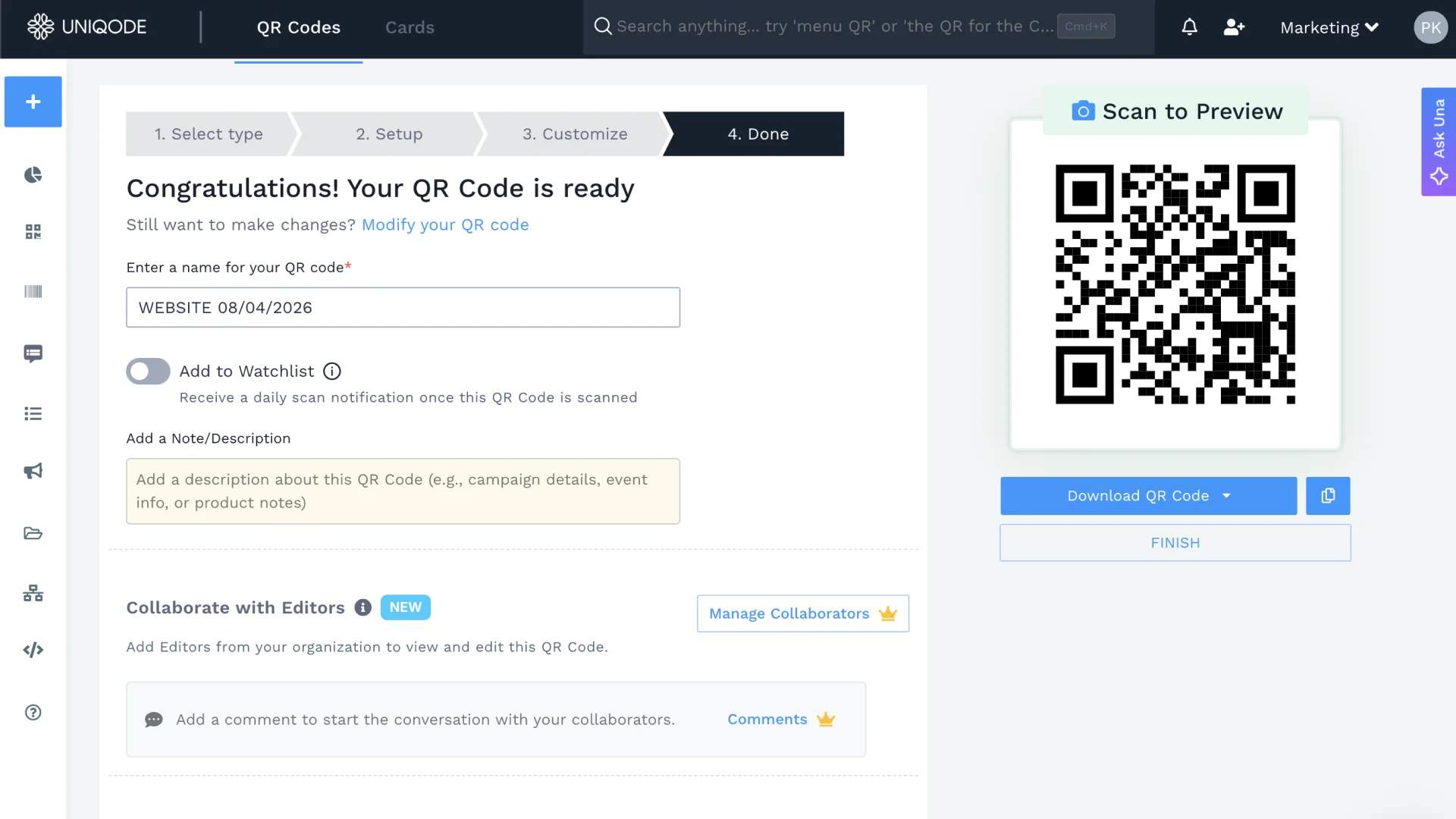
Once customization is done, click "Download QR Code."
Download stadium QR Codes in high-resolution formats like SVG or EPS, both vector-based, so they resize on demand without turning blurry. For a print billboard, EPS holds up best. For digital billboards, the most common stadium use case, SVG is the standard choice.
If you're creating more than a handful of these, gate signage across every entrance, parking codes across every lot, bulk upload handles it from a spreadsheet instead of one-by-one clicks: pick the type, download the template, fill in the destinations, upload, and the whole batch is ready to brand and download together. Save each deployment type as a template so next season's refresh is a data swap, not a redesign.
Create dynamic QR Codes for stadiums
Stadium QR Codes can automate gate entry, in-seat food ordering, smart navigation, sponsor activations, and fan feedback collection. Venues like Yankee Stadium, SoFi Stadium, and Lusail Stadium have already built QR Code systems that both improve the fan experience and reduce operational overhead.
Before the next season starts, run this audit against your own venue: list every QR Code currently deployed, by department. Tag each one as one-off, season-long, or permanent. Any code tagged season-long or permanent that is still static is a reprint waiting to happen, and the first time a sponsor link changes or a parking lot closes for construction, that cost becomes real.
Most stadium QR programs do not fail because of a bad platform. They fail because no one owns the system. That is the problem worth solving first.
Try out Uniqode for free and see how you can leverage analytics, retargeting and smart rules to create a cohesive QR Code program for stadiums.
Frequently Asked Questions
- How can I create a stadium QR Code?
You can create a stadium QR Code in 4 steps:
- Go to the Uniqode dashboard; click “+Create” and choose “QR Code” as your campaign type
- Select “Website (URL)” or your preferred QR Code type and paste the URL
- Customize your QR Code design as per your preference
- Download the final QR Code in the desired format and deploy
- What is the best QR code format for stadium billboards and signage?
For digital stadium billboards, SVG format is the most commonly used QR Code format, while EPS format is recommended for print billboards to ensure high resolution and prevent blurry scanning. Both SVG and EPS are vector-based formats that can be resized on demand without losing quality, which is critical for large-scale stadium displays. These high-resolution formats ensure QR Codes remain scannable from various distances and angles throughout the venue.
- What types of QR code campaigns work best for stadium marketing?
Dynamic QR Codes offer multiple campaign types for stadiums including social media QR Codes, discount coupon QR Codes, feedback QR Codes, and Website URL QR Codes. These can be deployed on scoreboards, billboards, food wrappers, posters, and even at individual seats for functions ranging from smart navigation to augmented reality experiences. During the FIFA World Cup 2024 at Lusail Stadium in Qatar, QR Codes successfully provided real-time directions and the fastest routes to help visitors navigate seamlessly to the venue.
- Can you edit stadium QR codes after they are printed?
Yes, dynamic QR Codes can be edited, modified, and tracked after printing, allowing stadium marketers to update campaigns without reprinting materials. This flexibility is available through QR Code generators like Uniqode, which offers a 14-day free trial for creating dynamic QR Code campaigns. Dynamic QR Codes enable stadiums to change destinations, update promotions, and track scan analytics in real-time throughout an event or season.
- What stadium operations can be automated with QR codes?
Stadium QR Codes can automate various operations including smart navigation with real-time directions, in-seat food and merchandise ordering with delivery in as little as 5 minutes, AR video sharing, poll voting, and social media contest entries. These QR Codes are typically displayed digitally on scoreboards and stadium billboards, or printed on physical items like food wrappers and posters. Major venues like Yankee Stadium, SoFi Stadium, and Lusail Stadium have successfully implemented QR Code systems to enhance fan experiences and streamline operations.
About the Author
Ektha is a QR code expert with years of research and analysis into the evolution of QR codes. Having written over 70 in-depth articles on QR technology, she has developed a comprehensive understanding of how QR codes are transforming industries. Her insights, including The State of QR Report, have been featured in leading publications. With a passion for simplifying complex topics and providing actionable strategies, Ektha helps businesses leverage QR codes to enhance their 'phygital' connections.
Related Posts
How to Create a QR Code for Waze Location
QR Codes for Customer Service: Cut Support Costs, Not Corners
How to Create a QR Code Menu (Step-by-Step Guide)

How QR Codes Boost Fan Engagement & Revenue in Events

Event QR Playbook: How to Use QR Codes Across the Event Lifecycle