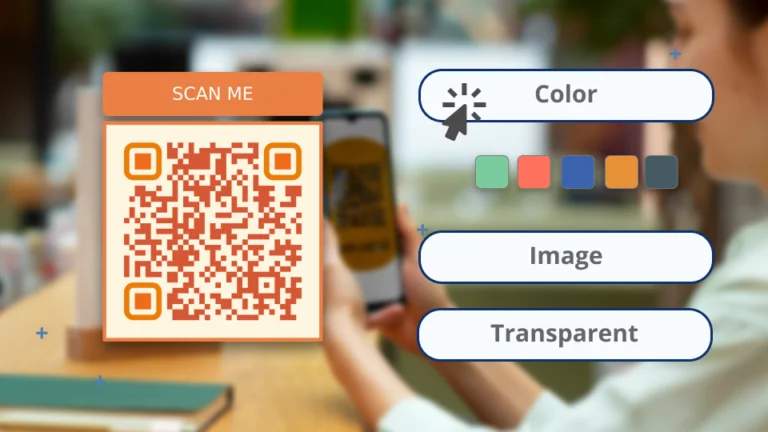
QR Codes, although typically black and white, can be any color if they maintain high contrast for scannability. Custom colors enhance branding, but following design rules ensures functionality.
QR Codes are most popular in their black and white avatar, but they need not be black and white. You can customize a QR Code to any color if it is scannable.
So, what colors can you use in a QR Code? What determines a QR Code’s scannability? What is the science (and myth) behind QR Code colors? I will address all these questions and more in the post.
Why QR Codes are typically black and white
When Denso Wave, a subsidiary of car giant Toyota, invented the QR Code in 1994, it was supposed to overcome the limitations of the 2D or stripped barcode. If you recall, barcodes, too, are predominantly black and white. The question is, why?
This choice of black and white for QR Codes and most machine-readable codes, such as barcodes and Data Matrix Codes, is more of an engineering choice than a visual or design choice.
Machines that scan codes such as the QR or barcodes depend on the camera to distinguish the code pattern (pixels, dots, stripes, etc.) from the rest of the environment.
Black and white, or black codes printed on a white background, offer the highest possible contrast. This makes every scan event more successful because the machine can determine the codes better from a contrasting background.
🎲Fun fact: The black-and-white design is also said to be inspired by a Japanese board game, Go, which resembles the QR Code’s grid-like pattern.

However, the modern QR Code has evolved, including printing and scanning technology, design and aesthetics, and the consumer mindset.
Today, a QR Code is functional and a design element that can reflect a brand’s personality. Hence, the question is, “Do QR Codes have to be black and white?”
Do QR Codes have to be black and white? Not anymore!
Due to reliability, the cheap cost of printing, and ease of accessibility, the black-and-white QR Code remains the most common. However, it’s possible to create QR Codes beyond black and white if the contrast between the data pattern and the background is maintained.
That said, even if you create a colorful QR Code, you still have to maintain the contrast between the pattern and the background.
🤔Did you know?
Uniqode is the only QR Code generator in the market with a scannability score to indicate how scannable your QR Code is irrespective of color. When you attain a higher scanability score, you automatically have a higher-contrast QR Code.
Going beyond black-and-white QR Codes: Thing to keep in mind
High contrast is essential to ensure QR Code scannability, and this is precisely why black-and-white QR Codes rule the roast and are still the most commonly found:
- Rule 1: Use dark colors instead of black and light colors to replace the white. This ensures a high contrast and aids the readability of the QR Code.
- Rule 2: If you choose to invert the colors, that is, use white patterns on a black background (or something similar), be aware that it may not always work. This can depend on scanner light sensitivity and compatibility issues. The solution? Test thoroughly!
- Rule 3: Don’t skip testing with various devices and scanners to confirm they work under different conditions (e.g., on screens, printed, in poor lighting).
Simplicity in design has been another reason black-and-white QR Codes have been so popular. However, with the evolution of technology and scanning apps, it has become easier to experiment with QR Code designs without compromising the results. Please keep in mind these design-specific rules for QR Codes:
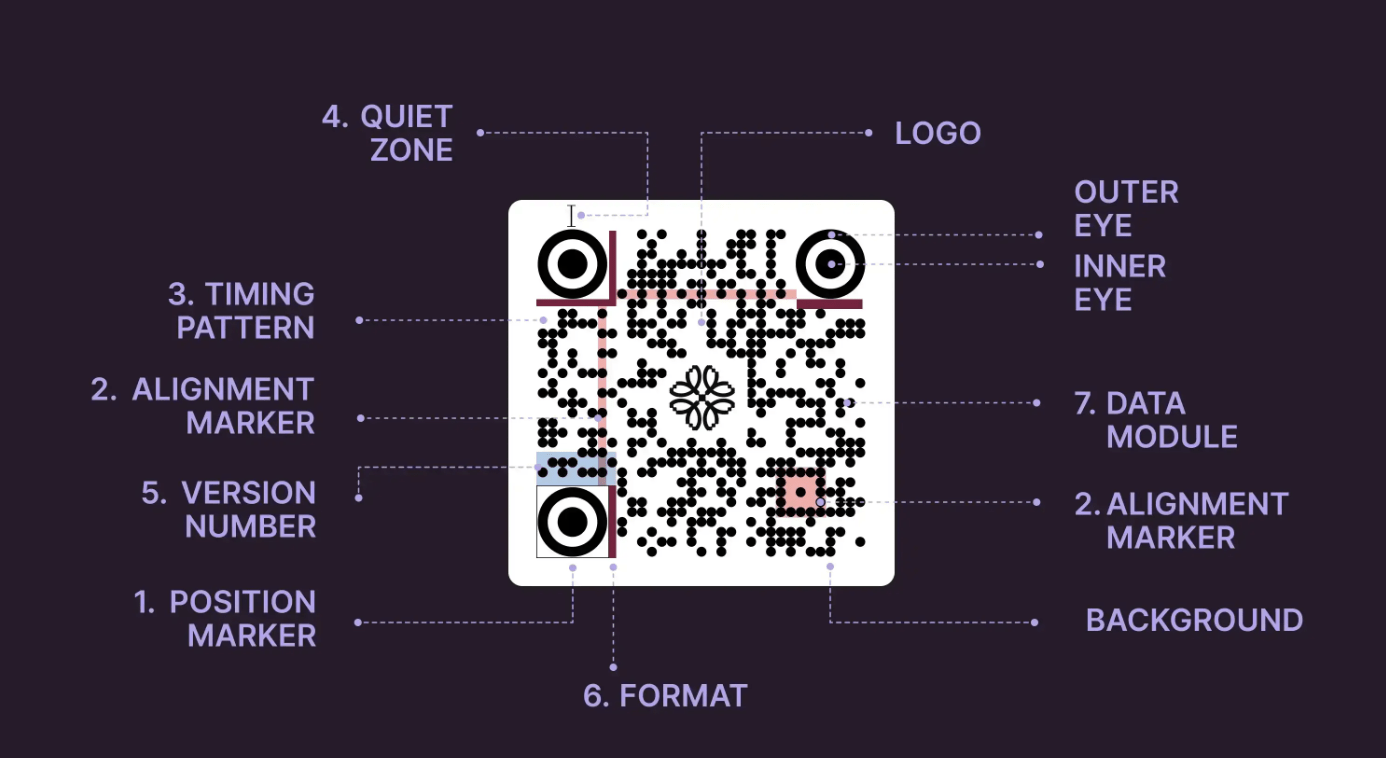
- Don’t overcomplicate with noisy background colors. A solid or lightly patterned background works best.
- Avoid placing logos or images in the functional areas. Adding images is a great customization option for QR Codes; however, you must leave the finder pattern and alignment markers untouched to maintain high scannability.
- Maintain a quiet zone to ensure that external elements (such as text, images, or colors) near the QR Code don’t interfere with the scanning process. If this buffer zone is absent or cluttered, the scanner may fail to detect where the QR Code begins and ends.
- Protect positioning squares and leave them unobstructed. They help identify and align the QR Code correctly, regardless of its orientation.
Read more about how QR Codes work.
The benefits of a non-black-and-white QR Code
While black-and-white QR Codes have been successful, it is now easy and convenient to design QR Codes in different colors using a design-friendly QR Code Generator. The advantages of adding color to your QR Codes are many:
✅ Better branding and visual appeal: Customizing QR Codes to match a company’s brand colors makes them more visually cohesive and professional.
✅ Increased engagement: A visually appealing QR Code will likely catch people’s eyes and spark curiosity.
✅ Better aesthetics: Colored QR Codes can smoothly blend into marketing materials and complement the overall design instead of clashing with it
✅ Customizability for campaigns: You can use different colors for a specific theme. For example, you can go with red and green for a Christmas special or create green QR Codes for your sustainability information
✅ Versatility for different marketing channels: You can experiment across digital and print media without worrying about scannability
🎥 See it in action: Hidden messages in high-contrast QR Codes
Guinness, one of the world’s most popular Irish stout beer brands, launched its most successful marketing campaigns for St Patrick’s Day.
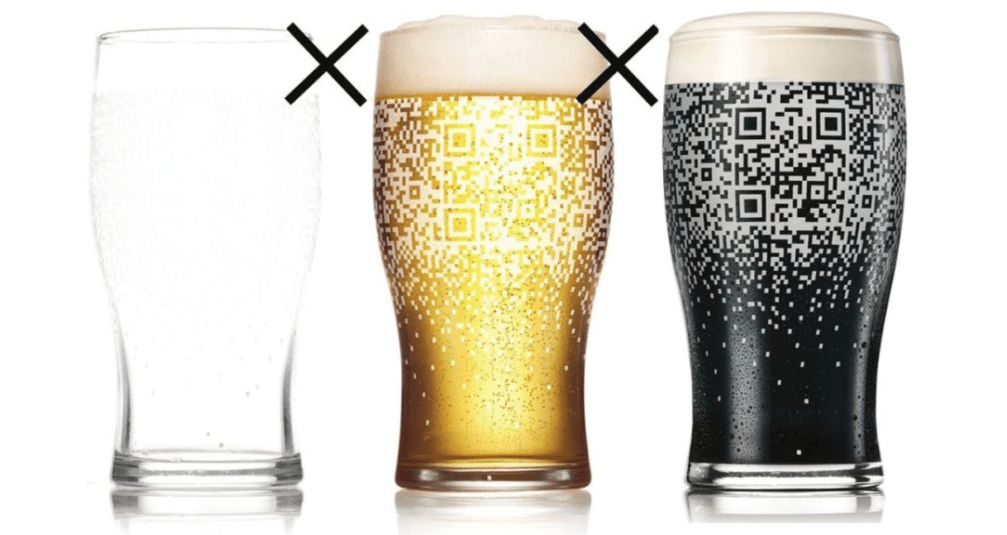
These customized Guinness mugs unveiled a QR Code when filled with Guinness beer. This QR Code was unscannable when any other beer was filled, which was also a great way to get people to refill their mugs. The dark brown beer provided a high contrast against the white QR Code, making it scannable and effective.
Upon scanning, users could download exclusive Guinness promotions, update their Facebook and X (formerly Twitter) statuses, and invite their friends to join them. An innovative way to use QR Codes with transparent backgrounds for sure!
How to create a QR Code that’s not black and white (but high-contrast)
Follow this detailed guide on creating color QR Codes, best practices and tips on using color psychology to create the ideal color QR Codes for your brand.
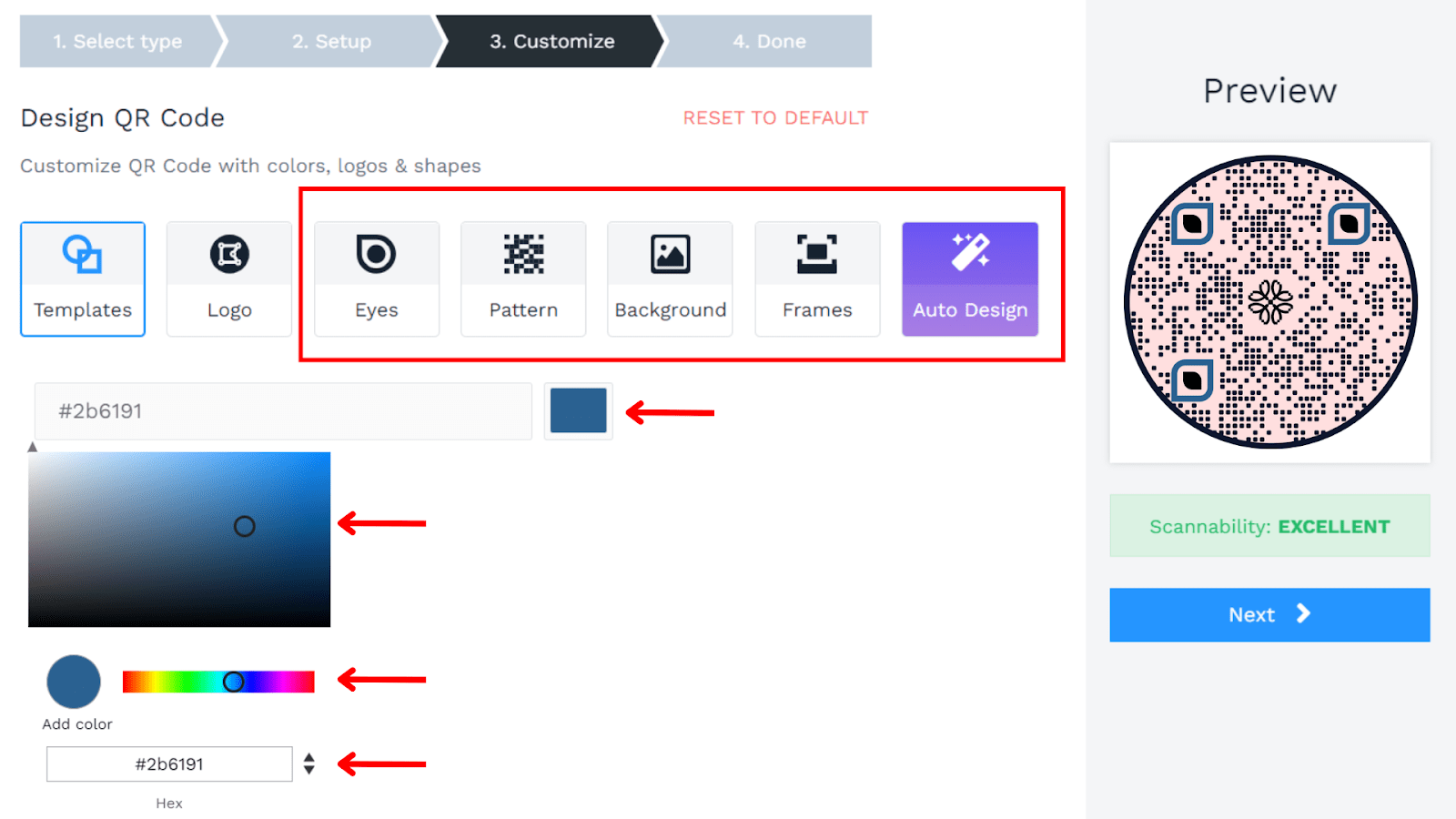
The ultimate QR Code branding and design customization checklist
This checklist will help you choose the feature that works best for you and give you examples of the possibilities offered by a QR Code generator like Uniqode:
| 📱Feature | 📄 Description | ➡️ Example |
|---|---|---|
| 🎨 Change QR Code color | Replace the traditional black-and-white design with brand colors while maintaining contrast for scannability. | A sportswear brand uses its signature red and white for the QR Code on product tags. |
| 🌈 Change pattern color | Use gradients or multi-color schemes to enhance the QR Code’s appeal. | A music festival uses a gradient pattern in the QR Code that matches its event theme colors. |
| ⚪ Change QR Code eye color | Alter the color of the finder pattern eyes to complement the overall design and match the QR Code’s aesthetic. | To maintain brand harmony, a cosmetics brand uses pastel-colored eyes in the QR Code for its product labels. |
| 🌅 Gradient background | Add a gradient or ombre background behind the QR Code for a sleek, modern appearance | A tech startup uses a blue-to-green gradient background on their event QR Code for a futuristic vibe |
| ®Add logo | Insert a logo or icon in the center of the QR Code without compromising its scannability | A coffee shop adds its logo in the QR Code on flyers, making it instantly recognizable to customers |
| ⬛ Add frame and frame text | Add a frame around the QR Code and customize the text for a call-to-action (e.g., “Scan Me”) | A retail brand adds a bold frame with the text “Unlock Exclusive Deals!” to draw attention to the QR Code |
| ⏺️ Change QR Code Pattern | Customize the dot or square modules to creative shapes (e.g., circles, diamonds, or stars) | A children’s brand uses star-shaped patterns to make the QR Code on its product packaging more playful |
| 🔷 Change QR Code shape | Modify the overall shape of the QR Code to make it circular, hexagonal, or another creative design | A tech company uses a rounded QR Code design for a modern look on its app promotional materials |
| 👁️ Change QR Code eye frame | Customize the square frames around the finder patterns to include unique designs (e.g., dotted, rounded, or themed frames) | A luxury jewelry brand uses gold-lined eye frames to align with its premium branding |
| 📄 Print in multiple file formats | Export the QR Code in formats such as PNG, SVG, or PDF for digital and print applications | A marketing agency prints high-quality PDF QR Codes for posters and shares PNG versions for social media |
| 🔗 Short-URL | Shorten the target URL embedded in the QR Code to make it compact and reduce the overall data density | An ecommerce store uses a short URL to ensure fast scanning and improve user experience on mobile devices |
| 🏷️ White-label Solution | Remove third-party branding from the QR Code generator platform to maintain exclusivity for your brand | A SaaS company creates QR Codes without the QR generator’s logo to maintain a professional look |
| 💻 Custom domain | Use your branded domain in the URL embedded in the QR Code for trust and brand consistency | A fitness studio creates QR Codes that link to their domain (e.g., scan.fitstudio.com/offer) |
| 🖼️ Add background image | Overlay the QR Code on a background image or pattern to make it visually striking | A travel agency places a QR Code on a scenic beach image for their vacation package flyers |
| ✨ Add custom shapes in modules | Individual QR Code modules (dots or squares) should be replaced with tiny icons, such as hearts, stars, or thematic symbols | A wedding invite QR Code uses heart-shaped modules for a romantic touch |
| 💧Transparency in QR Code | Use semi-transparent QR Code elements to overlay on images while keeping the code scannable | A fashion brand places a semi-transparent QR Code on a product model’s image in their digital catalog |
Go beyond black and white QR Codes for your brand
Ready to up your QR Code game? Explore how you can customize QR Codes with Uniqode.
START FREE TRIALFrequently Asked Questions
- Do QR Codes have to be black and white?
No, QR Codes don’t have to be black and white. They can be customized to any color if there’s enough contrast between the foreground (code) and background for scanners to read it effectively.
- What colors work best for QR codes besides black and white?
Dark colors like navy blue, dark green, or burgundy work best for the QR code pattern, while light colors like white, cream, or pale yellow should be used for the background. The key requirement is maintaining high contrast between the foreground and background colors to ensure scannability across different devices and lighting conditions. When using colored QR codes, always test them with multiple scanner apps to verify functionality.
- What is the quiet zone requirement for colored QR codes?
The quiet zone is a mandatory buffer area around all QR codes that must remain free of external elements like text, images, or background colors to prevent interference with the scanning process. This white space allows scanners to properly identify where the QR code begins and ends, which is especially critical for colored or customized QR codes. Without an adequate quiet zone, even high-contrast colored QR codes may fail to scan consistently across different devices.
About the Author
Ektha is a QR code expert with years of research and analysis into the evolution of QR codes. Having written over 70 in-depth articles on QR technology, she has developed a comprehensive understanding of how QR codes are transforming industries. Her insights, including The State of QR Report, have been featured in leading publications. With a passion for simplifying complex topics and providing actionable strategies, Ektha helps businesses leverage QR codes to enhance their 'phygital' connections.
Related Posts

How to Design a QR Code: Best Practices, Mistakes to Avoid, and Real Examples
High Resolution QR Code : Ensure Clarity and Scannability
Vector QR Codes Explained: SVG vs EPS, DPI, and Print-Ready Setup
QR Code with a Background Image: How to Create One That Still Scans
How to Add a QR Code Border (and Keep It Scannable)