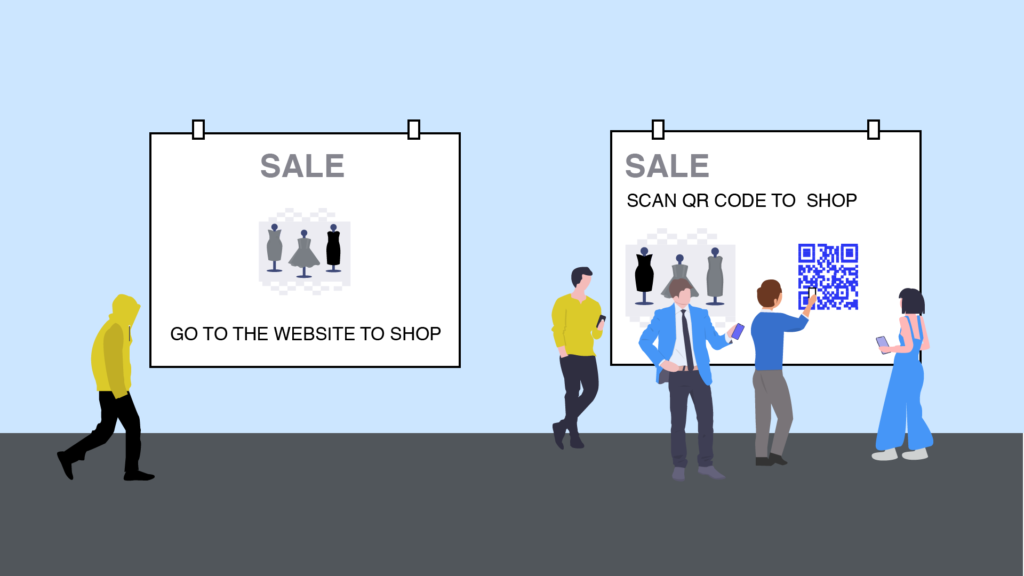
QR Codes for Direct Mail Campaigns: How They Work, Use Cases & ROI
QR Codes offer a digital edge to your direct mail marketing efforts. You can generate higher ROI by creating dynamic direct mail QR Codes. Discover more in this detailed guide.
QR Codes for direct mail campaigns turn a physical mailer into a trackable digital touchpoint. Scan the code, and the recipient lands on a landing page, form, video, or GPS location you control. This seamless bridge between print and digital is fueling a resurgence in direct mail, a channel that has been on the decline since 2004. While traditional direct mail may be waning, the integration of QR Codes is steadily gaining momentum.
Despite the impressive response rates and ROI that direct mail continues to deliver, conversations with marketing leaders reveal a familiar set of challenges. Time and again, these five issues surface:
- Direct mail is a high-cost initiative
- Measuring the ROI (lead/sales attribution) of direct mail is complex
- The risk of fines and reputation loss due to non-compliance with GDPR and CAN-SPAM regulations is always lurking
- Personalization is a pain due to the lack of data
- Mail fatigue leads to low response rates
Fortunately, QR Codes offer practical solutions to each of these challenges. By incorporating a QR Code into your direct mail, you unlock the ability to:
- Track direct mail data from your platform’s analytics dashboard and prevent data silos
- Ensure campaigns are compliant with GDPR and CAN-SPAM to avoid fines and lawsuits
- Personalize your direct mail QR Code campaigns with deep demographic, device, and first-party data points
- Improve response rates with attractive designs and faster information capture (through scans)
- Prevent additional print materials and save costs
Up next: a closer look at how to set up your own direct mail QR Code campaign, the data behind its ROI and response rates, and insights on whether this approach is the right fit for your industry and specific needs.
What is a direct mail QR Code?
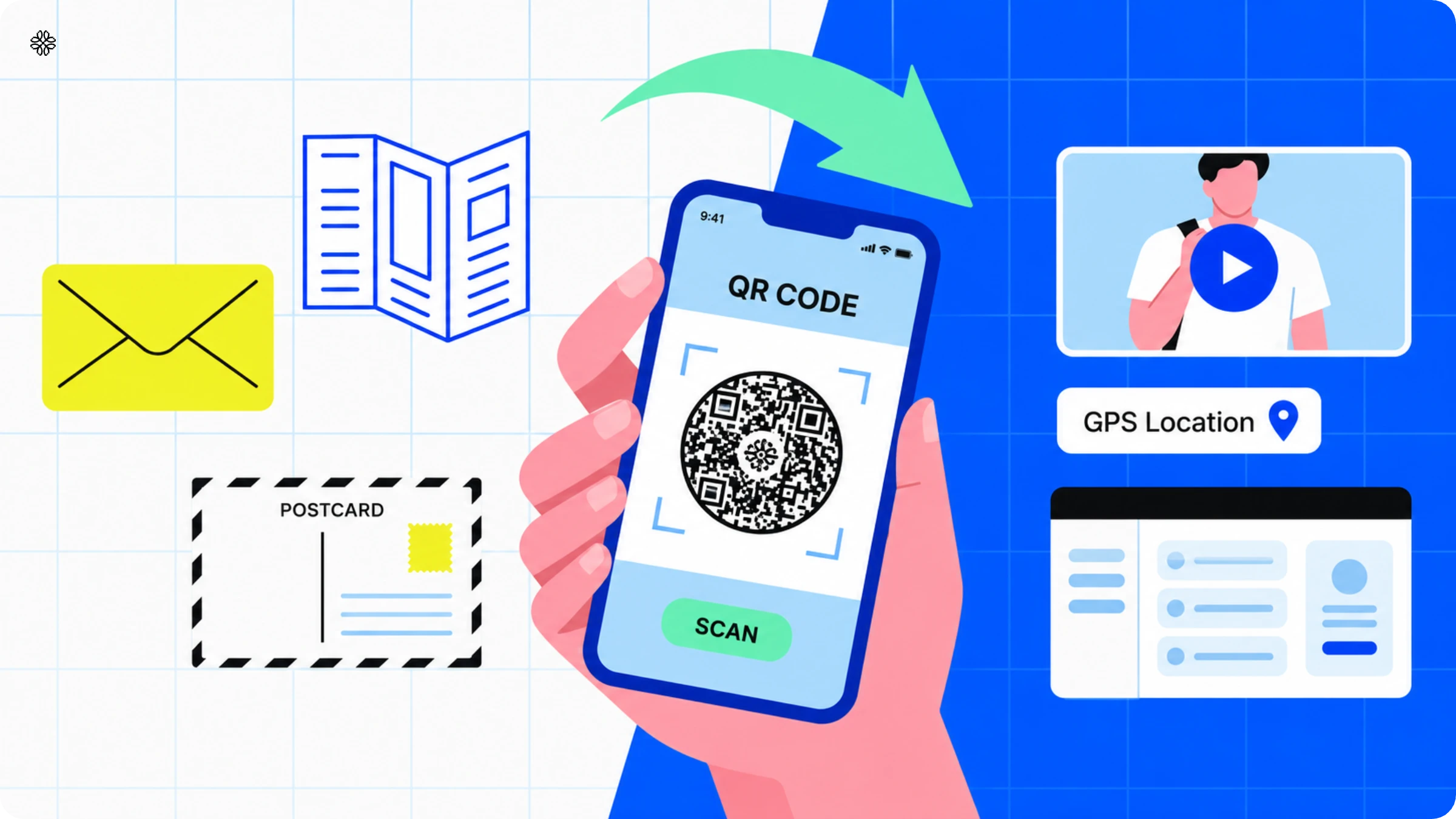
A direct mail QR Code is a digital integration to your physical mail assets that takes the recipient to a specific digital destination through a mobile device scan. The destination can be a landing page, feedback form, GPS location, or any digital content.
Adding QR Codes in direct mail bridges the gap between physical (flyers, letters, postcards, catalogs) and digital(landing pages, forms, videos, GPS) worlds, creating a cohesive customer experience.
Benefits of using QR Codes in direct mail campaigns
Every scan becomes a trackable event
With direct mail, you only know how many pieces were delivered, not how many people actually responded. This is where a QR Code steps in. Every scan is recorded in your analytics dashboard, complete with a timestamp and device type. Add UTM parameters, and you can even track each visit as a tagged session in Google Analytics. Instead of guessing whether your campaign worked, you can see exactly how many people took action.
Editing a live campaign doesn't mean reprinting it
Static QR Codes can be tricky. Once you print them, they are set in stone. If you accidentally link to the wrong page or need to update an expired offer, your only option is to print everything again. But with dynamic QR Codes, you get flexibility. You can simply update the destination URL from your dashboard, and every code you have already sent out will point to the new page.
One code, different destinations depending on who's scanning
After you print a static QR Code, you cannot change where it leads. If you link it to the wrong page or need to update an old offer, you have to reprint everything. With a dynamic QR Code, you have more flexibility. The printed code does not change, but you can update the destination URL from your dashboard whenever you want. This way, even mailers that have already been sent out can direct people to the new link right away, without needing to print again.
Lower cost per response
When it comes to direct mail budgets, the print run and the inevitable reprints after every error or update usually take up the largest share. But here’s where dynamic QR Codes change the game. Since the destination of a dynamic QR Code exists outside the printed material, you can update a landing page or roll out a new offer without spending a single extra rupee on printing. This simple shift can be the difference between a campaign that delivers a solid cost per acquisition and one that only looks good on paper the first time around.
A cleaner record for data privacy compliance
Each time someone scans a QR Code and lands on your form or landing page, you are collecting first-party data. This means you need to follow the same consent rules as for any other data capture, including GDPR requirements. By using a single QR Code platform, you can easily track what data is being collected and where it is sent. This way, you have everything in one place, ready to show if a customer or regulator ever asks.
How QR Codes work in direct mail (and why must you use dynamic QR Codes)
A direct mail QR Code works in four steps:
- Design and printing: Create, design, and print the QR Code on a direct mail
- Scanning: The recipient scans the QR Code with a mobile device
- Redirecting: The recipient is redirected to a specific digital destination
- Data collection: Gather the user and scan data in the backend
The easiest way to own the process is using a QR Code generator like Uniqode.
You’ll need to create dynamic QR Codes that are editable, trackable, scalable, and secure (I’ll show you how later in this post). Plus, they also integrate with your existing tools, which you will need to measure the ROI of your direct mail campaigns. An ROI Calculator can further help you analyze the effectiveness of your campaigns by providing clear insights into costs, conversions, and overall return on investment. This allows you to optimize future campaigns for better performance.
👁️What is a dynamic QR Code? A dynamic QR Code is an editable QR Code. You can edit the content or URL of dynamic QR Codes without any campaign changes or reprinting. A static QR Code is just the opposite. They are permanent once created, meaning you can’t edit them. You’ll have to create (and print) afresh.
Here’s how dynamic QR Codes elevate your direct mail marketing workflow:
Make static direct mail more interactive
Traditional direct mail is static and often results in passive recipients, prolonging the gap between receiving it and converting.
With dynamic QR Codes, recipients can perform any action (watch a video, go to a landing page, check a map location) you want them to in seconds, right from the physical material.
For instance, if your marketing strategy requires a mail recipient to check out a PDF, you can direct them with a dynamic QR Code to a PDF. This is something direct mail without a QR Code is incapable of.
Read more: Create a QR Code with CTA
Bridge multiple marketing channels
Previously, you needed to complement your direct mail marketing efforts with other channels, such as phone calls or emails. Additionally, you’d need to rely on other channels, such as outdoor advertising.
With dynamic QR Codes, you can do omnichannel marketing from your direct mail. For example, you can connect your offline audience to any other online channel, such as a landing page, YouTube video, or social media channel.
As a result, you have fewer channels to manage and a lower customer acquisition cost (CAC) to account for.
Transform direct mail into a direct response tracking tool
Direct response is a form of marketing designed to drive the recipient into an action, such as making a call (if it’s offline, like direct mail) or clicking a URL (if it’s a website).
In legacy direct mail, this response is either limited to some offline activity, or there is no way to attribute if someone takes an online action from a direct mail piece. This is where dynamic QR Codes act as a direct response tracking tool for offline mailers.
You can turn direct mail into a tangible digital touchpoint and an accurate attribution source. For example, if you create a dynamic QR Code unique to each mailer sent, you can track specific data points, such as the number of scans, time of scans, demographics of scanners, and website visits from the mailer. With the data in, you can attribute them directly without relying on secondary touchpoints.
Improves the customer experience
Think of this from a customers’ perspective. They receive direct mail with a QR Code, but the latter is off-brand (perhaps made from a simple QR Code tool or seems added as an afterthought).
Next, they consume the information from the physical mail. And if they have to take any action, they must use their mobile device (for example, type a URL). Sounds like too much work? It is.
Dynamic QR Codes are customizable and easy to mold into the overall branding. You can give your customers an uninterrupted customer experience with better brand recall when your QR Code contains your brand’s logo, for example.
Moreover, a QR Code reduces the interaction cost to obtain more product information, offer feedback, or purchase, which is otherwise a manual task from direct mail.
Read more: Create custom QR Codes
Make direct mail marketing more personalized
Imagine the data collection scenario from a direct mail campaign: sorting through prospect lists, direct mail action data, and parsing through other native or third-party prospect data to find common metrics. Unsurprisingly, you’ll be left with inaccurate and incomplete data even after so much work.
Dynamic QR Codes offer a single source of data with accurate attribution. This helps cut through data silos and do away with incomplete data. Additionally, use specific QR Code features to make your campaigns more personalized.
Reliable data can help you make more strategic decisions. Additionally, you can send more personalized campaigns based on device, time of day, location, and demographics. You can also customize stuff at the campaign level for greater control.
Read more: QR Code campaign personalization
How to use direct mail QR Codes for your industry and business goals (based on Uniqode’s internal data)
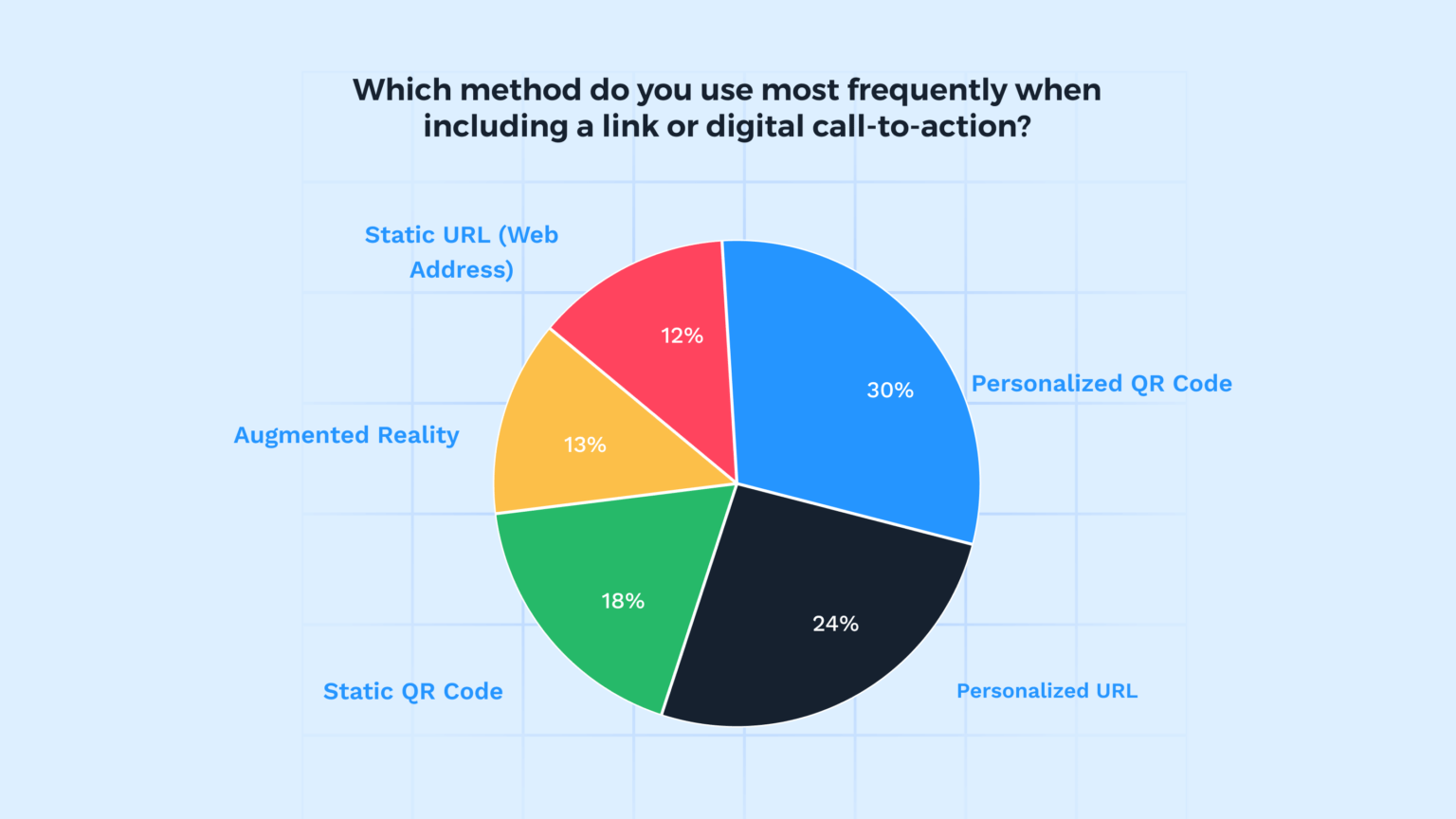
Keypoint Intelligence’s 2023 survey found that using digital links in direct mail leads to a 9% surge in response rates. And guess the most popular digital links for marketers: QR Codes (30% personalized and 18% static QR Codes).
At Uniqode, we delved deep into specific use cases for these businesses, and it led to intriguing revelations.
Here’s a breakdown of our findings:
| Industry | Use case | Business goal | Scope of use | Feature in focus |
|---|---|---|---|---|
| Marketing consulting | Campaign tracking and gathering audience insights | Data collection and understanding of the target audience | Digging into QR Code tracking data to measure campaign effectiveness and understand customer background and behavior | QR Code analytics |
| Real estate | Take direct mail prospects to a property valuation landing page and export analytics data to a CRM | Lead generation and data management | Building custom landing pages and integrating QR Code generator with a CRM | 1. Mobile-optimized landing page 2. Integrating Uniqode with Zapier to create custom workflows |
| Consumer packaged goods (CPG) | Update the destination of QR Codes and add branding to QR Codes | Brand awareness, customer experience, and campaign management | Flexible QR Codes that can be edited anytime and aligning QR Codes to company branding | 1. Editable dynamic QR Codes 2. Customizing QR Code design through Auto Design, logo, and other features |
| Finance | Direct direct mail prospects to a landing page from where they can book a discovery call | Lead generation | Building custom landing pages with attached data capture form | 1. Custom landing page 2. Analyzing user and scan data to optimize campaign 3. Retargeting prospects who have scanned but haven’t taken any action |
| Media and internet | Bulk QR Code creation that triggers specific actions in a CRM | Lead generation | Creating bulk QR Codes and integrate QR Code generator with a CRM | Bulk QR Code creation through CSV or API Integrating Uniqode with Zapier |
| Healthcare | Generate HIPAA-compliant data flows and track data with marketing automation platforms | Data collection and management | QR Codes with adequate safety features and third-party integrations | 1. Creating healthcare-specific QR Codes 2. Integrating Uniqode with Marketo |
| Travel and leisure | Creating high-resolution QR Codes with custom domains and retargeting options | Brand awareness and lead generation | QR Codes with custom download options, custom domains, and ad retargeting | 1. High-resolution QR Codes 2. Whitelabel QR Codes 3. Retargeting non-converting customers with ads |
How to create a direct mail QR Code
You can create a QR Code for direct mail in four simple steps. Along the way, you’ll find several helpful features to customize your direct mail QR Codes as per your need.
Before you proceed…
Most of the features for direct mail marketing campaigns are available with dynamic QR Codes. To create a dynamic QR Code, you must sign up for a 14-day free trial of the Uniqode platform (no credit cards required) and start building your campaign.
Step 1: Click “+ Create” and choose “QR Code”
You’ll find the blue button on the right-hand corner of your dashboard.

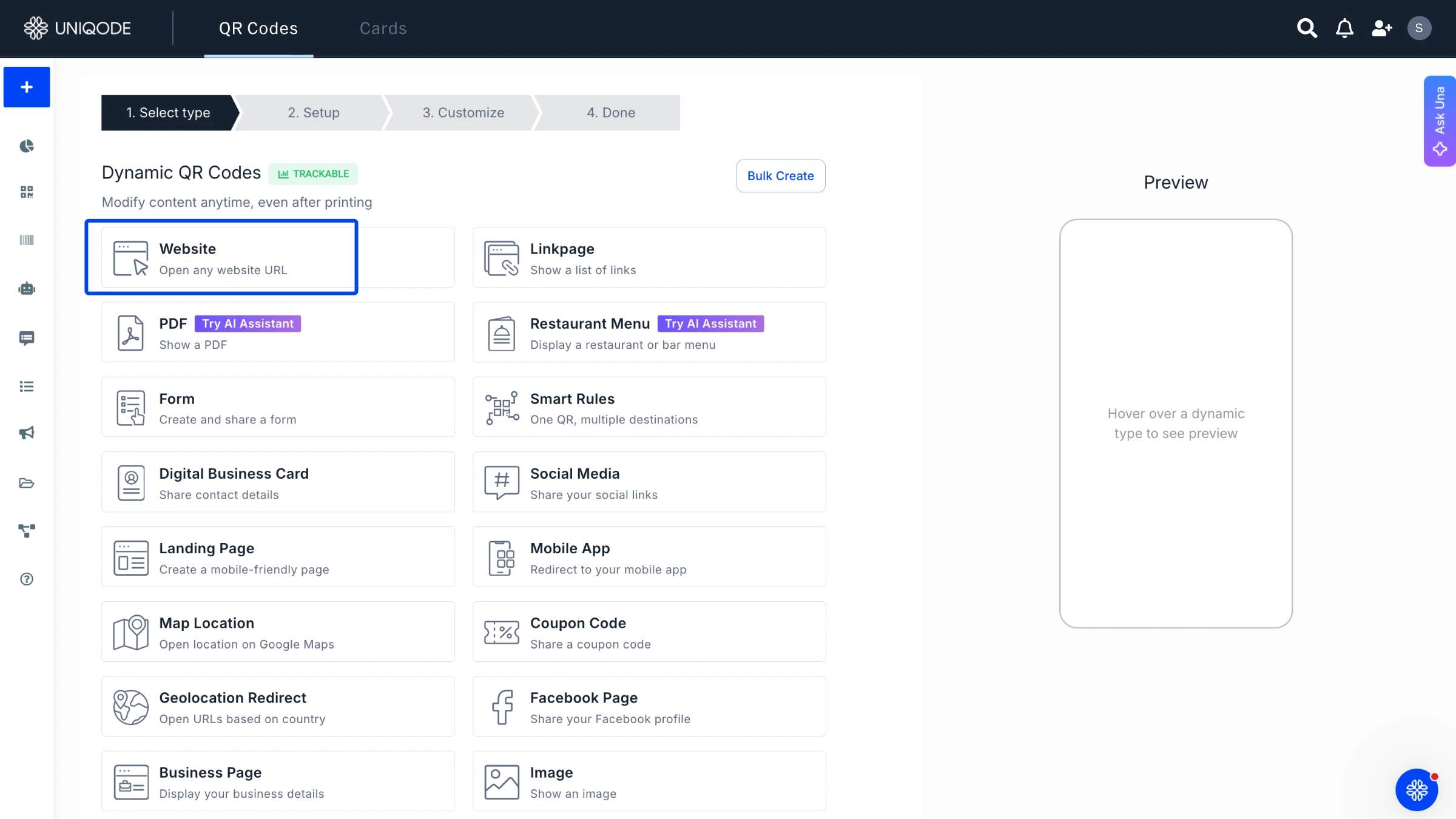
Step 2: Choose your campaign type
Choose which QR Code type you want to proceed with based on your industry and business goals.
In this example, we’re choosing a Website QR Code.
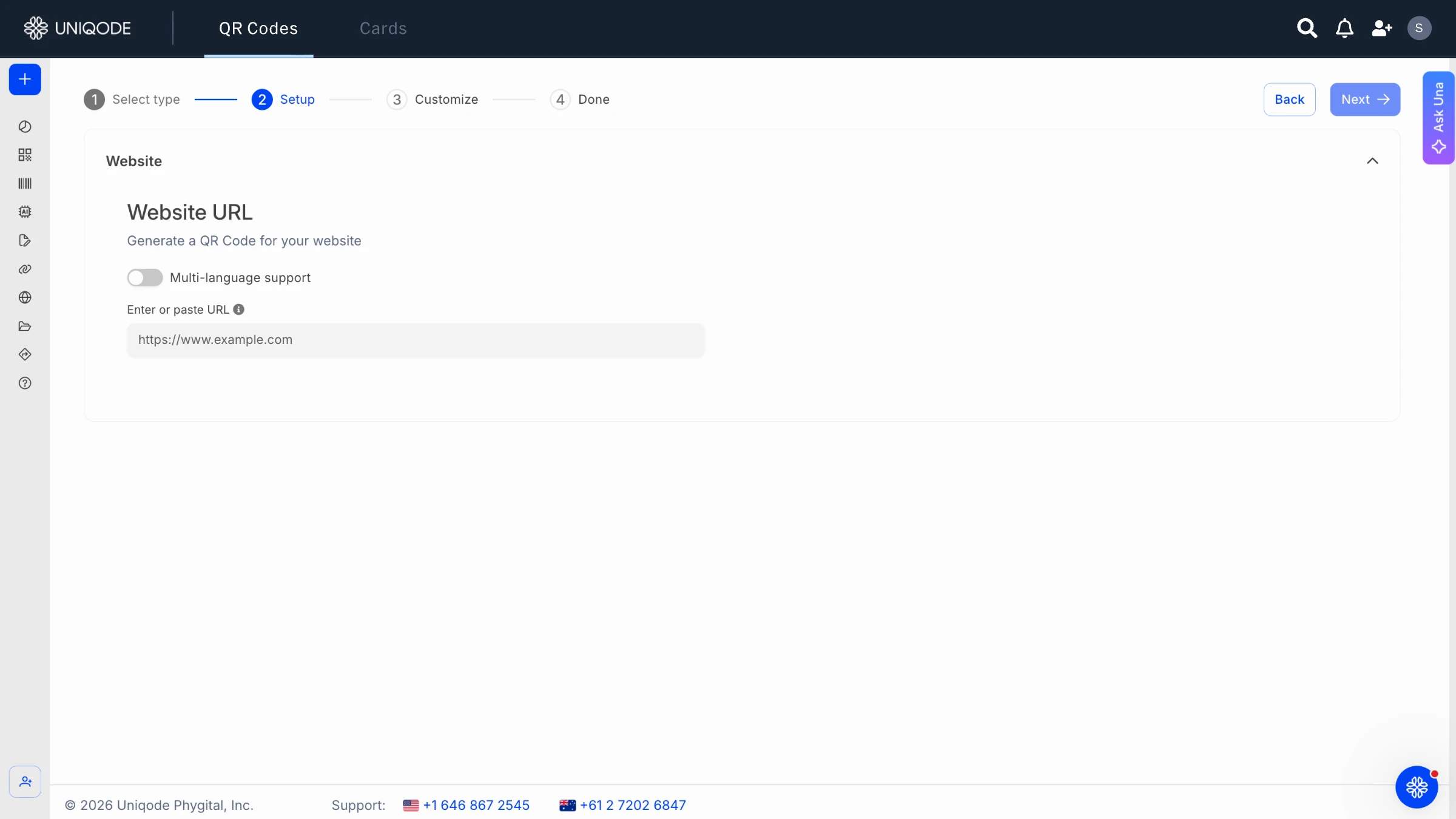
Copy your destination URL and paste it in the box under “Enter URL.”
📝Note:
Considering tracking is one of your main goals, you can add a UTM parameter in this step.
Choose “Parameters” below the white box where you pasted the URL.
To add a new parameter, choose “+ Add New Parameter”. Select the blue and red icons to edit or delete existing parameters.
You can preview your URL, including the UTM parameters at the top.
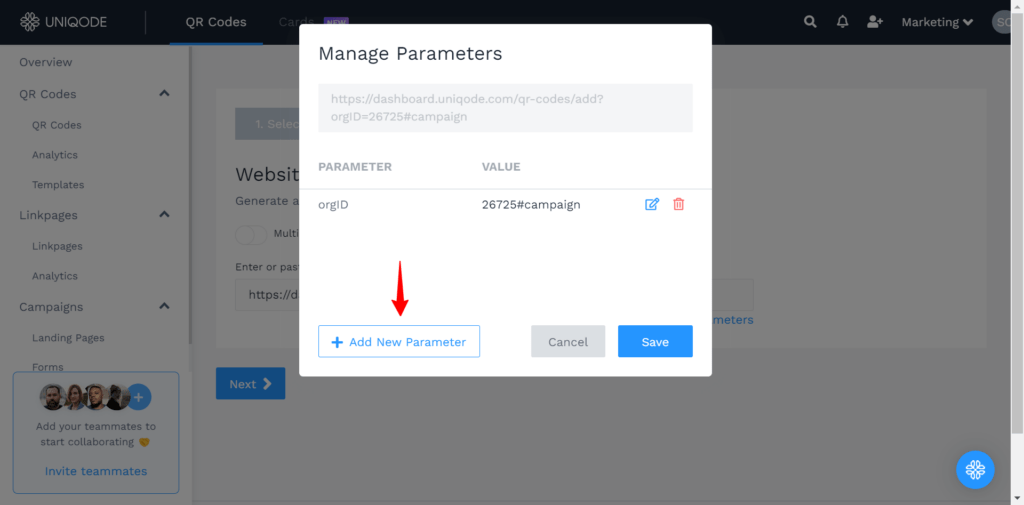
Adding UTM parameters will let you unearth data such as the number of scanners (total and unique), the time of the scan, the location of the scan, the device used to scan, the source of the scan, and the actions taken after scanning.
In short, a world of data at your fingertips! Click “Next”to continue.
Step 3: Customize your direct mail QR Code
Align your QR Code to the rest of your direct mail design.
Customize each aspect of your QR Code, such as templates, logo, eyes, and colors. You can also use the Auto design feature to save time (and create stunning designs).
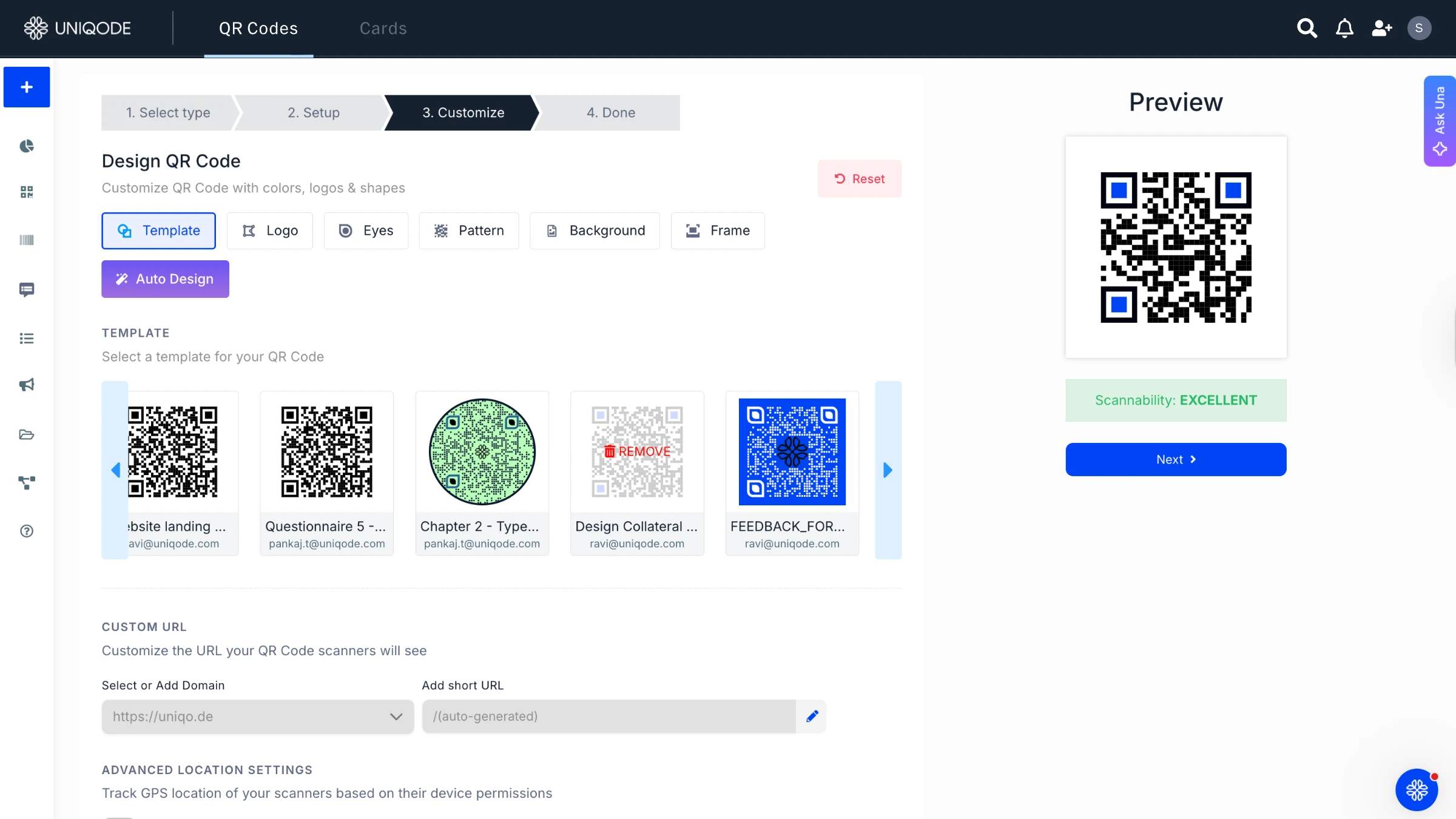
To ensure branding alignment, add a logo. If you have any saved QR Code templates, you can also use that—another smart way to speed up your workflow.
Click “NEXT” once done.
Step 4: Download your direct mail QR Code
Once you’ve finished customizing, it’s time to download your QR Code. Click the “Download QR Code” button to proceed.
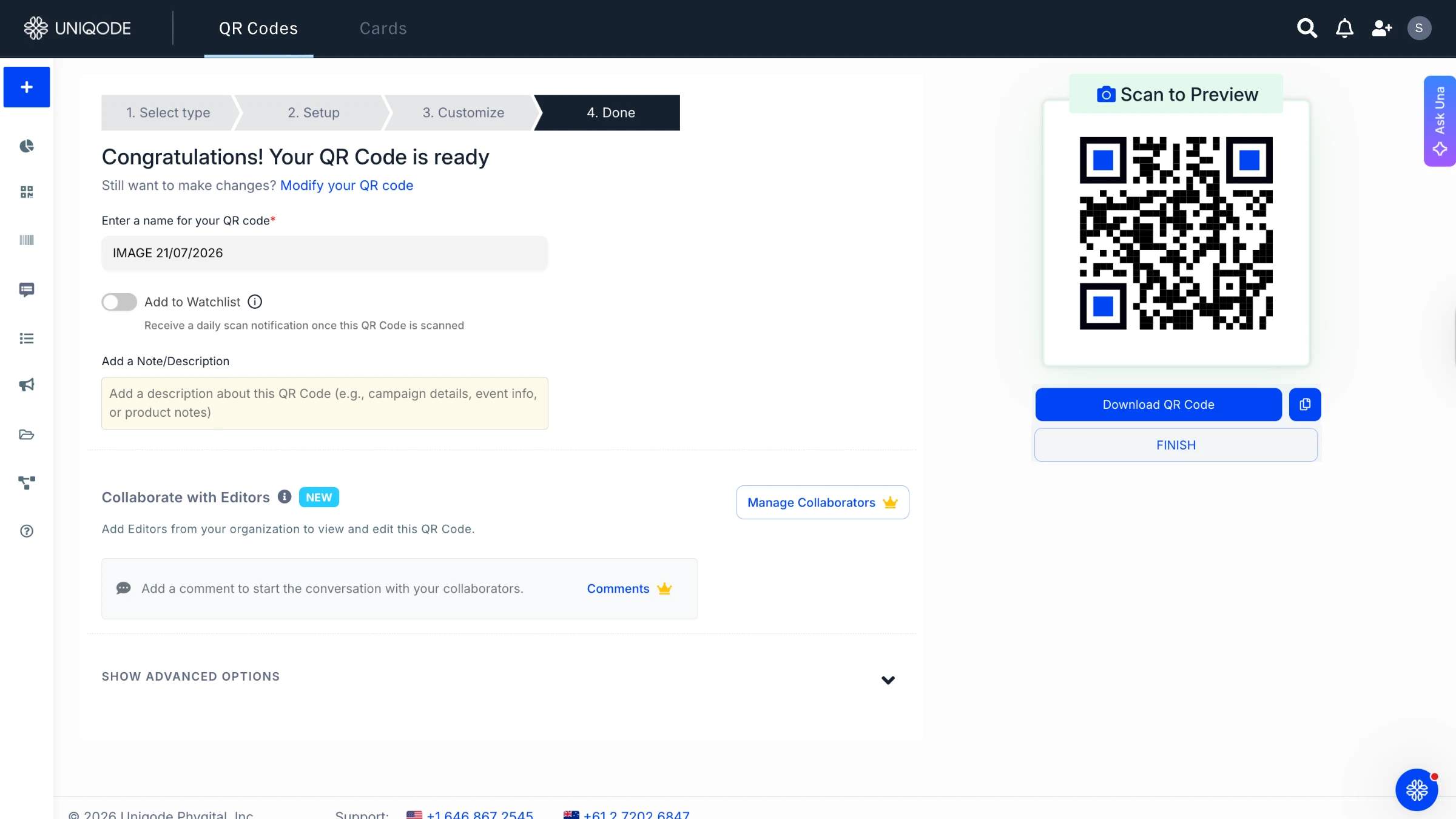
You’ve options to download your QR Code in various file formats. For a direct mail use case, JPG will be an ideal choice because
1. It’s compatible with most printers and software
2. It has a smaller file size, which will make it easy to transfer and print your QR Code
3. Because your direct mail will be small in size, JPG will offer good enough clarity

What tech stack do you need for direct mail QR Codes?
Ready to deploy your QR Codes? We have listed out some essential tech stack you need to complete your campaign below.
💡Before you get started: The direct mail campaign process entails switching between multiple platforms. A QR Code generator that integrates with relevant tools can make this process smoother. With Uniqode’s QR Code generator suite, you can integrate with the right tech stack to improve your workflow.
Here are some suggested integrations:
1. Google Analytics integration for digging into deeper user data
2. UTM builder to add parameters from within the dashboard
3. Zapier integration to access HubSpot CRM
4. Google Sheets integration to create bulk QR Codes
5. Landing page builder to create stunning, responsive landing pages from within the dashboard
6. Slack integration to get real-time updates of scan activity or form responses
QR Code generator with analytics
Obviously, this is the most important tool for a ROI-positive direct mail campaign. You must invest in a QR Code generator with in-depth tracking capability.
UTM Builder
Like most marketers, you would probably use Google’s campaign builder to create UTM parameters for your direct mail campaign URL.
Graphic design software
You’ll need design software, such as Adobe Illustrator, Photoshop, orInDesign, to design your direct mail and integrate your QR Code.
Printing and distributing services
You’ll need to find a service provider to physically print, post, and mail your direct mail. Many printers help with both the printing and mailing parts. Several all-in-one companies provide end-to-end services.
Customer relationship management (CRM software)
You’ll need a CRM to manage your lead-capturing and nurturing process and customer data.
6. Landing page builder
Will you be directing your direct mail QR Code scanners to landing pages? You’ll need a landing page builder to create professional-looking landing pages.
7. Email marketing platform
Planning to collect email addresses through your QR Codes? You’ll need an email marketing software.
How to boost your ROI with direct mail QR Codes?
By their “phygital”(physical and digital)nature, QR Codes contribute to marketing ROI and help you collect zero-party and first-party customer data to drive conversions.
Here’s how QR Codes can contribute to direct mail marketing ROI:
Attribute business impact to each QR Code action
Without QR Codes, it would have been difficult to tie the dots between user activity (such as visiting a webpage) from your direct mail and business impact.
For example, if most of your scans come from a specific location and lead to a particular webpage, you can ascertain the ROI from that location and the associated webpage.
Pinpoint your target audience
You can build an accurate customer profile from your scan data.
From scan data, you can determine your customers’ demographics, the devices they use, the time of day when they are most active, and the geographical locations they scan from. You can use this data to fine-tune future direct mail campaigns.
Create more personalized campaigns
Once you understand your target audience, you can craft even more personalized direct mail. Try A/B testing different customer profiles you unearth from QR Code scan data and measure their effectiveness in future campaigns.
🔥If you use Uniqode, you can use the Smart Rules feature to launch specific actions for specific conditions when users scan a QR Code.
For example, if you’re a real estate business, you can set smart rules to take users to specific properties based on their geographic location of scans.
Retarget users who didn’t convert
If your users have scanned the direct mail QR Code but have not taken any action, you still have a chance to nurture them.
With QR Code retargeting, you can reach out to these prospects through ads and convert them into full-time customers.
Save manual efforts with automation
Previously, you would need to start nurturing direct mail leads from sales calls. With QR Codes, you can land higher up on the funnel. The leads can come from a product comparison or a free trial page.
This saves human hours in qualifying leads through the entire funnel. A QR Code reduces interaction costs for your customers because they can self-serve with a click or browsing and convert faster.
5 handy formulas to calculate ROI from direct mail using QR Codes
Now that you know which areas to focus on for boosting ROI from your direct mail marketing campaigns, it’s time to move on to specific key performance indicators (KPIs).
These are the few formulas you’ll need to track to measure your direct mail ROI using QR Codes:
1. Response rate
📈Industry average: 2-5%
Calculate your direct mail response rate to determine the success of your campaign. A higher response rate is an indicator of success.
How to calculate:
Direct mail response rate = Number of responses/ number of direct mail sent
Where:
- Number of responses: the total number of scans (previous + new) received
- Number of direct mail sent: the total number of direct mail pieces sent
Example:
If you’ve sent out 1,000 direct mail and received 20 scans, your response rate will be:
(20/1,000)*100 = 2%
2. Conversion rate
📈Industry average: 0.5-2%
Let’s say your direct mail pieces take readers to a specific landing page. How would you calculate the number of actual customers from the ones who visited?
How to calculate:
Direct mail conversion rate = (Number of customers/ number of visitors)*100
Where:
- Number of customers: the total number of paying customers
- Number of visitors: the number of people who landed on the page
Example:
If 100 people visited your landing page and 2 of them became paying customers, your conversion rate will be:
(2/100)*100 = 2%
You can replicate this for digital metrics other than landing pages, such as website visits, phone calls, or form submissions.
3. Cost per acquisition (CPA)
📈Industry average: Depends on campaign costs and conversion rates
What’s the cost of turning a prospect into a customer? You can measure your campaigns’ effectiveness in $ with cost per acquisition (CPA). A lower CPA indicates a more cost-effective campaign.
How to calculate:
Direct mail CPA = Total cost of campaign/ number of new customers acquired
Where:
- Total cost of campaign: all direct mail expenses, such as platform, printing, postage, staff, mailing, and any other associated costs
- Number of new customers acquired: total number of direct customers from the campaign
Example:
If you spent $500 on a direct mail campaign and acquired 50 customers, your CPA will be:
$500/50 = $10
4. Customer lifetime value (LTV)
📈Industry average: Depends on specific niche and product/service
To ensure the overall profitability of your direct mail campaigns, you must compare your CPA to your customer lifetime value (LTV). This is a crucial metric to understand your ROI of acquiring new customers and their long-term value.
A higher LTV indicates you have a loyal customer base.
How to calculate:
Customer lifetime value = average order value (AOV)*purchase frequency*customer lifespan
Where:
- Average order value: the average amount a customer spends in a single transaction
- Purchase frequency: the average number of purchases a customer makes in a specific period (e.g., a year)
Customer lifespan:the period during which a customer is active with your business
Example:
If your AOV is $50, your customer purchases twice a year, and the average customer lifespan is 4 years, your LTV is:
$50*2*4 = $400
5. Return on investment (ROI)
📈Industry average:18-20%. The median ROI is 29%. Anything above is good
The holy grail of your direct mail marketing campaign is its return on investment (ROI), which measures its revenue effectiveness.
How to calculate:
Direct mail ROI = (total revenue from campaign – total cost of campaign)/ total cost of campaign)*100
Where:
- Total revenue from campaign: the total income generated from your campaign
- Total cost of campaign: your total direct mail campaign expenses
Example:
If your direct mail campaign generated a revenue of $1,000 in revenue, with a total expense of $500, your ROI will be:
($1,000-$500/$500)*100 = 99900%
Best practices while using QR Codes in direct mail campaigns
| Best practice | Why it matters | How to apply it |
|---|---|---|
| Size the code for handheld reading distance | A code that's too small won't scan, and an oversized one eats space you need for the offer | Print at least 0.8 x 0.8 in (2 x 2 cm) for a postcard or letter read at arm's length; scale up only if the piece is meant to be read from further away, like a poster insert |
| Keep a clear quiet zone around the code | Scanners need blank space around the pattern to lock on; text or images crowded up to the edge cause failed scans | Leave a margin of at least 4 modules (the small squares) of white space on all four sides, and avoid placing the code over a photo or patterned background |
| Use high contrast, dark-on-light coloring | Low contrast between the code and its background is the single most common reason a QR Code fails to scan | Stick to dark code on a light background; if the code needs to match a brand color, test it on multiple phones before the print run ships |
| Pair the code with a clear call to action | A QR Code with no context gets ignored, recipients won't scan something without knowing what's on the other side | Add a short instruction next to the code, like "Scan for 20% off" or "Scan to book a demo," not just the code on its own |
| Make it dynamic, not static | A static code locks in its destination forever, so a dead link, an expired offer, or a typo means a full reprint | Generate the code through a platform that lets the destination URL change after the mail has already shipped |
| Give every list segment its own tracked code | One code for the whole mailing shows total scans, not which list, offer, or design drove them | Create a separate QR Code, or a shared code with UTM parameters, per list segment, offer variant, or mail wave, so the analytics dashboard can break out performance by segment |
| Test the physical print before the full run | A code that scans fine on-screen can still fail once printed, from paper stock, ink bleed, or a resize during layout | Print a physical proof and scan it with at least two different phone models and camera apps before approving the full run |
Case study: How DRMG drove higher engagement by using QR Codes in direct mail
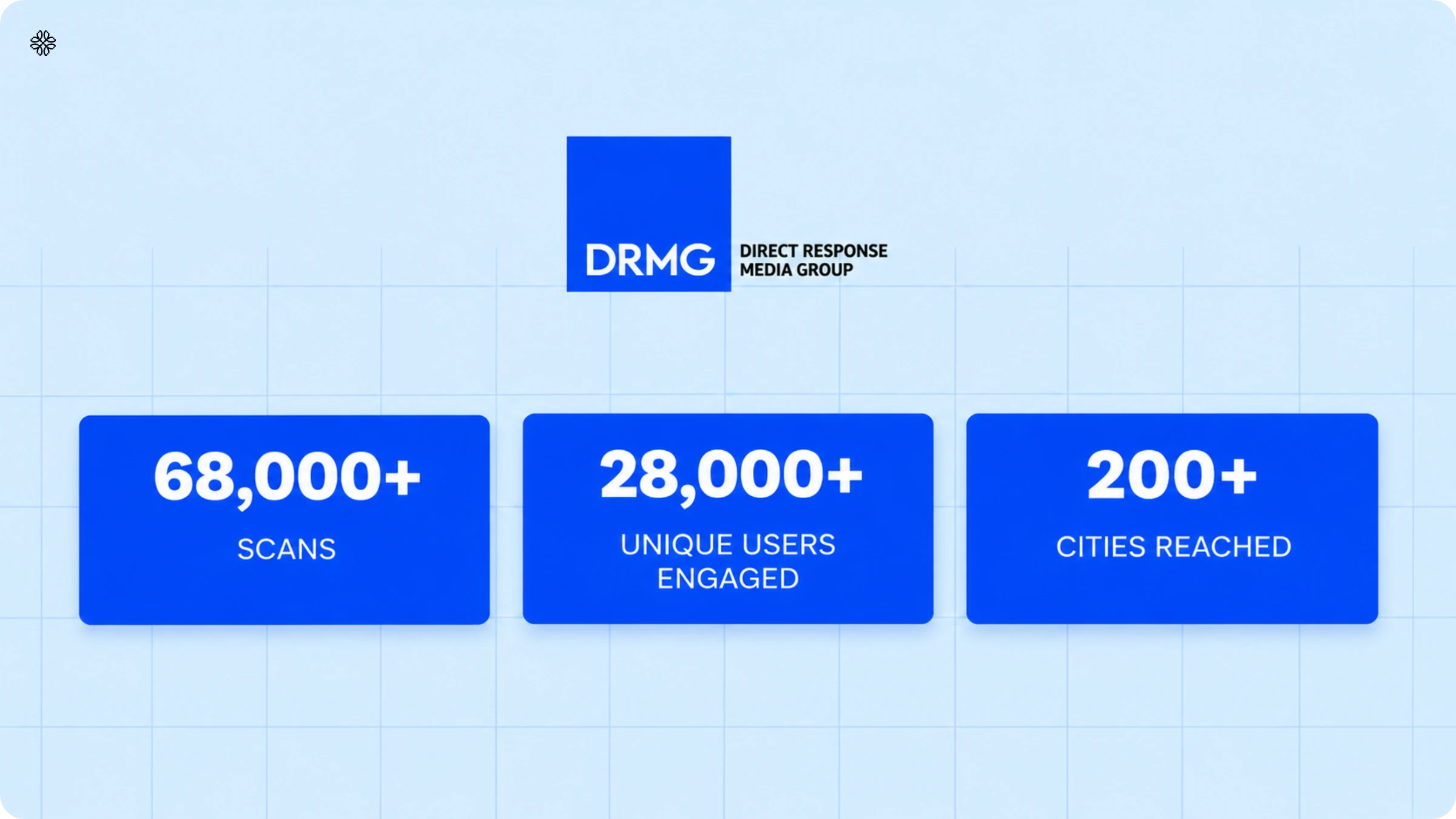
Adding digital integrations (like dynamic direct mail QR Codes) in direct mail can impact the bottom line. Case in point: Direct Response Media Group (DRMG), a renowned direct mail agency in Canada
The problem:
- Traditional direct mail touchpoints (like phone calls) offered limited scope for conversions
- Direct mail attribution was inaccurate and insufficient in most cases
- The workflow was not flexible because no changes could be made once the campaign was live.
The solution:
- Dynamic QR Codes in direct mail led to more conversion-friendly touchpoints such as a location, landing page, PDF, video, or email.
- Dynamic QR Codes offered better attribution owing to first-party data such as location, time, device, and demographics
- Owing to their editability, dynamic QR Codes offered better flexibility and personalization.
- Changing the QR Code destination according to the campaign goals became possible
The results:
- 68,000 QR Code engagements
- 28,000 unique users across 200 cities in Canada
Drive higher ROI by creating direct mail QR Codes with Uniqode
Hopefully, this article will help you view direct mail marketing in a new light. With QR Code’s innovations and the power of a digital push, you can drive better ROI with every campaign.
Once you sign up for a professional QR Code generator suite such as Uniqode, you will realize that your workflow is not limited to QR Codes. Uniqode will be a trusted companion at every stage of your campaign. Dynamic QR Codes by Uniqode will give you greater control over every aspect of your campaigns.
Take the next step and sign up for a free trial today!

Frequently Asked Questions
- Can I use a QR Code in direct mail to receive an SMS?
Using an SMS QR Code, you can instantly receive a text message on your desired phone number. Your business can easily configure a phone number and a text message inside a QR Code and include that QR Code in your direct mail material. All customers have to do is scan the code, and hit the send button to send the text message your company wants to receive.
Make sure to clearly communicate the call-to-action (CTA) and the purpose of the text message in your direct mail, so your customers are fully aware of the message they’re sending across.
- Should you use a QR Code in direct mail marketing?
Absolutely! QR Codes in direct marketing material such as postcards, brochures, letters, etc., can be a great way to bridge the online and offline worlds for your customers. This can eventually result in more conversions and revenue for your business.
Here are a few actions you can drive by using QR Codes in direct mail –
Boost traffic to your company’s website.
Help customers easily navigate to your store location.
Drive app downloads for your brand.
Share online coupons for ongoing offers and discounts.
Receive customer feedback to improve your services.
Share all your social media profiles using a single QR Code.
- What is the use of QR Codes in direct mail?
You can use QR Codes in direct mail for various use cases. You can use them to send prospects to different digital destinations, such as landing pages, PDFs, videos, locations, and more. Additionally, you can use them for various industries.
- What size should a QR Code be for direct mail?
Print the code at least 0.8 x 0.8 in (roughly 2 x 2 cm) for a postcard, letter, or flyer meant to be scanned at arm's length. A code on an asset meant to be read from further away, like a poster or in-store display, needs to scale up proportionally with that distance.
- Can you update a QR Code in direct mail after it's already been sent?
Yes, you can update a QR Code in direct mail after it’s been sent if the code is dynamic. A dynamic QR Code stores its destination separately from the printed pattern, so changing the URL from your dashboard updates every piece already in circulation immediately. A static QR Code can't be changed after printing; the destination is locked in permanently.
- Do you need an app to scan a QR Code on direct mail?
No, you do not need an app to scan a QR Code on direct mail. Every iPhone camera since iOS 11 (2017) and most Android camera apps scan QR Codes natively, with no separate app download required. The remaining friction is whether the recipient knows to point their camera at the code, which is why a clear call to action next to it matters more than the code itself.
- How do you measure ROI from a QR Code direct mail campaign?
To measure ROI from a QR Code direct mail campaign, you need to track scans, and not just mail sent. A dynamic QR Code platform logs every scan with a timestamp and device type, and passing UTM parameters through to Google Analytics connects that scan to what happens next: a form fill, a purchase, or a booked call. From there, ROI follows the standard formula: (revenue attributed to the campaign minus campaign cost) divided by campaign cost.
- Does a QR Code in direct mail need its own landing page, or can it link to a website?
It can link anywhere, but a dedicated landing page outperforms sending traffic to a generic homepage. Match the landing page's message and design to the mail piece's offer, keep it mobile-optimized, and keep the number of steps between the scan and the conversion, a purchase, a form fill, a booking, as short as possible.
About the Author
Ektha is a QR code expert with years of research and analysis into the evolution of QR codes. Having written over 70 in-depth articles on QR technology, she has developed a comprehensive understanding of how QR codes are transforming industries. Her insights, including The State of QR Report, have been featured in leading publications. With a passion for simplifying complex topics and providing actionable strategies, Ektha helps businesses leverage QR codes to enhance their 'phygital' connections.