Customer Spotlight: How an image consultant leverages QR Codes
How an image consultant leverages Uniqode’s QR Codes and you can too!
Carol Hanson, an image consultant, helps people style their clothes while remaining conscious of the impact of fast fashion on the planet.
She has been using Uniqode’s platform to create QR Codes for her business and this is what she had to say:
“The upsides of using Uniqode QR codes – in my case the dynamic codes, mean I have a great deal of versatility for a very reasonable price.”
— Carol Hanson

So, how does Carol use these QR Codes and how can you recreate them?
#1. Using QR Codes for business cards
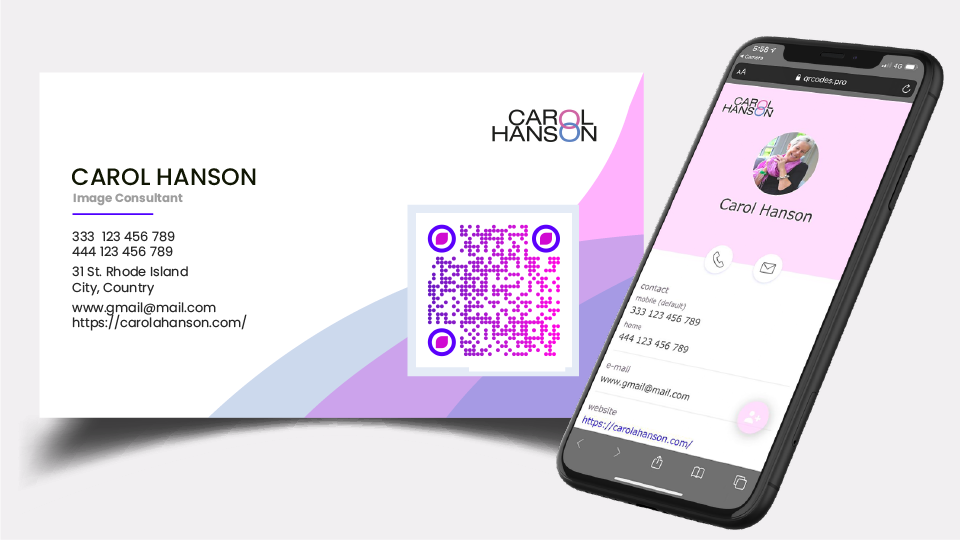
When Carol runs a specific course or promotion, she has business cards printed up to hand them out when networking. These business cards contain a QR Code that includes a link to her website or a vCard so that users can save the contact information to their smartphone seamlessly.
Post the pandemic, these vCard QR Codes can still be a handy tool to ensure a contactless experience.
How to create a QR Code for your business card
- Adding a link to the website: Choose the ‘Website QR Code’ on the dashboard to create a QR Code that links back to your website.
- Saving contact information: Choose the ‘vCard Plus’ QR Code to create a customized landing page that displays your contact details. Users can then save the contact file to their smartphone.
Supercharge your strategy
You can elevate your physical business cards by adding a lead magnet form that can collect responses seamlessly.
Using ‘Forms’ campaign, you can create an aesthetically pleasing form that captures interest and sends customized responses to the users that fill it out.
READ: How to use Forms to send custom responses
Running a campaign? Link the QR Code to a landing page with your offer and details. You can also add an ‘Add to Calendar’ button linked to a .ics file for digital events.
#2. Using QR Codes for presentations
For presentations, Carol uses QR Codes to get people to sign up for a Masterclass or enable contactless payments.
Users simply scan the QR Code on the screen and arrive at the customized landing page.
Leveraging QR Codes at events is the best way to ensure a zero contact experience. There are other types of QR Codes that can be used at presentations including one on the event ticket that offers real-time updates of the event.
Also read: Our guide on how to create QR Codes for tickets
How to create a QR Code for presentations
There are a couple of different ways you can create a QR Code for presentations.
1. Link to PDF:If you’d like to share your presentation as a PDF, choose the ‘PDF QR Code’ and upload your material. A mobile-optimized version will be rendered on the user’s smartphone. If you want your audience to download and access the presentation, you can easily create a QR Code to download a file.
2. Book an appointment:You can also encourage users to book an appointment with you by using the ‘Forms’ feature. This is the best way to take in user details and send customized responses.
3. Drive traffic back to the website:If your aim is to drive traffic to your website, choose a simple Website QR Code or a basic landing page with more information.
4. Contactless payments: At the end of the session, you can also use QR Codes to receive payments with zero contact. Link your payment platform to the QR Code and users will be able to scan and pay seamlessly.
Advanced features
You can take advantage of the Zapier integration to automate your workflow.
Let’s say you want to be notified each time someone fills out your form. You can create a Zap (a workflow) to do this.
Or, you want to feed the user details into a CRM you already use. You can use Zapier to do that too. Zapier supports Mailchimp, Salesforce and a ton of other CRMs.
READ: How to create a Zap fast
Recommended Reading:
1.QR Codes for Digital Marketing
2. QR Codes in US: Who’s using it and how fast is it growing?
About the Author
Ektha is a QR code expert with years of research and analysis into the evolution of QR codes. Having written over 70 in-depth articles on QR technology, she has developed a comprehensive understanding of how QR codes are transforming industries. Her insights, including The State of QR Report, have been featured in leading publications. With a passion for simplifying complex topics and providing actionable strategies, Ektha helps businesses leverage QR codes to enhance their 'phygital' connections.
Related Posts
Audio QR Code: Convert and Share Any MP3 in a Flash
How to Create a Canva QR Code: Optimize Your Canva Designs

QR Codes in Healthcare: Use Cases & HIPAA Compliance Guide
How Much Data can a QR Code Hold? A Guide to QR Code Data Size
A Guide On QR Code Scams And How To Protect Yourself From Them (2026)