
An In-Depth Guide to Optimizing CFO Email Signatures with Digital Business Cards
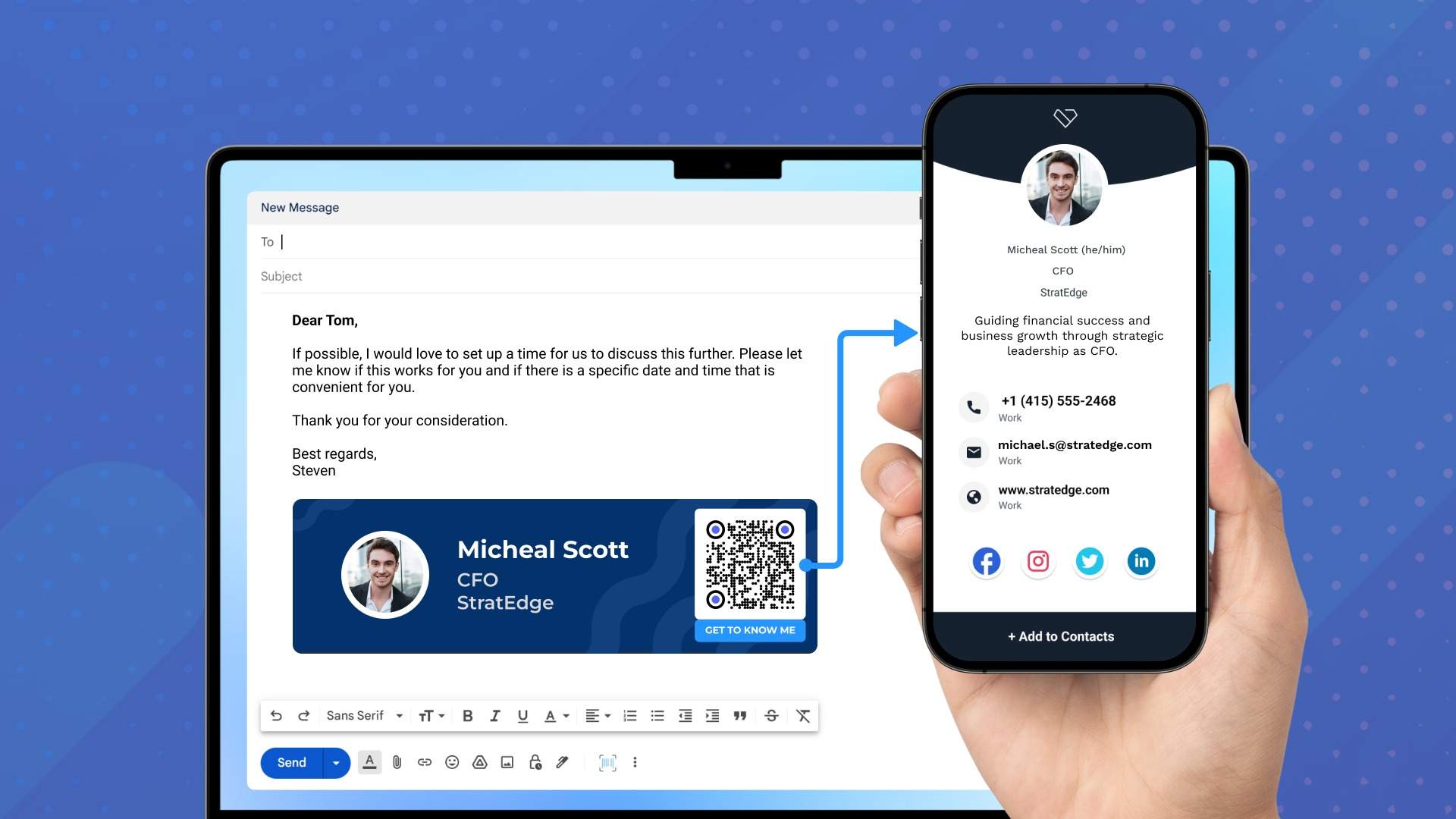
Learn the benefits of incorporating a digital business card into your CFO/finance executive email signature. Go beyond the limitations of traditional email signatures and enhance your professional image and credibility.
As your organization’s CFO, your email signature (a.k.a. your CFO email signature) holds greater importance than being a mere email sign-off.
Whether you interact with your finance team or industry peers, you can use this email communication tool to establish professionalism, credibility, and influence.
However, you must optimize your email signature to achieve this impact. An optimized email signature strikes a balance between:
- Informing recipients about your professional details
- Maintaining a clean and concise format
Balancing brevity and informativeness is essential. If you limit the details you share for brevity, you may omit crucial context about yourself. If you overcrowd your email signature with irrelevant information, it can clutter its design (as shown below).
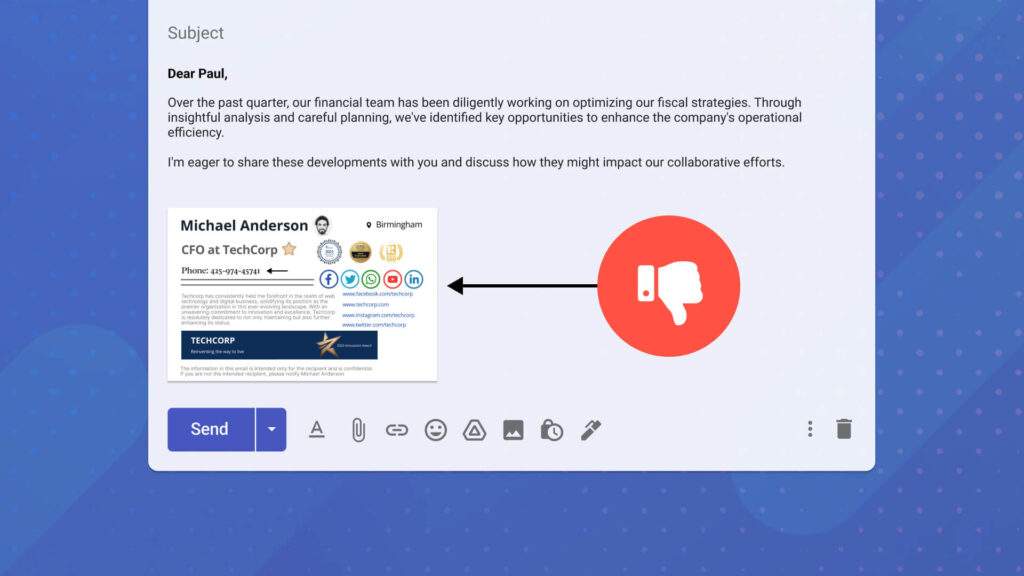
A cluttered signature block may overwhelm your recipients, diminishing the impact of your message.
You can balance brevity and informativeness by adding a digital business card (or e-business card) to your CFO email signature 👇🏻.
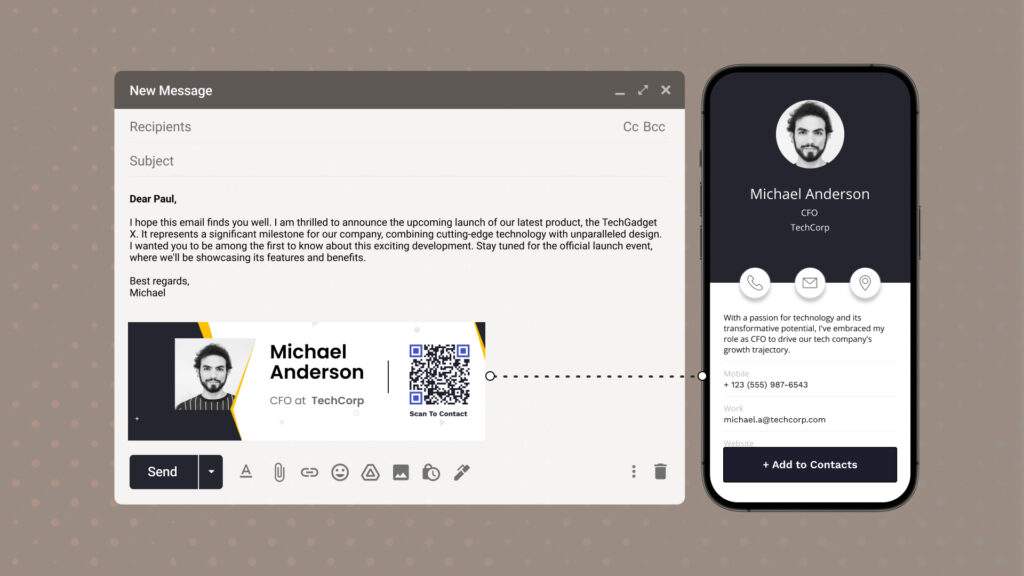
This article explores the five compelling reasons why we highly recommend using digital business cards in your CFO email signature.
5 Compelling reasons to add a digital business card to your CFO email signature
1. Ensure a clean and professional CFO email signature
According to Mailtrack, a business email signature must be clear and concise while providing relevant information. It must include the basics, such as your name, title, company, contact information, and social media links.
However, these basic details are often the only elements you can include in your signature block. You risk cluttering your email signature design if you go beyond these details.
Adding a digital business card to your email signature is one effective way to balance conciseness and informativeness.
Recipients can conveniently access your digital business card—via a link or QR Code in your email signature—to view your complete professional details. You do not have to include these details directly in the signature block. Hence, you keep a clean and concise design. This is why modern email design favors clarity and visual hierarchy over clutter. Superside's email campaigns show how clean layouts and concise content improve readability while keeping a professional presence.
2. Provide your audience with all the essential information they need
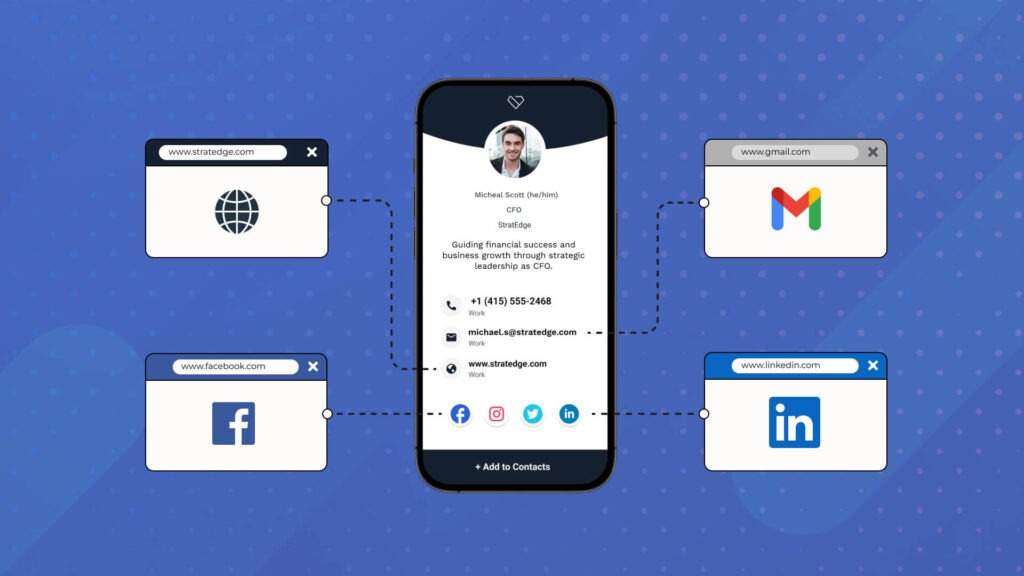
Traditional email signatures are meant to be compact sign-offs. They are meant to accommodate only basic information. But adding a digital business card allows you to go beyond this restriction—without cluttering your signature block.
E-business cards can house as many contact details and multimedia content as your audience requires.
Here are some resources you can share via the e-business card in your email signature:
- Your website or thought-leadership content
- Documented company contributions showcasing your financial expertise
- All your relevant social media handles
- Details of your speaking engagements and event appearances
- A Google Maps location of your place of business
💡 Good to know: Your audience can click to interact with each detail in your digital business card. E-business cards offer high interactivity via your CFO email signature. Your clients can easily reach you through your phone number or access a specific URL on your card with a single tap—without manually typing your details.
3. Make it easy to save your contact details
Recipients cannot instantly save your contact details on their mobile devices via traditional email signatures. They must manually type and save your contact information.
Eliminate this manual process by adding a digital business card to your CFO signature block.
Recipients will see an “+Add to Contacts” button upon receiving your card (via a link or a digital business card QR Code) which they can tap to instantly save your contact details.
4. Capture your recipient’s contact details through your email signature
Digital business cards offer two-way contact sharing. This feature lets your recipients instantly submit their contact details via a form in your shared card.
Two-way contact sharing simplifies contact exchange, transforming it from a manual endeavor into a convenient two-step process. Here’s how it works:
- Upon accessing your e-business card from your CFO email signature, your recipient taps a “+Add to Contacts” button. This instantly saves your contact information in their phone book.
- Your recipient can then share their contacts in return by tapping a “Share Your Contact” button on the same card. This triggers a form where they can submit their contact details.
Both parties do not have to manually type and save each other’s contact details during a networking interaction.
If you’re using Uniqode: You can customize the Two-Way Contact Sharing form based on the information you wish to capture. On Uniqode’s dashboard, toggle on or off different fields such as name, company, and phone number. You can even provide a field prompting recipients to leave a message.
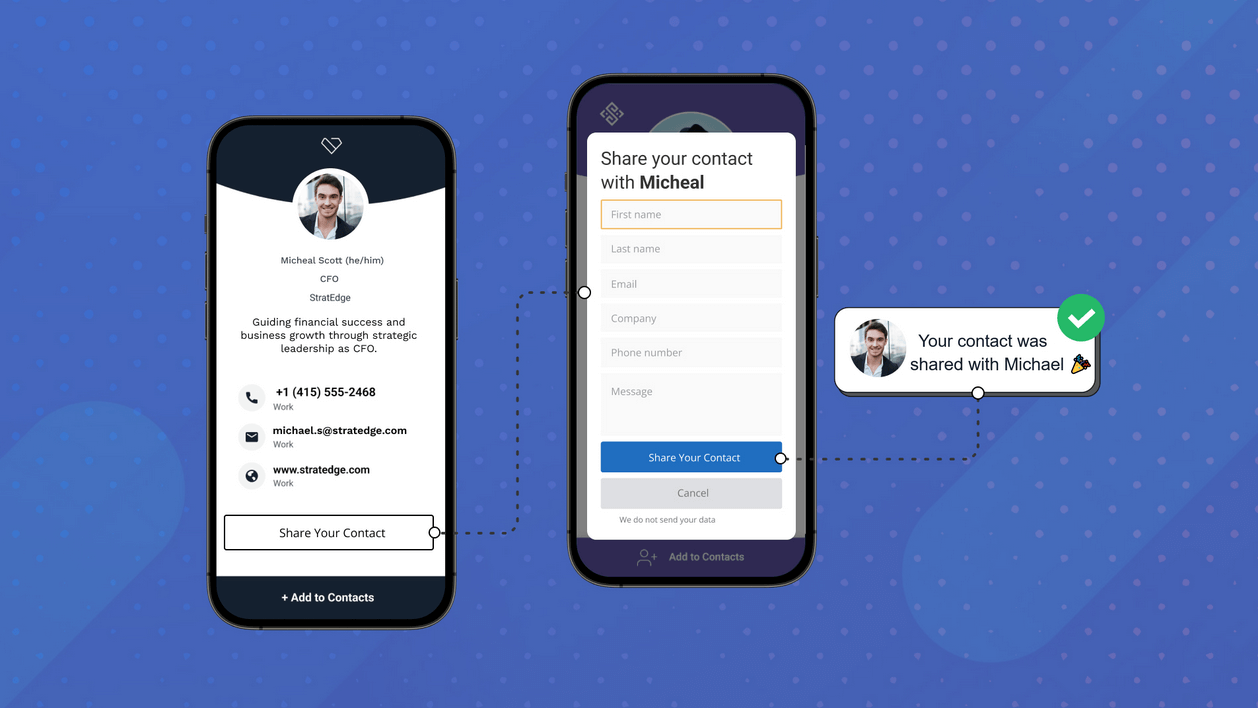
Each form submission becomes a contact entry in your digital address book. You can view and manage all the contacts you collect from this address book and export them directly to Salesforce or 700+ other lead management tools via Zapier.
5. Track and analyze your email networking initiatives
A potential connection viewing your e-business card via your email signature indicates strong intent and genuine interest. This interest could be about your expertise or a desire to initiate a networking relationship.
Digital business cards allow you to track their engagement via card-scan trackingand analytics.
And the fact these engagements indicate genuine interests makes them extremely important to monitor.
🔥 If you’re using Uniqode: You can track and analyze the following e-business card metrics for each card you share:
1. The total number of views your card has received
2. The total number of times someone saved your contact information
3. The total number of unique recipients your cards reached
4. Details about the devices used to view your cards
5. The exact hours of the day users are viewing your cards
6. The specific locations where recipients view your cards
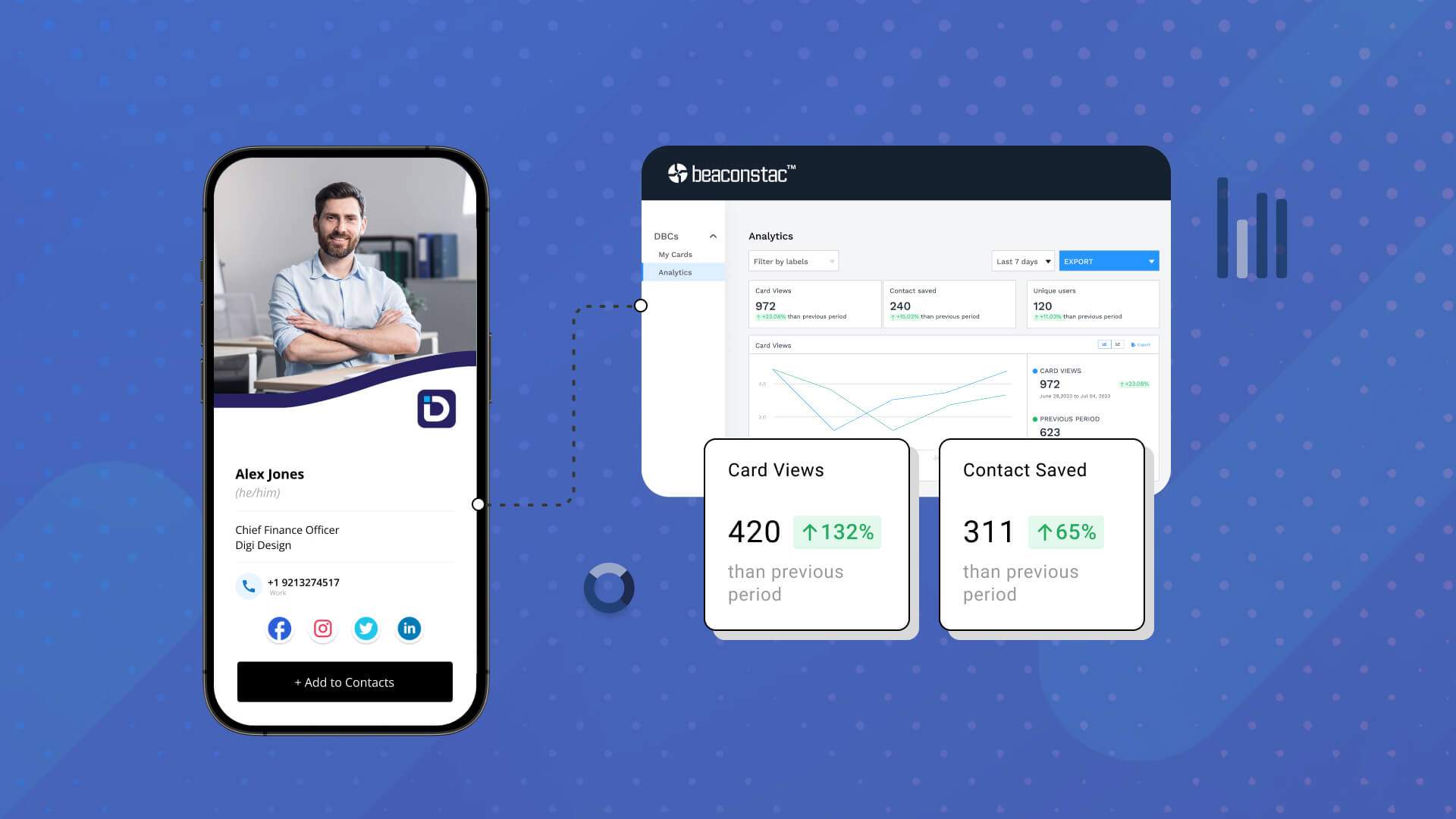
Why analyze? These metrics clearly show how the digital business card in your CFO email signature performs, helping you make data-backed decisions to improve your networking initiatives.
Bonus: 4 tips when adding a digital business card to your CFO email signature
1. Showcase expertise through your e-business card’s professional summary Highlight your expertise as your organization’s head of finance. Concisely showcase your key strengths, accomplishments, and visionary approach to financial leadership.
2. Place relevant contact details and social media handles on your card Increase the impact of your signature block by adding relevant contact details and social media links in your e-business card.
3. Add links to resources that strengthen your credibility You can add links to testimonials and endorsements from partners and peers. This showcases your proficiency in influencing financial success. You can also add links to your thought-leadership content, such as your research papers and personal blog.
4. Customize your digital business card to exude your company’s branding Experts highly recommend branding email signatures with your organization’s logo, colors, and typographies. Extend this practice to your digital business cards. Add your firm’s distinct visual elements to your e-business card to promote brand consistency and recognition.
Next step? Enhance your CFO email signature with Uniqode’s digital business cards
Email signatures are meant to be concise and compact, which can limit your information sharing. You can overcome this restriction by adding a digital business card to your CFO email signature.
To access a comprehensive suite of tools for creating and centrally managing business cards at scale, consider using Uniqode’s digital business card solution.
Empower recipients to instantly save your contact information with a single tap while encouraging reciprocation through Two-Way Contact Sharing. Adding an e-business card to your email signature also lets you introduce another email tracking layer, as you can measure card engagement metrics.
The best part? Using the solution does not require downloading an additional app. You also conduct safe and secure email networking through industry-leading, enterprise-grade security measures.
These capabilities make Uniqode one of thebest digital business card solutions today.
Frequently Asked Questions
- What is the average open rate for emails with professional signatures?
Emails with professional signatures have an average open rate of 32% compared to 20% for emails without signatures. For CFO and finance executives, a well-designed email signature with a digital business card can increase click-through rates by up to 15%, making it a crucial tool for establishing credibility in financial communications.
- How many email signatures does the average CFO send per year?
The average CFO sends approximately 10,000 to 12,000 emails annually, which means their email signature is displayed thousands of times each year. This makes the email signature one of the most frequently viewed pieces of professional branding for finance executives, with each signature serving as a potential networking touchpoint.
- What is the best digital business card platform for finance executives?
The best digital business card platforms for CFOs typically include features like encryption for sensitive contact data, GDPR compliance, and professional templates. Leading platforms such as HiHello, Linq, and Mobilo offer enterprise-grade security with 256-bit encryption and support for company-wide branding standards, which are essential requirements for financial professionals handling confidential information.
- Do email signatures with links increase response rates?
Email signatures containing clickable links to digital business cards or professional profiles can increase response rates by 11-14% compared to plain text signatures. For CFOs communicating with investors, auditors, and board members, this improved engagement rate translates to approximately 1,100-1,400 additional responses per year based on typical email volume.
- Why is it essential to optimize your CFO email signature?
Your CFO email signature reflects your professionalism and expertise as a financial executive. Optimizing is essential to maintain and enhance its ability to convey these qualities.
An optimized email signature offers these benefits:
- Convey a professional image
- Strengthen your credibility as a financial leader
- Provide your audience with convenient access to relevant information
- Prevent overwhelming your audience with a cluttered email signature design
About the Author
Sukanya is a content marketer who previously worked as a journalist. She has been passionate about writing from a young age and now helps businesses boost engagement through content. Currently, she is exploring innovative tools, such as digital business cards, and their transformative impact on various aspects of business.