A Simple Guide to Generate Leads Using QR Codes
How do JLO Beauty, Supergoop, and L’Oreal drive traffic and improve the quality of customers? Using QR Codes! Discover how you can do the same.
QR Code lead generation campaigns fail at the scan as they don't capture contact information, fail to sync everything to a CRM, and skip in tracking conversions. Effective campaigns need a complete scan-to-conversion system that turns anonymous scans into a measurable pipeline and revenue.
83% of consumers are willing to share data after scanning a QR Code, yet only 12% of marketers connect QR scans to revenue. That gap isn't a QR Code problem; it's an infrastructure problem. Most campaigns simply lack the architecture to convert scans into leads.
The QR Code itself is rarely the issue. Post-scan infrastructure determines whether a campaign succeeds or fails. Most organizations link QR Codes to a homepage and measure only total scan volume. Visitors stay anonymous and never enter the sales pipeline.
Successful QR Code lead generation runs on a four-step workflow:
1. A dynamic QR Code redirects users to a dedicated landing page or offer.
2. The landing page presents a lead capture form that collects first-party data.
3. Form submissions sync automatically to a CRM for nurturing and sales follow-up.
4. Retargeting pixels track non-converters so future campaigns can re-engage them.
This guide walks through how to build scan-to-conversion infrastructure and details six proven workflows businesses use to generate, nurture, and convert leads with QR Codes.
What data does a QR Code collect?
A QR Code collects two types of data: scan analytics, captured automatically with every scan, and form submission data, collected only when a user completes a form. Understanding the difference is what separates simple scan tracking from effective lead generation.
Scan analytics are automatic. Every dynamic QR Code logs:
* Device type and operating system (iOS, Android, desktop)
* City and country of the scan
* Timestamp: date, day of week, and hour
* Total scans vs. unique scans (each device counted once for the unique metric)
Collecting form submission data requires a lead capture form at the QR Code destination. That form can capture any fields you need, like name, email, phone number, company, job title, or custom fields supported by your form builder.
A QR Code alone cannot reveal personal identity, which requires a form. Scan analytics tell you that a Samsung Galaxy device in Chicago scanned the code at 2:14 pm on a Tuesday. They don't tell you who. A form is the only way to get that information.
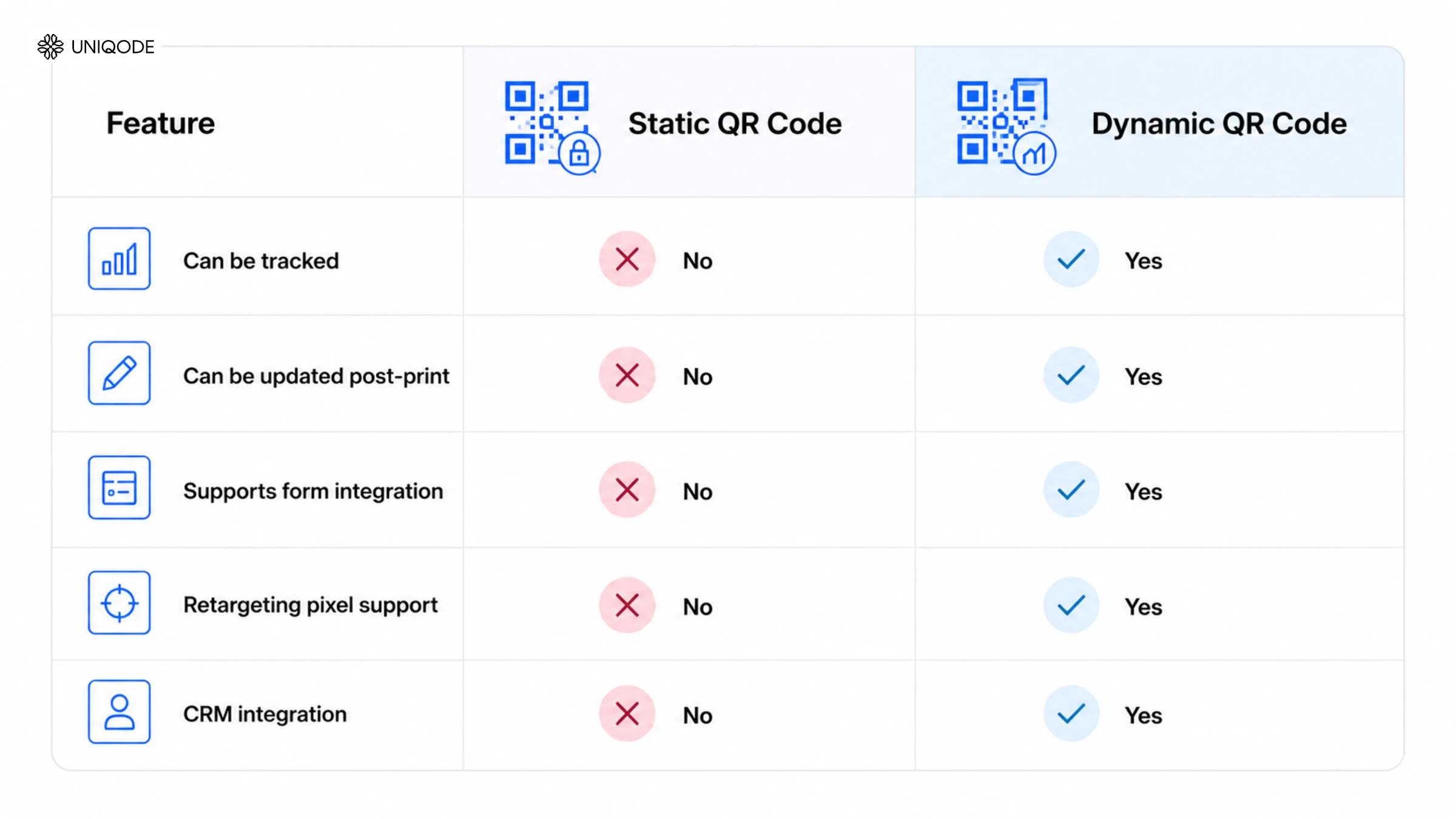
Static QR Codes collect no scan analytics. Because they embed a fixed URL without a redirect layer, no scan data is recorded. Campaigns built on static codes start blind.
According to Uniqode's State of QR Codes 2026 report, 83% of consumers are willing to share data via QR Code. The barrier isn't audience reluctance; it's the absence of data collection mechanisms in the campaign itself.
How QR Codes capture leads: the scan-to-conversion workflow
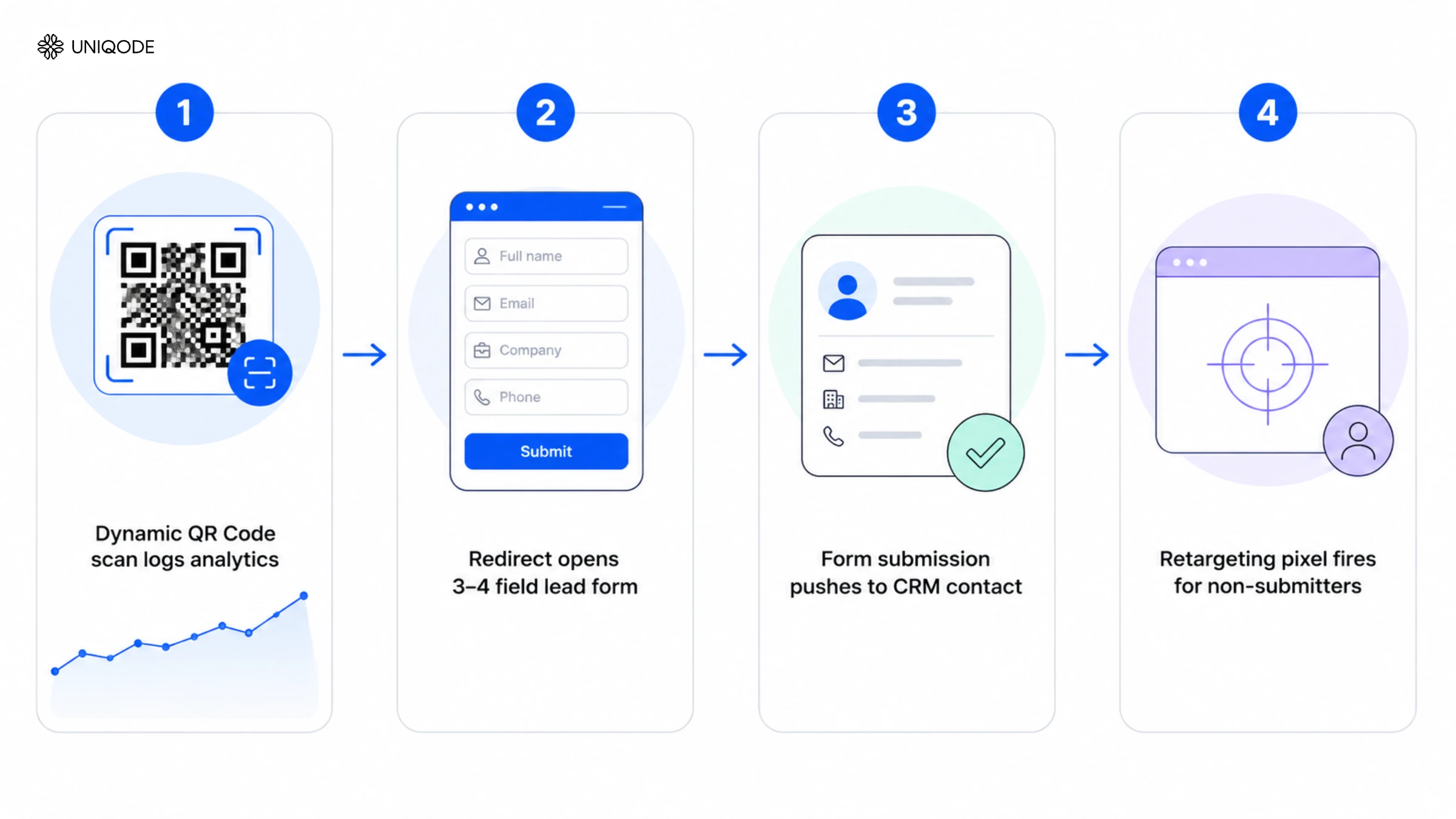
QR Code lead generation runs on four steps: a scan triggers a dynamic redirect, which opens a lead capture form; the form sends data to a CRM; and a retargeting pixel re-engages non-submitters. Skip any one of these steps and the pipeline breaks.
According to Uniqode's State of QR Codes 2026 report, only 12% of marketers connect QR scans to revenue. The other 88% are running an incomplete workflow. The most common failure point is sending scans to a homepage with no form. As a result of this, leads arrive and disappear without a trace.
Here is what the complete loop looks like in practice.
Step 1: When someone scans, the dynamic QR Code routes them through a redirect layer that logs scan data before sending them to the destination. This happens automatically with every dynamic QR Code. Dynamic codes also let you update the destination after printing. The printed code stays the same while the destination changes. Static codes have no redirect layer and record nothing.
Step 2: The redirect sends every scan to a focused lead capture form, not a homepage. Keep it to three or four fields maximum: name, email, company, phone. Every field you add beyond that cuts your completion rate. Because the form sits directly at the QR Code's redirect destination, every scan lands straight into the form experience.
Step 3: Form submission data goes directly into the CRM through a native integration or Zapier webhook without any spreadsheet, CSV export, or manual import. The contact appears in the CRM within 60 seconds of submission.
Here is what this looks like using Uniqode: create a Dynamic QR Code, point it at a Uniqode Form with 3-4 fields, and connect the form to HubSpot or Salesforce via native integration (or to any other CRM via Zapier). Every submission creates a CRM contact automatically, with form fields mapped to CRM fields at setup.
Step 4: A Facebook Pixel or Google Tag fires on the form page on every load and not just on submission. Every scanner who lands on the form without submitting enters a retargeting audience automatically. These non-submitters are a warm audience for your next ad campaign: they showed enough intent to scan, just not enough to complete the form. A retargeting ad reaches them again and gives them another chance to convert.
The QR Code is the entry point. The infrastructure is what converts entries into contacts.
6 QR Code lead generation use cases
QR Code lead generation works across six primary use cases, each deploying the same scan-to-form-to-CRM loop in a different physical or digital channel. The channel changes. The infrastructure does not.
1. Digital business cards
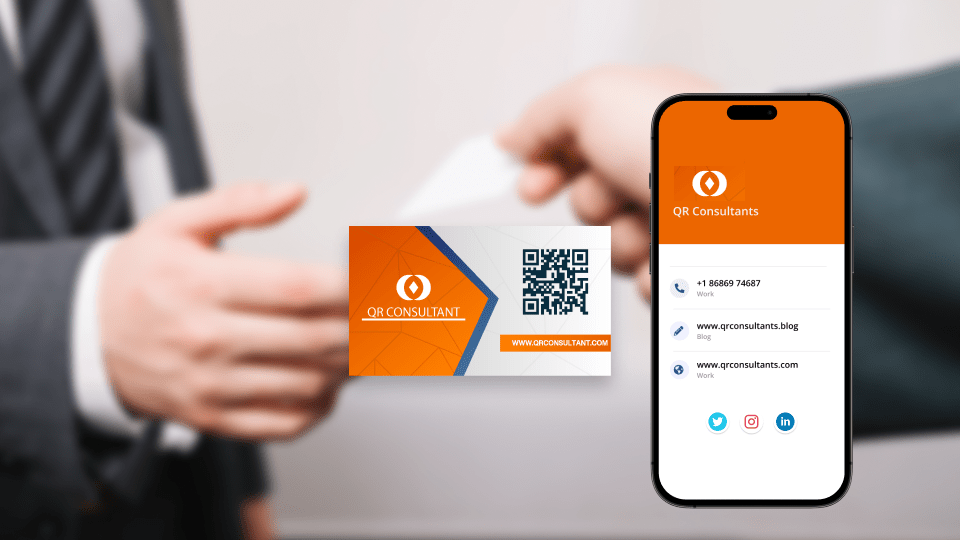
A QR Code on a digital or physical business card opens a contact form where the visitor enters their email or phone number to receive the cardholder's details. One scan creates a two-way exchange: the cardholder captures the visitor's information while the visitor saves the cardholder's contact directly to their phone.
Uniqode's Digital Business Cards automate this exchange through a built-in QR Code. The form records scan analytics, who scanned, when, and from which device. A standard business card shares contact details and nothing more. A Digital Business Card with a QR Code turns every interaction into a CRM entry instantly.
2. Landing page lead forms
A campaign-specific landing page with a single-focus form is the most effective QR lead capture method. Place the QR Code on print ads, product packaging, or out-of-home placements and send users to one page asking for name and email in exchange for something valuable like a discount, a guide, or early access.
Never send a conversion-focused campaign to your homepage. Too many options and too many exit points kill conversion. A focused landing page works because it gives visitors exactly one decision to make.
3. Direct mail lead capture
A QR Code on a physical mailer connects print and digital CRM in a single scan. The mailer builds awareness; the QR Code captures the lead.
Use a dynamic QR Code for direct mail as they let you update offers, landing pages, or forms mid-campaign without reprinting. The mailer stays the same; you manage the destination from the dashboard.
4. Trade show and event lead capture
A Form QR Code on tables, banners, or printed cards replaces badge scanners at trade shows and events entirely. Visitors scan, complete a brief form and their contact information goes directly to the CRM in real time. No badge scanner hardware, no manual data entry after the event.
Placement-based scan analytics show which banner or booth location generated the most contacts. For trade shows with multiple booth configurations, that means measuring the performance of each location individually, not just total event leads.
5. Retail and in-store shopper engagement
On-shelf QR Codes, POS displays, and product packaging use value exchanges to capture leads like scanning to claim a discount, entering a contest, or joining a loyalty program. Each interaction presents a form that collects an email address or phone number.
A Coupon Code QR takes this a step further by combining form submission and offer delivery in a single step, after the visitor provides their email, a unique discount code goes directly to their inbox. That approach captures verified contacts and ensures each recipient gets a unique code, not a generic screenshot anyone can share.
6. Survey and feedback QR Codes
A QR Code on receipts, product packaging, table tents, or post-purchase emails links to a brief survey. Every response generates a first-party data record and an opt-in contact, delivering product intelligence through customer feedback while enriching existing CRM records with preferences and sentiment.
Uniqode Forms, the integrated form builder within QR Code management, supports logic jumps. A high satisfaction rating triggers a referral request; a low rating routes the customer to support. Each path delivers a distinct outcome without requiring separate forms.
How to create a QR Code for lead generation
Follow these five steps to create a lead-generating QR Code: build a Dynamic QR Code, set up a lead capture form, connect to a CRM, add a retargeting pixel, and download for deployment.
Step 1: Create a Dynamic QR Code in Uniqode
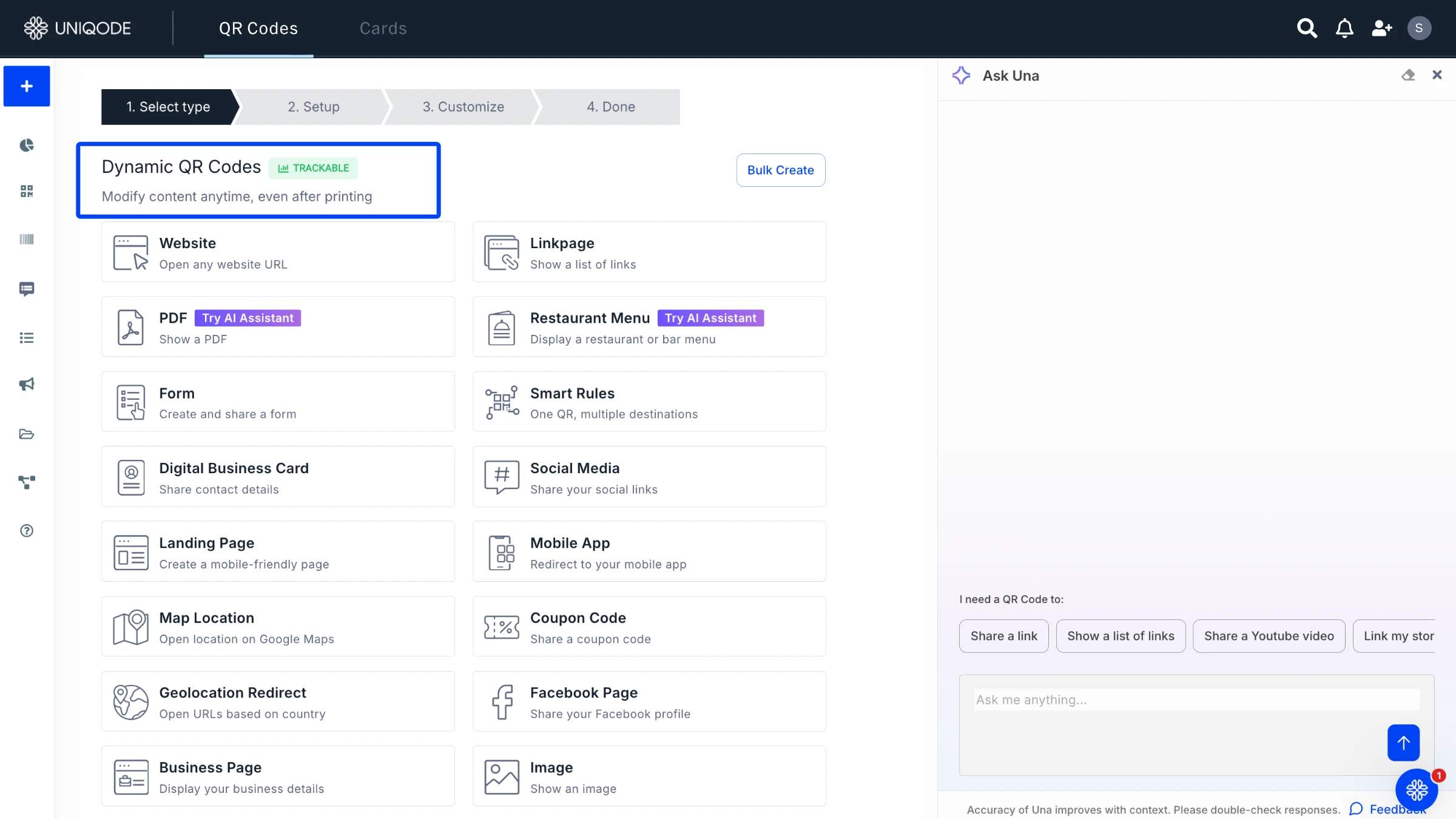
In the Uniqode dashboard, click +Create New > QR Code > Dynamic. Choose Dynamic regardless of the QR Code type selected next. Dynamic is what enables the redirect layer that logs scan analytics and allows destination updates after printing.
For the QR Code type: select Form QR Code (a Dynamic QR Code with a built-in lead capture form as its destination) to build the lead form inside Uniqode. Select Website QR Code to point to an existing form tool (HubSpot Forms, Typeform, Calendly). Both options work. Form QR Code is the faster path for new campaigns with no existing form infrastructure.
Do not generate a static QR Code for any campaign with a lead generation goal. Static codes cannot be tracked, cannot be updated, and cannot be connected to a retargeting pixel.
Step 2: Build or connect a lead capture form
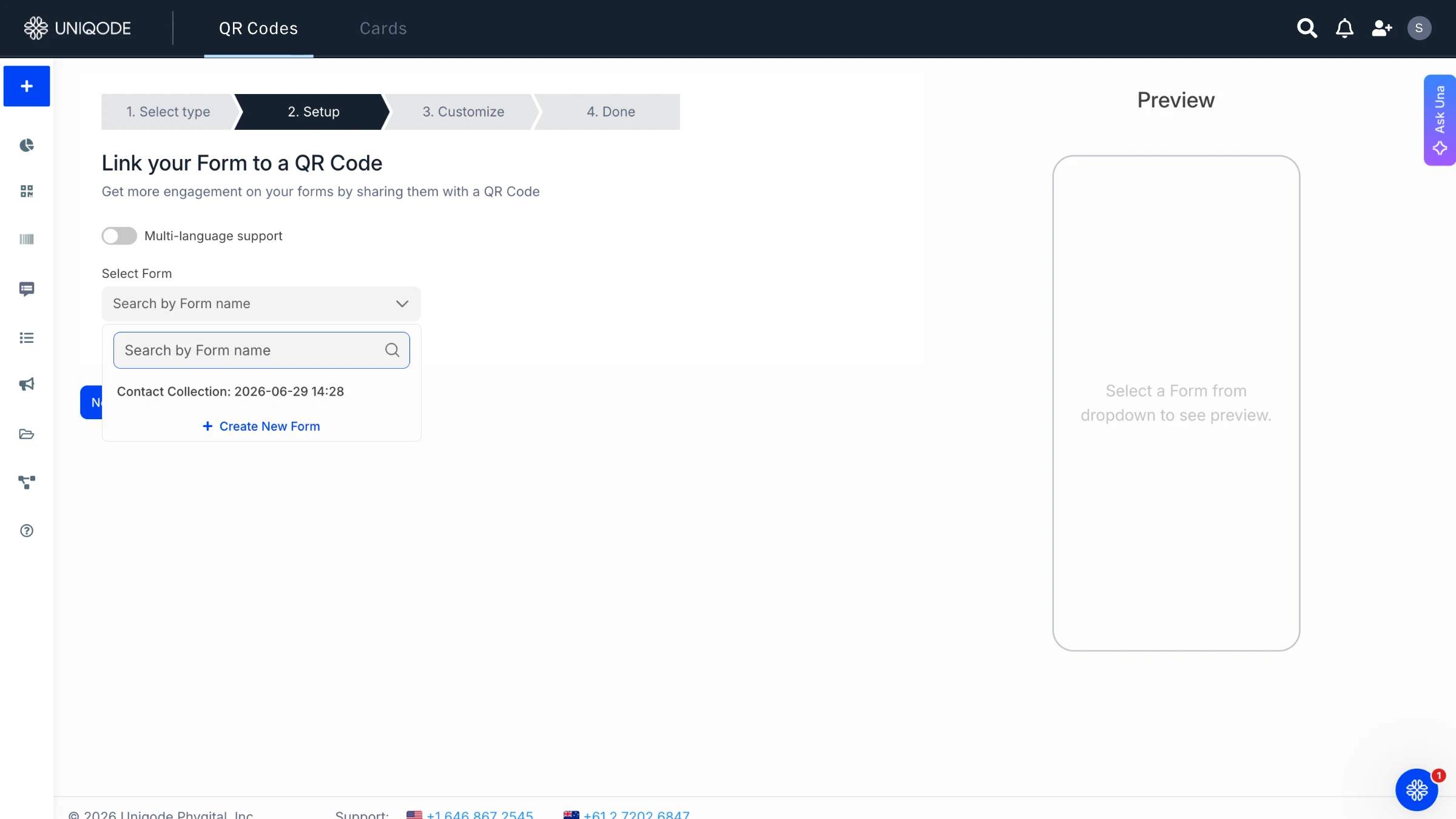
Form QR Code path: Build a 3-4 field form in Uniqode Forms. Name, email, and one qualifying field (company or phone) is a standard lead capture setup. Add a value exchange in the form headline: "Get the guide" or "Claim your discount."
Website QR Code path: Enter the URL of your existing form tool as the destination. The form tool handles submission and CRM push. The QR Code handles scan tracking. Both functions operate independently.
Form best practice: keep it to three or four fields. Each additional field beyond four reduces the form completion rate.
Step 3: Connect to your CRM
In Uniqode's form settings, connect to HubSpot or Salesforce via native integration. For any other CRM, use the Zapier webhook: new form submission creates a contact in the selected CRM. Test before launch: scan the QR Code, fill the form, confirm the contact appears in the CRM within 60 seconds.
Map form fields to CRM fields before launch. An unmapped field creates a submission with no destination in the CRM record.
Step 4: Add a retargeting pixel
In Uniqode's advanced settings, enter the Facebook Pixel ID or Google Tag ID. The pixel fires on every page load of the form destination, not just on submission. Every scanner, whether they submit or not, enters the retargeting audience. This feature is available on Uniqode's Business+ plan.
Step 5: Download and deploy
Download the QR Code in SVG for print (infinite resolution, no quality loss at any size) or PNG at 1,000px minimum for digital placements. Use Download > Advanced Options to select the format and resolution. Add a "Scan me" frame to the code for placements where the scanning action may not be obvious.
How to track and measure QR Code leads
QR Code lead tracking runs on three measurement layers: scan analytics (who scanned, when, and from where), form conversion rate (the percentage of scanners who submitted), and CRM attribution (which QR Code led to a closed deal). According to the State of QR Codes 2026 report, 44% of marketers say analytics need improvement, and the reason is clear: most tracking stops at scan analytics and never reaches the layers that connect scans to revenue.
Layer 1: Scan analytics
Uniqode's analytics dashboard tracks total scans, unique scans, device type, operating system, city, country, and scan time for every dynamic QR Code. For lead generation, unique scans is the metric that matters as it counts each device once. Total scans does not represent the number of leads.
A product manager at Nestlé Waters put it directly: "The ability to track user traffic is extremely useful." Scan tracking is the baseline. The real objective is knowing which placement was scanned, on which device, in which city, and whether the visitor completed the form.
Layer 2: Form conversion rate
Form conversion rate is unique scans divided by form submissions. Well-designed forms with a clear value exchange convert 25 to 40% of scanners. A rate below 15% signals form friction: too many fields, an unclear value proposition, or a mismatch between the QR Code's context and what the form is asking for.
Layer 3: CRM attribution
Enable UTM auto-append in Uniqode's advanced settings and every scan records in GA4 as a tagged session with pre-filled utm_source, utm_medium, and utm_campaign fields. QR Code leads appear in the same attribution reports as paid search and organic channels, so you can track which QR Code generated each CRM contact, which contacts became deals, and which deals closed.
Una, Uniqode's AI analytics assistant, answers attribution questions in plain English like "Which QR Code from last month's direct mail campaign drove the most form submissions?", pulling answers directly from the analytics layer without requiring a custom dashboard.
Set up a Scheduled Report to send key metrics like unique scans, form conversion rate, and top-performing codes to stakeholders automatically each week. Clear QR analytics insights, no manual dashboard exports required.
Benefits of using QR Codes for lead generation
There are several advantages that are native to QR Code usage on marketing materials that make lead generation and capture easier for brands. Here are the most common ones:
- High conversion rates: QR Codes simplify the conversion process for customers by removing any roadblocks. For instance, registration QR Codes can give users access to Google Forms that are already templatized, and require input of minimal details, thus helping with increasing conversion rates.
- Data tracking: Trackable QR Codes yield insightful information on the number of scans, location, device used, etc., that may be used to refine marketing strategies in the future. This also enables better understanding of customer needs. More importantly, first-party data collection with QR Codes ensures this information is earned through explicit action, giving brands cleaner signals rooted in consent, context, and real-world intent, and not passive tracking.
- Cost-efficiency: Using QR Codes lessens the need for unnecessary printing, resulting in a sustainable, cost-effective strategy. For instance, shopkeepers or local businesses can use a single QR Code for Google Reviews rather than keep physical cards and registries.
- Google Analytics integration: You can connect QR Codes with Google Analytics to track goal completions and conversions, optimizing your lead generation efforts.
- Retargeting: With QR Codes, you also get options such as retargeting that can help retarget potential customers or missed leads. You can integrate your QR Codes with Google and Facebook ads to showcase relevant ads to potential prospects, redirecting their journey back to your lead generation cycle.
Real results: How Uniqode customers use QR Codes for lead generation
Uniqode customers running QR Code lead campaigns consistently outperform standard digital channels but only when they build a complete scan-to-CRM process, not when they simply direct users to a website.
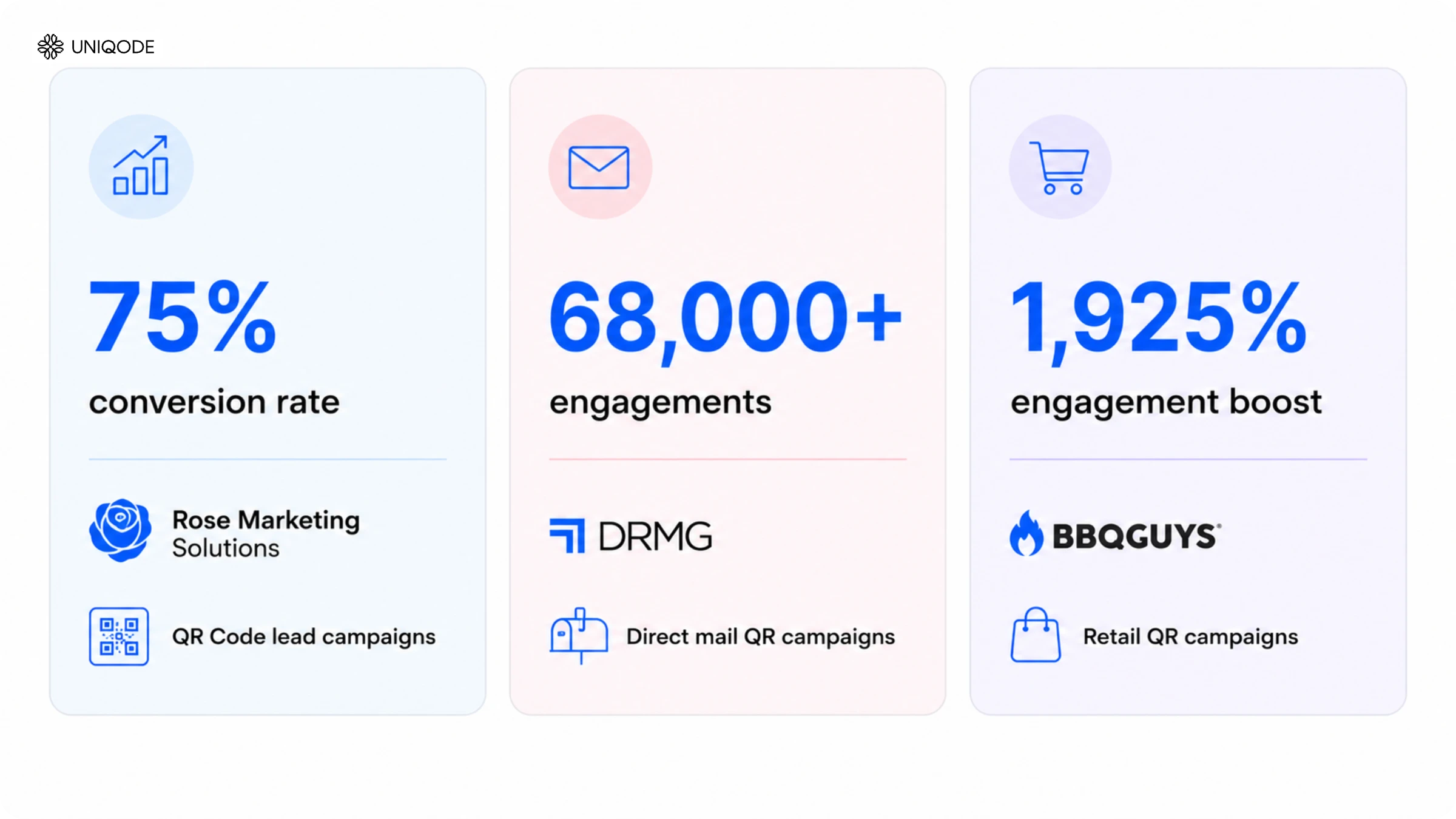
Rose Marketing Solutions: 75% conversion rate
Rose Marketing Solutions achieved a 75% conversion rate on QR Code lead campaigns by routing users through a structured process: form submission, CRM integration, and retargeting. The campaign infrastructure drove that result and not the QR Code alone. Linking to a homepage would not have generated those contacts.
DRMG: 68,000+ engagements via direct mail
DRMG generated over 68,000 engagements through direct mail campaigns using Uniqode QR Codes. Every engagement was a scan-to-form interaction tied to a physical mailer. Dynamic QR Codes let the team update campaign destinations in real time without reprinting, and every engagement fed directly into a live CRM pipeline.
BBQGuys: 1,925% engagement increase
BBQGuys exceeded their campaign target by 1,925% by linking a QR Code to a form with a clear value exchange in a high-purchase-intent retail environment. High intent combined with a frictionless form experience produced the result.
The pattern across all three is consistent. Rose Marketing Solutions, DRMG, and BBQGuys each connected the QR Code to a form, integrated that form with a CRM, and added a retargeting layer. The QR Code started the process and the infrastructure behind it drove the results.
Why enterprise marketing teams choose Uniqode for QR lead generation
Free QR Code generators provide a URL redirect and nothing more. Uniqode delivers a complete lead generation system including scan analytics, form integration, CRM integration, retargeting, and enterprise-grade compliance, all operational from day one.
Compliance built in: Uniqode is SOC 2 Type II certified, GDPR compliant, HIPAA compliant, and ISO 27001 certified. For healthcare, financial services, and enterprise teams, those certifications are a prerequisite before deploying any data collection tool. Cigna Group, one of the largest US health insurers, tripled its total scans year-over-year with Uniqode, with full compliance from the start.
Update campaigns without reprinting: Dynamic QR Codes let you change the destination URL for any live code directly from the Uniqode dashboard. A 90-day direct mail campaign can swap its landing page, replace its form, or change its offer without touching a single printed piece. Free generators create only static codes, change the destination and the code becomes useless.
CRM integration with no manual steps: Uniqode connects natively to HubSpot and Salesforce, with Zapier providing access to 5,000+ additional apps. Every form submission creates a CRM contact automatically, no CSV to download, no manual import, no 48-hour lag between a scan and a contact appearing in the pipeline.
Retargeting without separate setup: On Business+ plans, Facebook Pixel and Google Tag activate automatically on the form page. Every scanner enters the retargeting audience, whether they submit the form or not. Non-submitters from a QR campaign become a warm audience for the next ad campaign immediately.
Team management at scale: Organize QR Codes by campaign in folders and assign access so each team member or agency editor sees only their designated codes. Bulk creation via CSV template handles campaigns with 50 or more codes. The audit log records every edit, who made it and when.
Success stories: How prominent brands embraced QR Codes
Leading brands have successfully integrated QR Codes into their campaigns, enhancing user engagement and conversions. Here are a few campaigns that stood out for customers:
1. JLO Beauty
Co-promoted with Jennifer Lopez’s New Year’s Eve performance, JLo Beauty used QR Codes on MTA trains in New York City to offer exclusive content and performance information.

2. Synchrony Bank
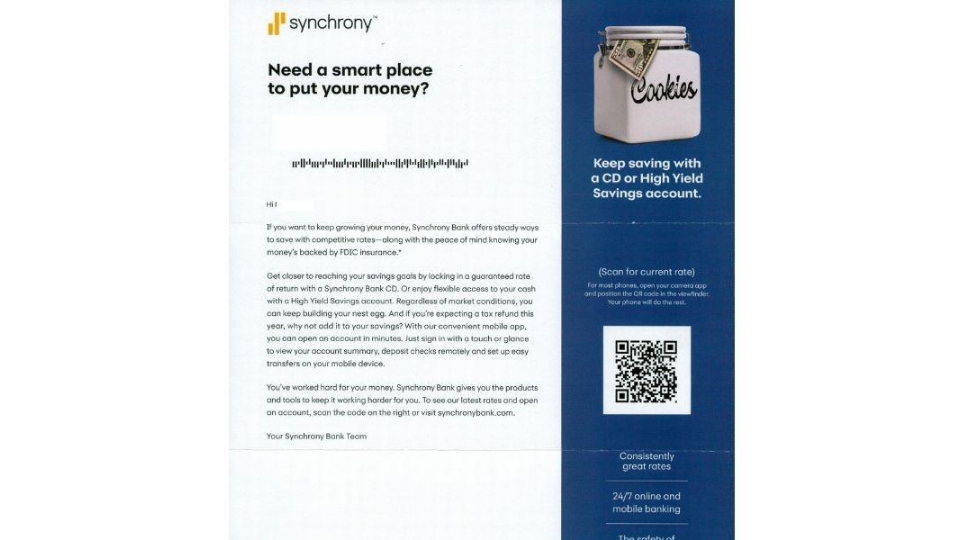
Synchrony Bank incorporated QR Codes into mailers to direct recipients to landing pages with current interest rates, enabling data collection for future marketing campaigns.
3. L’Oreal
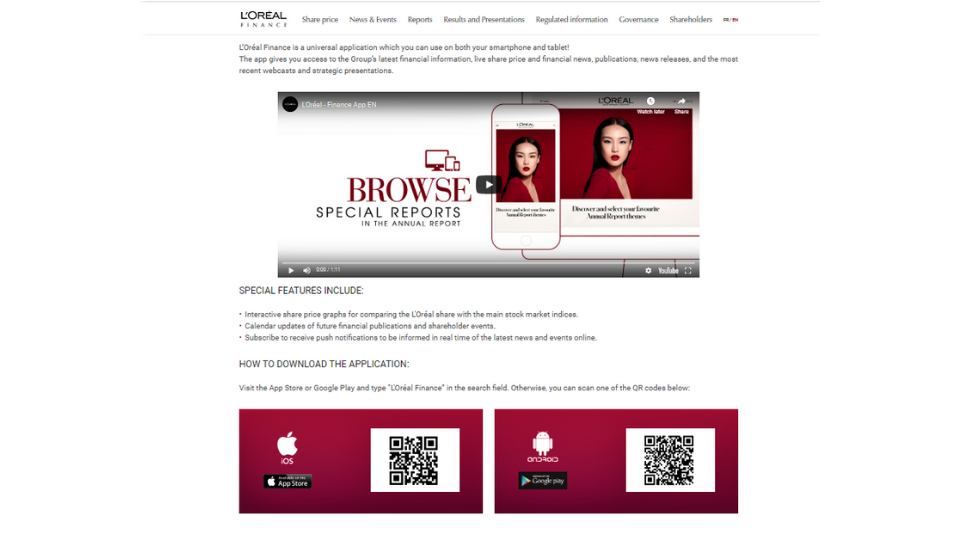
L’Oreal used QR Codes on print ads in taxis to engage consumers with videos and information before leading them to shop on the website, resulting in an 80% boost in app downloads.
4. Supergoop
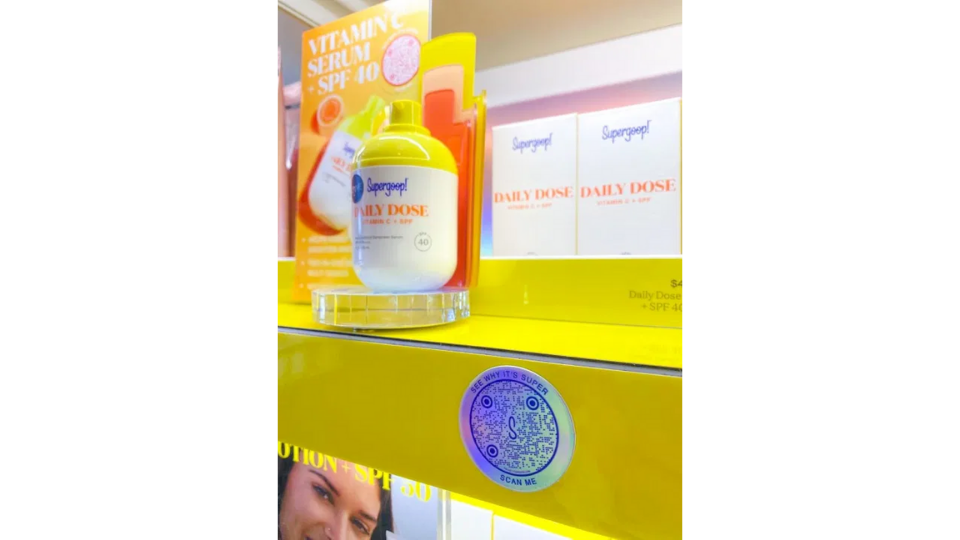
Supergoop utilized QR Codes on in-store displays to provide product information such as ingredients, formulations, and nature of packaging via contactless scanning during the pandemic, ultimately driving user engagement.
Start generating leads with every scan
A scan is the starting point, not the outcome. QR Code lead generation works when a dynamic QR Code links to a form, the form pushes data to a CRM, and a retargeting pixel tracks non-submitters. That infrastructure turns scan counts into a qualified pipeline. Without it, campaigns produce numbers that look promising and deliver nothing.
The infrastructure this guide outlines takes under 15 minutes to set up for your first campaign. The outcomes it unlocks, scan attribution, real-time CRM entries, and retargeting audiences built from non-submitters are what separate a basic QR Code campaign from a true lead generation system. The goal isn't the scan count. It's the contact.
Frequently Asked Questions
- What kind of data can a QR Code collect?
A QR Code collects two types of data: scan analytics (device type, OS, city, country, timestamp, total vs. unique scans) and form submission data (name, email, phone, company, or any custom field). Scan analytics are automatic on every Dynamic QR Code. Form data requires a connected lead capture form. A QR Code cannot identify who scanned by name or email from the scan alone. Static QR Codes provide no analytics.
- Can a QR Code collect contact information?
A QR Code collects contact information when it routes to a lead capture form. The code delivers the scanner to the form; the form captures the contact data. Create a Dynamic QR Code that points to a 3-4 field form, connect the form to your CRM, and every submission creates a contact record automatically.
- How do I create a QR Code to collect email addresses?
Create a Dynamic QR Code in Uniqode, select Form QR Code, add an email field to the form, and connect it to your CRM. Every scanner who submits the form sends their email directly to the CRM. Download in SVG for print or PNG for digital.
- What is the difference between a static and dynamic QR Code for lead generation?
Static QR Codes embed a fixed URL with no redirect layer: they cannot be tracked, cannot be updated after printing, and cannot support form integration or retargeting. Dynamic QR Codes log every scan and can be updated at any time without reprinting. For any campaign with a lead generation goal, use a Dynamic QR Code.
- How do I track who scanned my QR Code?
Dynamic QR Codes track every scan automatically: device type, OS, city, country, and timestamp appear in the analytics dashboard. Unique scans (each device counted once) is the correct metric for lead generation, not total scans. Identifying a scanner's name or email requires a connected lead form. The scan logs device and location data; the form logs identity data.
- How do QR Codes help with first-party data collection?
QR Codes create a consent-based scan-to-form flow: the user initiates the scan and chooses whether to submit the form. Every form submission is a first-party data record. GDPR-compliant platforms add a consent checkbox, making every submission a verified opt-in. QR Codes turn physical placements (direct mail, retail, events, packaging) into owned first-party data channels.
- Can I connect a QR Code to my CRM?
Connect a QR Code to a CRM through Uniqode's native HubSpot or Salesforce integration, or through a Zapier webhook for any other CRM. The difference from a Google Form: Uniqode provides scan attribution (which code, which location, which device) and retargeting for non-submitters. Google Forms provides a spreadsheet. Both are valid options. If scan attribution and retargeting are not requirements, a Google Form handles basic lead collection.
About the Author
Shashank - Enthusiastic about marketing and improving the ROI of businesses.
Related Posts
QR Code Forms: How to Capture Leads, Registrations, and Feedback in One Flow
How to Create a QR Code Survey (+ Best Practices for Higher Response Rates)
How to Create a QR Code for Data Collection

14 Effective Real Estate Lead Generation Tactics (Online & Offline)
The Ultimate Guide To Automate Lead Generation From Offline & Online Channels