What Is a Product Code? GTIN vs UPC vs EAN Explained
A product code is a unique identifier assigned to a product, and the GTIN is the one retailers read. UPC and EAN are the 12-digit and 13-digit forms of a GTIN. Learn when a US or EU version needs a new GTIN and which number goes in a GS1 QR Code.
What is a product code?
A product code is a unique identifier assigned to a product. Businesses use product codes to track inventory, process sales, and manage supply chains. The term covers internal codes that one business sets and standardized codes that retailers and marketplaces read.
Each team that handles a product works with a different code. Operations manages each item by its stock keeping unit (SKU), and engineering tracks a design by model number. A manufacturer tracks each unit by serial number. Packaging teams and retailers use a fourth code: the number under the barcode, called the Global Trade Item Number (GTIN).
The GTIN has 12 digits on most US packs and 13 digits on most EU packs. Teams treat the 12-digit Universal Product Code (UPC) and the 13-digit International Article Number (EAN) as two different numbers. A GS1 QR Code holds one number, so a retailer’s request for one forces a choice.
Food and Drug Administration (FDA) product codes are a separate system. The FDA assigns them to classify regulated products such as foods, drugs, and medical devices.
| Product code | Assigned by | Identifies | Used for |
|---|---|---|---|
| SKU | The seller | One item in the seller’s catalog | Stock counts and orders |
| Model number | The manufacturer | One product design | Spec sheets and support |
| Serial number | The manufacturer | One physical unit | Warranty and recalls |
| GTIN | The brand, through GS1 | One product as traded | Retail checkout and marketplace listings |
| FDA product code | The FDA | One regulated product category | Regulatory filings |
Key takeaways
- A product can carry many product codes, and retailers read the GTIN printed under the barcode.
- UPC and EAN are the 12-digit and 13-digit forms of a GTIN, so one product keeps one number across both.
- Add leading zeros until a GTIN has 14 digits: two zeros for a UPC and one for an EAN-13.
- A product keeps one GTIN in the US and the EU until a change meets any of GS1’s three tests.
- A GS1 QR Code carries one GTIN as 14 digits, and the UPC or EAN stays on the pack.
What is a GTIN?
A Global Trade Item Number (GTIN) is the number that identifies one specific product, issued under GS1 standards. A barcode carries the GTIN so a scanner can read it. A GTIN comes in four lengths: GTIN-8, GTIN-12, GTIN-13, and GTIN-14.
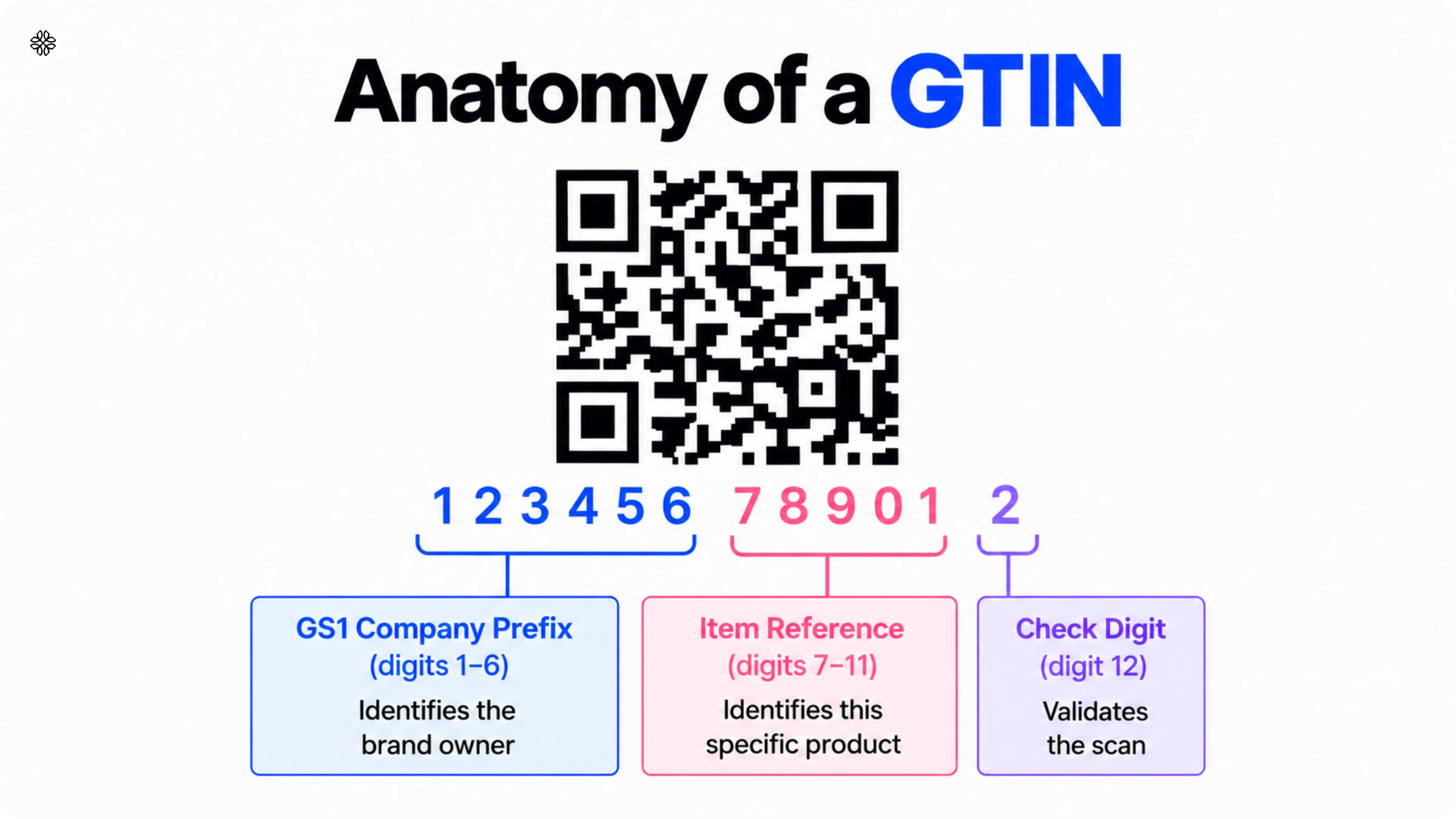
Every GTIN has three parts:
- The GS1 Company Prefix identifies the company that licensed the GTIN.
- The item reference identifies the product, and the company assigns it.
- The check digit sits last and catches typing and scanning errors.
Each size, flavor, and pack quantity of a product needs its own GTIN. A single can and a 12-pack of the same drink carry different GTINs.
Only GS1 guarantees that a GTIN stays unique worldwide. A brand licenses GTINs through the GS1 office in its country.
What is the difference between GTIN, UPC, and EAN?
The GTIN is the number, and UPC and EAN are the names for its 12-digit and 13-digit forms. A UPC is the 12-digit GTIN used mostly in North America. An EAN is the 13-digit GTIN used mostly outside North America.
| GTIN format | Digits | Where it is common | Barcode that prints it |
|---|---|---|---|
| GTIN-8 (EAN-8) | 8 | Small packs worldwide | EAN-8 |
| GTIN-12 (UPC) | 12 | North America | UPC-A (UPC-E on small packs) |
| GTIN-13 (EAN) | 13 | Outside North America | EAN-13 |
| GTIN-14 | 14 | Cases and shipping packs worldwide | ITF-14 or GS1-128 |
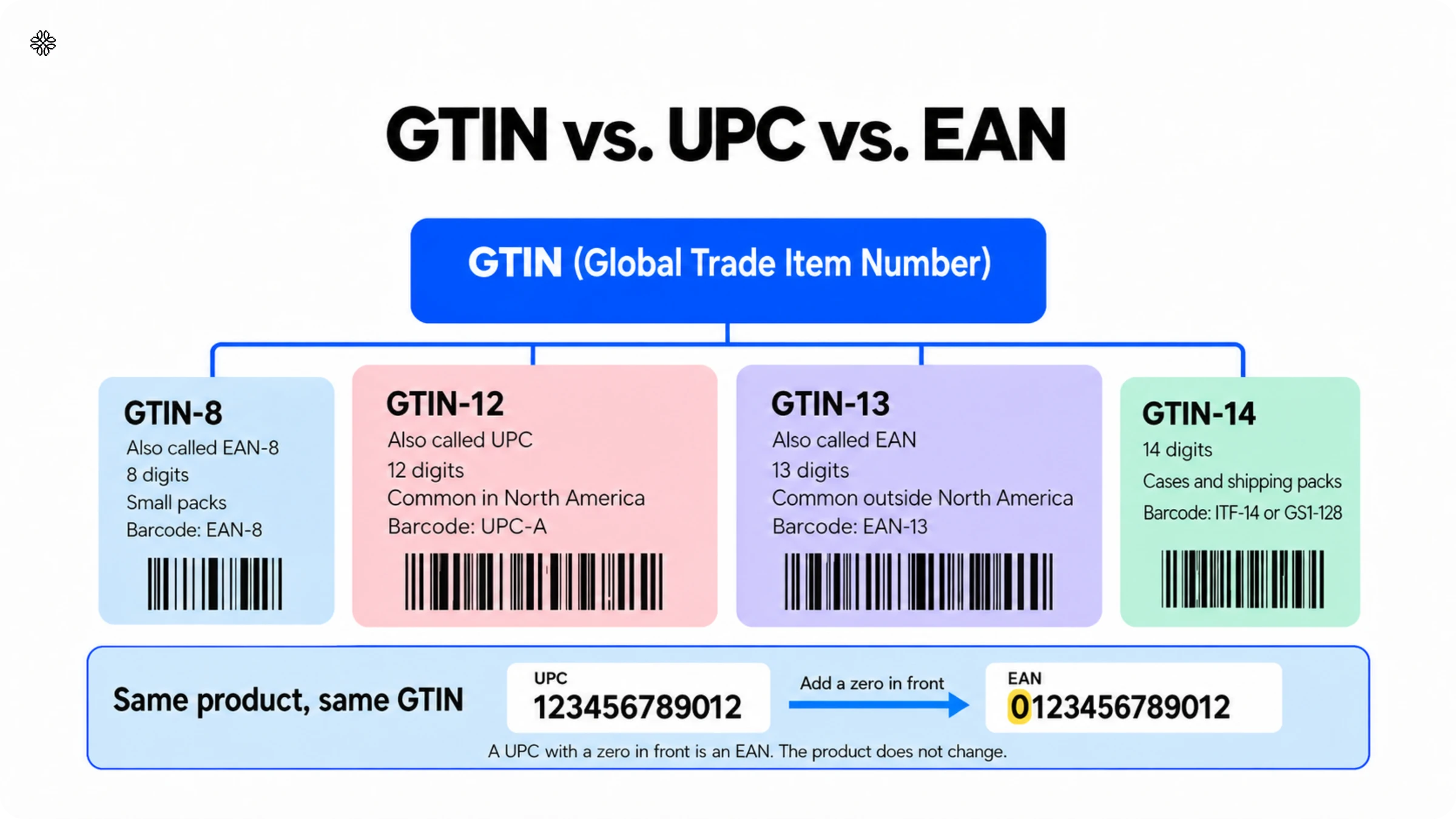
GTIN vs UPC
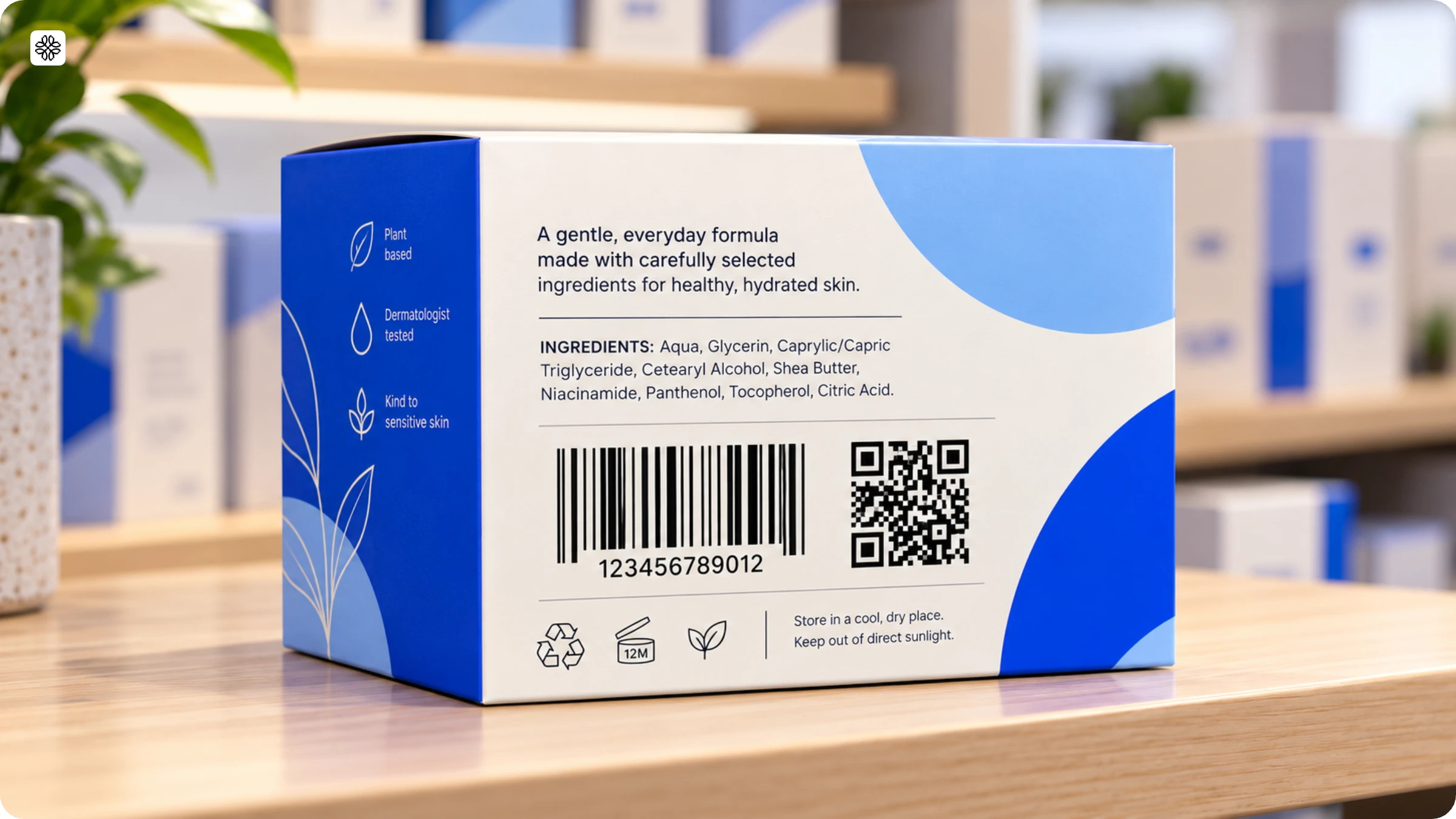
Every UPC is a GTIN, and the GTIN family also includes GTIN-8, GTIN-13, and GTIN-14. The word UPC names both the 12-digit number and the UPC-A barcode that prints it. On a US pack, the number 123456789012 under the UPC-A barcode is both the UPC and the GTIN-12.
A GTIN-14 is a UPC padded to 14 digits or the number for a case or multipack. A GTIN with 13 or 14 digits becomes a UPC only when dropping its leading zeros leaves exactly 12 digits.
If a GS1 QR Code platform asks for a GTIN and your pack shows a UPC, enter the UPC.
UPC vs EAN
A UPC has 12 digits, and an EAN has 13. Regional habit decides which one a pack carries. A 12-digit UPC becomes a 13-digit EAN when you add a zero in front. For example, the UPC 123456789012 and the EAN 0123456789012 identify the same product. An EAN converts back to a UPC only when it starts with a zero.
The first digits of an EAN identify the issuing GS1 office, so the product’s country of origin can differ.
GS1 says both formats are accepted worldwide. A US retailer can scan an EAN, and an EU retailer can scan a UPC. A retailer’s buying guide can still accept only one. GS1 advises asking each trading partner which format it supports.
EAN vs GTIN
An EAN is a 13-digit GTIN, so every EAN number is also a GTIN. The word EAN names both the 13-digit number and the EAN-13 barcode that prints it.
An EAN comes from GS1, and a SKU comes from the seller. GS1 is the organization that issues GTINs, and UPC and EAN are formats of them. The EAN-8 is the eight-digit GTIN-8, used on small packs where a 13-digit barcode does not fit.
How do you turn a UPC or EAN into a 14-digit GTIN?
Add leading zeros until the number has 14 digits: two zeros for a UPC and one zero for an EAN-13. A UPC is already a GTIN-12, so the number on your pack is your GTIN. The zeros change the length of the number, and the product stays the same.
GS1 recommends storing every GTIN as a 14-digit number in your databases. The GS1 General Specifications require 14 digits for a GTIN in a GS1 Digital Link.
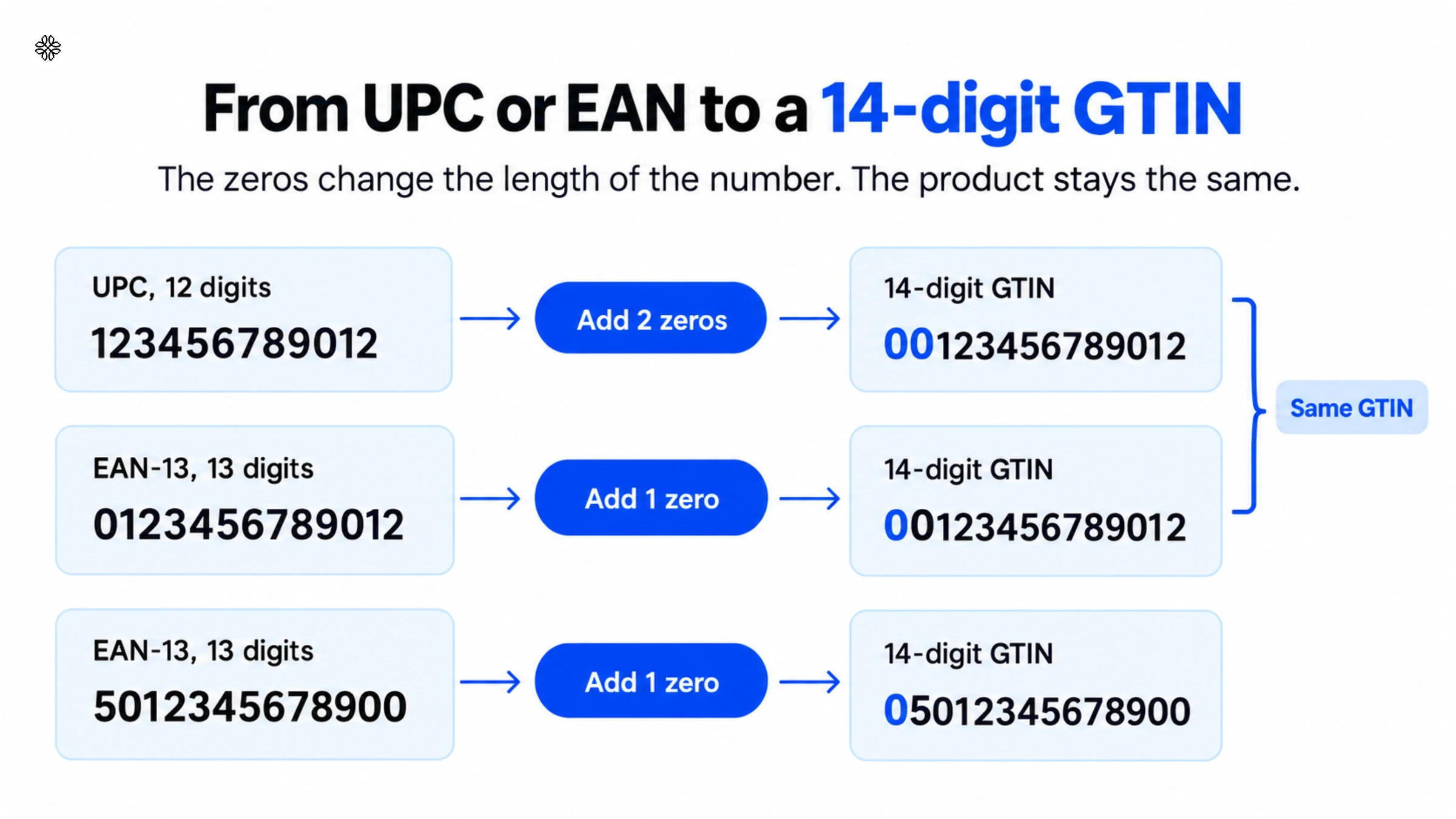
| What your pack shows | Digits | Zeros to add | 14-digit GTIN |
|---|---|---|---|
| UPC: 123456789012 | 12 | 2 | 00123456789012 |
| EAN-13: 0123456789012 | 13 | 1 | 00123456789012 |
| EAN-13: 5012345678900 | 13 | 1 | 05012345678900 |
| EAN-8: 12345670 | 8 | 6 | 00000012345670 |
A UPC and its 13-digit EAN version pad to the same 14-digit GTIN.
When a 14-digit number is a different product
A 14-digit number that starts with a zero is a padded UPC or EAN, and it identifies the single item. A 14-digit number that starts with a digit from 1 to 8 identifies a case or pack of that item.
For example, 00123456789012 identifies one can, and 10123456789019 identifies a case of 12 cans. The case number ends in a different digit because the check digit is recalculated. Packaging teams use the case number on cartons, and checkout scanners read the single-item number.
Is your product data ready for 14-digit GTINs?
Our Sunrise 2027 playbook covers the 14-digit rule and the other changes to your product data and packaging.
Can you use the same GTIN in the US and the EU?
GS1 says a product keeps the same GTIN in every market, including the US and the EU. A GTIN licensed by any GS1 office works worldwide. A brand with a UPC keeps that number in the EU. A brand with an EAN keeps that number in the US.
A GTIN is linked to one product, so a second GTIN makes the same product look like two. A consumer brand that sells in the US and the EU asked our team which number its EU partners read. The partners read the same GTIN, whether the pack prints a UPC or an EAN.
A product needs a new GTIN only when a change to the product meets one of GS1’s tests.
When does a US or EU version need a new GTIN?
A US or EU version needs a new GTIN only if a change meets any of three tests. The tests come from GS1’s GTIN Management Standard.
The three tests ask:
- Does the change involve a regulatory or liability disclosure to the consumer or a trading partner?
- Does the change substantially affect how the product is shipped, stored, or received?
- Must a consumer or trading partner be able to tell the new version from the old one?
These GS1 rules turn the tests into specific cases.
| Difference between versions | New GTIN? | GS1 rule |
|---|---|---|
| A different net content on the label, such as 12 units and 10 units | Yes, for any change | Declared net content |
| A recipe change that alters the legally declared ingredients or allergens | Yes, when buyers must tell the versions apart | Declared formulation or functionality |
| A certification mark added or removed, such as CE or UL | Yes | Add or remove certification mark |
| A different primary brand name | Yes | Primary brand |
| A different preprinted price on the pack | Yes | Price on pack |
| A size or gross weight change of more than 20% | Yes | Dimensional or gross weight change |
| A different case or pallet quantity | Yes, at case and pallet level only | Pack or case quantity |
| An extra version with a different label language, such as a Spanish-only version of an English product | Yes | New product introduction |
| The same net content shown in different measurement units | The standard does not say, so ask your GS1 office | None |
A pack of 12 for the US and a pack of 10 for the EU carry two different GTINs. A removable price sticker or a small ingredient change that leaves every legal declaration unchanged keeps the same GTIN. Each version with its own GTIN needs its own GS1 QR Code.
The standard says local, national, or regional regulations can require new GTINs more often and take precedence. A brand owner can also assign a new GTIN more often than the rules require.
Which GTIN goes in a GS1 QR Code?
A regular QR Code holds only a web address, and the GTIN lets a retailer’s scanner recognize the product. A GS1 QR Code uses the GTIN printed under your UPC or EAN, written as 14 digits. The GTIN sits after /01/ in the address of a GS1 QR Code, which follows the GS1 Digital Link standard. The address starts with a domain, then /01/, then the 14-digit GTIN. A shopper who scans the code lands on the page you choose.
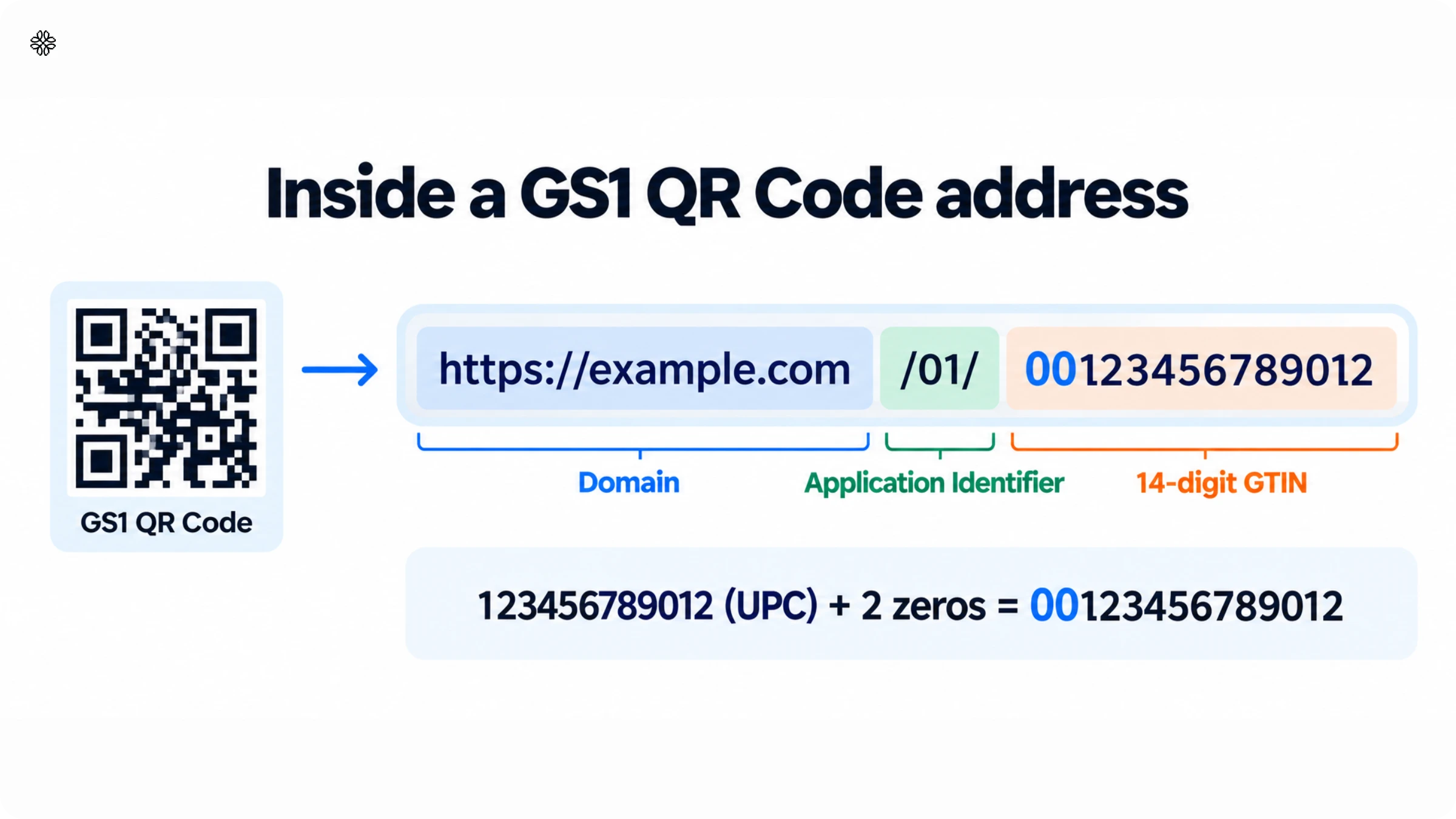
| What the pack shows | 14-digit GTIN | Address in the code |
|---|---|---|
| UPC 123456789012 on a US pack | 00123456789012 | https://example.com/01/00123456789012 |
| EAN-13 5012345678900 on an EU pack | 05012345678900 | https://example.com/01/05012345678900 |
A GS1 QR Code carries one GTIN. The UPC and the EAN of the same product pad to the same 14-digit GTIN, so one code serves both. A brand with 150 GTINs creates 150 codes, one for each.
The GTIN in a pack’s GS1 QR Code is the one for the item shoppers buy. GS1’s rules for consumer packs allow a GTIN-8, GTIN-12, or GTIN-13, so a case GTIN-14 stays on cartons.
GS1 says a UPC or EAN barcode stays on the pack during the transition. Both codes carry the same GTIN.
GS1 UK says a QR Code that becomes the only symbol on a pack needs the GTIN written underneath. If the two codes cannot sit side by side, the GTIN accompanies both.
Placing both product codes on one pack?
Our guide to 2D barcodes covers where each code sits on the pack.
How to create a GS1 QR Code with Uniqode?
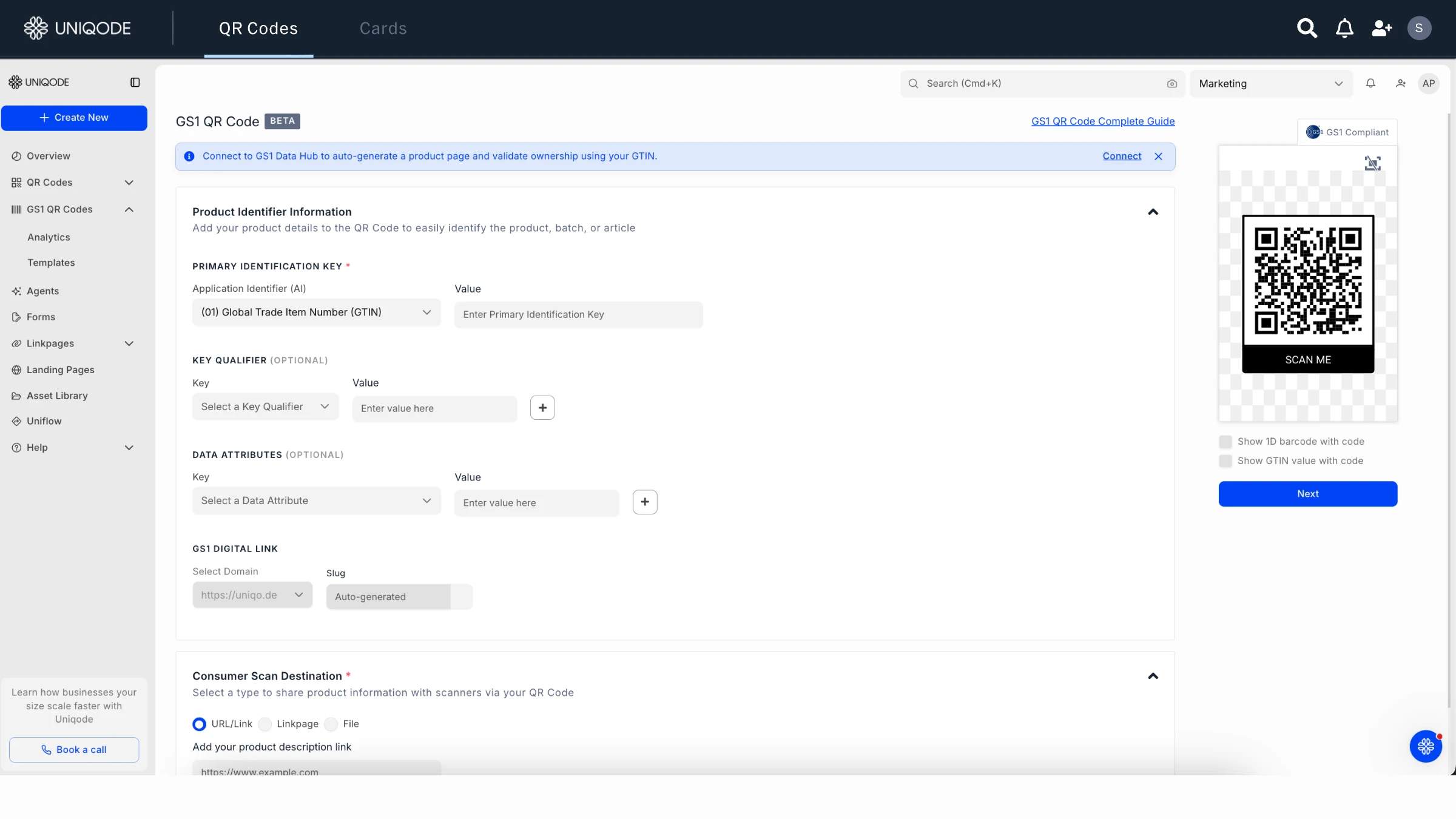
To create a GS1 QR Code, enter your GTIN and choose the page shoppers land on. Uniqode builds the GS1 Digital Link address from your GTIN, so you never write /01/ by hand. Have two things ready: the GTIN from your pack and the page you want shoppers to open.
Follow these steps to create the GS1 QR Code:
- Open the GS1 QR Code page in your Uniqode dashboard.
- Under PRIMARY IDENTIFICATION KEY, keep (01) Global Trade Item Number (GTIN) selected.
- Enter your GTIN in the Value field next to it.
- Under Consumer Scan Destination, choose where scanners land: URL/Link, Linkpage, or File.
- Select Next to continue.
The code carries your GTIN for retail scanners and opens your page on a shopper’s phone. The GTIN is the only required number. A batch or lot number, a serial number, and an expiry date are optional. They go under KEY QUALIFIER (OPTIONAL) and DATA ATTRIBUTES (OPTIONAL).
What should you check before you print a GS1 QR Code?
Before you print a GS1 QR Code, do three things:
- Confirm each product’s GTIN and write it as 14 digits.
- Check each US or EU version against GS1’s three tests.
- Keep the UPC or EAN on the pack beside the code.
Uniqode is a GS1 US Executive Solution Partner that helps enterprise teams manage a GS1 QR Code for every GTIN. Bring your GTIN list and your next print date, and the Uniqode team will map the rollout with you.
Comparing GS1 QR Code platforms?
Our guide to choosing a GS1 QR Code provider covers what to ask each provider.
Frequently Asked Questions
- Where do I find the GTIN on my product?
The GTIN is the number printed beneath the barcode on the pack. A case GTIN-14 sits beneath the carton barcode. Your GS1 office’s portal lists every GTIN you license.
- Is a GTIN always 14 digits?
A GTIN has 8, 12, 13, or 14 digits, and GS1 recommends storing every GTIN as 14 digits. A GS1 QR Code needs the 14-digit form.
- Can I use an EAN barcode in the USA?
GS1 accepts both formats worldwide, so a US retailer can scan an EAN. A retailer’s buying guide can still accept only one format, so ask before you print.
- Can I make my own GTIN?
Only GS1 can issue a GTIN that is unique and verifiable, so you license yours through your local GS1 office. A GTIN bought from a reseller can belong to another company.
- How do I check whether a GTIN is valid?
Verified by GS1 confirms a GTIN is valid and shows which company licenses it. GS1’s check digit calculator tests whether the number is correctly formed.
- Can I reuse a GTIN on another product?
A GTIN stays linked to one product for good, so a discontinued item’s number never goes to a new product.
About the Author
Architaa is a Content Marketer at Uniqode, where she explores how QR Codes, Digital Business Cards, and phygital experiences are reshaping the way brands connect with their audiences. She transforms complex marketing trends and technologies into clear, actionable insights that help businesses strengthen engagement and build lasting connections with their customers. Outside of work, Architaa is most likely lost in a novel, following every ball of a cricket match, or binging her favorite shows.