
Instant CRM Sync: What It Means for Event Lead Capture
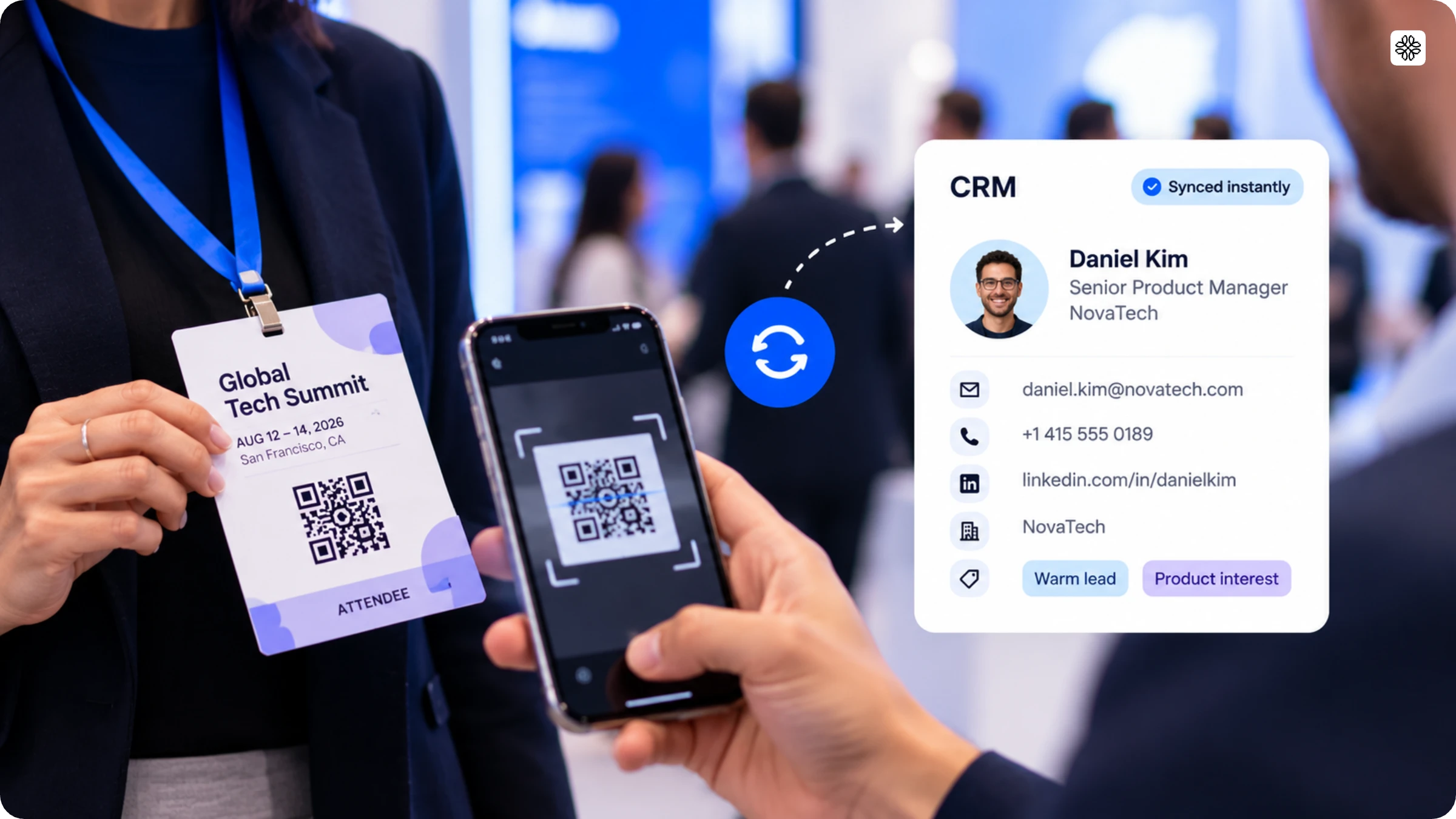
Instant CRM sync writes a captured lead's complete contact record into a CRM in real time, through a native connection that reaches more than one CRM at once. This guide covers what breaks down in the manual process, how instant sync fixes it, and what to check before you buy.
Instant CRM sync ensures that every captured lead’s contact record is written directly into your CRM, instantly and in real time. This happens through a native connection, so there is no waiting for scheduled exports or dealing with manual uploads. What’s more, instant CRM sync can reach multiple CRMs at once, so your sales team is never limited to just one system.
Many vendors treat CRM integration as a simple yes-or-no checkbox. But the real factors that decide whether a lead converts are sync speed, sync completeness, and how many CRMs you can reach without extra steps.
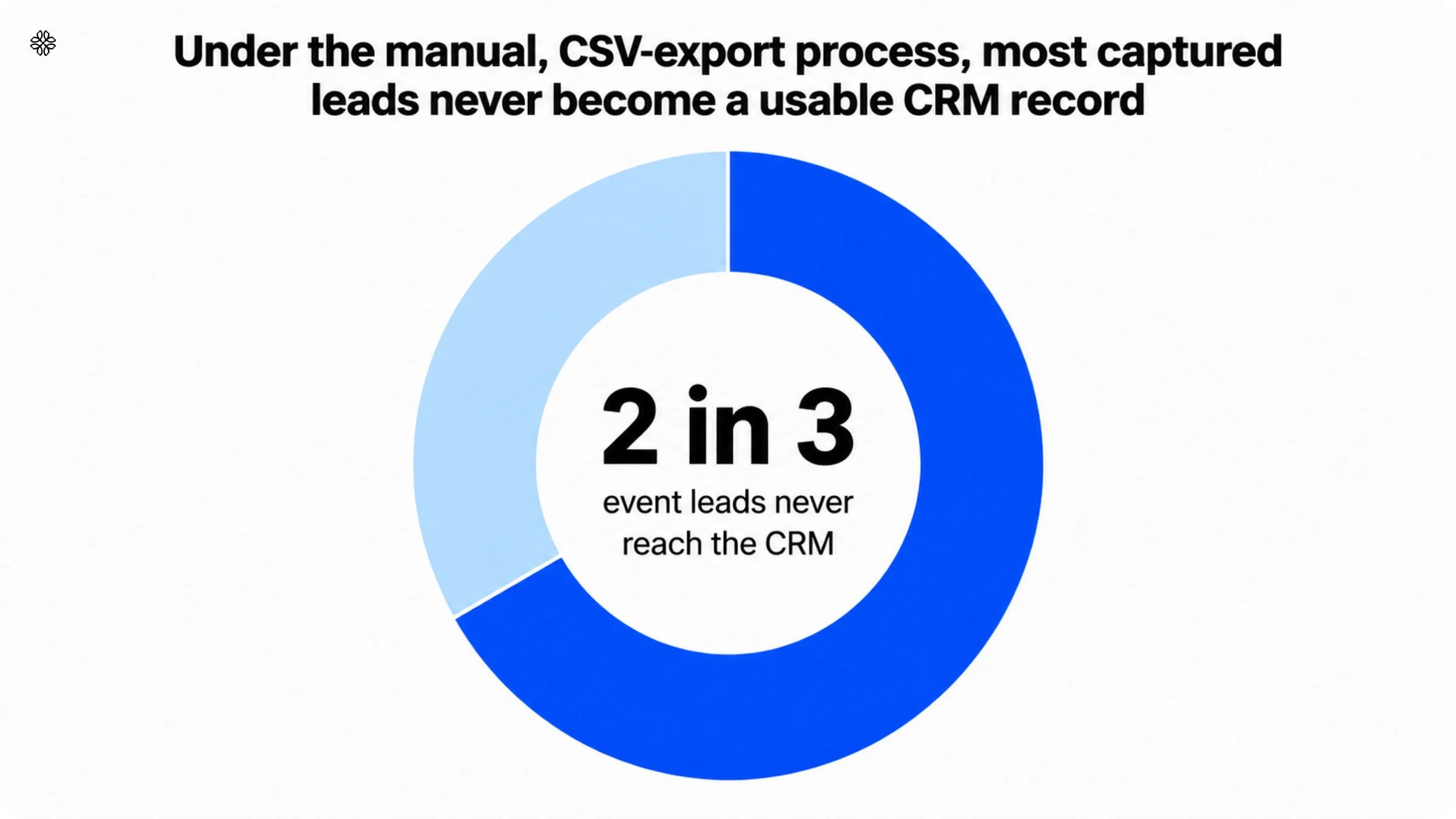
Getting this wrong can be costly. Two out of three event leads never reach the CRM at all when handled manually and half the scans from a rented show-floor scanner never make it into any system your sales team can use. In the following sections, we’ll look at where the traditional process fails, how instant CRM sync changes the game, which CRMs it supports, and what you should check before making a decision.
What is instant CRM sync?
Instant CRM sync is a feature of event lead capture software that moves a scanned lead's enriched contact record into a CRM within seconds of capture, through a direct connection the vendor builds and maintains. It is different from CRM synchronization that runs on a schedule: a nightly batch job or a once-an-hour poll still counts as sync, but it is not instant, and the gap between those two words is where leads go cold.
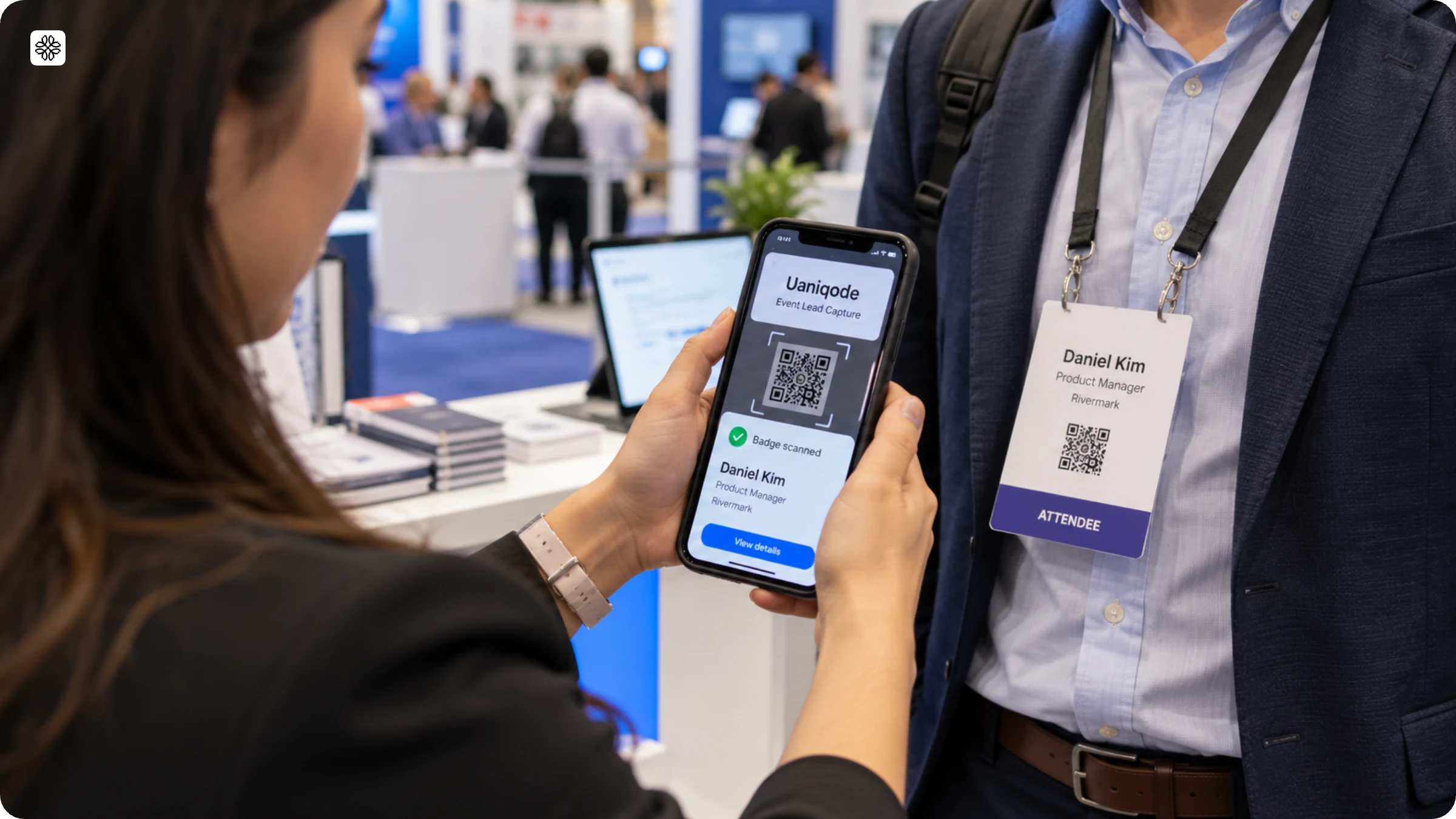
The real difference to pay attention to is native sync versus a workaround. With native CRM sync, your data writes straight into the CRM’s own fields, so speed and reliability depend only on the two platforms talking to each other. But if you use a workaround, like Zapier or another automation tool, you are adding a third system into the mix. That extra step can queue jobs, hit rate limits, or quietly drop a lead without anyone noticing, until a sales rep realizes something is missing.
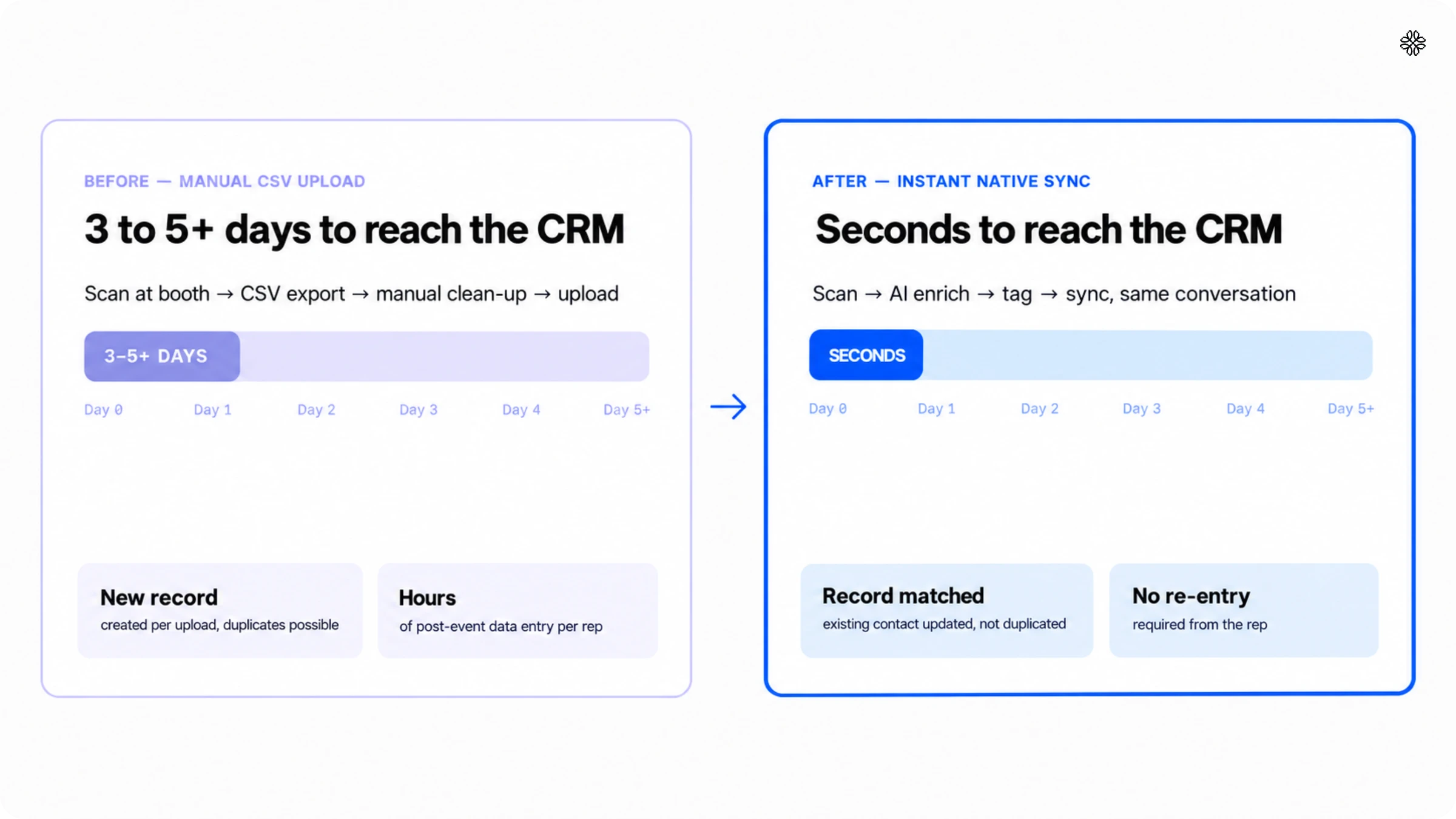
Before we dive in, here are three things you should know. First, the old way of syncing leads often took three to five days, not minutes. Second, native instant CRM sync shrinks that wait to just seconds. And third, syncing to only one CRM is a very different story from a multi-CRM sync that connects with every system your sales team actually uses.
The traditional way event leads reached a CRM
If you have ever managed event leads, you know the drill. It starts with a scan, a swipe, or even a handwritten note, and ends, days later, with someone finally entering the details into the CRM. Picture this: a rep scans a badge or exchanges business cards at the booth, and then the contact information sits idle on a phone, a rented scanner, or in a growing stack of paper for the rest of the event. There is no clear path from capture to CRM just yet. Only after the event does someone export a CSV file, painstakingly clean up the columns, and upload it. This process costs the average team five days before they can even begin to follow up.
But not every team is simply looking to speed up a slow process. For some, there is no process in place at all.
“So we use a Excel pivot type of sheet with pipeline built-in data for us all. We are what you would consider a small business. So we haven’t invested in any larger scale CRM tools.”
— Sales representative, small B2B supplier company
For teams in this situation, event lead capture software with instant CRM sync is more than just a time-saver. It finally gives every captured lead a proper, structured home. Teams already using a CRM often see the manual process above as their default routine, something they constantly work around, rather than a rare exception.
What manual lead entry actually costs sales teams
A manual process does more than just slow things down by a few days. It actually costs you most of your leads. Speed makes all the difference. When a lead sits untouched for five days, the average delay caused by manual CSV exports, it is no longer the same opportunity you had on day one. Interest cools, budget discussions move forward without your prospect, and the rep who made the connection may have already forgotten the details by the time the spreadsheet lands in the CRM.
There is another cost that often goes unnoticed: your sales reps’ time. According to Salesforce’s State of Sales report, sixth edition, B2B sales reps already spend 70% of their time on non-selling activities, including manual CRM data entry. Manually re-entering a pile of post-event contacts only adds to that burden, on top of all the other CRM admin tasks waiting for them each week.
Manual uploads bring another headache: duplicate contacts. When you upload a CSV by hand, there is no system to check if that email address already exists. The same contact gets created twice, ownership is divided, and the original rep loses sight of the new entry. Suddenly, two reps approach the same account with different stories, and the prospect notices the confusion before anyone on your team does. Automatic CRM lead synchronization, which we will discuss next, is designed to solve exactly this problem.
What instant CRM sync actually does
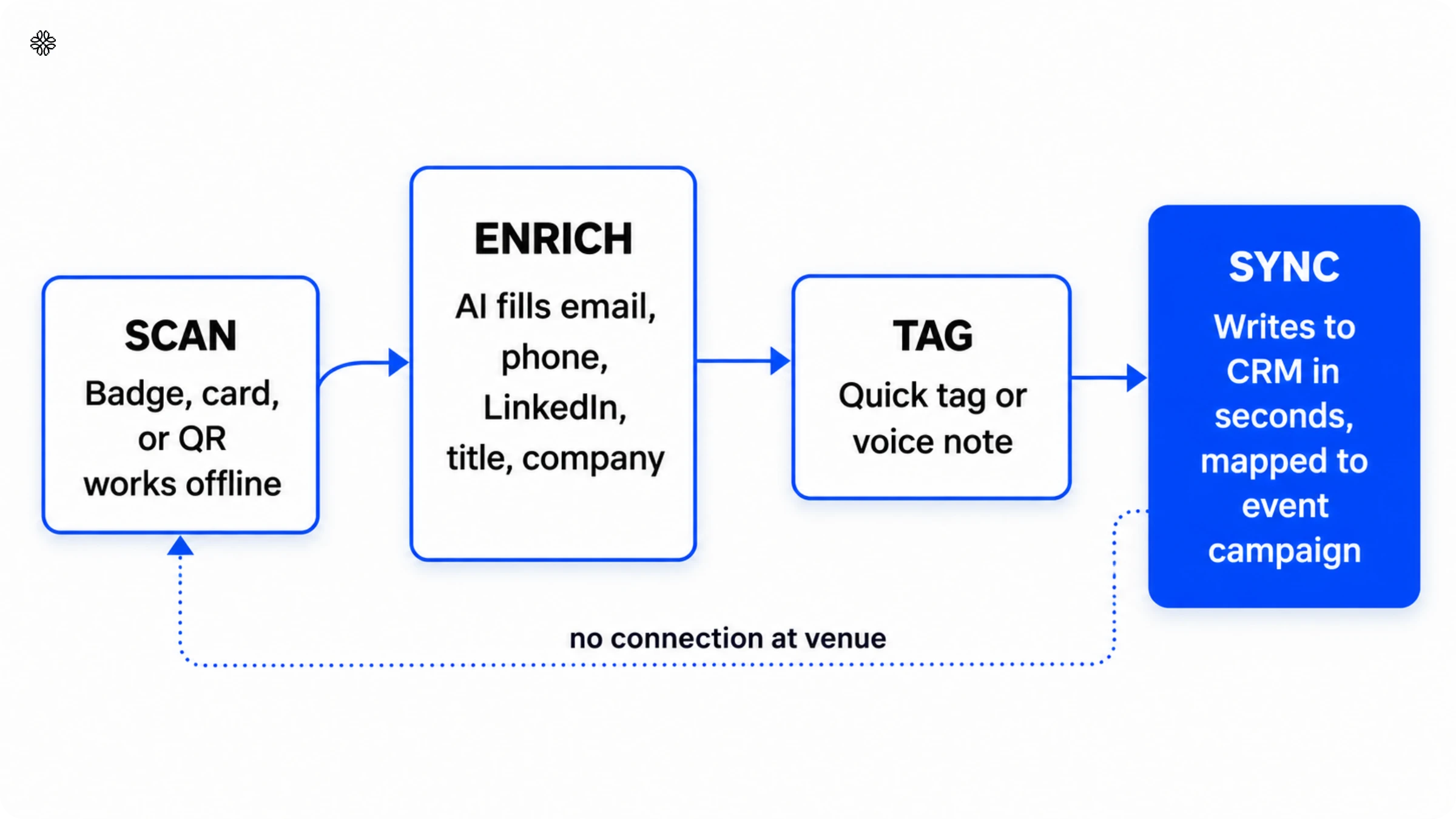
Uniqode’s event lead capture makes instant CRM sync refreshingly simple, following four clear steps: scan, enrich, tag, and sync. A rep scans a badge or business card. The scan queues locally and syncs automatically as soon as the connection is back. Next, AI steps in to fill any gaps, pulling details like email, phone, LinkedIn, title, and company from over 10 data sources, all before the rep has even wrapped up the conversation. Adding a tag or a quick voice note gives each contact valuable context. Finally, the enriched and tagged record lands in the CRM, already mapped to the right event campaign.
What makes this automated lead gen process reliable at scale is record matching, not overwriting. If a scanned contact is already in the CRM, instant sync simply updates the existing record, rather than creating a duplicate. The original owner remains assigned, so nothing gets lost in the shuffle. In fact, during two separate enterprise rollouts with Microsoft Dynamics 365, new scan data merged seamlessly into existing contacts every time, with ownership preserved.
Leads appear in the CRM within seconds, often before the rep even starts their next conversation. Here’s why the mechanics of sync matter more than just ticking the ‘does it integrate’ box. Uniqode’s State of QR Codes 2026 report reveals that 24% of marketers see integration difficulties as a major scaling challenge, while 11% list tool integration as a top feature priority. Instant CRM lead capture only matters if it actually works that way once it’s live, not just on a feature list.
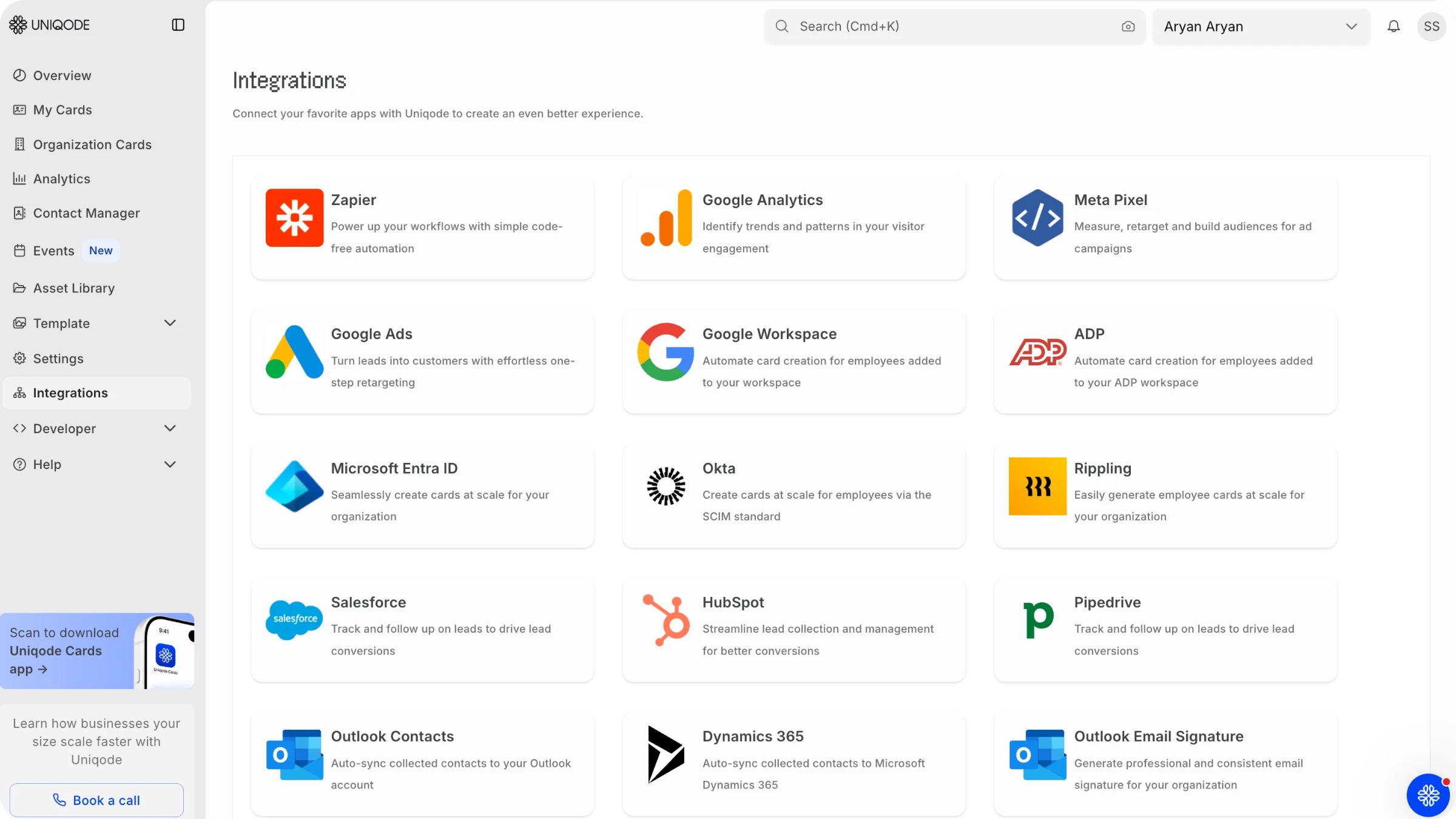
Native sync across Salesforce, HubSpot, Microsoft Dynamics 365, and Pipedrive
Native CRM sync with Uniqode event lead capture is simple and efficient. It works seamlessly with four major CRMs: Salesforce, HubSpot, Microsoft Dynamics 365, and Pipedrive. Beyond those four, a direct Outlook connection and a Zapier link cover thousands of other tools for teams running less common setups.
Imagine a sales team split between two platforms after a merger or acquisition, or simply because different regions use different tools. You should not have to juggle two separate lead-capture workflows, one smooth and integrated, the other patched together with workarounds. This situation is all too common: the acquiring company uses Salesforce, the acquired team uses HubSpot, and the systems have not yet been merged. With Uniqode, syncing leads into any of the four supported CRMs works exactly the same way every time. You get the same speed, the same reliable field mapping, and the same record-matching accuracy.
Where instant CRM sync fits in automated lead generation
For automated lead generation to truly work, every lead must reach your CRM instantly, not days later through a manual upload. With native CRM sync, each enriched contact record is written directly into the CRM in real time, thanks to a dedicated connection built and maintained by the vendor. This approach avoids the delays and risks of scheduled exports or workaround tools that can introduce new points of failure.
Manual uploads are often where automated lead gen falters. Leads can sit idle on a phone, a rented scanner, or a spreadsheet until someone takes the time to export a CSV and upload it manually. This process delays follow-up by an average of five days. Manual uploads also tend to create duplicate contacts rather than updating existing records, since there is no system in place to check if the email address is already on file.
Instant CRM sync closes this gap with a simple four-step process: scan, enrich, tag, and sync. Each captured contact is enriched with missing details like email, phone, title, and company from more than ten data sources. The contact is then tagged with relevant context and synced to the CRM within seconds. Existing records are matched and updated, not duplicated.
Manual upload vs. instant CRM sync
Instant native CRM sync beats manual CSV upload on every measurable criterion: time to CRM, data completeness, duplicate risk, offline resilience, and rep time cost. The table below puts the two processes side by side.
| Criterion | Manual CSV upload | Instant native CRM sync |
|---|---|---|
| Time to CRM | 3 to 5+ days | Seconds |
| Data completeness | Manually re-keyed, error-prone | AI-enriched from 10+ sources |
| Duplicate risk | New record created per upload | Existing record matched and updated |
| Offline resilience | Lost if WiFi or hardware fails | Captured offline, synced on reconnect |
| Rep time cost | Hours of post-event data entry | No manual re-entry required |
How instant CRM sync benefits event marketers
For event marketers, the impact is clear and important. Instant CRM sync helps four key areas move forward together:
- Follow-up speed. In a typical manual process, teams lose up to five days before they can even start reaching out. With instant sync, that delay shrinks to mere seconds. This means your reps can connect with leads while the conversation is still top of mind, rather than waiting until the lead has moved on after a long work week.
- Event ROI attribution. With instant CRM lead retrieval, every lead is tagged with its event campaign right at the moment of capture. This ensures that marketers have accurate, ready-to-use data from the outset, eliminating the need to piece together reports from spreadsheets after the event.
- Rep time. According to Salesforce’s State of Sales report, sales reps spend a staggering 70% of their time on non-selling activities, such as CRM data entry. By removing the need to manually re-enter event leads, reps reclaim valuable hours that can now be devoted to what matters most: selling.
- Marketing and sales alignment. When spreadsheets serve as the go-between for event data and the CRM, marketing and sales often end up with mismatched lead counts, one from the export, the other from what actually gets uploaded. Instant CRM sync bridges this gap completely. Both teams work from the same up-to-date CRM record captured at the time of the scan, so there is no confusion or need to reconcile numbers later.
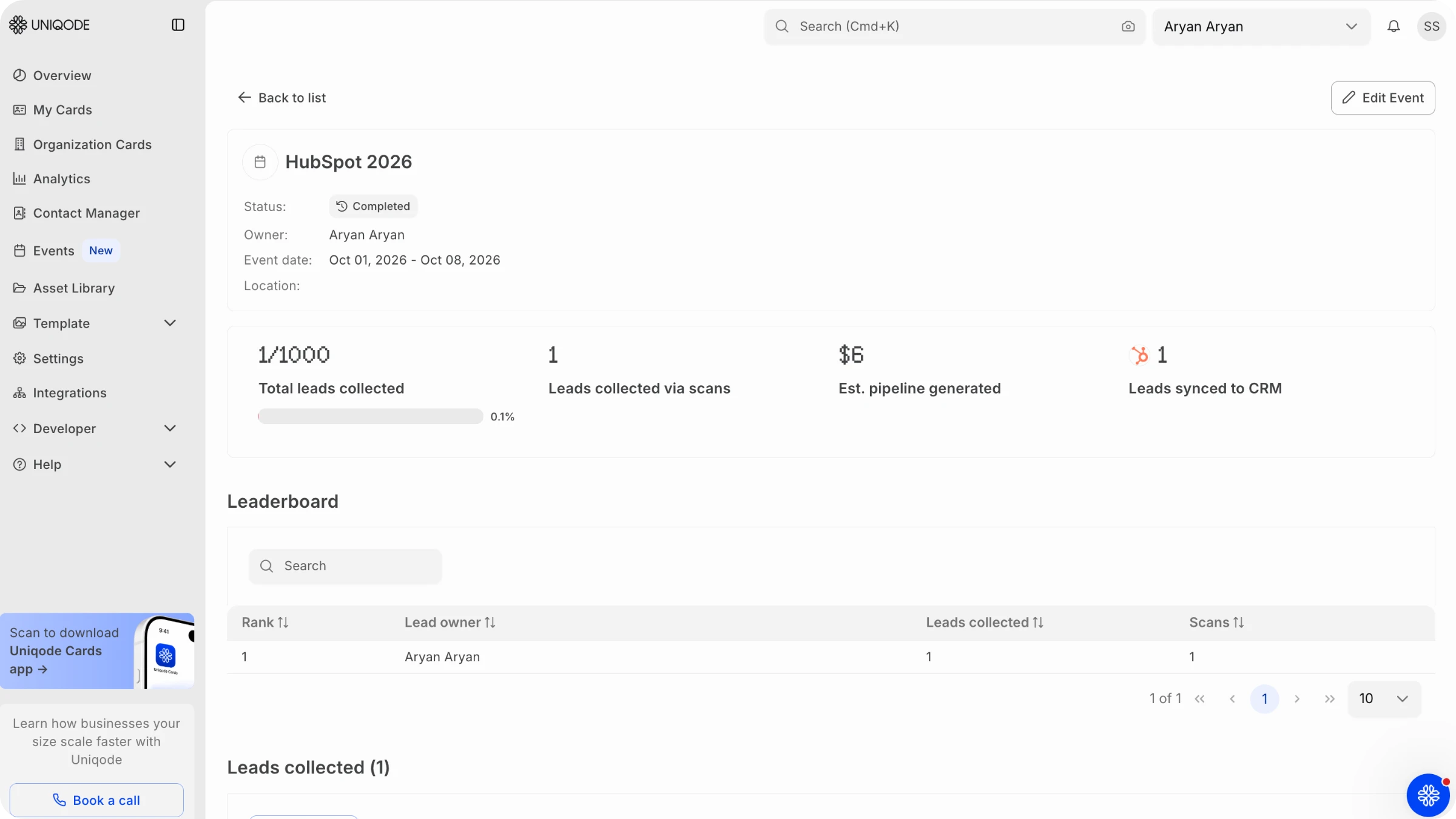
Pro tip: Since each synced lead already has its event-campaign tag, the event dashboard’s rep leaderboard and per-event pipeline totals are accurate as soon as the show ends. There’s no need to wait days for someone to update a spreadsheet.
What to check before buying an instant CRM sync tool
Before you make a purchase, focus on four key questions that reveal how well the event lead capture app connects with your CRM software. The way a vendor answers these questions will help you spot genuine instant CRM sync, as opposed to a workaround that only claims to offer the same.
- Always ask for a clear, named list of CRMs that are natively supported. A vague promise like “We integrate with your CRM” simply does not suffice; you need specifics. If your team relies on a CRM that requires Zapier or another third-party connector, it is essential to know this upfront, well before you commit.
- Be sure to ask what happens if the venue’s WiFi goes down. The best tools offer true offline capture, storing scans locally and syncing them automatically once the connection is restored. Without this feature, scans can be lost entirely, and your team may not even realize it until much later.
- It is also important to ask how duplicate contacts are managed. Will the sync merge new information into the existing record and retain the original owner, or will it create a separate, disconnected entry?
- Ask what your team needs to do internally before the sync turns on. In practice, the sync itself is rarely the slow part. An internal approval step to connect a new tool to the CRM is the real holdup, and that step sits entirely outside the vendor’s control.
See instant CRM sync in your own CRM
The gap we have been discussing is not simply about speed. It is about the dead zone where a captured lead never even makes it into your CRM. This gap only closes when sync is native, instant, and designed to reach every CRM your sales team actually uses, not just the one featured in a demo. You can try to patch a manual process with more discipline, or use a workaround for a single-CRM integration. However, neither approach truly closes the gap as completely as a sync solution that was purpose-built from the beginning.
Experience instant, native sync into Salesforce, HubSpot, Microsoft Dynamics 365, or Pipedrive using your own badge scans. If you are still comparing vendors, take a look at how this solution measures up in Uniqode’s Popl alternatives roundup. For teams working with HubSpot, you can explore the details of field-mapping mechanics in the dedicated HubSpot integration guide.
Frequently Asked Questions
- What does “native” CRM integration mean, and how is it different from Zapier?
A native CRM integration writes directly into the CRM's own fields through a connection the vendor builds and maintains. A Zapier connection routes data through a third-party automation layer instead, which adds a point where a sync can lag, queue, or fail silently.
- Does instant CRM sync work if there is no WiFi at the venue?
Yes, native CRM sync works if there is no WiFi at the venue. Offline capture queues each scan locally and syncs automatically once the device reconnects, so a dead venue network delays nothing once the connection returns.
- Will instant sync create duplicate contacts in my CRM?
No, instant sync will not create duplicate contacts in your CRM when the sync is native. A scanned contact that already exists in the CRM gets matched and updated, with the original record owner staying assigned, rather than being re-created as a second, disconnected entry.
- Can one event lead capture tool sync to more than one CRM?
Yes, one event lead capture tool can sync to more than one CRM. Uniqode's Event Lead Capture syncs natively into Salesforce, HubSpot, Microsoft Dynamics 365, and Pipedrive, with an Outlook connection and a Zapier link covering other tools.
- Can a scanned badge integrate directly with CRM systems like Salesforce and HubSpot?
Yes, a scanned badge can integrate directly with CRM systems like Salesforce and HubSpot. A scanned badge is just the capture step. Uniqode's Event Lead Capture syncs that capture natively into Salesforce, HubSpot, Microsoft Dynamics 365, and Pipedrive, writing the enriched contact record into the CRM in real time instead of through a scheduled export or a Zapier-style workaround.
- Is instant CRM sync the same feature across every event lead capture vendor?
No, instant CRM sync is not the same across every event lead capture vendor. Some vendors sync to one CRM natively and route everything else through a Zapier connector. Others batch updates on a schedule instead of syncing in real time. The word “sync” covers all of these in marketing copy, so the four questions in the section above matter more than the word itself.
About the Author
Somreeta is a Senior Content Marketer at Uniqode, where she writes about QR Code technology and how teams put it to work in the real world. She brings 8+ years of marketing experience to every piece, with a focus on turning product depth into content people actually use.