How To Create a QR Code for WeChat in 4 Steps
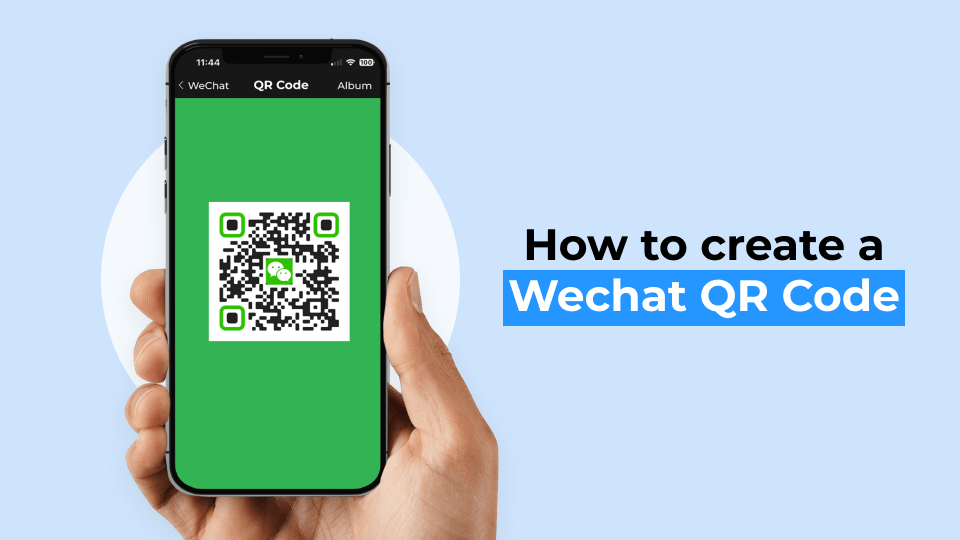
Boost your brand on WeChat with a simple QR Code. Learn the steps to create one and start connecting with prospects and customers.
WeChat is a popular messaging platform with over one billion users. If you own a business, WeChat is a promising opportunity to enhance your customer engagement and brand loyalty alongside Facebook, Instagram, X (formerly Twitter), and LinkedIn.
You can use WeChat QR Codes on your marketing materials. Your end-users can scan the QR Code to do a number of things, such as directly chatting with official accounts, addressing queries with your customer support chat, redeeming discount codes, and more.
You can easily create a WeChat QR Code for your next promotion or offline marketing campaign. All you need is your verified WeChat account and a customized QR Code, and you’ll be ready to ace your social media marketing with better customer interaction.
Read this step-by-step guide to find out how!
How to create a WeChat QR Code
Here’s how to create a QR Code for WeChat in four steps (detailed description below):
1. Sign up and go to Uniqode’s dashboard and click “+CREATE”
2. Choose the QR Code campaign type and insert details
3. Customize QR Code with your brand
4. Save, download, and share your QR Code
Before you proceed… To make a WeChat QR Code, you must get the WeChat URL or link to your official account.
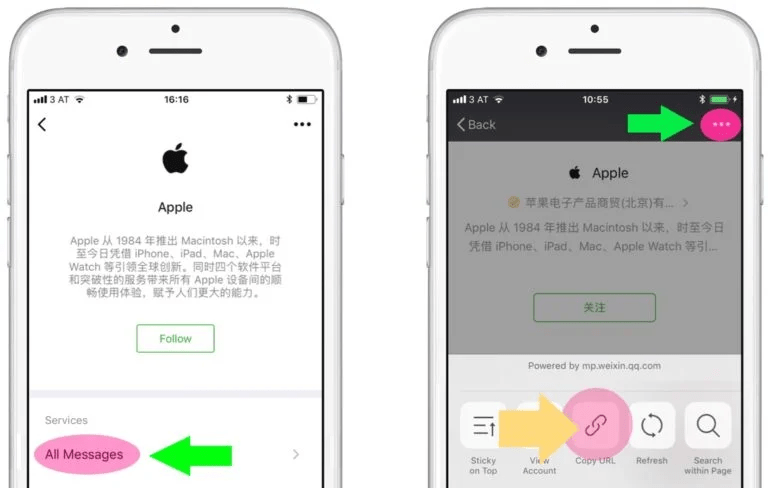
You can do so by clicking on “All Messages” on your WeChat account. Then tap on the three dots on the top right side to access the menu and copy the URL. Now, your WeChat URL is ready to use.
Step 1: Go to Uniqode’s dashboard and click “+CREATE”
If you don’t have access to Uniqode’s dashboard yet, sign-up for a 14-day trial to create custom free QR Codes for WeChat. No credit cards needed.
You can use all the premium features during the trial, such as editing the QR Code URL after printing, tracking scans, or generating QR Codes in bulk, etc.
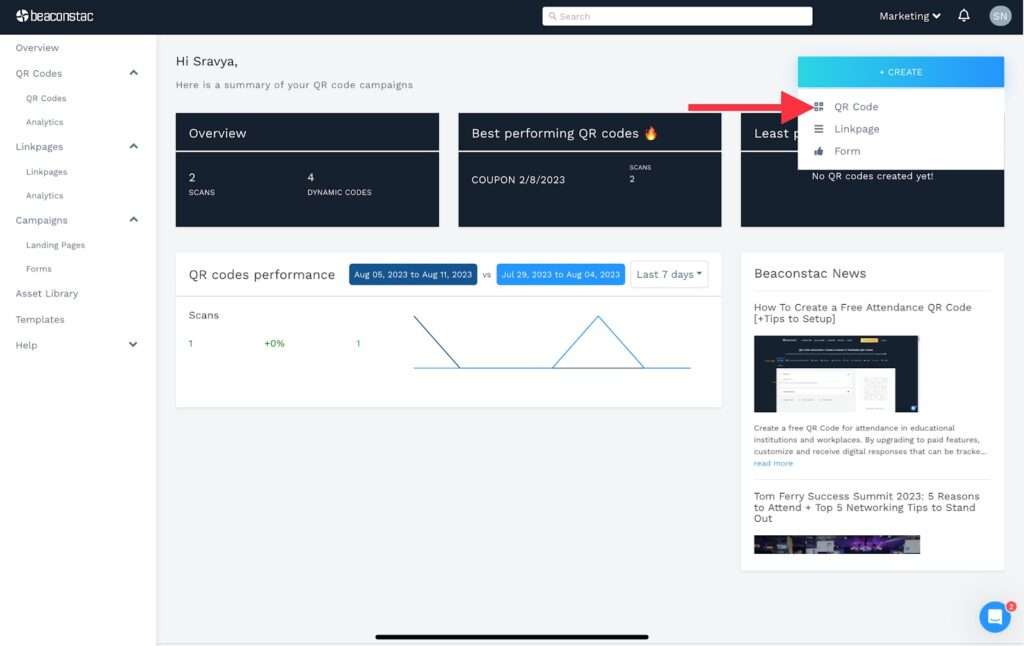
On the dashboard, clicking “+CREATE” will reveal a dropdown menu. Select “QR Code” from the list.
Step 2: Choose the QR Code campaign type and insert details
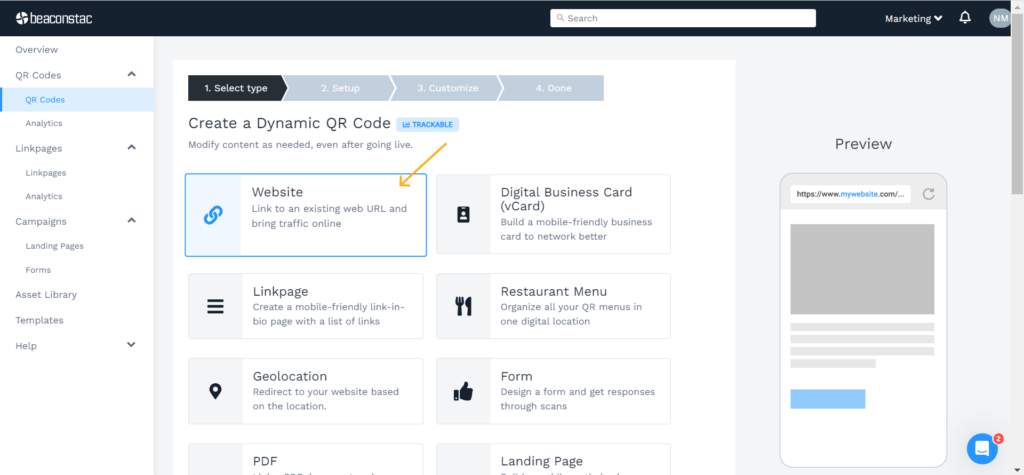
Choose the “Website” option in Uniqode dashboard. Paste your WeChat account URL in the field to convert it into a QR Code.
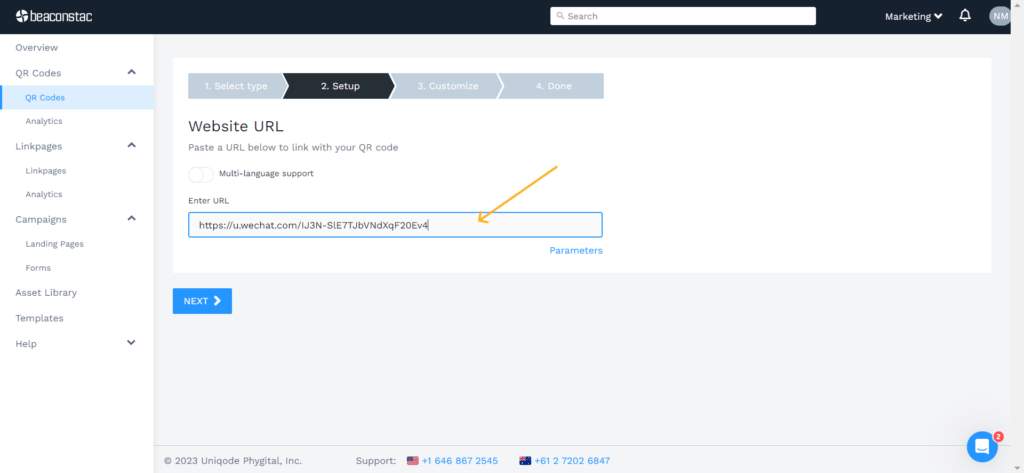
Step 3: Customize your QR Code
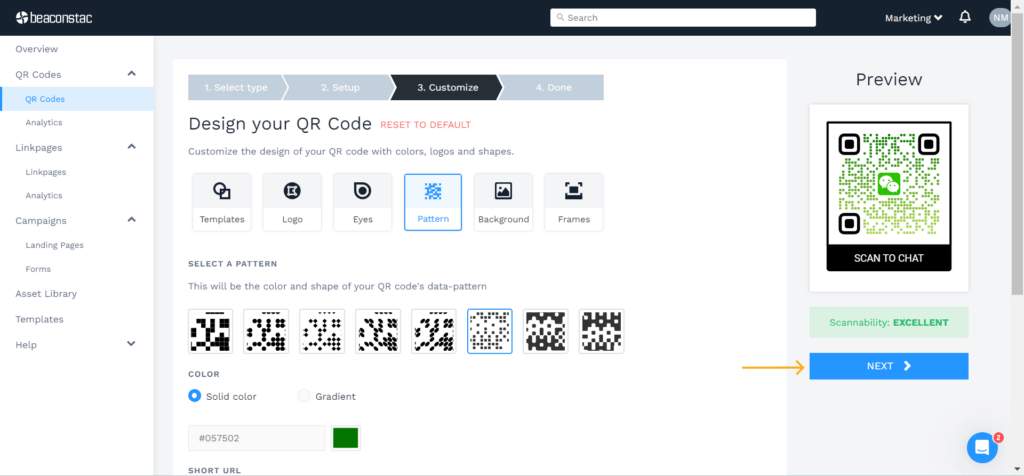
Custom design your QR Code on various aspects, starting with the QR Code shape. Choose a QR Code frame, add a CTA, and customize the background and the pattern to your liking.
Click “NEXT.”
📝Note: The dashboard includes a real-time scannability assessment. Strive for an “EXCELLENT” score to ensure that the QR Code is always scannable.
You can also test the QR Code with your mobile device at this stage.
Step 4: Save, download, and share your WeChat QR Code
Your personalized QR Code is ready to download. You can download your QR Code in JPG, PNG, EPS, SVG, or PDF formats.
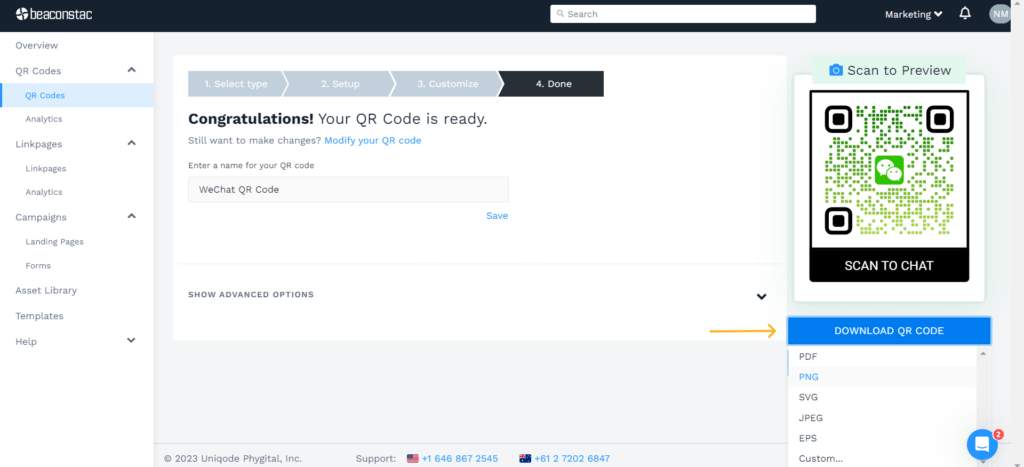
You can name the QR Code and save it in your dashboard. Here are a few things you can start with now that your WeChat QR Code is ready to share:
- You can nurture leads through WeChat by using a QR Code as a call-to-action on your marketing collateral. This CTA will redirect end-users to relevant landing or contact pages, where they can learn more about your brand offerings
- You can share WeChat QR Codes in your email marketing campaigns to improve brand awareness and loyalty
- Make use of QR Codes for WeChat for networking during events. You can create WeChat groups akin to LinkedIn and Facebook groups to keep your group members updated on the latest news and industry information
Why invest in dynamic QR Codes for your WeChat marketing campaigns?
Dynamic QR Codes offer convenience for your seasonal marketing endeavors.
You can modify the QR Code’s data even after its initial generation and placement on your marketing platforms, which is a limitation in static QR Codes.
With static QR Codes, you:
- Cannot edit your QR Codes
- Cannot track your QR Codes
- Cannot retarget users
- Cannot personalize QR Code for users
In contrast to static QR Codes for WeChat, dynamic QR Codes offer:
1. Editability
Dynamic QR Codes let you rectify errors or update information, which is not possible in static QR Code once generated. For example, you can edit your WeChat username and update your URL without reprinting the dynamic QR Code.
Note: WeChat’s in-app QR Codes are static. It means if you’ve printed the QR Code and made changes to your account later, such as the username or the URL, the QR Codes will not redirect to the updated account.
2. Trackability
With a dynamic QR Code, you can keep tabs on vital QR Code scan metrics and comprehensive campaign data, such as scan counts, geographical data, and the mobile devices employed to scan. You cannot drive analytics from WeChat’s native QR Codes.
3. Ease of use
Updating existing QR Codes with new WeChat URLs and changing the QR Code design is super easy with dynamic QR Codes. Simply make the changes in the dashboard and update it in real-time.
4. Customization
Easily customize the QR Code, add a brand logo, and a CTA such as “Scan to chat” for increased interactions.
🔥If you use Uniqode: Change the appearance of your WeChat QR Code with ample customization options. Change the QR Code pattern, eye shape, and color, add a background image, use gradients, and so much more.
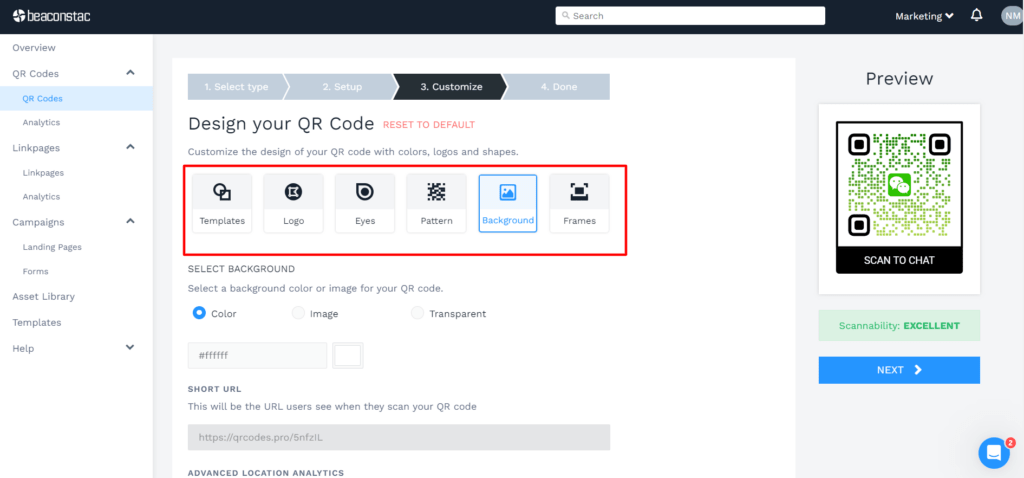
WeChat’s in-app options are limited to some pre-made designs you may not prefer.
4. Enhanced customer experience
When users scan a dynamic WeChat QR Code, the data is instantly displayed within WeChat if the app is installed. If not, the link opens up in a browser of their choice, eliminating the need for any third-party applications to view content.
By choosing dynamic WeChat QR Codes, you choose sustainability and ease of use while building campaigns for the long term.
Best practices to follow while creating a WeChat QR Code
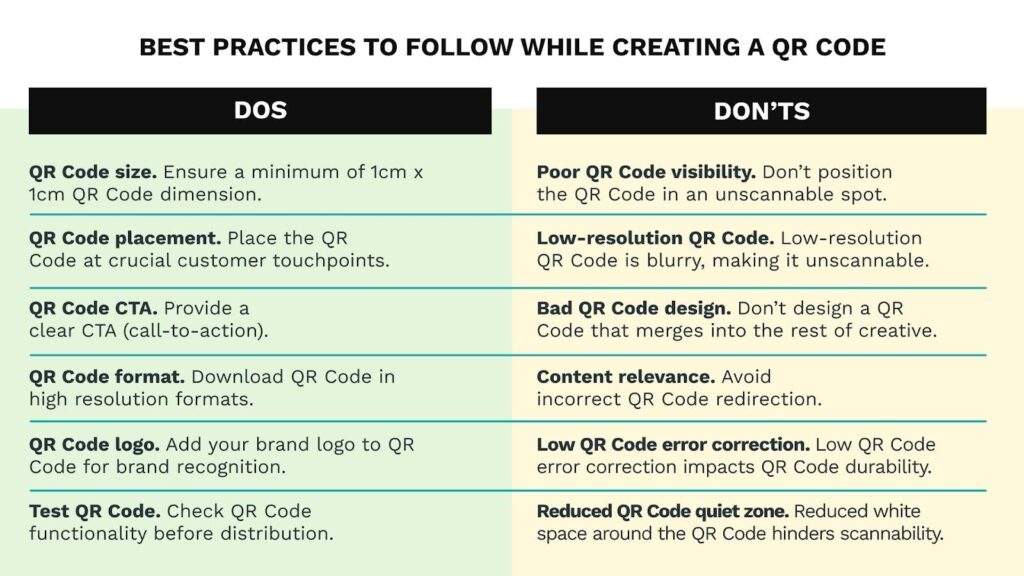
Let’s explore the best practices for creating a QR Code for WeChat, including tips on customization, design, and usage.
Simplify consumer-brand interaction with WeChat QR Codes
WeChat QR Codes are an effective way to boost user engagement in your marketing campaigns. By creating Uniqode’s QR Codes for WeChat, you can easily share them on your marketing collateral for both online and offline campaigns.
This makes it easy for you to connect with audiences and deliver information quickly and effectively.
With the ability to track the effectiveness of your campaigns, you can make data-driven decisions and improve the ROI of your marketing efforts using Uniqode’s dynamic WeChat QR Codes.
Wondering how to proceed with it?
Here’s how you can try it out for yourself!

Frequently Asked Questions
- How to scan WeChat QR Code?
You can scan a QR Code on WeChat by following the below steps:
- Open WeChat and click “Discover” on the bottom menu
- Click “Scan” on the menu
- Point your camera at the QR Code
- WeChat will detect the code and scan it
If you are using WeChat Web, go to the “Discover” tab on your phone and choose the Scan QR Code option.
- Why is my WeChat QR Code not working?
There could be several reasons why your WeChat QR Code is not working. Here are some possible reasons and solutions:
- Connectivity issues: If your WeChat QR Code is not being identified, it may be due to a problem with connecting to a server used by WeChat. You can try using a VPN and connecting to a server in Hong Kong, Japan, or Taiwan
- Scan using a mobile device: If there are no WeChat users nearby to scan the code, you can ask a WeChat user to help you register by entering your mobile number
- Scan using Discover menu: Finally, you can scan a QR Code on a friend’s mobile device, a brand’s promotional poster, or product packaging by clicking “Scan” in the “Discover” menu of the WeChat app
About the Author
Ektha is a QR code expert with years of research and analysis into the evolution of QR codes. Having written over 70 in-depth articles on QR technology, she has developed a comprehensive understanding of how QR codes are transforming industries. Her insights, including The State of QR Report, have been featured in leading publications. With a passion for simplifying complex topics and providing actionable strategies, Ektha helps businesses leverage QR codes to enhance their 'phygital' connections.