
Are QR Codes Safe? How to Check if a QR Code is Safe
Are QR codes safe to scan? Learn how to check if a QR code is safe, spot fake links, and avoid scams before you scan and protect your data instantly.
Many people assume QR Codes are inherently safe. The reality is more nuanced.
QR Codes themselves are safe, but what they link to can be manipulated. A single scan can quietly redirect you to a fake website, trigger a malicious download, or pressure you into sharing sensitive information with a fake reward offer.
This guide explains how QR Code scams work, the most common scam patterns, and how to check if a QR Code is safe.
Are QR Codes safe?
QR Codes are generally safe to use. However, scammers can misuse them by linking the QR Codes to malicious websites or harmful downloads that steal personal data or install malware on a device.
QR Codes are not executable software; they do not hack your phone on their own. What they do is encode a destination, such as a website URL, app download, or action prompt. The risk comes from the destination the code opens.
Scanning a malicious QR Code leads to the following risks.
- Redirects customers to a phishing website that mimics a trusted brand.
- Triggers a malicious file download that installs malware, resulting in data breach.
- Opens a fake login or payment page designed to capture credentials.
- Leads to deceptive offers that steal data or money, potentially resulting in identity theft.
QR Codes are safe, but the destination they link to determines the risk.
Attackers exploit the fact that QR Codes hide URLs from plain sight, making people trust the code and act quickly without verification.
QR Codes in phishing emails surged by 1,400% between 2021 and 2024, and they now appear in 12% of phishing attacks, showing how quickly attackers have adopted this tactic, according to a study by Northdoor.
How QR Code scams work (and why scammers use them)
QR Code scams, sometimes called QR Code phishing or quishing, exploit speed, convenience, and misplaced trust to trick customers into unsafe actions.
QR Code scams follow a predictable sequence of actions. Here's how a typical QR Code scam works.
- Encounter a QR Code placed in a public location, email, or message.
- Scan the QR Code because it appears routine or urgent.
- Get redirected to a fake website or prompted to take an action.
- Enter credentials, payment details, or install a file.
- Lose data or install malware without obvious warning signs.
Scammers use QR Codes because they increase the success rate of phishing attempts. QR Codes enable scams for the following four reasons.
- QR Codes hide the destination URL until the code is scanned.
- QR Codes appear in familiar use cases such as menus, payments, and check-ins.
- QR Codes bypass traditional phishing filters used for email links.
- QR Codes work across both physical and digital environments.
The above reasons make QR Code scams a direct threat to mobile device security, since most codes are scanned on smartphones with access to personal data, payment apps, and saved credentials.
Because of the growing abuse of QR Codes, organizations such as the Federal Bureau of Investigation (FBI) have issued warnings urging caution when scanning QR Codes from unknown or unexpected sources.”
How to check if a QR Code is safe in six steps
̌To check if a QR Code is legit, preview the link, verify the website’s security, and confirm the source before taking any action. Suspicious QR Codes appear in unexpected emails, tampered public stickers, or pages that request sensitive information immediately. Follow these 6 steps to evaluate whether a QR Code is safe to scan.
1. Scan the QR Code, but pause before opening the link
Scan the QR Code and review the link preview before opening it. Most phone cameras show a link preview before opening the destination. Use that moment to verify the destination URL. Check that the URL looks legitimate and readable, the spelling is correct, and the domain matches the brand, location, or context.
Be cautious of shortened links or random-looking URLs that do not clearly indicate the destination.
2. Verify the website’s security
Verify the website’s security indicators before interacting with the page. If you open the link, check the browser carefully. Look for HTTPS (not just HTTP) or a padlock icon in the address bar. Be cautious if the page immediately asks for logins, OTPs, payment details, or personal information. Legitimate QR Code destinations rarely request sensitive data without context.
For extra protection, especially on public Wi-Fi, use a VPN before opening links from QR Codes to prevent attackers from intercepting your data.
3. Be skeptical of urgency or scare tactics
Treat the QR Code as unsafe if the destination uses urgency or scare tactics. Watch out for urgent or alarming messages such as “Your account will be blocked,” “Immediate action required,” or “You’ve won a prize.” These messages are commonly used in phishing attempts to pressure people into acting quickly without verifying the source.
4. Use a QR Code scanner with built-in security checks
Use a QR Code scanner that checks links against known threat databases. Some QR Code scanners warn you if a link is unsafe by checking it against known threat databases. You can also copy the URL without opening it and scan it using tools such as Google Safe Browsing and VirusTotal. These tools can flag links associated with phishing or malware.
5. Check the source of the QR Code
Consider where the QR Code appears and whether it belongs there before scanning. A QR Code on a branded menu inside a restaurant or on an official poster from a known company is far more trustworthy than one stuck to a random lamp post or taped to the back of a street sign.
Look at how the code is displayed. Stickers placed over existing surfaces can indicate tampering. Random QR Codes on public walls, poles, or unsolicited messages carry a higher risk and are best avoided.
6. Avoid downloading files through QR Codes
If scanning a QR Code prompts a file or app download, pause and avoid proceeding immediately. Attackers often use QR Codes to distribute malicious files disguised as updates, documents, or required apps. Downloading these files can install malware or spyware on your device, exposing personal data, login credentials, or financial information.
→ Related: Use a secure QR Code generator to reduce risk for your customers
QR Code Safety Checker: Do's and Don'ts
| ✅ Do's | ❌ Don'ts |
|---|---|
| Preview the destination URL before opening it | Open a link immediately after scanning without reviewing it |
| Check that the URL spelling and domain match the brand or context | Trust shortened or random-looking URLs that don't indicate a clear destination |
| Look for HTTPS and a padlock icon in the browser before interacting | Interact with pages that only use HTTP or show no security indicators |
| Use a QR Code scanner with built-in threat detection | Assume a QR Code is safe just because it appears in a public or familiar place |
| Cross-check suspicious links using tools like Google Safe Browsing or VirusTotal | Enter login credentials, OTPs, or payment details without verifying the source |
| Verify that the QR Code belongs to its physical context (menu, poster, signage) | Scan QR Codes on stickers placed over existing surfaces or in unsolicited messages |
| Treat urgency or scare-based messages as a red flag | Act quickly on messages like "Your account will be blocked" or "You've won a prize" |
| Pause and investigate if a QR Code prompts a file or app download | Download files or apps triggered by a QR Code without confirming the source |
What to do if you've scanned a fraudulent QR Code
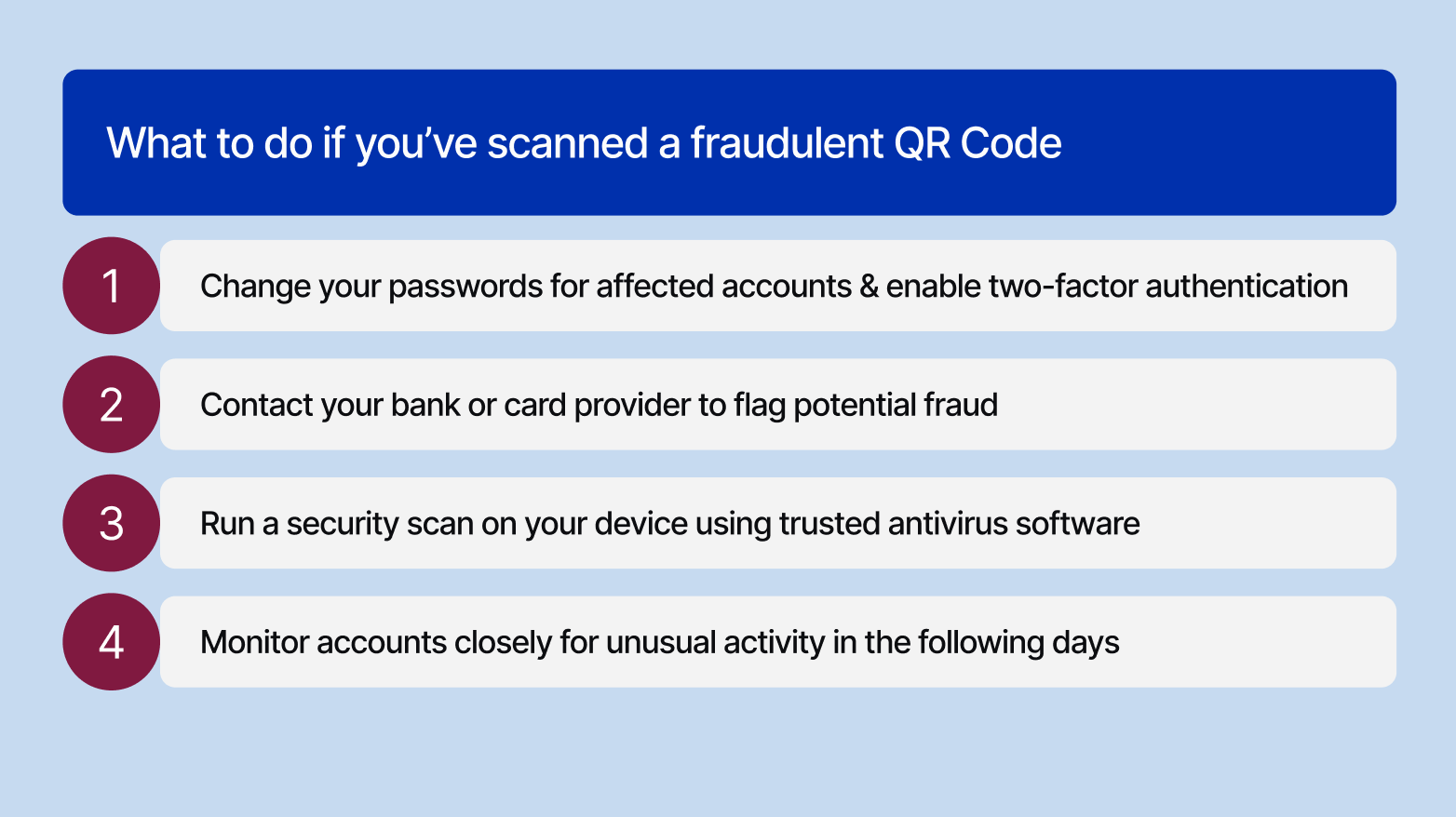
- Change your passwords for affected accounts and enable two-factor authentication: If you entered any login details after scanning, update those passwords immediately. Enable two-factor authentication (2FA) to add an extra layer of security, making it much harder for attackers to access your accounts even if your credentials were compromised.
- Contact your bank or card provider to flag potential fraud: If you shared any financial information or made a payment, call your bank or card provider right away. They can freeze suspicious transactions, issue a new card, and monitor your account for unauthorized activity.
- Run a security scan on your device using trusted antivirus software: Use a reputable antivirus app to scan your device for malware or spyware that may have been installed without your knowledge. Remove any threats detected immediately.
- Monitor your accounts closely for unusual activity: Keep a close eye on your bank statements, emails, and social accounts over the following days and weeks for anything suspicious.
- Report the malicious QR Code by filing a complaint with the FTC at reportfraud.ftc.gov or contacting the FBI's Internet Crime Complaint Center at ic3.gov.
What are the most common QR Code scams in 2026?
QR Codes were used in 12% of all phishing attacks in 2025, according to a report from cybersecurity platform KeepNet Labs. Below are a few real-world quishing attack scenarios.
1. Parking meters and public payment receipts with fake QR Codes
Scammers place fraudulent QR Code stickers over legitimate payment codes on parking meters, tricking drivers into entering their card details on a fake payment site.
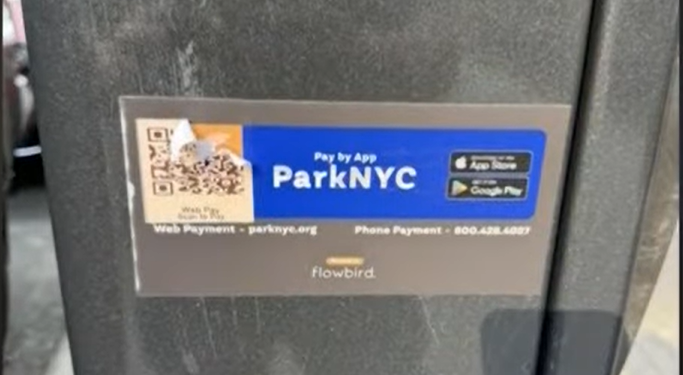
The victim believes they are paying for parking, but their payment information goes directly to criminals. In some QR Quishing cases, scammers pose as bank officials, cite exact transaction details, and extract additional financial information.
The New York Department of Transportation issued a warning that scammers are posting QR Codes on parking meters that are not legitimate payment links.
2. Unsolicited packaging with malicious QR Codes
The FBI issued a warning in July 2025 about a variation of the brushing scam. Criminals send unsolicited packages containing QR Codes designed to steal personal and financial information or install malicious software. The packages often arrive without sender information, and the QR Code may include a prompt such as "scan to find out who sent this gift."
As Bitdefender reported, some of these packages use Amazon branding to create instant trust, directing victims to fake account verification pages that capture login credentials.
3. Phishing emails and messages with embedded QR Codes
Attackers embed malicious QR Codes directly in phishing emails or PDF attachments, often impersonating trusted services such as Microsoft, HR departments, or government agencies.
Kaspersky, a cybersecurity company, recently reported that detections of phishing emails containing malicious QR Codes surged more than fivefold between August and November 2025. These emails typically ask the recipient to scan a code to verify an account, review a document, or resolve a supposed issue. The malicious URL can bypass traditional email security filters that only scan text-based links because it is hidden inside the QR Code image.
4. Public signage and marketing materials with tampered QR Codes
Criminals print QR Code stickers and place them over legitimate codes on restaurant menus, event posters, public transit signs, and EV charging stations. The fake sticker is designed to blend in with the original signage, making it nearly impossible to spot at a glance.
A recent report by the Bureau of Investigative Journalism notes that nearly a third of all local authorities in the UK had their car parks targeted by quishing scammers. The UK’s national reporting centre for fraud and cybercrime, Action Fraud, received nearly 800 reports of QR Code fraud. Victims lost a total of £3.5 million in the 12 months leading up to April 2025 from these frauds.
Each of these scams relies on the same assumption that people will scan first and think later. Recognizing the pattern is the first step to breaking it.
Create safe QR Codes with Uniqode
QR Code safety depends on both how customers scan and how businesses create the code. A QR Code created with a safe QR Code generator directs customers to trusted destinations, protects data, and reduces misuse.
Uniqode is built around that standard. Businesses create QR Codes while maintaining control over access, data protection, and brand trust. This control comes from three safeguards:
- Authenticity and trust: Custom-branded domains prevent spoofing and make every QR Code traceable.
- Access control: Single sign-on (SSO) restricts who can create and manage QR Codes.
- Data protection and compliance: ISO 27001:2022, SOC 2 Type 2, GDPR, and HIPAA safeguard sensitive data through encryption.
For businesses that want their QR Codes to be as trustworthy as the brand behind them, Uniqode is the platform to start with. Learn more about safe QR Code generators from this article.
Create your first safe QR Code with Uniqode.
Frequently asked questions
1. How do I know if a QR Code is malicious?
A QR Code may be malicious if it redirects you to an unfamiliar or misspelled website, asks for sensitive information without context, or uses urgency or scare tactics to pressure you into acting quickly. Physical signs of tampering, such as a sticker placed over another QR Code, can also indicate risk. Always preview the URL before opening it and confirm that the destination matches the brand or source you expect.
2. Can a QR Code give my phone a virus?
A QR Code itself cannot infect your phone. However, it can redirect you to a malicious website or prompt you to download a harmful file or app. The risk is lower if you avoid downloading unknown files, install apps only from trusted sources, and use your phone’s built-in QR Code scanner.
3. What happens if I scan a malicious QR Code?
A malicious QR Code may redirect you to a phishing page, attempt to collect personal or financial information, or trigger a download of a harmful file or app. If you suspect something is wrong, close the page immediately and do not enter any information. Run a security scan on your device, and if you shared sensitive data, change your passwords and contact your bank or service provider.
4. How can I verify if a QR Code is safe?
You can verify a QR Code’s safety by checking its source, previewing the URL before opening it, confirming the site uses HTTPS, and ensuring the destination matches the brand or context of the QR Code. For printed QR Codes, inspect them for signs of tampering. Avoid scanning and look for another way to access the information if anything seems unusual.
5. What is quishing?
Quishing (QR Code phishing) is a cyberattack that uses QR Codes to send victims to malicious sites or trigger harmful downloads, aiming to steal passwords, financial data, or personally identifiable information for identity theft, fraud, or ransomware. Attackers embed QR Codes in emails, social posts, flyers, or physical objects and use social engineering; such codes can bypass some email security that treats them as images.
6. Can scanning a QR Code hack my phone?
Yes, scanning a QR Code can potentially hack your phone, but the QR Code itself isn't the threat; it's where it leads. A fraudulent QR Code can direct you to phishing sites that steal your credentials, trigger malware downloads, or exploit browser vulnerabilities. To stay safe, always preview the URL before tapping, avoid scanning random QR Codes in public, and keep your phone updated.
About the Author
Born too early to explore space, too late to explore the earth, but just in time to become your go-to for all things QR. I'm Ektha, a QR Code expert with years of research and analysis into the evolution of this powerful business tool. Over the course of writing 70+ in-depth articles on QR technology, I've gained a comprehensive understanding of how QR Codes are transforming industries. My insights, including The State of QR Report, have been featured in leading publications. With a passion for simplifying complex topics and providing actionable strategies, I help businesses leverage QR Codes to enhance their 'phygital' connections. If you're looking to explore how QR Codes can drive your business forward, let's connect.