Realtor Email Signature: Free Templates & Examples (2026)
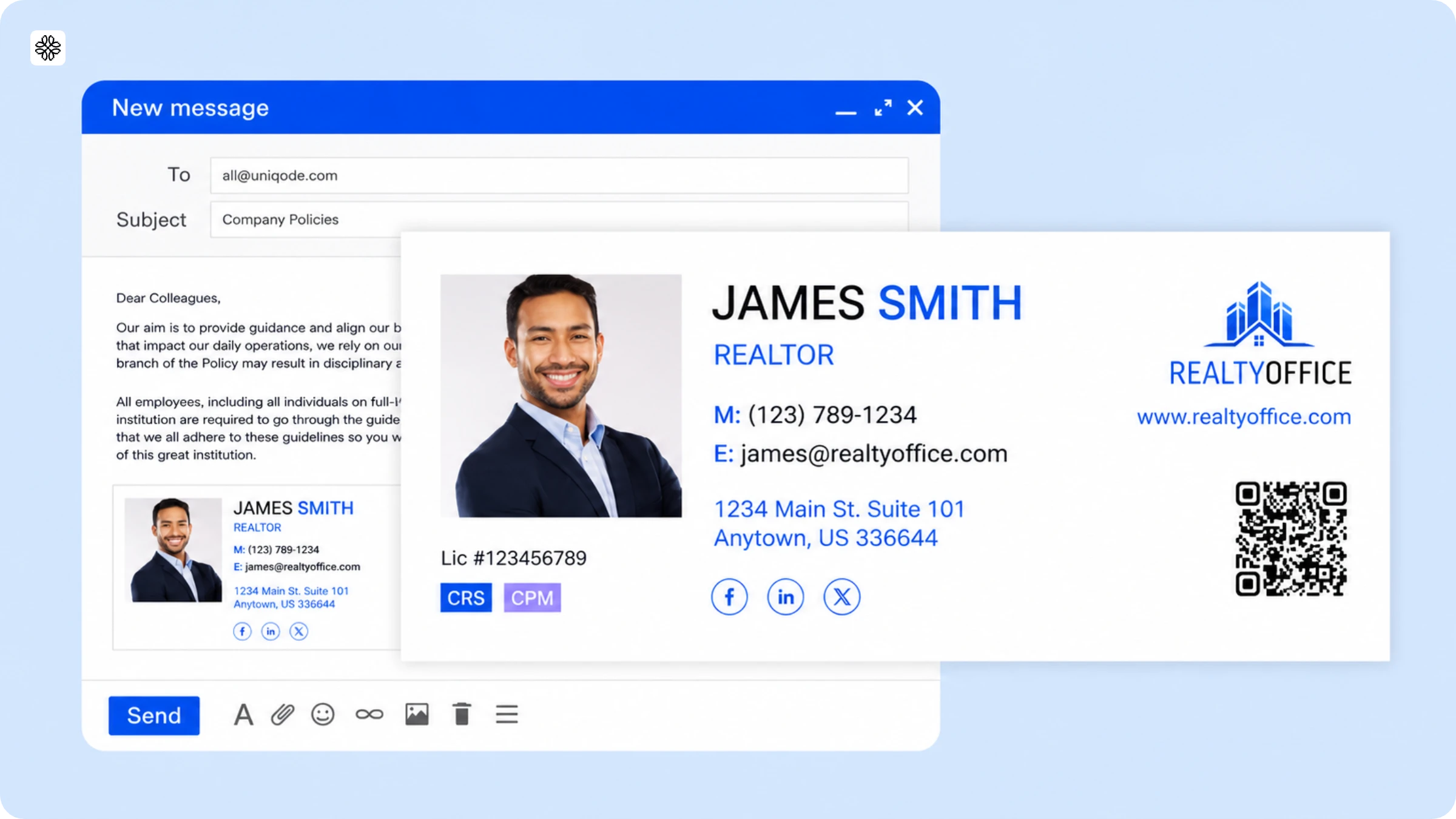
A strategic realtor email signature does more than share contact details. It showcases your listings, builds credibility, and generates leads. Learn how to create a signature that turns every email into a marketing opportunity.
A realtor email signature needs seven elements: full name, license number, brokerage name, professional headshot, primary contact method, one call-to-action, and an optional QR Code. Together, they cover compliance, credibility, and conversion in every email you send.
Most agents set their signature once and never revisit it. The phone number and brokerage logo look right at first but a sold listing, a new title, or an updated booking link makes it outdated and ineffective without anyone noticing.
A realtor email signature is more than a contact block. It's a consistent marketing asset that travels with every email you send. A well-designed signature turns routine replies into valuable touchpoints. A neglected or outdated one reflects poorly on your professionalism.
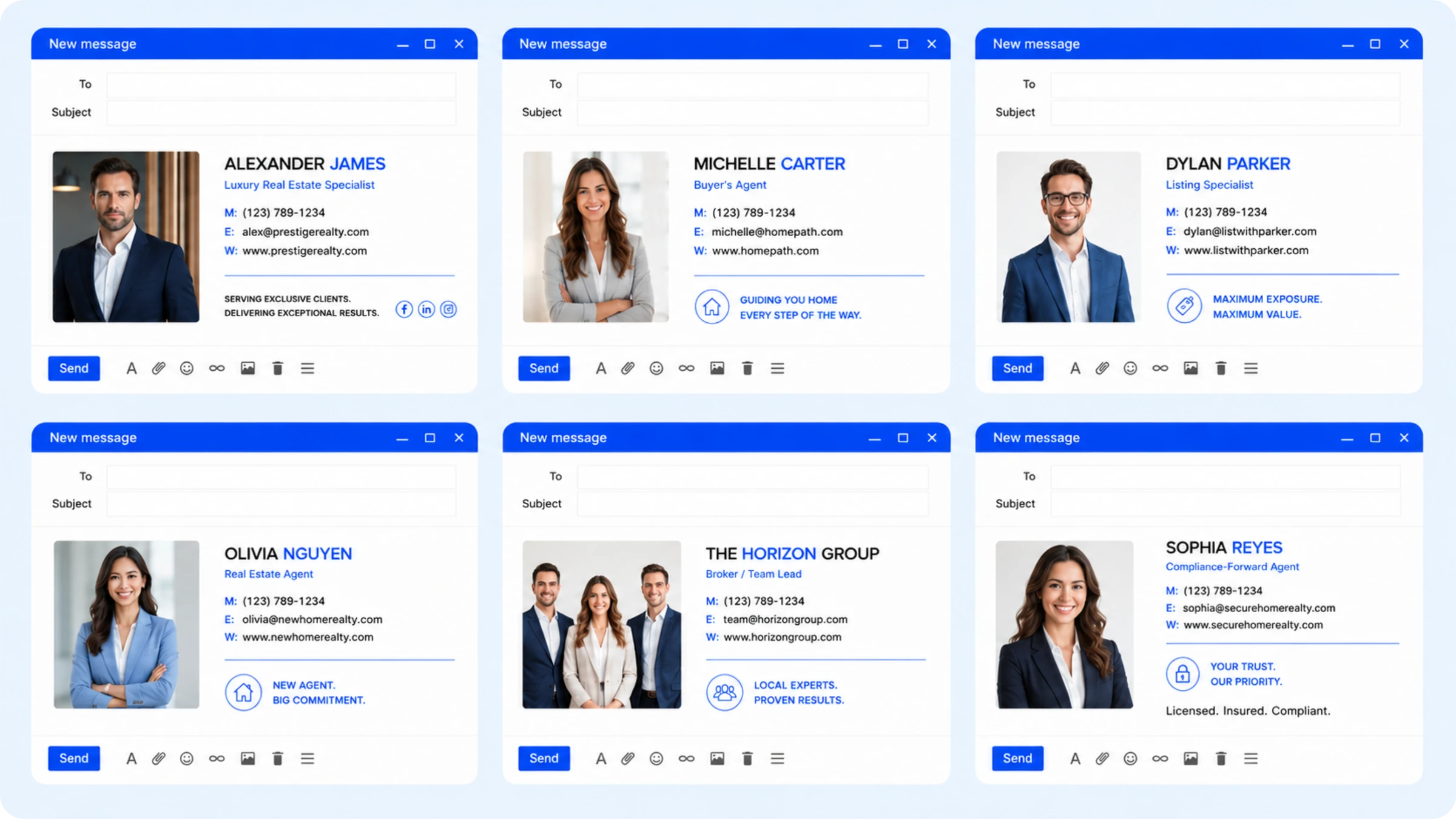
The six templates below are tailored to different agent types. Choose the one that fits, use its structure, and add your information. After the templates, you'll find the eight essential signature elements, state compliance guidelines, and a step-by-step creation guide.
Realtor email signature templates: 6 free examples by agent type
Effective realtor email signatures are concise, easy to read, and matched to your specific role. A luxury agent needs a different signature than a high-volume buyer's agent and generic templates miss that distinction. The templates below are organized by work style, not generic standards.
Template 1: Luxury agent
For agents working high-end residential, private listings, and clientele who expect discretion.
Jordan Ellis
Luxury Residential Specialist | CA DRE #02145678
Compass Real Estate
M: (310) 555-0192
jordan@compassre.com | www.jordanellis.com
[Request a Private Showing →]
[QR Code: dynamic, links to current active listing or private portfolio page]
Persona note: Luxury buyers research extensively before reaching out. The QR Code here links to a curated portfolio page or a current off-market listing, not a generic website homepage. One CTA. Nothing cluttered.
Template 2: Buyer's agent/Community-focused
For agents who win on neighborhood knowledge, relationships, and first-time buyer volume.
Maria Santos
Licensed Real Estate Agent | TX License #0876543
Keller Williams Realty, Austin Hill Country
M: (512) 555-0341
maria@kwaustin.com
I know these neighborhoods. Let's talk.
[Book a 15-Minute Call →]
Persona note: The single-line personality statement works where luxury minimalism would feel cold. No QR Code here: the CTA is the booking link, and adding more creates friction. See also: digital business card for realtors.
Template 3: Listing machine/Seller specialist
For agents whose primary value is selling homes fast, with strong market data to back it up.
David Park
Listing Specialist | 94% of Listings Sold Above Ask (2025)
Park Realty Group | FL License SL3456789
M: (813) 555-0778
david@parkrealtygroup.com
[Get Your Home's Value →]
[QR Code: dynamic, links to current CMA request page or active listing carousel]
Persona note: The stat ("94% of listings sold above ask") is the whole pitch. Verify your stat before publishing. The QR Code links to a home valuation tool or the agent's active listings page. See QR code for real estate marketing for setup options.
Template 4: New agent/First-year
For agents building credibility before they have a track record.
Priya Nair
Licensed Real Estate Salesperson | NY DOS License #10401234567
Coldwell Banker Warburg
M: (212) 555-0624
priya.nair@cbwarburg.com | Serving Manhattan & Brooklyn
[Schedule a No-Obligation Consultation →]
Persona note: New agents often over-complicate signatures trying to look established. This template does the opposite: full license disclosure, specific brokerage, specific geography served. The consultation CTA lowers the commitment threshold. No stat lines exist yet.
Template 5: Broker/Team Lead
For brokers managing agents, where the signature represents the team brand, not one individual.
Rachel Moore, Broker
Moore & Associates Real Estate | FL License BK3210987
O: (305) 555-0456 | M: (305) 555-0133
rachel@mooreassociates.com | www.mooreassociates.com
[Meet the Team →] [Request a CMA →]
[QR Code: dynamic, links to team bio page or current featured listing]
Persona note: Brokers can use two CTAs where individual agents should not: one for relationship development ("Meet the Team") and one for business capture ("Request a CMA"). The QR Code links to the team's active portfolio and can be updated without touching any agent's individual signature.
Template 6: Compliance-forward agent
For agents in states with strict disclosure requirements, or agents who want to lead with license information.
Thomas Berardi, REALTOR®
Licensed Real Estate Agent | CA DRE #01987654
Fair Housing Equal Opportunity Provider
Berkshire Hathaway HomeServices California Properties
M: (619) 555-0287 | thomas@bhhs.com
[View Current Listings →]
Persona note: This template leads with the REALTOR® designation and fair housing statement, appropriate for agents in compliance-sensitive markets or anyone who received a state-specific guidance letter from their broker. The CA DRE number appears on the second line per California regulations.
What every realtor email signature must include
An effective realtor email signature contains eight essential elements. Some are required by law, while others support conversion. Each serves a distinct purpose.
1. Your name & real estate credentials
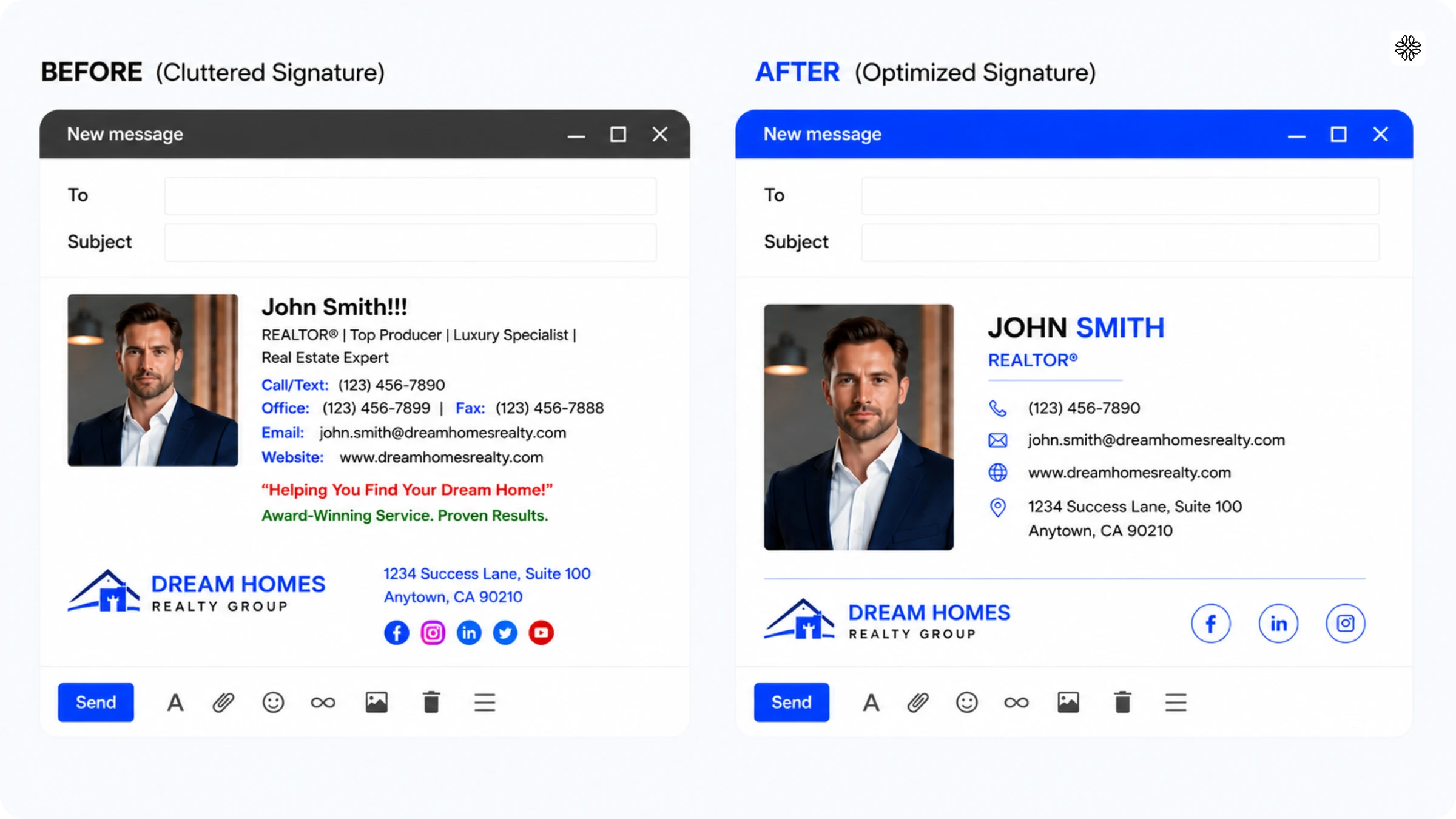
List your full name first, exactly as it appears on your license. On the same line or directly below, include your license type and your license number. In most states, placing the license number here satisfies disclosure requirements (see the compliance section below for state-specific formats). Add your most recognized professional designations on the same line, and limit yourself to two acronyms. More than that undermines rather than builds credibility.
2. Brokerage information
Most US states require your full, registered brokerage name in all advertising including email signatures. Don't use abbreviations or team names alone. Include the official brokerage logo, sized 50-100px and in horizontal format where possible. Use the file your brokerage provides, not a screenshot pulled from their website.
3. Professional headshot
Use a clear, current headshot, not a thumbnail, a logo, or a cropped event photo. A recognizable photo helps existing clients identify you immediately and gives new clients a sense of meeting you before you've spoken. For inline display, use 80×80px, or a 2:3 ratio if your brokerage requires a vertical headshot. Update your photo whenever your appearance changes significantly, and retire anything older than three years as an outdated photo creates an awkward disconnect at first meetings.
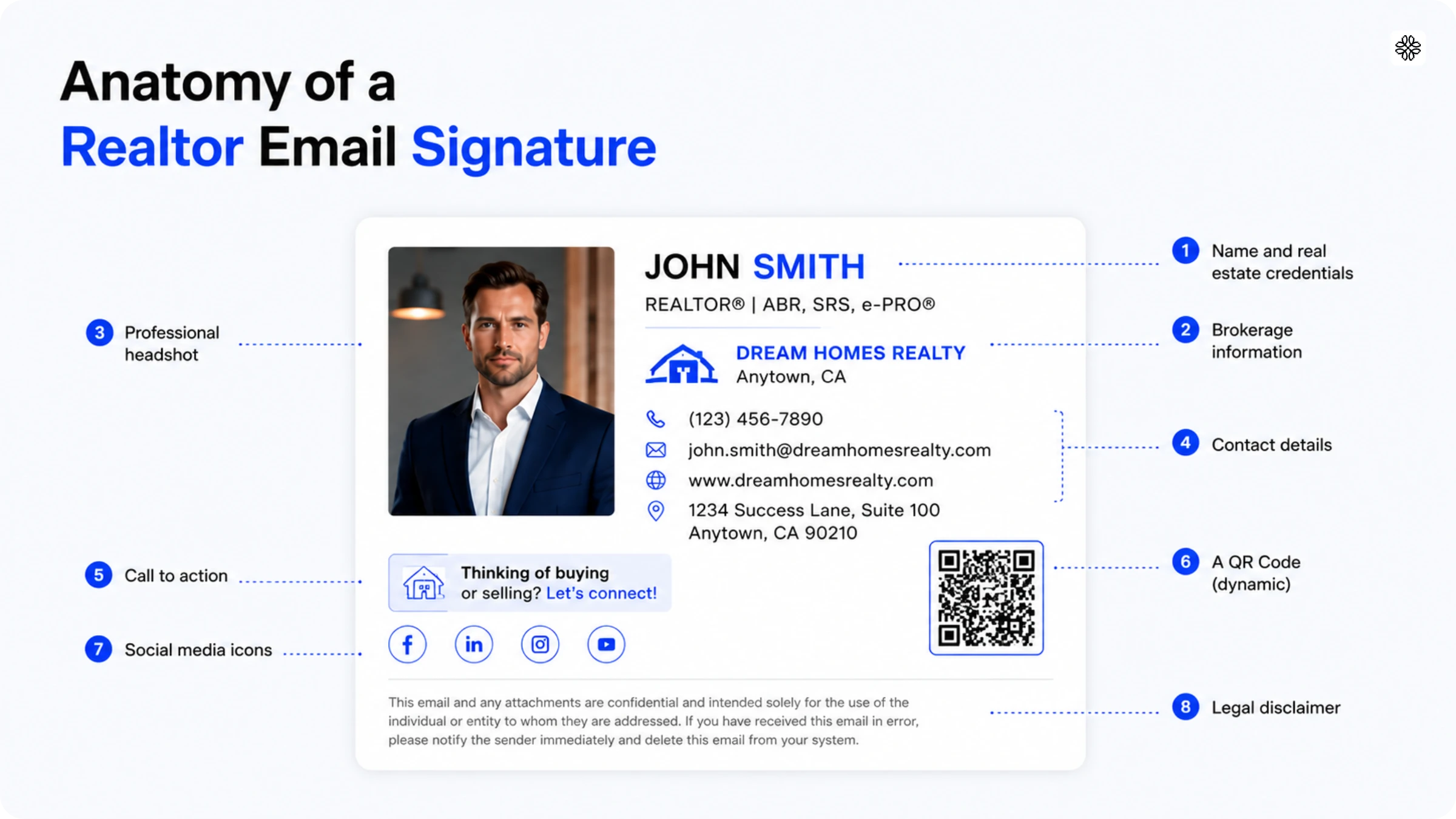
4. Contact details
List your mobile number first, labeled (M:) as that's where most clients actually respond. Place the office number second, labeled (O:), if you include it at all. Add your email address to keep the signature scannable, even if recipients already have it. If clients visit your office, include the address with a Google Maps link. Leave out the fax number.
⚡Pro tip: If you serve multiple areas, list your primary service locations to improve local recognition.
5. Call to action (CTA)
Include one call to action per signature like "View Current Listings," "Book a Call," "Get Your Home's Value," or "Download My Buyer's Guide." Pick the most relevant one and commit to it. The call to action is the single next step you want recipients to take after reading your message. Multiple calls to action compete with each other and reduce the effectiveness of all of them.
6. QR Code (dynamic)
A QR Code in your real estate email signature lets recipients access your listings, booking page, or digital business card without typing a URL. Use a dynamic QR Code through Uniqode to update the destination without changing the signature image. When a listing sells, redirect the QR Code to your next property in seconds and every previous email you've sent now links to current content automatically. According to the State of QR Codes 2026, 71% of consumers find QR Codes helpful in daily life. A scannable element in your signature builds trust with clients who prefer to research on their own terms.
7. Social media links
Include only platforms where you post at least once per week, and limit your signature to two or three icons as anything more than that overwhelms rather than impresses. Instagram and LinkedIn are the most relevant platforms for most real estate agents. Add Facebook only if your listings generate meaningful engagement there. Cut any platform where your last post was more than 30 days ago.
8. Legal disclaimer
Include a one-line fair housing statement and license disclosure. "Equal Housing Opportunity Provider" meets federal fair housing advertising requirements for email signatures in most cases. Some brokerages also require the Equal Housing Opportunity logo so check your brokerage's current policy. The compliance section below covers state-specific license disclosure requirements. Verify that your advertising line meets your state's regulations before finalizing your signature.
Realtor email signature compliance requirements by state
Most US states require realtors to include specific license disclosures in all advertising, and email signatures are no exception. Requirements vary significantly by state, so treat the guidance below as a starting point rather than a definitive legal reference. Always confirm current requirements with your state's regulatory body before finalizing your signature, as rules change and enforcement interpretations shift.
California
Regulatory body: California Department of Real Estate (DRE)
Requirement: All licensed real estate advertising must include the licensee's DRE license number. Email signatures are considered advertising. The responsible broker's name must also appear in all advertising.
Required format: "CA DRE #XXXXXXXX" (eight-digit number, preceded by "CA DRE #")
What counts as a violation: Omitting the license number, omitting the broker's name, or using an expired license number.
Source: dre.ca.gov
Florida
Regulatory body: Florida Department of Business and Professional Regulation (DBPR) - Division of Real Estate (FREC)
Requirement: Florida licensees must include the brokerage firm's licensed name in all advertising. If a licensee's personal name appears, it must match their name as registered with the Florida Real Estate Commission. License numbers are not required by state law.
Required format: Brokerage's registered name must appear adjacent to or immediately above or below any point-of-contact information (including email addresses) in online advertising.
What counts as a violation: Omitting the brokerage name, using a personal name that does not match FREC records, advertising in a manner that is false, deceptive, or misleading.
Source: myfloridalicense.com
Texas
Regulatory body: Texas Real Estate Commission (TREC)
Requirement: All real estate advertising by license holders must include the name of the license holder or team and the name of the sponsoring broker. The broker's name must appear in at least half the size of the largest contact information used for any sales agent, team, or associate broker in the advertisement. License numbers are not required by TREC rules.
What counts as a violation: Omitting the sponsoring broker's name, running advertising that implies a sales agent is the person responsible for operating a brokerage, or using a title that suggests broker-level responsibility when the licensee is a sales agent.
Source: trec.texas.gov
New York
Regulatory body: New York Department of State (DOS)
Requirement: All advertising must include the full name of the licensee as it appears on the license and the name of the real estate broker or brokerage with whom they are associated. Licensees must use the correct designation for their license type.
Designation requirement: New York recognizes three designations, "Licensed Real Estate Salesperson," "Licensed Associate Real Estate Broker," and "Licensed Real Estate Broker." Use the exact designation that matches your license. The terms "sales associate," "licensed sales agent," and "broker" used alone are prohibited.
License number inclusion: Not explicitly required; DOS recommends including it, but the mandatory requirement is correct designation and broker affiliation.
Source: dos.ny.gov
NAR REALTOR® Trademark Rule
If you use the REALTOR® designation, the ® symbol is required every time. REALTOR® is a registered trademark of the National Association of Realtors, and members of NAR agree to use the mark correctly under the Code of Ethics. Do not use "Realtor" in lowercase without the ®. This violates NAR's trademark policy.
Fair Housing statement
Some brokerages require the Equal Housing Opportunity logo or the statement "Equal Housing Opportunity Provider" in all advertising, including email signatures.
Note: These summaries reflect regulations as of 2026. State regulatory bodies update their requirements periodically. Always verify current requirements directly with your state's licensing authority before finalising your email signature.
How to create a realtor email signature in minutes with Uniqode
To create a realtor email signature in Uniqode, open the Digital Business Card builder, enter your credentials and headshot, set your brand colors, configure a dynamic QR Code destination, and export directly to Gmail or Outlook.
Building a signature from scratch in Gmail or Outlook is possible, but two problems come up consistently: layout collapse in Outlook caused by HTML rendering differences, and broken images when corporate firewalls block headshots. Uniqode's Digital Business Card solves both as it exports a signature file that displays correctly across email clients, and its dynamic QR Code never needs replacing when your links change.
Step 1: Open the Uniqode dashboard and select Create
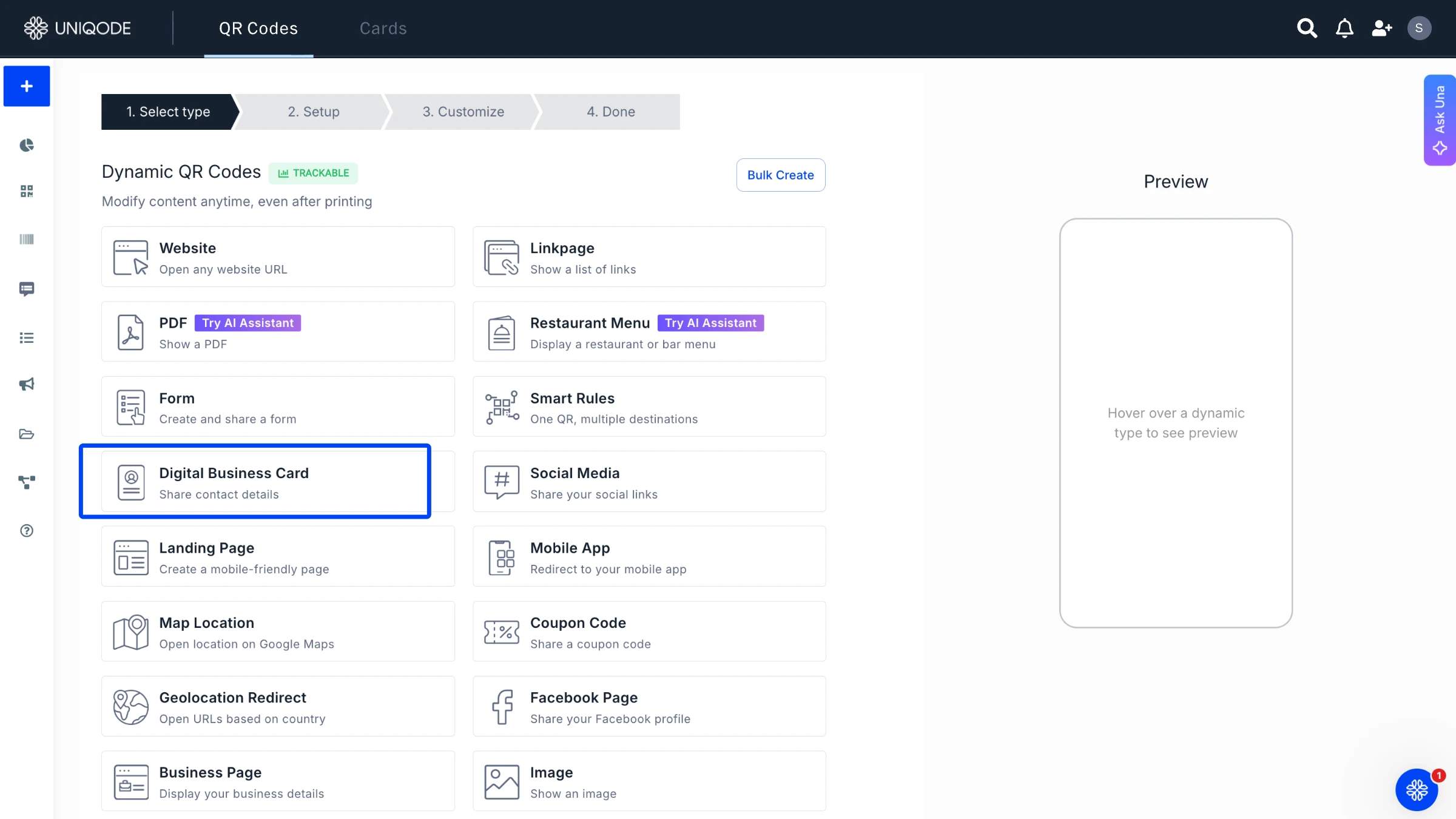
Log in to your Uniqode account. Select Create, and on the Select Type page choose Digital Business Card. This is the starting point for your email signature.
Step 2: Add your information
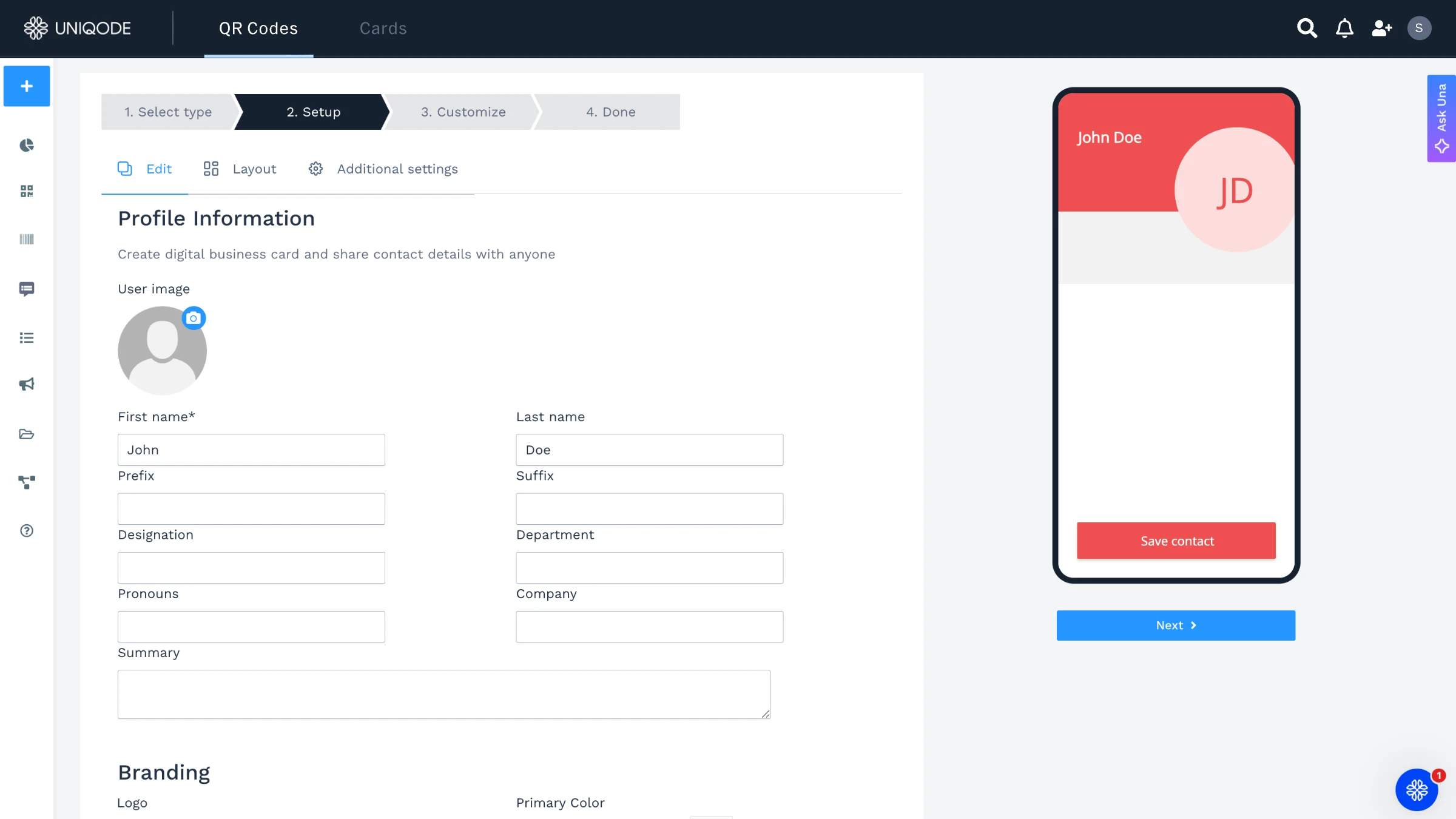
Enter your name, license designation, brokerage name, and contact information. Upload your headshot (2MB max, JPG or PNG). Upload your brokerage logo if you have one. Fill in the fields exactly as they should appear in your final signature. This becomes the source of truth.
Step 3: Set your brand colors
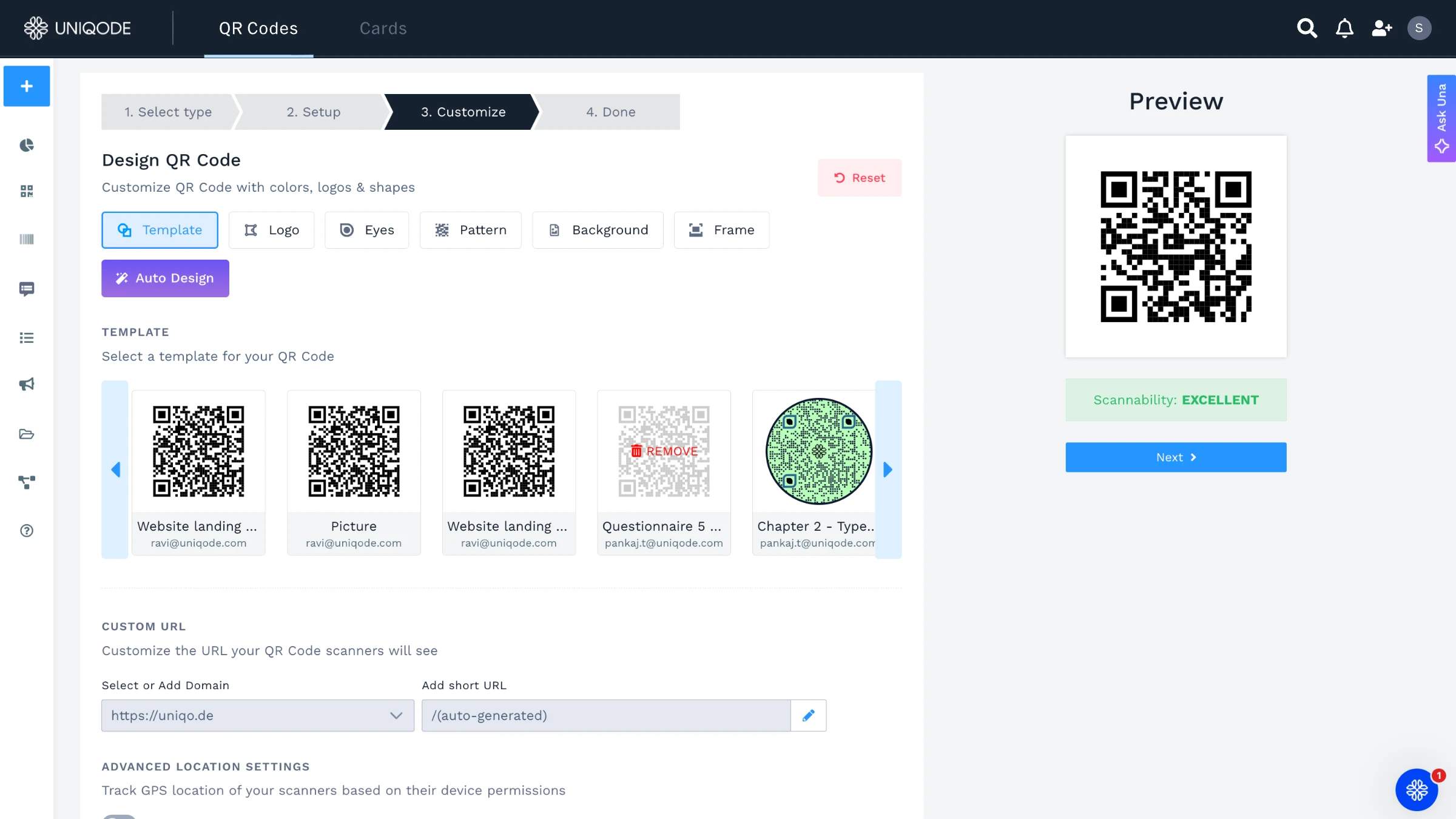
Match your signature to your brokerage's brand standards. If your brokerage has hex codes for its colors, enter them here. If not, use a color picker against your brokerage's website to get close.
Step 4: Configure your QR Code
Set the destination URL for your QR Code: your active listing page, your booking calendar, or your bio page. This is a dynamic QR Code, which means the destination can be updated any time without changing the QR Code image in your signature. 98% of marketers who use QR Codes report a positive business impact (State of QR Codes 2026). In real estate, where a single email thread can last months, a QR Code that always links to current content is not a minor convenience. It is the difference between a live lead and a dead link.
Step 5: Export and install
Select Export Signature. Choose your email client (Gmail or Outlook). Follow the installation instructions that appear on screen. The process takes under five minutes.
When a listing closes and your QR Code destination needs to change: log in to your Uniqode dashboard, open the QR Code linked in your signature, update the destination URL. Done in 30 seconds. The QR Code image in your signature does not change. Every email you have ever sent still carries a working link.
5 realtor email signature best practices
Effective realtor email signatures follow five practices: one call to action, mobile-compatible layout, a current headshot, a 90-day review schedule, and no more than four lines of text.
1. One CTA, not three
Multiple links in your signature split the reader's attention and dilute the impact of all of them. One call to action with clear, specific language like "Book a 15-Minute Call" outperforms a list of options every time. Clients who want more information will visit your website, which is the right place for everything else.
2. Test on mobile before publishing
75% of consumers scan QR Codes for more information, according to the State of QR Codes 2026 and most of your emails open on mobile devices. A signature that looks clean on a desktop often breaks on a 375px screen. Send yourself a test email and review it on your phone before you finalize anything.
3. Use a current headshot
Your email signature headshot is often the first image clients associate with you. A photo older than three years creates a disconnect the moment you meet in person, so always use a current headshot.
4. Set a 90-day review calendar reminder
A dynamic QR Code lets you update the destination without touching your signature. For static details like phone number, email address, title, brokerage name set a calendar reminder every 90 days to confirm everything is current. License renewals, brokerage changes, and title updates are the most common reasons signatures go stale.
5. Keep it under four lines of text
Keep your signature to four lines of text: phone number, email, license number, and CTA. A headshot or QR Code adds visual interest without adding clutter. Every line you add beyond four reduces the chance the reader reaches your call to action.
Frequently Asked Questions
- Do realtors legally need a license number in their email signature?
In most US states, yes. California, Florida, Texas, and New York all require real estate licensees to include their license number in advertising, and email signatures are classified as advertising under most state regulations. The specific format and required information vary by state (see the compliance section above for details by jurisdiction).
- What should a realtor always include in an email signature?
A realtor email signature should include: full legal name (as it appears on your license), license designation and number, affiliated brokerage name, one primary contact method, and one call-to-action. A professional headshot and a scannable QR Code are strongly recommended additions. The REALTOR® designation, if you hold it, requires the ® symbol.
- How long should a realtor email signature be?
Four to six lines of text is the right range. Below four lines, the signature may lack the disclosure information required by state regulation. Above six lines, the signature becomes longer than many of the emails it accompanies. A headshot and a QR Code add visual presence without adding text lines, which is the most efficient way to add information without adding length.
- Can I add a QR Code to my realtor email signature?
Yes. A QR Code in a real estate email signature links recipients to your listings, booking page, or digital business card. Use a dynamic QR Code so you can update the destination when a listing sells without changing the signature itself.
- What is the difference between a static and dynamic QR Code?
A static QR Code links to one fixed URL and cannot be changed after it is created. A dynamic QR Code lets you update the destination any time without reprinting or resending. For email signatures, dynamic is almost always the right choice: your listings, booking links, and landing pages change far more often than you expect, and a static QR Code that links to a sold property or an expired page is worse than no QR Code at all.
- Should I include my photo in my email signature?
Yes. A professional headshot in your signature makes your name recognisable before the first meeting, reduces friction at introductions, and signals that you take your professional presentation seriously. Keep the image small enough to load quickly (under 100KB) and large enough to be identifiable (at least 80x80px).
- How do I add my email signature to Gmail?
In Gmail: Settings (gear icon) → See All Settings → Signature → Create New → Paste or build your signature in the rich-text editor. For images, use the image upload option in the editor rather than copying and pasting from another program, which frequently causes images to arrive as attachments rather than inline displays in the recipient's inbox.
- How do I add my email signature to Outlook?
In Outlook (desktop): File → Options → Mail → Signatures → New. Assign the signature to a specific email account. Paste your signature content into the editor. For images, use "Insert Picture" rather than drag-and-drop, as dragged images are often sent as attachments rather than inline displays.
- Should I use the REALTOR® trademark in my signature?
If you are a member of the National Association of Realtors, you are entitled to use the REALTOR® designation in your professional communications. The ® symbol is required every time you use the term in advertising, including email signatures. Do not use "Realtor" in lowercase without the ®, as this violates NAR's trademark policy.
About the Author
Sukanya is a content marketer who previously worked as a journalist. She has been passionate about writing from a young age and now helps businesses boost engagement through content. Currently, she is exploring innovative tools, such as digital business cards, and their transformative impact on various aspects of business.
![Create the Perfect CEO Email Signature [Templates + Best Practices]](https://cdn.sanity.io/images/0aocp9sp/production/0bb019687a98bd1718e00e4179a9c0dd83f9ee7a-2560x1449.webp?w=3840&q=65&auto=format&fit=max)